
In an era where artificial intelligence is reshaping enterprise software, Salesforce has positioned itself at the forefront with Einstein AI — a powerful suite of AI capabilities embedded directly into the Salesforce platform. Among its most transformative offerings are Salesforce Einstein Vision and Language, two intelligent services that empower developers to build apps that can see, read, and understand data in ways that were once reserved for data science teams with specialized infrastructure.
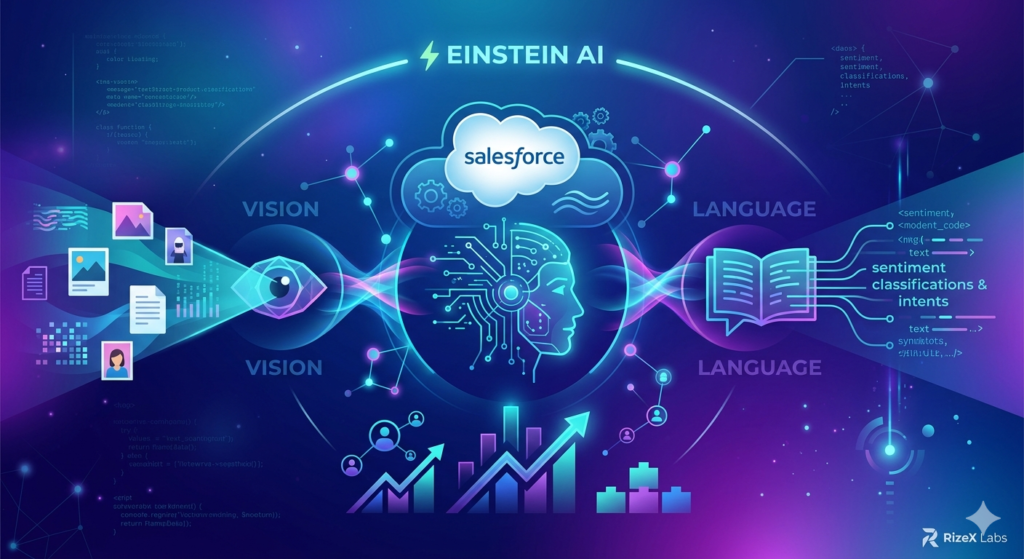
Whether you're a Salesforce developer looking to enhance customer experiences, a Salesforce architect designing smarter workflows, or an ISV partner building next-generation AppExchange solutions, understanding Salesforce Einstein Vision Language capabilities is no longer optional — it's essential.
In this comprehensive guide from RizeX Labs, we'll explore what Einstein Vision and Einstein Language are, how they work, the most impactful developer use cases, API integration methods, real-world business applications, implementation best practices, and where the future of AI in Salesforce is heading.
Table of Contents
- What Is Salesforce Einstein AI?
- Understanding Einstein Vision: AI-Powered Image Recognition
- Understanding Einstein Language: NLP for Salesforce
- Key Developer Use Cases for Salesforce Einstein Vision Language
- Benefits of Einstein Vision and Language for Developers
- API Integration Methods: How Developers Can Get Started
- Real-World Business Applications
- Implementation Best Practices
- Future AI Trends in Salesforce
- Conclusion: Driving Business Value with Einstein AI
<a name="what-is-salesforce-einstein-ai"></a>
What Is Salesforce Einstein AI?
Salesforce Einstein is an integrated set of AI technologies built natively into the Salesforce Platform. Launched in 2016, Einstein brings machine learning, deep learning, predictive analytics, natural language processing, and computer vision directly into CRM workflows — without requiring developers to build or manage their own ML infrastructure.
Einstein AI spans across the entire Salesforce ecosystem:
- Einstein Analytics – Predictive insights and smart data discovery
- Einstein Bots – AI-driven chatbots for service automation
- Einstein Prediction Builder – No-code custom predictions on any Salesforce object
- Einstein Vision – Image recognition and classification
- Einstein Language – Natural language processing (intent and sentiment analysis)
- Einstein GPT – Generative AI capabilities (the newest addition)
For developers, the most hands-on and extensible components are Einstein Vision and Einstein Language, accessible via REST APIs through the Einstein Platform Services. These services allow you to train custom models, make predictions, and integrate intelligent capabilities into any Salesforce application — or even external applications.
The Salesforce Einstein Vision Language suite democratizes AI, allowing developers who may not have a deep background in data science to harness the power of image recognition and natural language processing within their applications.
<a name="understanding-einstein-vision"></a>
Understanding Einstein Vision: AI-Powered Image Recognition in Salesforce
What Is Einstein Image Recognition in Salesforce?
Einstein image recognition Salesforce capabilities fall under the Einstein Vision service — a set of APIs that enable developers to train deep learning models to recognize and classify images. Using Einstein Vision, you can teach a model to understand visual data relevant to your specific business context.
Einstein Vision offers two primary capabilities:
1. Einstein Image Classification
Image Classification allows you to train a custom model to categorize images into predefined labels. For example:
- Classifying product images by category (electronics, clothing, furniture)
- Identifying brand logos in social media images
- Detecting damage types in insurance claim photos
- Sorting user-uploaded images by content type
The API provides a confidence score for each prediction, allowing developers to set thresholds for automated actions versus human review.
2. Einstein Object Detection
Object Detection goes a step further — it not only identifies what is in an image but also where it is located. The API returns bounding box coordinates for each detected object, enabling:
- Counting products on retail shelves
- Identifying multiple components in a manufacturing inspection photo
- Detecting specific items in field service images
- Locating defects in quality assurance workflows
How Einstein Vision Works
The workflow for Einstein image recognition Salesforce integration follows a structured pipeline:
- Create a Dataset – Upload labeled images to the Einstein Vision API
- Train a Model – Use the dataset to train a custom deep learning model
- Evaluate Performance – Review model metrics (accuracy, F1 score, confusion matrix)
- Make Predictions – Send new images to the trained model for real-time classification or detection
- Retrain & Improve – Continuously add new data and retrain for improved accuracy
Einstein Vision also provides pre-built models for general image classification and multi-label detection, allowing developers to get started quickly without custom training.
Example: Image Classification API Call
Bashcurl -X POST https://api.einstein.ai/v2/vision/predict \
  -H "Authorization: Bearer <ACCESS_TOKEN>" \
  -H "Cache-Control: no-cache" \
  -F "modelId=YourModelId" \
  -F "sampleLocation=https://example.com/image.jpg"
Sample Response:
JSON{
  "probabilities": [
    {
      "label": "damaged_roof",
      "probability": 0.9435
    },
    {
      "label": "intact_roof",
      "probability": 0.0565
    }
  ]
}
This simplicity is what makes Salesforce Einstein Vision Language so accessible — developers can integrate powerful AI with standard REST calls.
<a name="understanding-einstein-language"></a>
Understanding Einstein Language: Einstein NLP for Salesforce
What Is Einstein NLP?
Einstein NLP (Natural Language Processing) is the language-understanding component of Einstein Platform Services. It enables developers to analyze, classify, and extract meaning from unstructured text data — emails, support tickets, social media posts, survey responses, chat transcripts, and more.
Einstein Language provides two core capabilities:
1. Einstein Intent Classification
Intent Classification determines the purpose or intent behind a piece of text. This is the backbone of intelligent routing, chatbot understanding, and automated case categorization.
Common intents you might train:
- "I want to return my order" → Return_Request
- "My product stopped working" → Technical_Support
- "Can I upgrade my plan?" → Upgrade_Inquiry
- "I'd like to cancel my subscription" → Cancellation
- "What are your business hours?" → General_Inquiry
2. Einstein Sentiment Analysis
Sentiment Analysis evaluates the emotional tone of text and classifies it as positive, negative, or neutral. This enables:
- Real-time customer satisfaction monitoring
- Prioritization of negative support tickets
- Social media sentiment tracking
- Post-interaction feedback analysis
How Einstein NLP Works
Similar to Einstein Vision, the Einstein NLP workflow follows a consistent pattern:
- Create a Text Dataset – Provide labeled text examples (CSV format with text and label columns)
- Train a Custom Model – Einstein trains a language model using your labeled data
- Evaluate Accuracy – Review precision, recall, and F1 scores per intent/sentiment category
- Make Predictions – Send new text to the model for real-time intent or sentiment classification
- Iterate and Improve – Add more training data and retrain for better accuracy
Example: Sentiment Analysis API Call
Bashcurl -X POST https://api.einstein.ai/v2/language/sentiment \
  -H "Authorization: Bearer <ACCESS_TOKEN>" \
  -H "Cache-Control: no-cache" \
  -F "modelId=CommunitySentiment" \
  -F "document=The support team was incredibly helpful and resolved my issue quickly!"
Sample Response:
JSON{
  "probabilities": [
    {
      "label": "positive",
      "probability": 0.9712
    },
    {
      "label": "neutral",
      "probability": 0.0215
    },
    {
      "label": "negative",
      "probability": 0.0073
    }
  ]
}
What makes Einstein NLP particularly powerful for Salesforce developers is its seamless integration with the CRM — you can trigger Einstein Language predictions directly from Apex, Lightning components, Flows, or even from external systems calling into Salesforce.
<a name="key-developer-use-cases"></a>
Key Developer Use Cases for Salesforce Einstein Vision Language
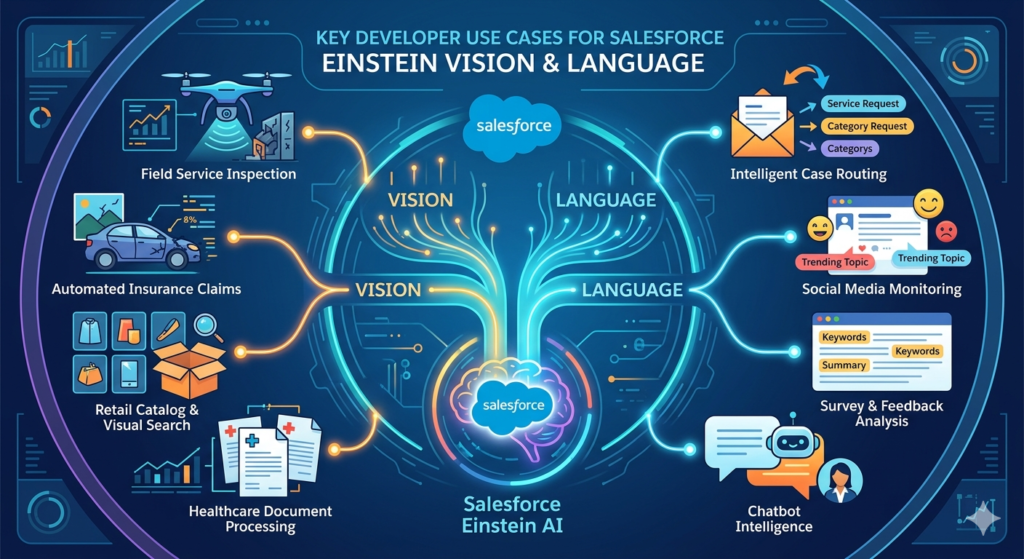
Now let's dive into the most impactful use cases where developers can leverage Salesforce Einstein Vision Language to build intelligent, automated, and differentiated applications.
🔍 Einstein Image Recognition Salesforce Use Cases
1. Automated Insurance Claims Processing
Insurance companies receive thousands of claim images daily — vehicle damage, property damage, medical documents. With Einstein image recognition Salesforce capabilities, developers can build systems that:
- Automatically classify damage severity (minor, moderate, severe)
- Detect specific damage types (dent, crack, water damage, fire damage)
- Route claims to appropriate adjusters based on image analysis
- Flag potentially fraudulent claims based on image inconsistencies
Developer Implementation:
apexpublic class ClaimImageClassifier {
    @InvocableMethod(label='Classify Claim Image')
    public static List<String> classifyImage(List<String> imageUrls) {
        Einstein_PredictionService service = new Einstein_PredictionService(
            Einstein_PredictionService.Types.IMAGE
        );
        Einstein_PredictionResult result = service.predictImageUrl(
            'YourClaimModelId',
            imageUrls[0],
            3,
            ''
        );
        // Process results and return classification
        return new List<String>{result.probabilities[0].label};
    }
}
2. Retail Product Catalog Management
E-commerce businesses can use Einstein Vision to:
- Auto-tag product images with categories, colors, and attributes
- Detect counterfeit or incorrect product images
- Enable visual search ("find products that look like this")
- Automate product listing quality checks
3. Field Service Visual Inspection
Field service technicians can photograph equipment, and Einstein Vision can:
- Identify equipment models and serial numbers
- Detect visible defects or wear patterns
- Recommend maintenance procedures based on visual analysis
- Auto-populate work order details from image recognition
4. Healthcare Document Processing
Healthcare organizations can use Einstein Vision to:
- Classify medical document types (prescriptions, lab results, imaging reports)
- Extract information from scanned forms
- Route documents to appropriate departments
- Ensure compliance documentation is complete
5. Real Estate Property Analysis
Real estate platforms can leverage image classification to:
- Auto-categorize property photos (kitchen, bathroom, exterior, living room)
- Assess property condition from images
- Tag architectural styles automatically
- Enhance property listing quality scores
📝 Einstein NLP Use Cases
6. Intelligent Case Routing and Prioritization
One of the most immediately impactful uses of Einstein NLP is automating service case management:
- Analyze incoming case descriptions to determine intent
- Route cases to the right team or queue automatically
- Prioritize cases based on sentiment (negative sentiment = urgent)
- Suggest relevant knowledge articles based on case content
Example Flow:
- Customer submits a case via web form or email
- Einstein Intent classifies the case category
- Einstein Sentiment determines urgency level
- Case is automatically assigned to the right agent with priority flags
- Relevant knowledge articles are attached to the case
7. Email and Communication Analysis
Developers can build solutions that:
- Classify incoming emails by department or topic
- Extract action items from email threads
- Detect escalation language in customer communications
- Monitor communication tone trends over time
8. Social Media Monitoring and Response
Using Einstein NLP with social media data:
- Track brand sentiment across platforms in real-time
- Identify emerging issues before they become crises
- Auto-categorize social media mentions by topic
- Prioritize social responses based on sentiment and influence
9. Survey and Feedback Analysis
Process open-ended survey responses at scale:
- Categorize feedback themes automatically
- Track sentiment trends across survey periods
- Identify specific product or service issues from free-text responses
- Generate actionable insights without manual review
10. Chatbot Intelligence Enhancement
Enhance Einstein Bots or custom chatbots with Einstein NLP:
- Improve intent recognition accuracy with custom-trained models
- Handle complex, multi-intent user messages
- Detect frustration or satisfaction in conversation flow
- Seamlessly escalate to human agents when negative sentiment is detected
🔄 Combined Vision + Language Use Cases
The true power of Salesforce Einstein Vision Language emerges when you combine both capabilities:
11. Multimodal Support Ticket Processing
When customers submit support tickets with both text descriptions and image attachments:
- Einstein Language analyzes the text for intent and sentiment
- Einstein Vision classifies the attached images
- The system cross-references both analyses for accurate categorization
- Automated responses or routing decisions account for full context
12. Content Moderation Platforms
For communities, marketplaces, or social platforms built on Salesforce:
- Einstein Vision screens uploaded images for inappropriate content
- Einstein Language screens text posts for harmful language or spam
- Combined analysis provides a comprehensive content safety score
- Flagged content is routed for human review with AI-generated context
13. Smart Product Returns Processing
When customers initiate returns:
- Einstein Language understands the reason from the customer's description
- Einstein Vision verifies product condition from uploaded photos
- The system automatically determines if the return meets policy criteria
- Refund or replacement is processed without human intervention (for qualifying cases)
<a name="benefits-for-developers"></a>
Benefits of Einstein Vision and Language for Developers
Why should Salesforce developers invest time in learning and implementing Salesforce Einstein Vision Language? Here are the compelling advantages:
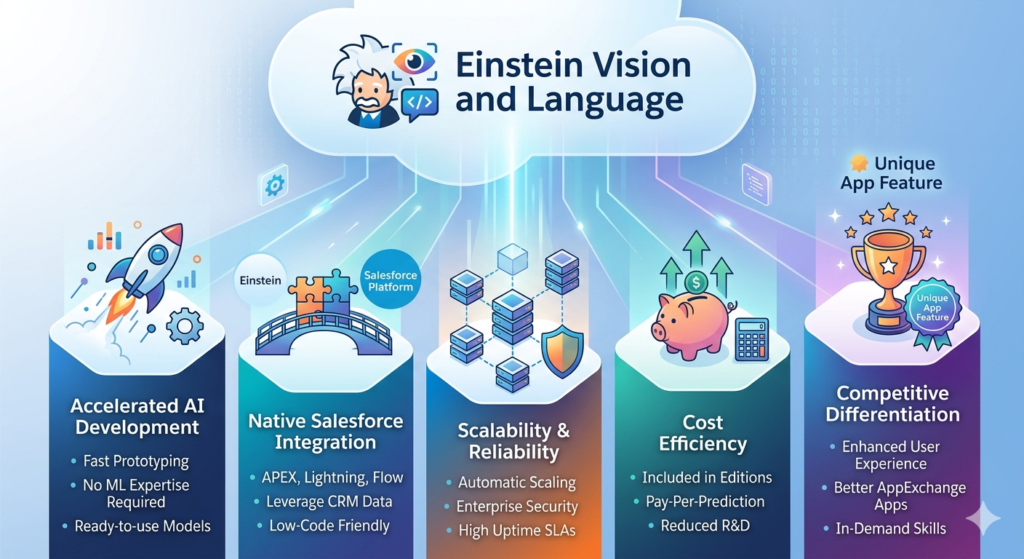
⚡ Accelerated AI Development
- No ML expertise required — Einstein abstracts away model architecture, training infrastructure, and optimization
- Pre-built models available — Start making predictions immediately with community models
- Custom model training — Train domain-specific models with your own labeled data
- Rapid prototyping — Go from concept to working AI feature in hours, not months
🔗 Native Salesforce Integration
- Apex-native libraries — Call Einstein APIs directly from Apex code
- Lightning component support — Build AI-powered UI components
- Flow and Process Builder compatibility — Trigger predictions from declarative automation
- Salesforce data access — Models can leverage CRM data for context-rich predictions
📈 Scalability and Reliability
- Salesforce-managed infrastructure — No servers to provision or maintain
- Automatic scaling — Handle prediction requests from tens to millions
- Enterprise-grade security — Data processed within Salesforce's security perimeter
- 99.9%+ uptime — Backed by Salesforce's platform SLAs
💰 Cost Efficiency
- Included in many Salesforce editions — Einstein Platform Services are available with certain licenses
- Pay-per-prediction options — Cost-effective for varying workloads
- Reduced development time — Faster time-to-market compared to building custom ML pipelines
- Lower maintenance overhead — Salesforce manages model hosting and API infrastructure
🏆 Competitive Differentiation
- Unique app capabilities — AI-powered features differentiate AppExchange apps
- Enhanced user experiences — Intelligent automation delights end users
- Data-driven decisions — AI insights improve business outcomes
- Future-proof skills — AI integration skills are increasingly in demand
<a name="api-integration-methods"></a>
API Integration Methods: How Developers Can Get Started
Integrating Salesforce Einstein Vision Language into your applications involves several approaches, depending on your use case and technical requirements.
Method 1: Direct REST API Integration
The most flexible approach — call Einstein Platform Services APIs directly from any HTTP client.
Step-by-Step Setup:
- Sign up for Einstein Platform Services at api.einstein.ai
- Download your private key (einstein_platform.pem)
- Generate an OAuth token using JWT authentication
- Make API calls to Vision and Language endpoints
Token Generation (Apex):
apexpublic class EinsteinTokenProvider {

    public static String getAccessToken() {
        // Read the private key from a Salesforce File or Custom Setting
        ContentVersion cv = [
            SELECT VersionData
            FROM ContentVersion
            WHERE Title = 'einstein_platform'
            LIMIT 1
        ];
        String privateKey = cv.VersionData.toString();

        // Build JWT claim
        Auth.JWT jwt = new Auth.JWT();
        jwt.setSub('your-email@example.com');
        jwt.setAud('https://api.einstein.ai/v2/oauth2/token');
        jwt.setValidityLength(3600);

        // Sign and send
        Auth.JWS jws = new Auth.JWS(jwt, 'einstein_platform');
        Auth.JWTBearerTokenExchange exchange = new Auth.JWTBearerTokenExchange(
            'https://api.einstein.ai/v2/oauth2/token', jws
        );

        return exchange.getAccessToken();
    }
}
Method 2: Einstein Platform Services Apex Wrapper
Use the open-source Einstein Platform Apex Wrapper by René Winkelmeyer — a community-maintained library that simplifies Einstein API integration.
Installation:
- Deploy via SFDX or install the unmanaged package
- Upload your Einstein private key as a Salesforce File
- Configure custom metadata or custom settings
Usage Example — Image Classification:
apexEinstein_PredictionService service = new Einstein_PredictionService(
    Einstein_PredictionService.Types.IMAGE
);

Einstein_PredictionResult result = service.predictImageUrl(
    'YourModelId',
    'https://example.com/product-image.jpg',
    3,  // number of results
    ''  // sample ID (optional)
);

for (Einstein_Probability prob : result.probabilities) {
    System.debug('Label: ' + prob.label + ' | Confidence: ' + prob.probability);
}
Usage Example — Intent Classification:
apexEinstein_PredictionService service = new Einstein_PredictionService(
    Einstein_PredictionService.Types.INTENT
);

Einstein_PredictionResult result = service.predictIntent(
    'YourIntentModelId',
    'I need to return a defective product and get a refund',
    3,
    ''
);

// result.probabilities[0].label → "Return_Request"
// result.probabilities[0].probability → 0.94
Method 3: Lightning Web Components (LWC) Integration
Build interactive AI-powered user interfaces using Lightning Web Components:
JavaScript// einsteinImageClassifier.js
import { LightningElement, track } from 'lwc';
import classifyImage from '@salesforce/apex/EinsteinVisionController.classifyImage';

export default class EinsteinImageClassifier extends LightningElement {
    @track predictions = [];
    @track isLoading = false;
    @track imageUrl = '';

    handleUrlChange(event) {
        this.imageUrl = event.target.value;
    }

    async handleClassify() {
        this.isLoading = true;
        try {
            const result = await classifyImage({ imageUrl: this.imageUrl });
            this.predictions = JSON.parse(result);
        } catch (error) {
            console.error('Classification error:', error);
        } finally {
            this.isLoading = false;
        }
    }
}
Method 4: Salesforce Flow Integration
For low-code/no-code scenarios, wrap Einstein API calls in Invocable Apex methods and expose them to Salesforce Flows:
apexpublic class EinsteinFlowActions {

    @InvocableMethod(
        label='Analyze Sentiment'
        description='Analyzes text sentiment using Einstein NLP'
    )
    public static List<SentimentResult> analyzeSentiment(List<String> textInputs) {
        List<SentimentResult> results = new List<SentimentResult>();

        Einstein_PredictionService service = new Einstein_PredictionService(
            Einstein_PredictionService.Types.SENTIMENT
        );

        for (String text : textInputs) {
            Einstein_PredictionResult prediction = service.predictSentiment(
                'CommunitySentiment', text, 3, ''
            );

            SentimentResult sr = new SentimentResult();
            sr.sentiment = prediction.probabilities[0].label;
            sr.confidence = prediction.probabilities[0].probability;
            results.add(sr);
        }

        return results;
    }

    public class SentimentResult {
        @InvocableVariable public String sentiment;
        @InvocableVariable public Decimal confidence;
    }
}
Method 5: External Application Integration
Einstein APIs can be called from external applications (Node.js, Python, Java, etc.) — useful for mobile apps, web portals, or microservices:
Pythonimport requests
import jwt
import time

# Generate JWT token
def get_einstein_token(private_key, email):
    payload = {
        'sub': email,
        'aud': 'https://api.einstein.ai/v2/oauth2/token',
        'exp': int(time.time()) + 3600
    }
    assertion = jwt.encode(payload, private_key, algorithm='RS256')

    response = requests.post(
        'https://api.einstein.ai/v2/oauth2/token',
        data={
            'grant_type': 'urn:ietf:params:oauth:grant-type:jwt-bearer',
            'assertion': assertion
        }
    )
    return response.json()['access_token']

# Classify an image
def classify_image(token, model_id, image_url):
    response = requests.post(
        'https://api.einstein.ai/v2/vision/predict',
        headers={'Authorization': f'Bearer {token}'},
        data={
            'modelId': model_id,
            'sampleLocation': image_url
        }
    )
    return response.json()
<a name="real-world-business-applications"></a>
Real-World Business Applications
Let's explore how leading organizations are leveraging Salesforce Einstein Vision Language to solve real business challenges:
🏦 Financial Services: Intelligent Document Processing
Challenge: A major bank receives millions of documents annually — loan applications, identity documents, financial statements — requiring manual classification and routing.
Solution with Einstein Vision:
- Trained a custom image classification model to identify 15+ document types
- Automated document routing reduced processing time by 65%
- Einstein Vision validates document quality (blur detection, completeness)
- Einstein NLP extracts key information from document text
Business Impact:
- $2.3M annual savings in manual processing costs
- 80% reduction in document misrouting
- 3x faster loan application processing
🏭 Manufacturing: Quality Control Automation
Challenge: A manufacturing company relied on manual visual inspection of products, leading to inconsistent quality checks and missed defects.
Solution with Einstein Image Recognition Salesforce:
- Deployed Einstein Object Detection to identify defect types and locations
- Integrated cameras on production lines with Einstein Vision API
- Automated pass/fail decisions for 90% of inspections
- Defect data feeds into Salesforce Service Cloud for warranty tracking
Business Impact:
- 95% defect detection accuracy (up from 82% manual)
- 40% reduction in quality control labor costs
- 50% fewer warranty claims due to improved pre-shipment detection
🛒 E-Commerce: Smart Customer Service
Challenge: An online retailer struggled with high case volumes and inconsistent case routing, leading to long resolution times and poor customer satisfaction.
Solution with Einstein NLP:
- Trained Einstein Intent model on 50,000+ historical case descriptions
- Automated case categorization and routing for 12 case types
- Einstein Sentiment analysis prioritizes high-urgency cases
- Combined with Einstein Vision for return image verification
Business Impact:
- 70% of cases auto-routed without human intervention
- Average resolution time decreased from 4.2 hours to 1.8 hours
- Customer satisfaction (CSAT) improved by 23%
- Agent productivity increased by 35%
🏥 Healthcare: Patient Communication Analysis
Challenge: A healthcare network needed to analyze patient feedback across multiple channels to identify service quality issues and compliance risks.
Solution with Einstein NLP:
- Sentiment analysis on patient reviews, emails, and call transcripts
- Intent classification identifies specific complaint categories
- Real-time alerting for critical negative sentiment patterns
- Trend analysis dashboards built with Einstein Analytics
Business Impact:
- Identified 3 systemic service issues within the first month
- Patient complaint resolution time reduced by 45%
- Regulatory compliance documentation improved significantly
🏠 Real Estate: Listing Intelligence
Challenge: A real estate platform needed to improve listing quality and automate property categorization across thousands of daily listings.
Solution with Salesforce Einstein Vision Language:
- Einstein Vision auto-categorizes property photos by room type
- Image quality scoring ensures listings meet platform standards
- Einstein Language analyzes listing descriptions for completeness and SEO optimization
- Combined analysis generates listing quality scores
Business Impact:
- Listing processing time reduced from 15 minutes to 2 minutes
- Listing quality scores improved by 40%
- Search relevance and user engagement increased by 28%
<a name="implementation-best-practices"></a>
Implementation Best Practices
Successfully implementing Salesforce Einstein Vision Language requires careful planning and execution. Here are proven best practices from the RizeX Labs team:
📊 Data Preparation Best Practices
For Einstein Vision:
- Minimum dataset size: At least 50 images per label (100+ recommended for production)
- Image quality: Use clear, well-lit images representative of production conditions
- Balanced classes: Ensure roughly equal numbers of images per category
- Diverse examples: Include variations in angle, lighting, background, and scale
- Consistent labeling: Establish clear labeling guidelines before data collection
- Data augmentation: Consider programmatic augmentation (rotation, flipping, cropping) to expand limited datasets
For Einstein NLP:
- Minimum dataset size: At least 50 examples per intent (150+ recommended)
- Representative text: Use real customer language, not idealized examples
- Balanced intents: Avoid heavily skewed distributions
- Edge cases: Include misspellings, slang, and varied phrasings
- Negative examples: Include text that shouldn't match any intent
- Regular updates: Retrain models as language and business terms evolve
🏗️ Architecture Best Practices
text┌─────────────────────────────────────────────────────┐
│                  Salesforce Org                       │
│                                                       │
│  ┌─────────┐    ┌──────────────┐    ┌─────────────┐ │
│  │  LWC /  │───▶│  Apex Layer  │───▶│  Einstein   │ │
│  │  Flow   │    │  (Service    │    │  Platform   │ │
│  │  UI     │◀───│   Classes)   │◀───│  Services   │ │
│  └─────────┘    └──────────────┘    └─────────────┘ │
│                        │                              │
│                        ▼                              │
│               ┌──────────────┐                        │
│               │  Salesforce  │                        │
│               │  Objects /   │                        │
│               │  Records     │                        │
│               └──────────────┘                        │
└─────────────────────────────────────────────────────┘
- Separation of concerns: Keep Einstein API logic in dedicated service classes
- Error handling: Implement robust error handling for API timeouts and failures
- Caching: Cache access tokens (they're valid for 1 hour)
- Async processing: Use @future or Queueable for bulk predictions
- Confidence thresholds: Define minimum confidence scores for automated actions
- Fallback paths: Always have human review paths for low-confidence predictions
🔒 Security Best Practices
- Secure key storage: Store Einstein private keys in encrypted Custom Settings or Named Credentials — never in code
- Principle of least privilege: Use dedicated Einstein API users with minimal permissions
- Data privacy: Ensure training data complies with GDPR, HIPAA, and other regulations
- Audit logging: Log all predictions for compliance and model monitoring
- PII handling: Anonymize sensitive data before sending to Einstein APIs when possible
📏 Model Management Best Practices
- Version control: Track model versions and performance metrics over time
- A/B testing: Test new models against existing ones before full deployment
- Monitoring: Set up alerts for prediction accuracy drops
- Regular retraining: Schedule quarterly (at minimum) model retraining cycles
- Feedback loops: Capture user corrections to improve training data
- Performance baselines: Establish accuracy benchmarks before deploying models
⚡ Performance Optimization
- Batch predictions: Group multiple predictions into batch calls when possible
- Image preprocessing: Resize images before sending to Einstein Vision (recommended max: 5MB)
- Async patterns: Use Platform Events or Change Data Capture for real-time processing pipelines
- Rate limiting awareness: Understand and respect Einstein API rate limits (typically 2,000 predictions/hour per model for free tier)
- Connection pooling: Reuse HTTP connections for sequential API calls
<a name="future-ai-trends"></a>
Future AI Trends in Salesforce
The Salesforce Einstein Vision Language capabilities we see today are just the beginning. Here's where Salesforce AI is heading — and what developers should prepare for:
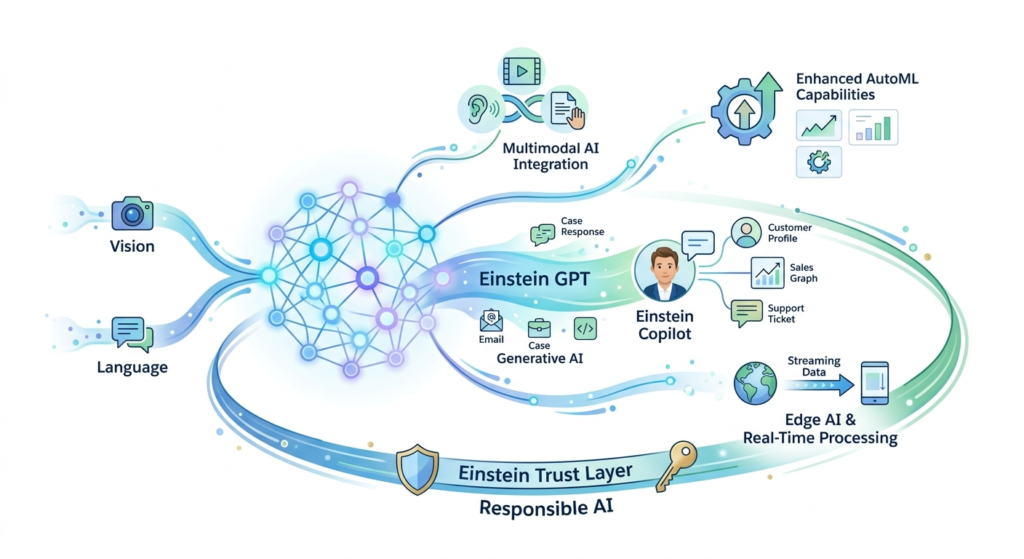
🤖 Einstein GPT and Generative AI
Salesforce's integration of generative AI through Einstein GPT is transforming the platform:
- Einstein GPT for Sales — Auto-generated emails, call summaries, and next-step recommendations
- Einstein GPT for Service — AI-generated case responses and knowledge articles
- Einstein GPT for Marketing — Personalized content generation at scale
- Einstein GPT for Developers — AI-assisted code generation within Salesforce IDEs
Einstein Vision and Language will increasingly work alongside generative AI, where Vision and Language classify and understand inputs, while generative AI creates intelligent outputs.
🧠 Einstein Copilot
Salesforce's conversational AI assistant — Einstein Copilot — combines:
- Natural language understanding (powered by Einstein NLP foundations)
- Visual understanding capabilities
- Generative response creation
- CRM-aware contextual intelligence
Developers who understand Salesforce Einstein Vision Language today will be well-positioned to build custom Copilot Actions that extend Einstein Copilot with domain-specific intelligence.
🔗 Multimodal AI Integration
The future of enterprise AI is multimodal — systems that simultaneously process text, images, audio, and video:
- Customer support that analyzes voice tone, written text, and image attachments simultaneously
- Field service AI that processes video feeds, work order text, and equipment images together
- Sales intelligence that combines email sentiment, meeting transcripts, and visual presentation analysis
📊 Enhanced AutoML Capabilities
Expect Salesforce to continue lowering the barrier to custom AI:
- Zero-shot and few-shot learning — Train accurate models with minimal data
- Transfer learning improvements — Better pre-trained models that adapt quickly
- Automated model optimization — Einstein automatically selects the best model architecture
- Continuous learning — Models that improve automatically from production predictions
🌐 Edge AI and Real-Time Processing
Future Einstein capabilities will likely include:
- On-device predictions — Einstein models running on mobile devices for offline capability
- Real-time streaming predictions — Sub-second predictions for IoT and live data streams
- Embedded AI in Salesforce Mobile — Native Vision and Language capabilities in the Salesforce mobile app
🔐 Responsible AI and Trust
Salesforce's Einstein Trust Layer will continue evolving:
- Data masking — Automatic PII protection in AI processing
- Bias detection — Tools to identify and mitigate model bias
- Explainability — Understanding why models make specific predictions
- Audit trails — Complete tracking of AI-assisted decisions
- Grounding — Ensuring AI outputs are factually anchored to CRM data
💡 What Developers Should Do Now
To prepare for these trends:
- Master Einstein Platform Services APIs — Vision and Language fundamentals remain the foundation
- Learn Prompt Engineering — Essential for Einstein GPT and Copilot customization
- Understand Data Architecture — AI is only as good as the data it processes
- Get Einstein Certified — Salesforce AI certifications validate your skills
- Experiment with Einstein Copilot Actions — Start building custom AI-powered automations
- Stay current — Follow Salesforce AI releases and Trailhead modules
<a name="conclusion"></a>
Conclusion: Driving Business Value and Developer Productivity with Salesforce Einstein Vision Language
The Salesforce Einstein Vision Language suite represents a fundamental shift in how developers build intelligent applications. By making advanced image recognition and natural language processing accessible through simple APIs, Salesforce has eliminated the traditional barriers to AI adoption — specialized ML expertise, complex infrastructure, and massive data science budgets.
For Developers:
Einstein Vision and Language dramatically accelerate your ability to deliver AI-powered features. What once required months of ML pipeline development — data preparation, model training, deployment, monitoring — can now be accomplished in days or even hours. The Einstein image recognition Salesforce capabilities and Einstein NLP services integrate seamlessly with the tools you already know: Apex, LWC, Flows, and the Salesforce Platform.
This means you can focus on solving business problems rather than wrestling with AI infrastructure.
For Businesses:
The use cases we've explored — from intelligent case routing and automated quality inspection to smart document processing and sentiment analysis — deliver measurable ROI:
- Reduced operational costs through automation
- Improved customer satisfaction through faster, more accurate service
- Enhanced decision-making through AI-powered insights
- Competitive differentiation through intelligent product experiences
- Scalable intelligence that grows with your business
For the Salesforce Ecosystem:
As AI becomes table stakes in enterprise software, developers and architects who master Salesforce Einstein Vision Language will be in high demand. These skills aren't just relevant today — they're the foundation for working with Einstein GPT, Einstein Copilot, and whatever Salesforce introduces next.
About RizeX Labs
At RizeX Labs, we specialize in delivering innovative Salesforce AI solutions that help businesses automate processes, improve customer experiences, and make smarter data-driven decisions. Our expertise includes Salesforce Einstein technologies, AI-powered automation, predictive analytics, and intelligent CRM implementations tailored for modern business needs.
We help organizations leverage Salesforce Einstein Vision and Language capabilities to automate image recognition, text analysis, sentiment detection, and workflow intelligence directly within the Salesforce ecosystem.
Internal Links:
- Salesforce Admin course page
- Salesforce Marketing Cloud vs Pardot: Which Is Right for You in 2026
- Agentforce Topics and Actions: Complete Configuration Guide
- SFMC Data Extensions vs Lists: What Every Marketer Should Know
- SFMC Email Content Builder: Best Practices & Templates 2026
- SFMC Query Activity SQL: The Complete Guide to Marketing Cloud SQL for Data-Driven Marketers
- SFMC Einstein Send Time Optimization: How It Works
External Links:
McKinsey Sales Growth Reports