
Introduction: The Age of AI-Driven Decision Making in Salesforce
Every sales rep, service agent, and relationship manager faces the same daily challenge: What should I do next to move this customer relationship forward?
In a world where customers expect hyper-personalized experiences and split-second responses, guessing the answer to that question is no longer good enough. That’s exactly why Salesforce Einstein Next Best Action has become one of the most powerful — and increasingly essential — tools in the modern Salesforce ecosystem.
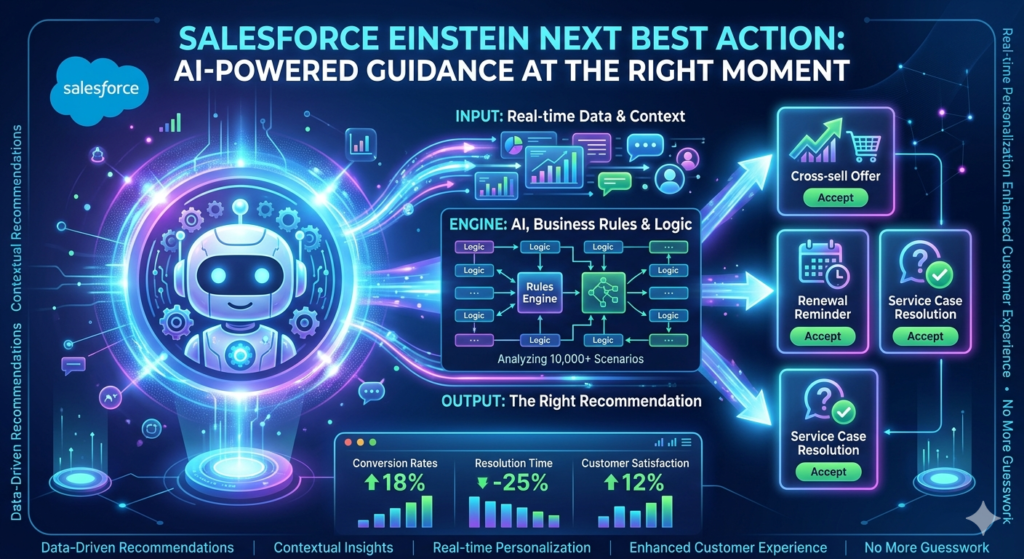
Salesforce Einstein Next Best Action (NBA) uses artificial intelligence, business rules, and real-time data to surface the right recommendation, to the right person, at the right moment — directly within the Salesforce interface. Whether a sales rep is on a call with a prospect or a service agent is resolving a ticket, NBA quietly analyzes context and delivers actionable guidance without requiring anyone to dig through dashboards or reports.
The results speak for themselves. Organizations that have deployed Einstein Next Best Action report improvements in conversion rates, shorter resolution times, and measurably better customer satisfaction scores. In 2026, as AI becomes deeply embedded into CRM workflows, understanding how to implement and optimize NBA is no longer optional — it’s a competitive necessity.
This comprehensive guide from RizeX Labs walks you through everything: the concepts, the architecture, the implementation steps, the use cases, and the best practices that separate a successful NBA deployment from a frustrating one.
Let’s get started.
What Is Salesforce Einstein Next Best Action?
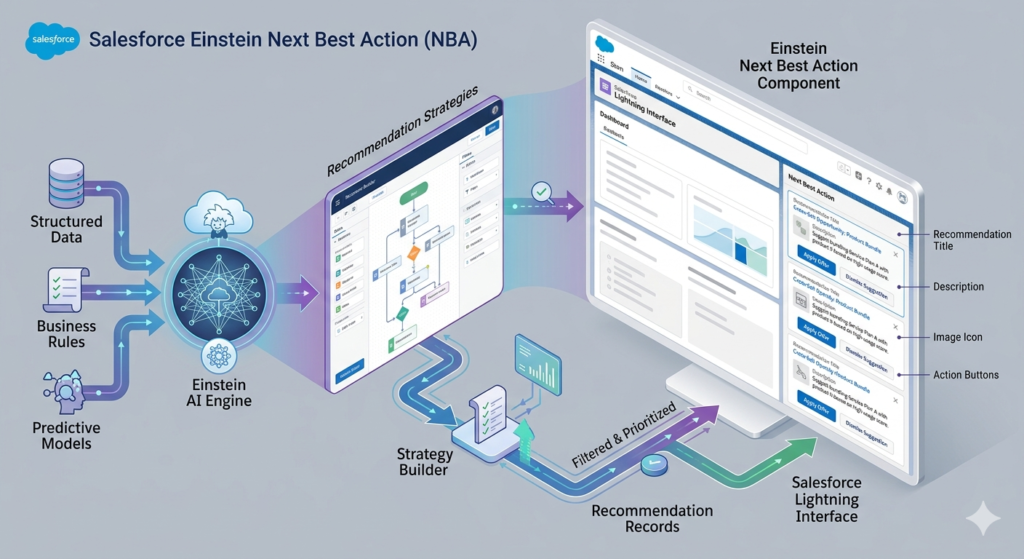
Salesforce Einstein Next Best Action is a native Salesforce feature that delivers AI-powered, context-aware recommendations directly to users within the Salesforce Lightning interface. It analyzes structured data, business rules, and predictive models to determine which action — a recommendation, offer, task, or suggestion — is most likely to produce a positive outcome in any given customer interaction.
At its core, NBA Salesforce operates on three fundamental building blocks:
1. Recommendation Records
These are structured Salesforce objects that define what the system can suggest. A recommendation record might represent an upsell offer, a service resolution tip, a product bundle, or a compliance alert. Each record contains a name, description, acceptance label, rejection label, and an optional image — everything needed to display a meaningful suggestion to a user.
2. Recommendation Strategies
This is the intelligence layer. Strategies are built using Strategy Builder (a visual flow-like canvas) or Salesforce Flow (for more complex logic). A strategy determines which recommendations to show, to whom, and when — based on conditions, filters, Einstein predictions, and business rules.
3. The Einstein Next Best Action Component
This is the front-end display — a native Lightning component that can be placed on any Lightning Record Page (Opportunity, Case, Account, Contact, Lead, or a custom object). It reads the output of your strategy and presents the top recommendation(s) to the Salesforce user in real time.
How NBA Salesforce Works — The Flow of Logic
textCustomer/Record Data → Strategy Builder (Rules + AI Models)
→ Filtered Recommendations → Lightning Component Display
→ User Action (Accept / Reject) → Outcome Tracking
When a user opens a record, the NBA component triggers the strategy, which runs in real time against live data. The strategy applies eligibility filters, business rules, and optionally, Einstein prediction scores to rank and select the best recommendation(s). The component then surfaces those recommendations — complete with descriptions and action buttons — so the user can act immediately or dismiss the suggestion.
This tight integration between Salesforce AI recommendations, business logic, and the user interface is what makes Einstein NBA genuinely powerful in practice.
Key Features of Salesforce Einstein NBA
Understanding the feature set helps you design smarter implementations. Here’s a breakdown of the most important capabilities:
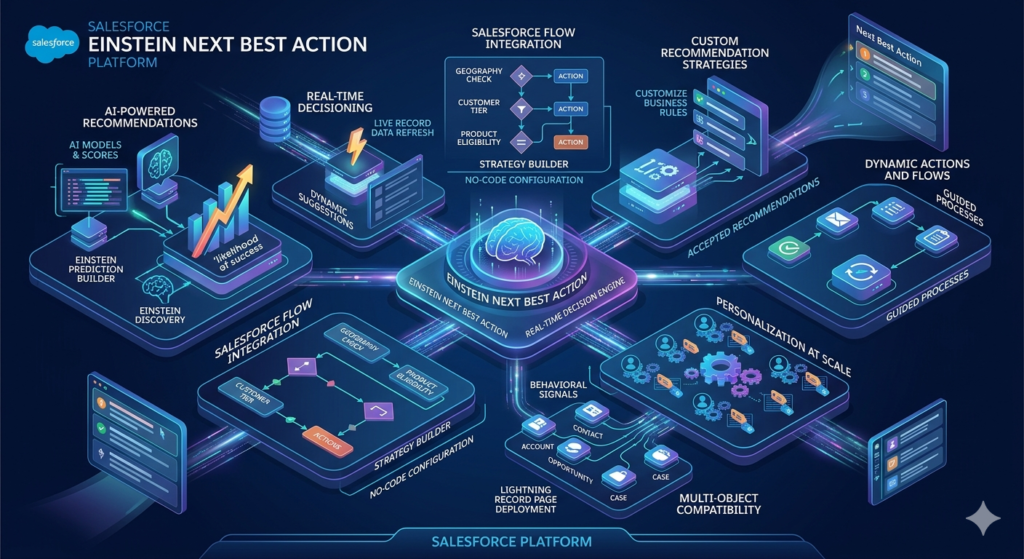
AI-Powered Recommendations
Einstein NBA can leverage Einstein Prediction Builder scores, Einstein Discovery insights, and external AI model outputs to prioritize recommendations. Rather than showing all eligible recommendations, AI models rank them by likelihood of success.
Real-Time Decisioning
Recommendations are generated dynamically at the moment a record is opened or refreshed. There’s no batch delay — the system reads live record data, making suggestions contextually relevant to the current state of the customer relationship.
Salesforce Flow Integration
Salesforce Flow recommendations are the engine behind strategy logic. Strategy Builder is built on top of Flow technology, allowing admins to use familiar branching logic, conditions, and data connectors without writing Apex code.
Custom Recommendation Strategies
Every business has unique decision logic. Strategy Builder allows admins and architects to create custom recommendation strategies that reflect specific business rules — geography, product eligibility, customer tier, contract status, and much more.
Dynamic Actions and Flows
When a user accepts a recommendation, NBA can trigger a Flow automatically — launching a guided process, creating a task, sending an email, or updating a field. This creates a seamless loop between recommendation and action.
Personalization at Scale
By combining record data, behavioral signals, and predictive scores, dynamic recommendations in Salesforce can be tailored to each individual customer — delivering a level of personalization that manual processes simply cannot match.
Multi-Object Compatibility
NBA works across standard and custom Salesforce objects. You can deploy it on Opportunities, Cases, Accounts, Contacts, Leads — anywhere a Lightning Record Page exists.
Benefits of Using Einstein Next Best Action
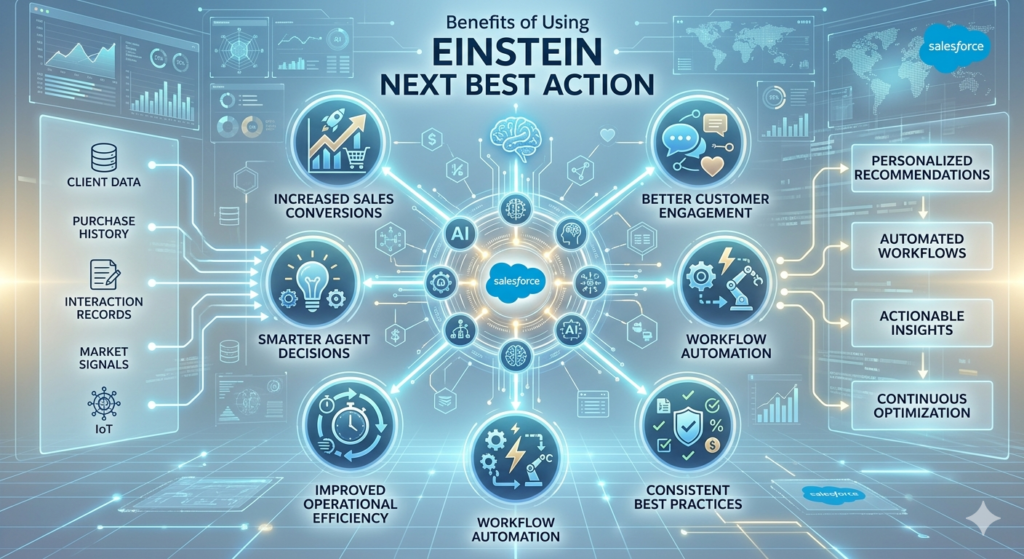
The business case for Einstein NBA is strong. Here’s why organizations across industries are investing in this capability:
| Benefit | Impact |
|---|---|
| Increased Sales Conversions | Reps receive timely upsell/cross-sell prompts at peak relevance |
| Better Customer Engagement | Agents deliver personalized service without manual analysis |
| Smarter Agent Decisions | AI guidance reduces cognitive load and decision fatigue |
| Workflow Automation | Accepted recommendations trigger downstream processes automatically |
| Improved Operational Efficiency | Less time searching for next steps; more time executing them |
| Consistent Best Practices | Every user follows the same data-driven playbook |
| Measurable ROI | Acceptance/rejection tracking enables continuous optimization |
The Business Impact in Practice
Consider a financial services firm where advisors manage hundreds of client relationships. Without NBA, an advisor might rely on instinct or a manual checklist to decide which product to recommend during a review. With Einstein Next Best Action, the system analyzes the client’s portfolio, risk profile, recent interactions, and market signals — then surfaces the single most relevant recommendation at the right moment. The advisor looks informed, the client feels understood, and the conversion rate improves.
That’s Salesforce AI automation working exactly as intended.
Salesforce Einstein Next Best Action Architecture
To implement NBA effectively, you need to understand how the pieces fit together. Here’s a technical overview of the architecture:
Architecture Diagram Overview
text┌─────────────────────────────────────────────────────┐
│              Salesforce Data Layer                   │
│  (CRM Records, Custom Objects, External Data)        │
└────────────────────┬────────────────────────────────┘
                     │
                     ▼
┌─────────────────────────────────────────────────────┐
│           Recommendation Records                     │
│  (Name, Description, Action Label, Image, Linked Flow)│
└────────────────────┬────────────────────────────────┘
                     │
                     ▼
┌─────────────────────────────────────────────────────┐
│           Strategy Builder / Flow                    │
│  (Eligibility Rules, AI Scores, Ranking, Filtering) │
└────────────────────┬────────────────────────────────┘
                     │
                     ▼
┌─────────────────────────────────────────────────────┐
│        Einstein NBA Lightning Component              │
│  (Displayed on Lightning Record Page)                │
└────────────────────┬────────────────────────────────┘
                     │
          ┌──────────┴──────────┐
          ▼                     ▼
   User Accepts           User Rejects
   (Triggers Flow)        (Feedback Logged)
Component Breakdown
Strategy Builder
The Einstein Recommendation Builder (Strategy Builder) is a visual, drag-and-drop canvas where you define the logic for selecting and ranking recommendations. It supports the following element types:
- Get Recommendations — pulls all active recommendation records
- Filter — applies eligibility conditions (e.g., Account Type = “Enterprise”)
- Branch — creates conditional paths based on record data
- Sort — orders recommendations by a field or AI score
- Limit — controls how many recommendations are displayed
- Map — transforms or enriches recommendation data before display
Recommendation Records
Standard Salesforce objects (type: Recommendation) that store the content of each suggestion. You can have dozens or hundreds of these, each representing a specific action or offer.
Lightning Component
The out-of-the-box Einstein Next Best Action Lightning component is dragged onto a Lightning Record Page via the App Builder. It accepts the strategy name and display parameters as configuration inputs.
Flow Integration
When a user accepts a recommendation, the system can invoke a Salesforce Screen Flow or Auto-Launched Flow to execute the next step — whether that’s opening a guided process, logging an activity, or creating a follow-up record.
AI and External Data Sources
Einstein Prediction Builder and Einstein Discovery models can feed probability scores directly into Strategy Builder logic. External data can be brought in through connected Data Cloud sources, Apex-invocable methods, or external services.
Step-by-Step Next Best Action Setup in Salesforce
This section provides a practical, hands-on implementation guide. We’ll build a simple upsell recommendation system for a sales team as our working example.
Step 1: Verify Licensing and Enable Einstein Features
Before anything else, confirm your org has the right licenses. Einstein Next Best Action requires:
- Salesforce Enterprise Edition or higher
- Einstein for Sales or Service Cloud Einstein add-on (depending on use case)
- Access to Strategy Builder in Setup
To enable:
- Go to Setup → Einstein → Next Best Action
- Toggle Enable Einstein Next Best Action to ON
- Confirm Lightning Experience is active in your org
Pro Tip: If you’re working in a Sandbox, enable NBA there first and test thoroughly before deploying to production.
Step 2: Create Recommendation Records
Recommendation records define the what — the actual suggestions your system will serve up.
Navigation: Setup → Recommendations → New
Example: Creating an Upsell Recommendation
| Field | Value |
|---|---|
| Name | Premium Support Upgrade |
| Description | Offer the customer our Premium Support package with 24/7 SLA |
| Acceptance Label | Send Offer |
| Rejection Label | Not Now |
| Image (optional) | Upload a relevant product image |
Create as many recommendation records as your use cases require. For a B2B sales scenario, you might create records for:
- Premium Support Upgrade
- Annual Contract Renewal Offer
- Product Bundle Discount
- Executive Business Review Invitation
- Referral Program Invitation
Step 3: Create Action Flows for Accepted Recommendations
For each recommendation, you’ll want a Flow that fires when the user clicks “Accept.”
Example: Create a Screen Flow for “Premium Support Upgrade”
- Go to Setup → Flows → New Flow
- Select Screen Flow
- Add a Screen element — include fields to capture relevant details (e.g., preferred start date, contact preference)
- Add a Create Records element to log the opportunity update or create a follow-up task
- Save and activate the Flow as: “Premium Support Upgrade Flow”
Link this Flow back to your Recommendation record under the Action field.
Step 4: Build Your Recommendation Strategy
This is the intelligence layer — where you define who sees which recommendations and when.
Navigation: Setup → Next Best Action → Strategy Builder → New Strategy
Example Strategy: “Sales Upsell Strategy”
- Add a “Get Recommendations” element
- Source: All active Recommendation records
- This pulls your full library into the strategy
- Add a “Filter” element
- Condition:
Opportunity Stage = "Closed Won"ANDAccount Type = "Customer" - This ensures we only show upsell offers on relevant records
- Condition:
- Add a Branch (optional)
- If
Account Annual Revenue > $500,000→ Show “Executive Business Review” recommendation - Else → Show “Premium Support Upgrade” recommendation
- If
- Add a “Sort” element
- Sort by: Einstein Prediction Score (if using AI model) or a custom priority field
- Add a “Limit” element
- Max recommendations to display: 2
- (Showing too many dilutes focus and reduces action rates)
- Save and Activate the strategy
💡 Best Practice: Name your strategies clearly — e.g., “Sales_Upsell_CustomerAccounts” — so they’re easy to identify as your library grows.
Step 5: Add the Einstein NBA Component to a Lightning Record Page
Now it’s time to make recommendations visible to your users.
- Navigate to the Opportunity object (or whichever object you’re targeting)
- Open a record → Click the Setup (gear icon) → Edit Page
- In the Lightning App Builder, find the “Einstein Next Best Action” component in the left panel
- Drag it onto the page layout — typically in the right sidebar or below key details
- In the component properties panel, configure:
- Strategy API Name:
Sales_Upsell_CustomerAccounts(your strategy’s API name) - Maximum Recommendations: 2
- Header Label: “Recommended Actions”
- Strategy API Name:
- Save and Activate the page for your target audience (Profile or App)
Step 6: Test Your Implementation
Never deploy untested NBA configurations. Here’s a testing checklist:
- Open a qualifying record — does the NBA component appear?
- Do the correct recommendation(s) display based on your filter logic?
- Does clicking “Accept” trigger the correct Flow?
- Does clicking “Reject” log the dismissal appropriately?
- Are non-qualifying records correctly excluded from recommendations?
- Test across multiple user profiles to verify visibility rules
Use Debug Mode in Flow Builder and check Einstein Next Best Action logs in Setup for troubleshooting.
Step 7: Monitor and Iterate
After go-live, track performance using:
- Recommendation Interaction reports (built into Salesforce)
- Custom dashboards tracking acceptance vs. rejection rates by recommendation type
- Feedback loops with users to refine strategy logic
Real-World Use Cases of Einstein Next Best Action
Financial Services: Cross-Selling Investment Products
A wealth management firm uses NBA on the Client Account page. When a client’s cash balance exceeds a threshold and their risk profile is “Moderate,” the system recommends a specific mutual fund. The advisor sees this recommendation during their next call — contextually relevant, data-backed, and fully actionable.
Retail/E-commerce: Upselling During Service Interactions
A service agent resolving a warranty complaint sees an NBA prompt: “This customer purchased Model X 11 months ago — offer a loyalty upgrade to Model Z at 15% discount.” The timing converts a potential churn moment into a retention win.
Healthcare: Patient Engagement and Care Gap Alerts
A care coordinator using a Health Cloud-based Salesforce org sees recommendations like: “Patient has not completed annual wellness screening — recommend scheduling.” This drives proactive outreach and improves care compliance metrics.
Insurance: Claims Processing Guidance
Claims adjusters receive contextual recommendations based on claim type and customer history. For example: “This is a high-value claim from a long-tenured customer — recommend escalation to senior adjuster and proactive call within 24 hours.” This reduces leakage and improves customer retention at a critical moment.
B2B SaaS: Customer Success Expansion
A Customer Success Manager views an account where product usage has increased 40% in 60 days. NBA surfaces: “High-growth signal detected — recommend an expansion conversation for additional seats.” The CSM acts on the signal before the customer even realizes they need more capacity.
Customer Support: Resolution Acceleration
On the Case object, NBA recommends the most relevant Knowledge Article based on case subject, customer tier, and agent success history. Agents resolve issues faster, and customers wait less.
Best Practices for Einstein NBA Implementation
1. Start with Data Quality
NBA is only as good as the data feeding it. Before building strategies, audit your CRM data for completeness. Key fields used in recommendation logic — Account Type, Industry, Opportunity Stage, Contact Role — must be reliably populated.
2. Design for the User, Not Just the Technology
Recommendations that agents ignore are worthless. Involve end users in the design process. Ask: What information would genuinely help you in this moment? The most technically sophisticated strategy fails if users dismiss every suggestion.
3. Limit Recommendations per View
Resist the temptation to show 5–10 recommendations at once. 2–3 focused, highly relevant recommendations outperform a long list. Decision fatigue is real — keep it tight.
4. Build Feedback Loops
Track acceptance and rejection rates obsessively. A low acceptance rate signals that your eligibility logic is too broad or your recommendations aren’t resonating. Iterate quickly.
5. Govern Your Recommendation Library
As your Recommendation record library grows, establish governance. Use naming conventions, ownership tags, and regular reviews to retire stale recommendations and keep the library clean.
6. Use AI Models Incrementally
Don’t try to integrate Einstein Prediction Builder scores from day one unless your data is mature. Start with rule-based strategies, establish baseline performance, and layer in AI scoring once you have enough interaction data to train models effectively.
7. Align with Change Management
Technical deployment is 50% of the work. Invest equally in user training, communication, and adoption programs. NBA changes how agents work — prepare them for it.
8. Test Across Profiles and Scenarios
Strategies behave differently depending on the data in each record. Test with records across multiple stages, account types, and geographies to ensure logic works as intended across all real-world scenarios.
Common Challenges and Solutions
Even well-planned NBA implementations hit bumps. Here are the most common issues and how to address them:
| Challenge | Root Cause | Solution |
|---|---|---|
| No recommendations showing | Strategy not activated or component misconfigured | Verify strategy is Active; check API Name matches in component settings |
| Wrong recommendations appearing | Filter logic too broad or conditions incorrect | Debug strategy in Strategy Builder; add more specific conditions |
| Flow not triggering on acceptance | Recommendation record not linked to correct Flow | Check Action field on Recommendation record; verify Flow is Active |
| Low user adoption | Recommendations feel irrelevant or disruptive | Involve users in design; refine eligibility logic; simplify recommendation text |
| Performance issues on page load | Complex strategy with too many records | Add early Filter elements to reduce recommendation set before complex logic runs |
| AI scores not appearing | Einstein Prediction Builder model not deployed or not connected | Verify model is active; check permission sets; confirm field mapping in strategy |
| Recommendations shown to wrong profiles | Page component not restricted to correct profiles | Use Lightning App Builder to set page activation visibility by Profile/App |
| Data inconsistencies causing bad results | Poor CRM data quality upstream | Conduct data audit; implement validation rules; run data hygiene campaigns |
Troubleshooting Tips
- Use Salesforce Flow Debug Mode to trace strategy execution step by step
- Check Einstein Next Best Action Logs in Setup for runtime errors
- Review Recommendation Interaction records to see what’s being served and how users respond
- Use the Strategy Builder Preview panel to simulate output against specific records during development
Einstein Next Best Action vs. Traditional CRM Recommendations
To appreciate the value of NBA, it helps to contrast it with conventional approaches:
| Dimension | Traditional CRM Approach | Einstein Next Best Action |
|---|---|---|
| Decision Source | Manual playbooks, manager judgment | AI + real-time data + business rules |
| Speed | Requires rep to look up info manually | Instant, in-context at point of interaction |
| Personalization | Generic scripts or segments | Individual-level, context-aware |
| Scalability | Degrades as team grows | Scales consistently across all users |
| Feedback Loop | Informal, subjective | Quantitative acceptance/rejection tracking |
| Action Integration | Separate steps required | One-click Flow execution |
| Adaptability | Updated manually via training | Strategy logic updated centrally, instantly |
The contrast makes it clear: NBA Salesforce isn’t just a nice feature — it’s a fundamental upgrade to how CRM teams operate.
The Future of Einstein NBA in 2026 and Beyond
The Salesforce AI roadmap is accelerating fast. In 2026, Einstein Next Best Action is increasingly intersecting with:
- Agentforce (Salesforce’s autonomous AI agents): NBA strategies are being used to guide autonomous agents, not just human users. An AI agent can receive a recommendation, execute the Flow, and log the outcome — entirely without human intervention.
- Data Cloud Integration: With Salesforce Data Cloud, recommendation strategies can now draw on unified customer profiles that blend CRM data, behavioral data, transactional data, and third-party signals — enabling far richer and more accurate recommendations.
- Generative AI + NBA: Einstein Copilot can now explain why a recommendation is being made in natural language, making it easier for agents to trust and act on AI-driven suggestions.
- Real-Time Event-Driven Recommendations: Platform Events and Streaming APIs allow NBA to respond to real-time triggers — for example, surfacing a retention offer the moment a customer submits a cancellation request.
Organizations that build strong NBA foundations today will be best positioned to extend into these emerging capabilities.
Conclusion: Turning AI Potential into Real CRM Performance
Salesforce Einstein Next Best Action represents one of the clearest examples of AI delivering tangible, measurable value inside a CRM platform. When implemented thoughtfully, it transforms every customer interaction into an intelligent decision point — guiding reps, agents, and advisors toward the actions most likely to create positive outcomes for both the business and the customer.
The implementation journey isn’t without complexity. Data quality, strategy design, user adoption, and ongoing optimization all require deliberate investment. But the organizations that commit to getting it right don’t just see efficiency gains — they build a systematic, scalable competitive advantage.
At RizeX Labs, we specialize in helping businesses unlock the full potential of Einstein Next Best Action Salesforce implementations — from architecture design and strategy configuration to change management and performance optimization. Whether you’re starting from scratch or looking to mature an existing NBA deployment, our team of Salesforce AI specialists is ready to help.
About RizeX Labs
We’re Pune’s leading IT training institute specializing in emerging technologies like Salesforce and data analytics. At RizeX Labs, we help professionals master advanced AI tools like Einstein Next Best Action through hands-on training, real-world strategy building, and expert mentorship. Our programs are designed to transform learners into job-ready Salesforce architects capable of deploying intelligent, automated business solutions.
Internal Links:
- Salesforce Admin & Development Training
- Einstein Prediction Builder: A Beginner’s Guide to AI Modeling
- Mastering Salesforce Flow: The Engine Behind Modern Automation
