
Introduction: The Hidden Cost of an Untrained Salesforce Team
Your company just invested six figures in Salesforce. The implementation is complete. The dashboards are live. The workflows are configured. And yet, three months later, your sales team is still tracking deals in spreadsheets, your support agents are logging cases inconsistently, and your marketing team has no idea how to pull a campaign report.
Sound familiar?
You’re not alone. According to research from Forrester, up to 70% of CRM implementations fail to meet expectations — and the primary reason isn’t the technology itself. It’s people. More specifically, it’s the gap between what the platform can do and what your employees actually know how to do with it.
Companies pour enormous budgets into licensing, customization, and integration, but allocate a fraction of that investment to the one factor that determines whether any of it pays off: training.
The result? Low user adoption. Dirty data. Frustrated teams. Missed revenue targets. And a growing sense across the organization that Salesforce “doesn’t work” — when, in reality, nobody was ever taught how to use it properly.
Here’s the truth: Salesforce is only as powerful as the people using it. A well-built Salesforce training program for employees isn’t a nice-to-have. It’s the single most important factor in determining whether your CRM investment delivers a return — or becomes the most expensive address book your company has ever purchased.
In this comprehensive guide, we’ll walk you through exactly how to build a corporate Salesforce training program that drives real adoption, measurable productivity gains, and long-term organizational value. Whether you’re rolling out Salesforce for the first time, onboarding new hires, or looking to improve how your existing team uses the platform, this is your roadmap.
Let’s get started.
What Is a Salesforce Training Program?
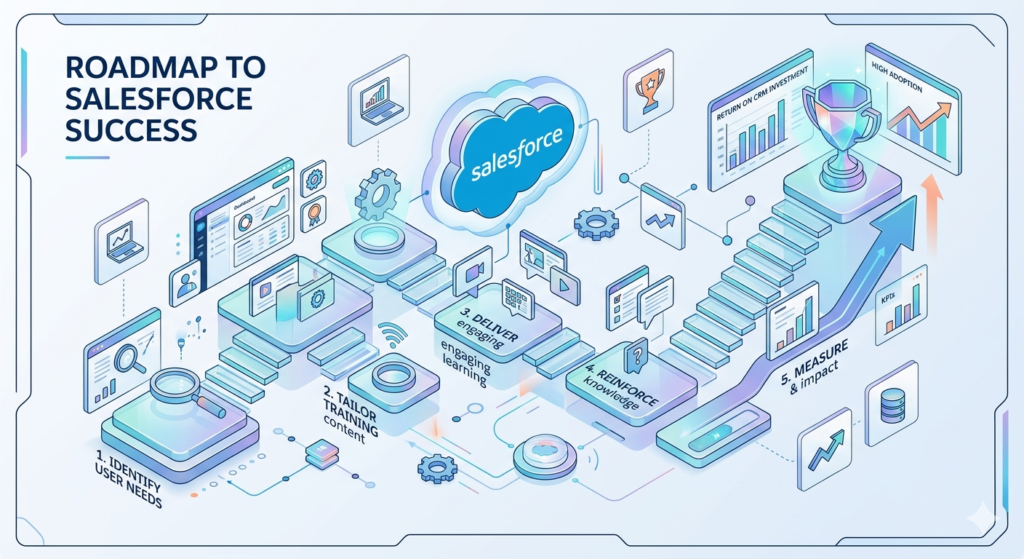
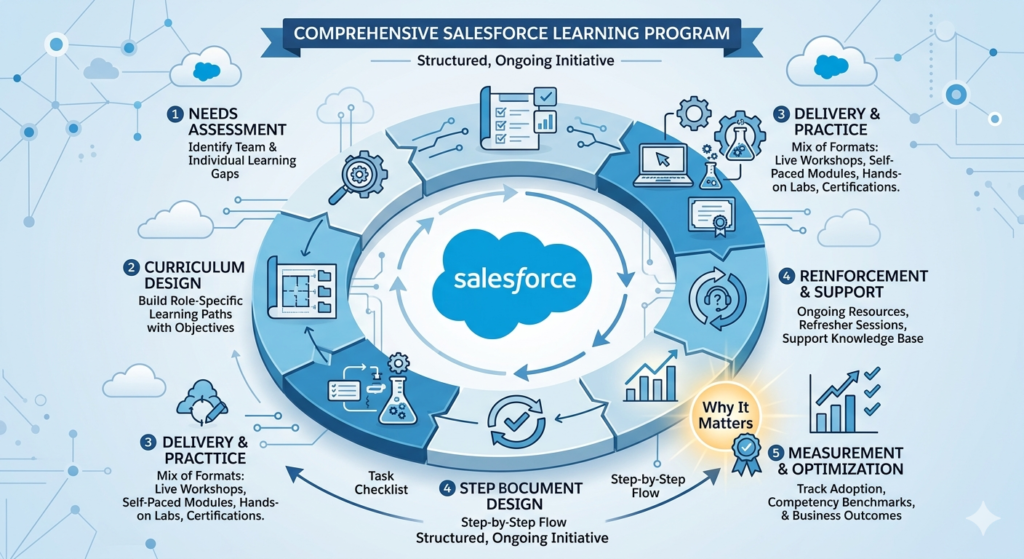
A Salesforce training program is a structured, ongoing initiative designed to teach employees how to effectively use Salesforce in their specific roles. It goes far beyond a one-time orientation session or a link to a help article. A true training program encompasses:
- Needs assessment — Identifying what each team and individual needs to learn
- Curriculum design — Building role-specific learning paths with clear objectives
- Delivery — Using a mix of formats (live workshops, self-paced modules, hands-on labs, certifications) to accommodate different learning styles
- Reinforcement — Providing ongoing support, refresher sessions, and knowledge resources
- Measurement — Tracking adoption metrics, competency benchmarks, and business outcomes
Think of it as a Salesforce learning roadmap — a deliberate, phased approach to building organizational competency with the platform over time.
A well-designed program answers three fundamental questions for every employee:
- What do I need to do in Salesforce? (Role-specific tasks and workflows)
- How do I do it? (Step-by-step processes and best practices)
- Why does it matter? (The business impact of consistent, accurate CRM usage)
That third question is often overlooked — and it’s arguably the most important. When employees understand why their Salesforce usage matters to the business, compliance shifts from obligation to ownership.
Why Companies Fail at Salesforce Adoption
Before we discuss how to build a successful training program, it’s worth understanding why so many organizations struggle with Salesforce user adoption in the first place. The patterns are remarkably consistent:
1. Training Is an Afterthought
In many implementations, training is the last line item in the project plan — and the first to get cut when timelines slip or budgets tighten. Teams go live with minimal preparation and are expected to figure things out on their own.
2. One-Size-Fits-All Approach
A single, generic training session is delivered to the entire organization. The sales rep, the marketing analyst, the customer support agent, and the system administrator all sit through the same two-hour webinar. Nobody learns what they actually need to know.
3. No Role-Based Context
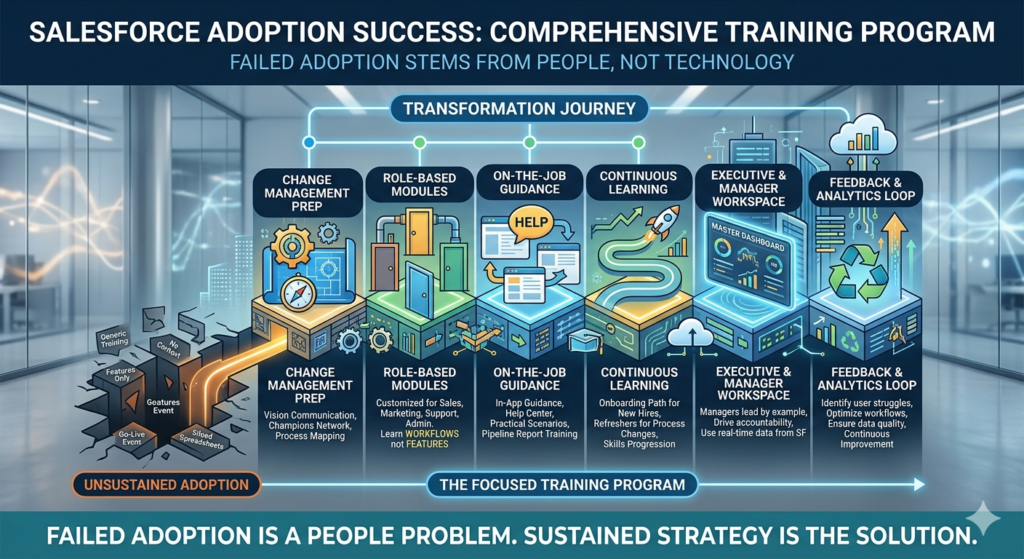
Employees are taught features instead of workflows. They learn that Salesforce has reports, but not how to build the specific pipeline report their VP needs every Monday. They know opportunities exist, but not the exact stages and fields their team is expected to use.
4. Training Ends at Go-Live
The organization treats training as a one-time event rather than an ongoing process. There’s no plan for onboarding new hires, no refresher sessions when processes change, and no mechanism for continuous learning.
5. No Executive Sponsorship
Leadership doesn’t actively use or champion Salesforce. When managers continue running meetings from spreadsheets instead of Salesforce dashboards, the implicit message is clear: this tool is optional.
6. Lack of Feedback Loops
There’s no system for identifying where employees are struggling, which processes are causing friction, or which training gaps are leading to data quality issues. Problems compound silently until adoption craters.
7. Ignoring Change Management
Salesforce adoption is fundamentally a change management challenge. It requires people to abandon familiar habits and adopt new ones. Without deliberate change management strategies — communication plans, champions networks, incentive structures — resistance is inevitable.
The bottom line: Failed Salesforce adoption is almost never a technology problem. It’s a people problem — and the solution is a thoughtful, sustained enterprise Salesforce training strategy.
The Business Case: Benefits of Corporate Salesforce Training
Investing in a structured corporate Salesforce training program delivers measurable returns across every dimension of business performance. Here’s what the data — and real-world experience — consistently show:
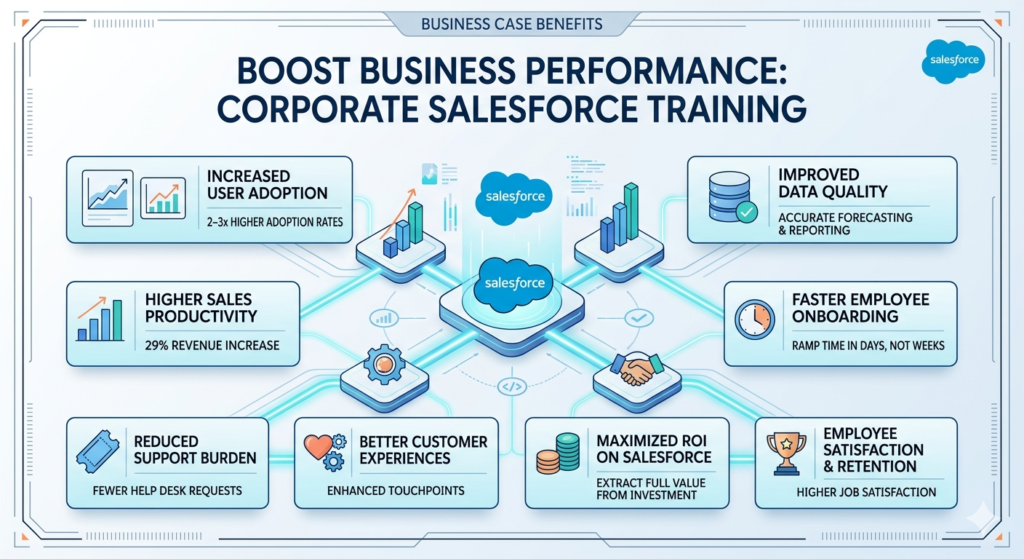
Increased User Adoption
Nucleus Research found that companies with comprehensive CRM training programs see adoption rates 2–3x higher than those without structured training. When employees feel confident using Salesforce, they actually use it.
Higher Sales Productivity
According to Salesforce’s own research, organizations that fully leverage CRM capabilities see an average 29% increase in sales revenue and a 34% improvement in sales productivity. Training is the bridge between having the capability and actually leveraging it.
Improved Data Quality
Trained employees enter data consistently, follow standardized processes, and understand why data hygiene matters. This directly impacts forecasting accuracy, reporting reliability, and decision-making quality.
Faster Employee Onboarding
A documented Salesforce employee onboarding program reduces ramp time for new hires by giving them a clear, structured path to proficiency. Instead of weeks of ad hoc learning, new team members can become productive in days.
Reduced Support Burden
When employees know how to use Salesforce effectively, the volume of internal support tickets, help desk requests, and “how do I…?” Slack messages drops dramatically — freeing your admin and IT teams to focus on optimization rather than firefighting.
Better Customer Experiences
When your customer-facing teams know how to access complete customer histories, log interactions accurately, and leverage automation, the customer experience improves at every touchpoint.
Maximized ROI on Your Salesforce Investment
Salesforce licensing alone can cost $25–$300+ per user per month, depending on the edition. When you factor in implementation, customization, integration, and AppExchange apps, the total investment is substantial. Training ensures you’re extracting maximum value from every dollar spent.
Employee Satisfaction and Retention
Employees who feel competent and supported with their tools report higher job satisfaction. Conversely, few things are more frustrating than being expected to use a complex system without adequate training. A strong team Salesforce upskilling initiative is also an investment in your people.
How to Assess Employee Skill Gaps
You can’t build an effective training program without first understanding where your team stands today. A thorough skill gap assessment provides the foundation for everything that follows.
Step 1: Define Proficiency Levels
Create a clear framework that defines what proficiency looks like at each level for each role. For example:
| Level | Description |
|---|---|
| Beginner | Can log in, navigate the interface, and perform basic tasks with guidance |
| Intermediate | Can independently complete role-specific workflows, run reports, and follow established processes |
| Advanced | Can build custom reports, troubleshoot issues, train others, and suggest process improvements |
| Expert | Can configure the platform, build automations, and serve as a Salesforce champion or admin |
Step 2: Survey Your Teams
Deploy a structured self-assessment survey that asks employees to rate their comfort level with specific Salesforce tasks relevant to their role. Examples:
- “I can create and update opportunities with all required fields.”
- “I can build a custom report and add filters.”
- “I know how to log a case and assign it to the correct queue.”
- “I can create a dashboard and share it with my team.”
Use a simple scale (1 = Not at all confident → 5 = Very confident) and leave room for open-ended comments about challenges and frustrations.
Step 3: Analyze Usage Data
Salesforce provides built-in tools to assess actual usage patterns:
- Login History — Who’s logging in regularly? Who isn’t?
- Setup Audit Trail — What configuration changes are being made?
- Reports & Dashboards Usage — Which reports are being accessed? Which are ignored?
- Field Population Rates — Are required fields consistently filled? Are optional fields being used?
- Adoption Dashboards — Salesforce’s built-in adoption analytics can highlight usage trends
Tools like Salesforce Optimizer and third-party platforms like Whatfix or WalkMe can provide deeper insights into user behavior.
Step 4: Interview Managers and Power Users
Quantitative data tells you what is happening. Qualitative interviews tell you why. Talk to:
- Team managers — What Salesforce-related challenges do they observe? Where are processes breaking down?
- Power users — What do they see their colleagues struggling with? What workarounds are common?
- New hires — What was their onboarding experience? Where did they feel unsupported?
Step 5: Map Gaps to Training Priorities
Compile your findings into a prioritized matrix:
| Role | Current Level | Target Level | Key Gaps | Priority |
|---|---|---|---|---|
| Sales Reps | Beginner | Intermediate | Opportunity management, activity logging, reports | High |
| Marketing Team | Beginner | Intermediate | Campaign tracking, lead management, list views | Medium |
| Support Agents | Intermediate | Advanced | Case escalation, knowledge articles, macros | Medium |
| Sales Managers | Beginner | Advanced | Dashboards, forecasting, pipeline reports | High |
| Admins | Intermediate | Expert | Flow Builder, permission sets, data management | High |
This matrix becomes the blueprint for your training curriculum.
Creating Role-Based Salesforce Learning Paths
One of the most critical principles in building an effective Salesforce training program for employees is role-based customization. Different roles interact with Salesforce in fundamentally different ways, and their training should reflect that reality.
Why Role-Based Training Matters
Consider the difference between what a sales development representative (SDR) needs versus what a Salesforce administrator needs:
- The SDR needs to know how to qualify leads, convert them to opportunities, log activities, and use email templates. They don’t need to know how to configure permission sets.
- The administrator needs to understand data models, automation tools, security settings, and deployment processes. They don’t need sales methodology training.
Delivering the same curriculum to both wastes everyone’s time and undermines the credibility of the entire program.
Sample Role-Based Learning Paths
Here’s an example framework for structuring role-based paths:
Path 1: Sales Representatives
- Module 1: Navigating Salesforce — Home page, navigation bar, search, record pages
- Module 2: Lead and Contact Management — Creating, updating, and converting leads
- Module 3: Opportunity Management — Stages, close dates, amounts, required fields, products
- Module 4: Activity Tracking — Logging calls, emails, meetings, tasks
- Module 5: Using List Views and Kanban — Managing your pipeline visually
- Module 6: Running Reports — Pipeline reports, activity reports, win/loss analysis
- Module 7: Mobile Salesforce — Using the Salesforce mobile app in the field
- Capstone: Realistic scenario exercise — Manage a full deal cycle from lead to close
Path 2: Sales Managers
- Module 1: Dashboard Fundamentals — Building and customizing dashboards
- Module 2: Pipeline Management — Forecasting, pipeline inspection, opportunity scoring
- Module 3: Team Performance Reports — Activity metrics, conversion rates, quota attainment
- Module 4: Coaching with Data — Using Salesforce insights for 1:1 coaching conversations
- Module 5: Data Quality Oversight — Identifying and addressing data issues
- Capstone: Build a management dashboard and present insights to leadership
Path 3: Marketing Teams
- Module 1: Campaign Management — Creating campaigns, tracking ROI, managing members
- Module 2: Lead Management — Lead sources, lead scoring, lead assignment rules
- Module 3: List Views and Segmentation — Building targeted lists for outreach
- Module 4: Reports for Marketing — Campaign performance, lead funnel, source attribution
- Module 5: Integration Awareness — Understanding how marketing automation tools connect to Salesforce
- Capstone: Design and track a complete campaign from launch to ROI analysis
Path 4: Customer Support Teams
- Module 1: Case Management — Creating, updating, and resolving cases
- Module 2: Queue Management — Understanding assignment rules and escalation
- Module 3: Knowledge Base — Finding and creating knowledge articles
- Module 4: Macros and Quick Actions — Automating repetitive tasks
- Module 5: Service Reports — Case volume, resolution time, CSAT tracking
- Module 6: Omni-Channel Basics — Managing cases across channels
- Capstone: Handle a simulated multi-touch support scenario
Path 5: Salesforce Administrators
- Module 1: Data Model and Architecture — Objects, fields, relationships
- Module 2: Security and Access — Profiles, permission sets, roles, sharing rules
- Module 3: Automation — Flow Builder, Process Builder (legacy), approval processes
- Module 4: Data Management — Import/export, deduplication, data quality tools
- Module 5: Reports and Dashboards — Advanced report types, cross-object reporting
- Module 6: AppExchange and Integrations — Evaluating and installing managed packages
- Module 7: Release Management — Sandbox environments, change sets, deployment best practices
- Certification Prep: Salesforce Certified Administrator exam preparation
Training Strategies for Sales, Marketing, Support, and Admin Teams
Beyond curriculum content, how you deliver training matters enormously. Different teams have different learning cultures, time constraints, and motivational drivers.
Sales Teams
Challenge: Sales reps are notoriously resistant to anything that takes them away from selling. They need to see immediate, tangible value.
Strategy:
- Lead with the “what’s in it for me” angle: Show how Salesforce helps them close more deals, not just how to fill in fields
- Use real deal data in training exercises — hypothetical scenarios feel irrelevant
- Keep sessions short (30–45 minutes max) and highly focused
- Provide cheat sheets and quick reference cards they can pin to their monitors
- Enlist the top-performing rep as a Salesforce champion — peer influence is powerful
- Show how Salesforce Mobile can make their lives easier on the road
Example scenario: “Sarah, a top-performing rep at a mid-market SaaS company, was skeptical about Salesforce. During training, her manager showed her how to set up a personal pipeline dashboard that automatically updated with her deals. Within two weeks, Sarah was using it daily — because it replaced the manual spreadsheet she’d been maintaining for years. She didn’t just adopt Salesforce; she became its biggest advocate on the team.”
Marketing Teams
Challenge: Marketing teams often interact with Salesforce indirectly through integrated tools (Pardot, HubSpot, Marketo). They need to understand the CRM context even when they don’t live in it daily.
Strategy:
- Focus on the lead lifecycle — how marketing-generated leads flow into Salesforce and what happens next
- Train on campaign attribution so marketing can demonstrate ROI
- Provide cross-functional context: Help marketing understand how sales uses the data they influence
- Offer integration-specific training for whatever marketing automation platform is connected
Support Teams
Challenge: Support agents often handle high volumes of repetitive interactions and need efficiency-focused training.
Strategy:
- Emphasize speed and workflow efficiency — macros, quick actions, keyboard shortcuts
- Use realistic case simulations with escalation scenarios
- Provide contextual help directly within Salesforce using in-app guidance
- Train on knowledge management so agents can self-serve before escalating
- Establish quality benchmarks — e.g., “Every case must have X, Y, and Z fields completed”
Admin Teams
Challenge: Admins need deep technical knowledge and must stay current with Salesforce’s three annual releases.
Strategy:
- Invest in Salesforce certification as both a learning vehicle and credential
- Allocate dedicated time for admin learning — it can’t be squeezed into gaps between support tickets
- Encourage participation in the Salesforce Trailblazer Community and local user groups
- Create a formal process for evaluating each Salesforce release and identifying relevant new features
- Pair junior admins with experienced mentors
Best Formats for Salesforce Training
The most effective corporate Salesforce training programs use a blended approach, combining multiple formats to accommodate different learning styles, schedules, and proficiency levels.
1. Instructor-Led Training (ILT) — Live Workshops
Best for: Initial rollouts, complex topics, interactive exercises
- Can be delivered in-person or virtually
- Allows for real-time Q&A, group exercises, and immediate feedback
- Most effective when sessions are role-specific and kept to 60–90 minutes
- Record all sessions for future reference and for team members who can’t attend
2. Salesforce Trailhead
Best for: Self-paced foundational learning, gamified engagement
- Salesforce’s free online learning platform with hundreds of modules and projects
- Covers everything from basic navigation to advanced development
- Trailhead badges and points create a gamified learning experience
- Particularly effective for admins and technical roles
- Can be incorporated into formal learning paths with assigned trails and deadlines
Pro tip: Create a company Trailhead leaderboard to spark friendly competition and recognize top learners.
3. Learning Management System (LMS) Integration
Best for: Tracking progress, delivering custom content, ensuring compliance
- Platforms like myTrailhead (Salesforce’s customizable LMS), Lessonly, Docebo, or TalentLMS allow you to create organization-specific content
- You can build courses that reference your company’s exact Salesforce configuration, processes, and terminology
- LMS tracking ensures managers and L&D teams can monitor completion rates and assessment scores
4. In-App Guidance and Digital Adoption Platforms
Best for: Just-in-time learning, reducing context switching
- Salesforce offers native In-App Guidance (prompts and walkthroughs within the platform)
- Third-party tools like Whatfix, WalkMe, or Spekit provide interactive step-by-step guidance overlaid on the Salesforce UI
- These tools are especially powerful for reinforcing training and supporting new processes
5. Video Tutorials and Screen Recordings
Best for: Visual learners, reusable reference material
- Create short (3–5 minute) videos demonstrating specific tasks in your Salesforce environment
- Organize them in a searchable knowledge base or internal wiki
- Update videos whenever processes or configurations change
6. Hands-On Sandbox Training
Best for: Practice without consequences
- Every Salesforce org can create sandbox environments where employees practice without affecting live data
- Sandbox exercises should mirror real-world scenarios using realistic data
- This is especially important for admin training, but valuable for all roles
7. Salesforce Certification Programs
Best for: Deep expertise, professional development, credentialing
Salesforce offers a robust certification ecosystem. Relevant certifications for different roles include:
- Salesforce Certified Administrator — For admins and power users
- Salesforce Certified Advanced Administrator — For experienced admins
- Salesforce Certified Sales Cloud Consultant — For sales operations and CRM strategists
- Salesforce Certified Service Cloud Consultant — For support teams and operations
- Salesforce Certified Marketing Cloud Administrator — For marketing operations
- Salesforce Certified Platform App Builder — For admins building custom applications
Investing in Salesforce certification for teams signals organizational commitment to excellence and gives employees a valuable professional credential. Many companies offer certification bonuses or reimbursement for exam fees.
8. Internal Mentoring and Champions Networks
Best for: Peer-to-peer learning, sustained culture change
- Identify 1–2 Salesforce Champions per department — enthusiastic, proficient users who serve as go-to resources for their peers
- Champions receive advanced training and have a direct line to the admin team
- Create a dedicated Slack/Teams channel where employees can ask questions and share tips
- Champions can also provide valuable feedback on what’s working and what’s not
Recommended Blended Approach
| Phase | Format | Purpose |
|---|---|---|
| Pre-launch | Trailhead trails + video overviews | Build foundational knowledge |
| Launch week | Instructor-led role-based workshops | Hands-on learning with Q&A |
| First 30 days | Sandbox exercises + in-app guidance | Reinforcement through practice |
| Ongoing | LMS modules + champions network | Continuous learning and support |
| Quarterly | Refresher sessions + new feature training | Stay current and address gaps |
| Annual | Certification prep + advanced workshops | Deep expertise development |
How to Measure Salesforce Training Success
If you can’t measure it, you can’t improve it. Effective measurement requires a combination of leading indicators (training activity) and lagging indicators (business outcomes).
Training Activity Metrics
- Course completion rates — What percentage of employees completed assigned training?
- Assessment scores — How well did employees demonstrate comprehension?
- Trailhead badges earned — Are employees engaging with self-paced learning?
- Certifications achieved — How many team members hold relevant Salesforce credentials?
- Training satisfaction scores — Do employees rate the training as useful and well-delivered?
Adoption Metrics
- Login frequency — Are employees logging into Salesforce regularly?
- Feature usage — Are they using the specific features covered in training (reports, dashboards, workflows)?
- Data entry compliance — Are required fields being populated consistently?
- Data quality scores — Are duplicate rates, incomplete records, and data errors declining?
- Support ticket volume — Are internal “how do I…?” requests decreasing?
Business Outcome Metrics
- Sales cycle length — Has the average deal cycle shortened?
- Win rates — Are conversion rates improving?
- Forecast accuracy — Are pipeline forecasts becoming more reliable?
- Case resolution time — Are support cases being resolved faster?
- Campaign ROI — Can marketing more accurately attribute revenue to campaigns?
- Customer satisfaction — Are CSAT or NPS scores improving?
- Time to productivity for new hires — Are new employees reaching proficiency faster?
The Kirkpatrick Model Applied to Salesforce Training
For a more structured evaluation framework, apply the Kirkpatrick Model:
- Reaction: Did employees find the training valuable? (Post-training surveys)
- Learning: Did employees gain the intended knowledge and skills? (Assessments and quizzes)
- Behavior: Are employees applying what they learned in their daily work? (Adoption metrics, manager observation)
- Results: Is the training driving measurable business outcomes? (Revenue, efficiency, data quality)
Most organizations measure only Level 1 (reaction). The real value comes from measuring Levels 3 and 4.
Common Mistakes to Avoid
Even well-intentioned training programs can fall flat. Here are the most common pitfalls — and how to avoid them:
1. Treating Training as a One-Time Event
The mistake: Conducting a single training session at go-live and assuming the job is done.
The fix: Build an ongoing program with quarterly refreshers, new hire onboarding modules, and continuous learning resources. Salesforce releases new features three times per year — your training should evolve accordingly.
2. Using Generic, Off-the-Shelf Content Only
The mistake: Pointing employees to Trailhead and calling it a day. While Trailhead is excellent, it teaches generic Salesforce — not your Salesforce.
The fix: Supplement Trailhead with custom content that reflects your specific objects, fields, processes, page layouts, and business rules. Employees need to learn how Salesforce works in their organization.
3. Neglecting the “Why”
The mistake: Teaching employees how to enter data without explaining why it matters.
The fix: Connect every training module to a business outcome. “We log activities so our managers can accurately forecast pipeline” is far more compelling than “Click the log-a-call button.”
4. Ignoring Change Resistance
The mistake: Assuming that providing training will automatically overcome resistance to change.
The fix: Pair training with a comprehensive change management strategy that includes executive sponsorship, clear communication about the rationale for change, and acknowledgment that the transition will require adjustment.
5. Overloading Employees
The mistake: Trying to teach everything at once. A four-hour Salesforce training marathon guarantees that employees will retain almost nothing.
The fix: Follow the principle of progressive disclosure. Teach the essentials first, let employees practice and build confidence, then layer in advanced topics over time. Microlearning — short, focused modules of 10–15 minutes — has been shown to improve retention by up to 80%.
6. Not Involving Managers
The mistake: Treating Salesforce training as an L&D initiative without engaging frontline managers.
The fix: Managers must be trained first — and more deeply — than their teams. They need to use Salesforce dashboards in team meetings, coach from CRM data, and hold their teams accountable for consistent usage. Managerial reinforcement is the single strongest predictor of lasting behavior change.
7. Failing to Gather Feedback
The mistake: Not asking employees what’s working and what isn’t.
The fix: Implement regular feedback mechanisms — post-training surveys, focus groups, office hours with the training team, and anonymous feedback channels. Use this input to continuously iterate on your program.
8. Skipping the Admin Training
The mistake: Focusing exclusively on end-user training while neglecting the administrators who maintain and optimize the platform.
The fix: Your admins are the backbone of your Salesforce ecosystem. Invest in their advanced training, support their certification goals, and give them the time and resources they need to stay sharp. An undertrained admin is a bottleneck for the entire organization.
Building a Long-Term Team Salesforce Upskilling Strategy
A training program gets you started. A team Salesforce upskilling strategy keeps you growing. Here’s how to build for the long term:
Establish a Salesforce Center of Excellence (CoE)
A Center of Excellence is a cross-functional governance body responsible for Salesforce strategy, standards, and continuous improvement. It typically includes:
- Executive sponsor — Provides strategic direction and organizational authority
- Salesforce administrator(s) — Manages the platform configuration and operations
- Business analysts — Translates business requirements into Salesforce solutions
- Training lead — Owns the learning program and training calendar
- Department champions — Represent each team’s needs and serve as peer trainers
The CoE ensures that training remains aligned with business strategy and that knowledge is institutionalized rather than siloed.
Create a Continuous Learning Calendar
Plan your training activities across the entire year:
- January: Annual skills assessment and gap analysis
- February–March: Role-based refresher training
- April: Spring release training (aligned with Salesforce’s Spring release)
- May–June: Advanced workshops and certification prep
- July: Mid-year adoption review and course correction
- August: Summer release training
- September–October: New hire onboarding cohort training
- November: Winter release training
- December: Year-in-review — training ROI report and next-year planning
Invest in Career Pathing
Use Salesforce skills as part of employee career development:
- Tie Salesforce certifications to promotions or role advancement
- Create internal “Salesforce Expert” or “CRM Power User” designations with associated recognition
- Offer learning stipends for Salesforce certification exam fees and preparation courses
- Encourage cross-training — a sales rep who understands the admin perspective becomes a more effective CRM user
Leverage Release Cycles for Continuous Education
Salesforce delivers three major releases per year (Spring, Summer, Winter), each bringing new features, enhancements, and changes. Each release is an opportunity to:
- Evaluate which new features are relevant to your organization
- Update training materials to reflect changes
- Deliver targeted “What’s New” sessions
- Retire outdated processes and replace them with improved workflows
Scale with Automation
As your training program matures, look for opportunities to automate:
- Automated onboarding workflows — New employees are automatically enrolled in role-specific training paths
- In-app prompts — Contextual tips appear when employees encounter new or underused features
- Scheduled knowledge assessments — Periodic quizzes ensure retention without manual administration
- Gamification — Leaderboards, badges, and rewards drive engagement without constant human intervention
Hypothetical Scenario: Building an Upskilling Strategy from Scratch
Imagine you’re the Director of Sales Operations at a 500-person manufacturing company. You implemented Salesforce 18 months ago, but adoption is at 40%. Reps are inconsistent with opportunity updates, managers don’t trust the forecast, and the marketing team has essentially abandoned the platform.
Here’s your 90-day plan:
Days 1–14: Assessment
- Survey all Salesforce users on confidence levels and pain points
- Pull login and usage data from the past 90 days
- Interview five managers and five power users
- Document the top 10 adoption barriers
Days 15–30: Strategy and Curriculum Design
- Define role-based proficiency standards
- Build learning paths for sales reps, sales managers, marketing, support, and admins
- Select training formats (live workshops for launch, Trailhead for self-paced, LMS for tracking)
- Identify and recruit department champions
- Secure executive sponsorship from the VP of Sales
Days 31–60: Delivery
- Kick off with an all-hands message from the VP of Sales explaining the “why”
- Deliver role-based workshops in cohorts of 15–20 people
- Assign Trailhead trails with 30-day deadlines
- Launch in-app guidance for the three most common workflow friction points
- Champions host weekly “office hours” for Q&A
Days 61–90: Measurement and Iteration
- Pull adoption metrics — login rates, field completion, report usage
- Compare pre- and post-training data
- Collect training satisfaction feedback
- Identify remaining gaps and plan the next round of interventions
- Present results to leadership with recommendations for Q2
By Day 90, login rates have increased from 40% to 75%. Opportunity field completion has jumped from 55% to 88%. The sales VP is running weekly pipeline reviews from a Salesforce dashboard. And the marketing team, for the first time, can see how their leads are being worked — and provide meaningful feedback to sales.
That’s the power of a structured approach.
Partnering with Experts for Enterprise Salesforce Training
While many elements of a Salesforce training program can be built internally, there are significant advantages to partnering with experienced Salesforce consultants — especially for:
- Initial program design — Consultants who’ve built training programs across dozens of organizations bring proven frameworks and avoid common pitfalls
- Custom curriculum development — Expert content writers and instructional designers can create high-quality, organization-specific materials faster than internal teams
- Advanced and technical training — Certification prep, admin training, and developer training often require subject matter expertise that’s difficult to source internally
- Objective assessment — External consultants can provide unbiased evaluations of your current adoption and training effectiveness
At RizeX Labs, we help organizations design and implement Salesforce training programs for employees that are tailored to their unique configurations, processes, and business goals. Our approach combines deep Salesforce expertise with proven change management methodologies to drive lasting adoption.
Related reading you might find helpful:
- How to Choose the Right Salesforce Implementation Partner for Your Business — Learn what to look for in a Salesforce consulting partner and how to evaluate fit.
- Maximizing ROI from Your Salesforce Investment: A Guide for Business Leaders — Explore strategies beyond training that drive Salesforce ROI, including optimization, integration, and governance.
- The Complete Guide to Salesforce Data Migration: Best Practices and Common Pitfalls — Clean data is the foundation of effective training — learn how to get your data right from the start.
Conclusion: Key Takeaways for Building Your Salesforce Training Program
Building a successful Salesforce training program for employees isn’t about checking a box — it’s about creating an organizational capability that compounds over time. Here’s what to remember:
- Start with assessment. You can’t train effectively without understanding where your team stands today. Identify skill gaps by role, not just in aggregate.
- Make it role-based. A sales rep and a system administrator need fundamentally different training. One-size-fits-all programs fail because they serve no one well.
- Blend your formats. Combine live workshops, self-paced learning (Trailhead), hands-on sandbox practice, in-app guidance, and peer mentoring for maximum impact.
- Invest in the “why.” Employees who understand why consistent Salesforce usage matters — for the business, for their team, and for their own careers — adopt faster and more sustainably.
- Measure relentlessly. Track training completion, adoption metrics, and business outcomes. Use data to continuously improve your program.
- Avoid the one-and-done trap. Training is not an event; it’s a process. Build a long-term team Salesforce upskilling strategy with continuous learning, release-aligned updates, and career development pathways.
- Engage managers and executives. Without leadership modeling and reinforcing Salesforce usage, adoption will always be fragile.
- Learn from mistakes. Don’t overload, don’t go generic, don’t skip the admins, and don’t ignore change resistance. Every one of these mistakes is avoidable with intentional planning.
The organizations that get the most from Salesforce aren’t the ones with the most complex configurations or the most expensive implementations. They’re the ones that invest in their people — consistently, strategically, and sustainably.
Your Salesforce training program is the highest-leverage investment you can make in your CRM success. Build it right, and everything else — adoption, data quality, productivity, revenue — follows.
About RizeX Labs
We’re Pune’s leading IT training institute specializing in emerging technologies like Salesforce and data analytics. At RizeX Labs, we help professionals master tools like Salesforce through hands-on training, real-world projects, and expert mentorship. Our programs are designed to transform teams into job-ready Salesforce experts with strong operational and reporting skills.
Internal Links:
- Salesforce Admin & Development Training
- Salesforce Apex Triggers: Beginner’s Guide with Real-Time Examples
- Salesforce Lightning Web Components (LWC) vs Aura: Which Should You Learn First
