
Introduction: The Hidden Cost of Manual Case Triage
Picture this: A customer sends an urgent support ticket about a billing error. That ticket lands in a general inbox, sits unread for hours, bounces between two departments, and finally reaches the right agent — three days later. By then, the customer is furious and ready to leave.

This scenario plays out thousands of times every day across customer service centers worldwide. Manual case triage — the process of reading, categorizing, and routing incoming support cases to the right team or agent — is one of the most time-consuming and error-prone tasks in any support operation.
The numbers tell a sobering story. According to Salesforce's own State of Service report, support agents spend a significant portion of their day on administrative tasks rather than actually solving customer problems. Miscategorized cases create delays, frustrated customers, overworked agents, and ultimately, revenue loss.
The good news? Salesforce has a powerful answer to this problem, and it lives right inside Service Cloud.
Salesforce Einstein Case Classification is an AI-powered feature designed to eliminate the guesswork from case triage. It automatically reads incoming case data, predicts the right field values (like case type, priority, reason, and product category), and routes cases to the appropriate team — all without human intervention.
In this blog, RizeX Labs walks you through everything you need to know about Einstein Case Classification: what it is, how it works, why it matters, how to set it up, and how to make the most of it in your support environment.
What Is Salesforce Einstein Case Classification?
Salesforce Einstein Case Classification is a native AI feature built into Salesforce Service Cloud. It uses machine learning to analyze patterns in your historical case data and then automatically suggests or sets field values on new incoming cases.
In simpler terms: when a new support case arrives, Einstein reads the case subject and description, compares it to thousands of past cases, and predicts what type of case it is, how urgent it is, what product it relates to, and which team should handle it.
This is not a third-party tool or a complicated integration. It's built directly into Salesforce, available as part of the Einstein for Service suite, and can be activated and configured right from your Service Cloud setup.
Key Components of Einstein Case Classification
- Field Prediction: Einstein predicts the values for key case fields like Case Type, Priority, Reason, and Product.
- Confidence Scores: Each prediction comes with a confidence score. You can set thresholds to determine when Einstein acts automatically vs. when it flags for human review.
- Case Routing Integration: Predictions feed directly into Omni-Channel or other routing mechanisms to direct cases to the right queue or agent.
- Continuous Learning: The model improves over time as agents accept, reject, or correct Einstein's predictions.
How AI-Powered Case Classification Works
Understanding the mechanics behind Salesforce Einstein Case Classification helps you appreciate why it's so effective — and how to get the best results from it.
Step 1: Data Ingestion and Model Training
Einstein starts by analyzing your existing case history. It looks at closed cases with populated field values and learns the patterns. For example, it might notice that cases containing phrases like "invoice," "overcharged," or "payment failed" in the subject line consistently get classified as "Billing Issues" with a high priority.
To train effectively, Einstein typically needs a minimum dataset — Salesforce recommends at least 400 closed cases with completed field values per prediction target. More data means more accurate predictions.
Step 2: Real-Time Prediction on New Cases
When a new case is submitted — whether through email, a web form, chat, or any other channel — Einstein immediately reads the case's text fields (subject and description) and generates predictions.
These predictions are displayed to the agent as suggestions, or applied automatically based on your configured confidence thresholds.
Step 3: Confidence Thresholds and Automation
You control how hands-off or hands-on Einstein is through confidence thresholds:
- If Einstein is 90% confident a case is a "Billing Issue," you might configure it to auto-set the field and route the case immediately.
- If confidence is only 65%, Einstein might suggest the field value but leave the final decision to the agent.
This layered approach ensures automation where it's reliable and human oversight where it's needed.
Step 4: Agent Feedback and Model Improvement
Every time an agent accepts or modifies a prediction, that feedback is fed back into the model. Over time, Einstein gets smarter, more accurate, and better aligned with your specific business context.
Benefits of Automated Case Triage
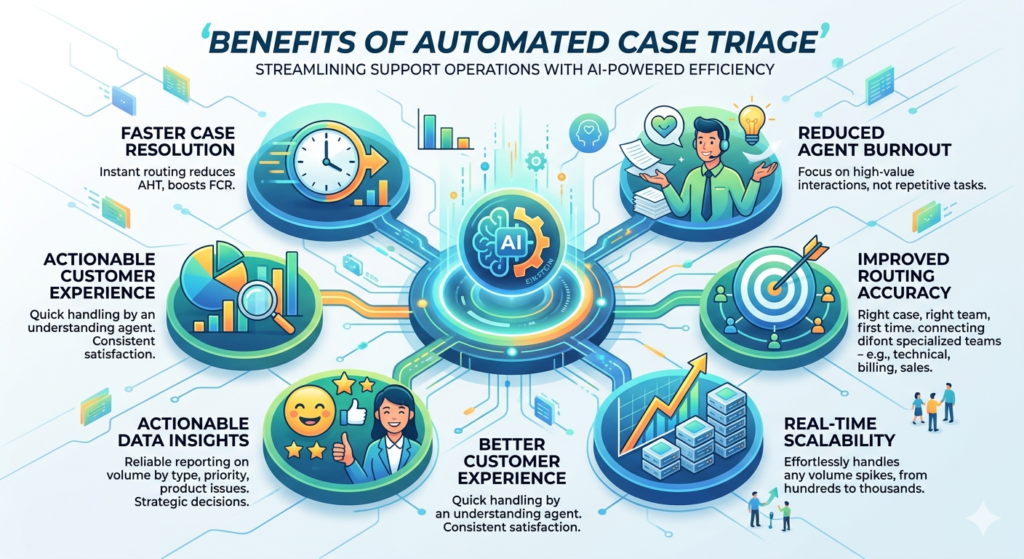
The shift from manual to automated case triage isn't just about saving time — although it certainly does that. The benefits ripple across your entire support operation.
✅ Faster Case Resolution
When cases are categorized and routed instantly and correctly, agents spend less time on administrative overhead and more time actually solving problems. Average Handle Time (AHT) decreases, and First Contact Resolution (FCR) improves.
✅ Reduced Agent Burnout
Repetitive manual triage is mentally draining. When AI handles the classification work, agents can focus on higher-value interactions that require empathy, creativity, and complex problem-solving — the tasks humans do best.
✅ Improved Routing Accuracy
Human triage agents make mistakes, especially during high-volume periods. Einstein's predictions are consistent and don't degrade under pressure. The right case gets to the right team the first time, reducing transfers and escalations.
✅ Real-Time Scalability
Whether you receive 100 cases a day or 10,000, Einstein scales effortlessly. You don't need to hire additional triage staff to handle volume spikes.
✅ Better Customer Experience
Customers don't know or care about your internal routing logic. What they notice is that their issue is handled quickly by someone who understands their problem. Accurate automated case triage makes that experience consistently better.
✅ Actionable Data Insights
With cases being classified consistently and accurately, your reporting becomes more reliable. You get cleaner data on case volume by type, priority distribution, product-related issues, and more — enabling better strategic decisions.
How AI Case Routing in Salesforce Improves Customer Support
AI case routing in Salesforce takes the output from Einstein Case Classification and turns predictions into action. Here's how the full loop works and why it's a game-changer for support teams.
Seamless Integration with Omni-Channel
Salesforce's Omni-Channel routing engine uses case field values to determine how and where to route cases. Once Einstein sets or predicts a field like "Case Type = Technical Issue," Omni-Channel routing rules can automatically direct that case to your Technical Support queue.
This means Einstein Classification and Omni-Channel work as a powerful tandem — AI predicts, routing executes, and customers get connected to the right expert faster.
Priority-Based Routing for High-Stakes Cases
With Einstein predicting priority levels, your routing logic can automatically elevate urgent cases to senior agents or dedicated escalation teams without any human intervention. A case flagged as "Priority = Critical" can jump the queue instantly.
Skill-Based Routing Enhancement
Many organizations use skill-based routing — matching cases to agents based on their expertise. AI case routing in Salesforce enhances this by adding intelligent case classification to the equation. A case about "Product = Enterprise Suite" with "Type = Integration Error" gets matched to an agent who specializes in that exact area.
Reduced Queue Contamination
One of the most underappreciated benefits is the reduction of misrouted cases polluting specialized queues. When a billing question ends up in the technical queue, both the customer and the agent suffer. Einstein Classification dramatically reduces these misroutes.
Supporting Omni-Channel Agents Across Channels
Whether the case comes in via email, chat, social media, or a customer portal, Einstein applies the same consistent classification logic. Your support experience becomes uniform across all channels — something that's extremely difficult to achieve with manual triage.
Real-World Use Cases and Examples
Let's ground all of this in practical reality. Here are some scenarios where Salesforce Einstein Case Classification delivers measurable results.
🏦 Financial Services: Billing and Account Issues
A bank's customer service center receives thousands of monthly cases. Before Einstein, triage agents spent hours per day reading and routing tickets. After implementing automated case triage, cases containing billing keywords were immediately classified, prioritized, and sent to the Collections or Billing team. Resolution times dropped by 40%, and customer satisfaction scores improved significantly.
🛒 E-Commerce: Order and Shipping Issues
An online retailer implemented Einstein Case Classification to distinguish between "Order Tracking," "Refund Requests," "Damaged Items," and "Wrong Product" cases. Each category feeds a different workflow and agent queue. The result? Cases that previously took 4+ hours to route were being routed in seconds, and agents started each interaction already knowing the context.
🏥 Healthcare: Patient Support Portal
A healthcare organization's patient support portal receives cases ranging from appointment scheduling to insurance billing to medical record requests. Einstein was trained to classify these into distinct categories and route them to the appropriate department. This not only improved response times but also helped maintain compliance by ensuring sensitive case types were handled only by authorized teams.
💻 SaaS Company: Technical Support Optimization
A B2B software company with a complex product suite used AI case routing in Salesforce to match technical cases to agents by product module expertise. Cases mentioning specific product names or error codes were automatically classified and routed to the right tier of support. Tier-1 cases were resolved without escalation 60% more often after implementation.
Step-by-Step Setup Overview Inside Salesforce
Setting up Salesforce Einstein Case Classification doesn't require a data science degree. Here's a high-level overview of the process.
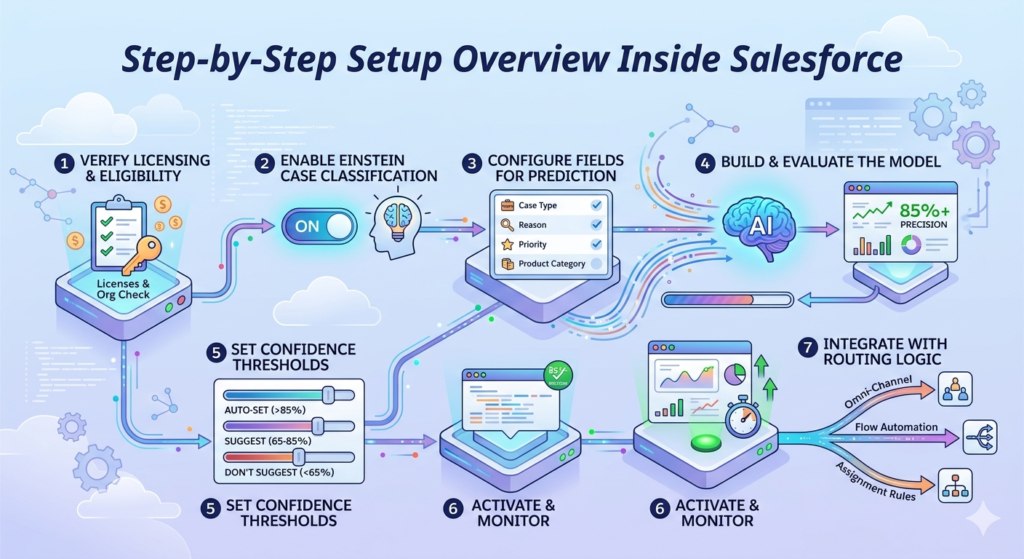
Step 1: Verify Licensing and Eligibility
Einstein Case Classification is available with Einstein for Service, which is included in certain Service Cloud editions or available as an add-on. Confirm your org has the appropriate licenses in Setup > Company Information.
Step 2: Enable Einstein Case Classification
Navigate to:
Setup → Service → Einstein Case Classification
Toggle the feature on. Salesforce will begin analyzing your historical case data in the background.
Step 3: Configure Fields for Prediction
Choose which case fields you want Einstein to predict. Common choices include:
- Case Type
- Case Reason
- Priority
- Product Category
- Sub-Category
Select fields that are consistently populated in your historical data for best results.
Step 4: Build and Evaluate the Model
Salesforce trains the model on your historical data. Once complete, you'll see a model evaluation screen showing predicted accuracy for each field. Review these metrics carefully:
- Precision: How often Einstein is right when it makes a prediction
- Coverage: How often Einstein makes a prediction (vs. abstaining)
Aim for high precision scores (ideally 80%+) before enabling automation.
Step 5: Set Confidence Thresholds
For each field, set the confidence threshold that determines when Einstein acts automatically. For example:
- Above 85% confidence → Auto-set the field value
- 65–85% confidence → Suggest but require agent approval
- Below 65% → Don't suggest
Step 6: Activate and Monitor
Enable the feature and monitor performance through the Einstein Case Classification dashboard. Track:
- Prediction accuracy rates
- Field coverage
- Agent acceptance rates (how often agents accept Einstein's suggestions)
Step 7: Integrate with Routing Logic
Ensure your Omni-Channel routing rules, flow automation, or assignment rules are set up to act on the field values Einstein populates. This is where the classification becomes action.
Best Practices for Training Accurate AI Models
Getting the most out of Salesforce Einstein Case Classification comes down to the quality and structure of your training data and ongoing management practices.
🎯 Start with Clean, Consistent Historical Data
Before training, audit your case data. Fields that are only partially filled, used inconsistently, or contain junk values will confuse the model. Clean data produces accurate predictions.
🎯 Ensure Sufficient Training Volume
More data = better model. Salesforce recommends 400+ cases per predicted field, but in practice, 1,000+ is ideal. If you're a smaller org, prioritize the fields with the most case history.
🎯 Choose the Right Fields to Predict
Not every case field is a good candidate for AI prediction. Choose fields that:
- Are consistently populated in historical cases
- Have clear categorical values (not free-form text)
- Are actually used in routing or SLA logic
🎯 Set Realistic Confidence Thresholds
Don't start with 100% automation on day one. Begin conservatively — let Einstein suggest rather than auto-apply — and increase automation as you validate accuracy.
🎯 Train Your Agents to Provide Good Feedback
When agents correct Einstein's suggestions, they're training the model. Make sure agents understand this and take it seriously. A quick training session on why their feedback matters can pay dividends for months.
🎯 Retrain the Model Periodically
Your business evolves. New products, new issue types, and changing customer language all affect case data. Retrain your Einstein model quarterly or whenever you notice a drop in prediction accuracy.
🎯 Monitor and Iterate
Use the Einstein dashboard regularly. Watch for drops in confidence scores or coverage, and investigate root causes. Einstein Case Classification is not a "set it and forget it" tool — it rewards ongoing attention.
Common Challenges and Limitations
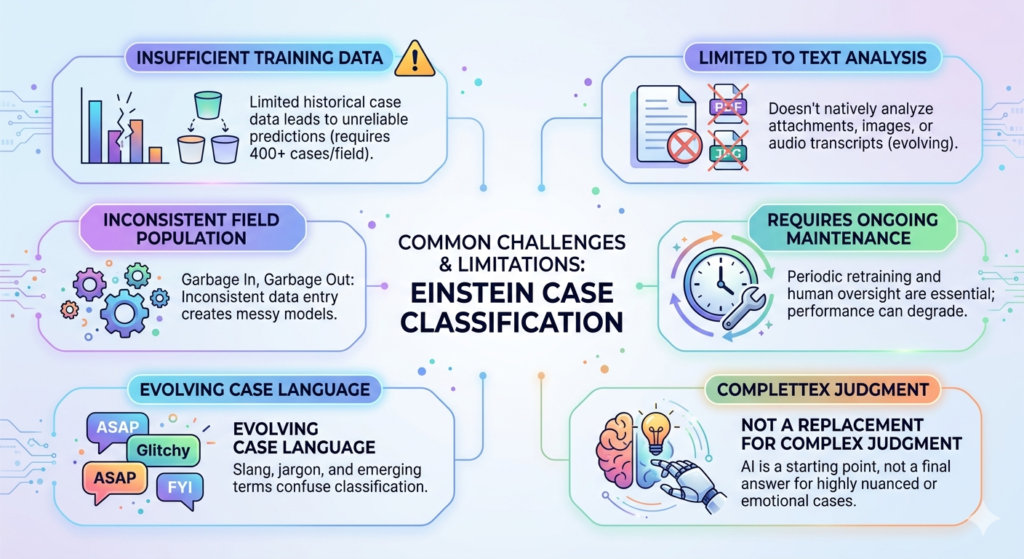
No technology is perfect, and Salesforce Einstein Case Classification is no exception. Being aware of potential pitfalls helps you plan for them.
⚠️ Insufficient Training Data
Smaller organizations or those with incomplete historical case data may struggle to build accurate models. If you don't have 400+ closed cases per field, predictions will be unreliable.
Solution: Focus on fewer fields initially. Build up data volume before expanding to additional predictions.
⚠️ Inconsistent Field Population in Historical Data
If your team hasn't been filling in case fields consistently, Einstein has messy data to learn from. Garbage in, garbage out.
Solution: Run a data cleanup exercise before enabling Einstein. Create validation rules going forward to enforce consistent field population.
⚠️ Unusual or Evolving Case Language
If customers use slang, industry jargon, or newly emerging terminology that wasn't present in historical data, Einstein may struggle to classify correctly.
Solution: Regular model retraining and monitoring helps. You can also supplement with keyword-based rules for known edge cases.
⚠️ Limited to Text Analysis
Einstein Case Classification currently analyzes text from case subject and description fields. It doesn't natively analyze attachments, images, or audio transcripts (though that's evolving with Salesforce's broader AI roadmap).
⚠️ Requires Ongoing Maintenance
The model needs periodic retraining and human oversight. Organizations that enable it and walk away often see performance degrade over time.
⚠️ Not a Replacement for Complex Human Judgment
For highly nuanced or emotionally sensitive cases, AI classification is a starting point, not a final answer. Build in human review steps for case types that require empathy and contextual judgment.
The Future of AI in Salesforce Customer Service
The launch of Salesforce Einstein Case Classification was just the beginning. The AI trajectory in Salesforce customer service is accelerating rapidly, and the roadmap ahead is genuinely exciting.
Einstein GPT and Generative AI for Service
Salesforce has been heavily investing in generative AI through Einstein Copilot and the broader Salesforce AI Cloud platform. Future capabilities will include:
- AI-generated draft responses for agents
- Automatic case summaries
- Predictive sentiment analysis to flag at-risk customers
- Conversational AI for self-service deflection
Unified AI Across the Customer Lifecycle
The next frontier isn't just about routing cases — it's about AI that understands the full customer journey. Imagine an AI that sees a customer's purchase history, previous support interactions, product usage data, and current case all at once, and then not only routes the case but recommends a solution before the agent even says hello.
Proactive Support with Predictive Intelligence
As AI matures within Salesforce, expect a shift from reactive to proactive support. Instead of waiting for a customer to submit a case, AI will predict issues before they occur and trigger outreach to customers proactively — turning support from a cost center into a retention engine.
Autonomous Agents and Case Resolution
Salesforce's Agentforce platform is pushing toward fully autonomous AI agents that can handle entire case resolution workflows — gathering information, making decisions, performing actions in Salesforce, and communicating with customers — with minimal or zero human involvement for routine case types.
Deeper Integration with Data Cloud
As Salesforce's Data Cloud brings together data from across the enterprise — CRM, marketing, ERP, third-party platforms — Einstein's classification models will have access to richer context, enabling even more accurate predictions and hyper-personalized support experiences.
Why Partner with RizeX Labs for Your Einstein Implementation
Enabling Salesforce Einstein Case Classification in your org is technically possible for any Salesforce admin. But doing it right — in a way that delivers consistent, measurable results — requires experience, strategic thinking, and a deep understanding of your unique support workflows.
At RizeX Labs, we specialize in turning Salesforce's AI capabilities into real business outcomes. Our team of certified Salesforce experts and AI implementation specialists has helped organizations across industries:
- Audit and clean historical case data for optimal model training
- Configure multi-field prediction models with precision-tuned confidence thresholds
- Integrate Einstein Classification with Omni-Channel, Flow automation, and custom routing logic
- Train support teams to work effectively alongside AI predictions
- Monitor and optimize models over time for sustained performance
We don't just flip a switch and walk away. We partner with you through the full journey — from strategy and setup to optimization and scale.
Conclusion: Stop Sorting Cases Manually. Start Resolving Them Faster.
The era of manual case triage is ending. Support teams that continue to rely on human agents to read, categorize, and route every incoming case are falling behind — in speed, in accuracy, in customer satisfaction, and in operational efficiency.
Salesforce Einstein Case Classification offers a smarter path forward. By leveraging machine learning trained on your own historical data, it delivers accurate, real-time case classification that feeds directly into your routing and workflow automation. The result is faster resolutions, happier customers, and empowered agents who spend their time doing what they do best: solving problems and building relationships.
With automated case triage and AI case routing in Salesforce, your support operation doesn't just get more efficient — it gets fundamentally better.
The technology is ready. The question is: are you?
Ready to bring the power of Einstein Case Classification to your support team? Connect with RizeX Labs today for a free consultation. Our Salesforce AI experts will assess your current setup, identify opportunities for automation, and design an implementation plan tailored to your business goals.
About RizeX Labs
At RizeX Labs, we specialize in delivering advanced Salesforce AI solutions, including Salesforce Einstein Case Classification for intelligent customer support automation. Our expertise combines deep Salesforce knowledge, AI-driven workflows, and real-world implementation experience to help businesses reduce manual case handling and improve service efficiency.
We help organizations modernize their support operations by transforming traditional ticket management into automated, intelligent case-routing systems that improve response times, accuracy, and customer satisfaction.
Internal Links:
- Salesforce Admin course page
- Salesforce Einstein Analytics for Beginners: Getting Started in 2026
- Agentforce vs ChatGPT for Enterprise: A Salesforce Developer's Perspective
- How to Deploy Agentforce in a Sandbox: Step-by-Step Guide for Salesforce Teams
- Agentforce Licensing: What It Costs and What You Get
- SFMC Einstein Send Time Optimization: How It Works
External Links:
McKinsey Sales Growth Reports