
Introduction: Why Every Salesforce Team Needs to Master Agentforce Sandbox Deployment
Deploy Agentforce Sandbox correctly before production rollout is no longer optional for Salesforce teams working with AI-powered automation. As Salesforce continues pushing AI innovation through Agentforce, admins and developers must understand how to deploy Agentforce in a sandbox environment safely, test thoroughly, and prevent costly production issues.

Deploying advanced AI features directly into production without validation is a mistake many teams regret quickly. Permission conflicts, broken automations, inaccurate AI responses, and unexpected workflow behavior can disrupt operations and damage user trust. When working with autonomous AI agents inside Salesforce, the risks become even higher because these systems interact with customer data, automate actions, and influence business processes in real time.
That’s why a proper Agentforce sandbox setup is critical.
At RizeX Labs, we’ve worked with Salesforce teams adopting AI solutions and understand the challenges that come with implementation. This guide explains how to deploy Agentforce sandbox environments step by step, including setup requirements, user permissions, testing strategies, validation methods, and the common deployment mistakes developers should avoid.
Whether you're a Salesforce admin exploring AI capabilities for the first time or a developer preparing to test AI agents in Salesforce before a production release, this guide will help you deploy Agentforce sandbox environments with greater confidence, stability, and control.
What Is Agentforce? Understanding Salesforce's AI Agent Framework
Before we jump into deployment steps, let's make sure we're on the same page about what Agentforce actually is—and why it's different from everything Salesforce has offered before.
Agentforce: More Than a Chatbot
Agentforce is Salesforce's autonomous AI agent platform, introduced as part of the broader Salesforce AI ecosystem that includes Einstein GPT, Einstein Copilot, and the Data Cloud. But unlike traditional chatbots or basic Einstein features, Agentforce agents are designed to act independently—reasoning through multi-step tasks, accessing real-time CRM data, and taking actions on behalf of users or customers.
Think of it this way: Einstein Copilot assists a human user. Agentforce replaces entire task sequences that a human would normally handle.
What Can Agentforce Do?
Here are some practical examples of what Agentforce agents can handle:
- Service Agent: Automatically resolves customer cases by looking up order history, checking knowledge articles, and sending responses—without human intervention.
- Sales Development Agent: Qualifies inbound leads, schedules meetings, and sends personalized follow-up emails based on CRM data.
- Commerce Agent: Guides customers through product selection, applies discounts, and processes orders in real time.
- Custom Agents: Built with Agent Builder, these can be tailored to virtually any business process—from employee onboarding to IT ticket triage.
The Architecture Behind It
Agentforce agents operate using a combination of:
- Topics: Define the scope of what an agent can discuss or act on.
- Actions: Specific tasks the agent can perform (e.g., update a record, send an email, call a flow).
- Instructions: Natural language guidelines that shape agent behavior.
- Guardrails: Safety boundaries that prevent agents from exceeding their intended scope.
- Data Sources: Connections to Salesforce objects, Data Cloud, Knowledge, and external systems.
Understanding this architecture is critical before you attempt to deploy Agentforce in a sandbox, because each of these components needs to be configured, tested, and validated independently.
Why Sandbox Deployment Matters for Agentforce
Let's be direct: deploying Agentforce directly to production without sandbox testing is one of the riskiest decisions a Salesforce team can make. Here's why.
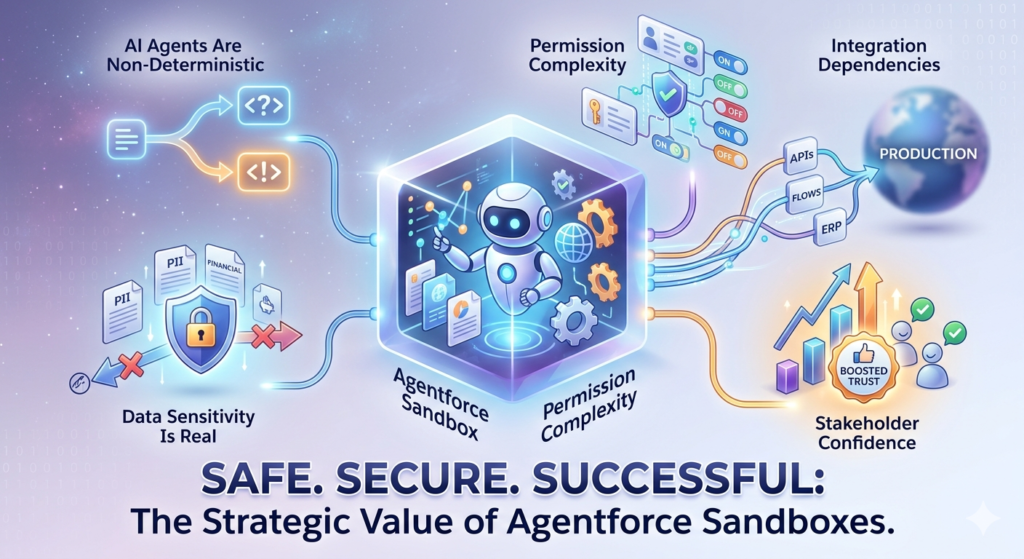
1. AI Agents Are Non-Deterministic
Unlike a validation rule or a workflow rule that behaves the same way every time, AI agents can produce different outputs for the same input. Testing in a sandbox lets you observe these variations, fine-tune instructions, and tighten guardrails before real customers are affected.
2. Data Sensitivity Is Real
Agentforce agents access and process CRM data—potentially including PII, financial records, and confidential communications. A misconfigured agent in production could expose sensitive data to the wrong audience. Sandbox testing with anonymized or sample data eliminates this risk during the development phase.
3. Permission Complexity
Agentforce requires a specific combination of licenses, permissions, and settings that interact with your existing security model. Getting these wrong can either block the agent from functioning or give it too much access. A sandbox is the safe place to sort this out.
4. Integration Dependencies
If your Agentforce agents call external APIs, trigger flows, or interact with third-party systems, every one of those integration points needs to be validated. Sandbox environments let you use mock endpoints and test data without affecting live systems.
5. Stakeholder Confidence
When you can demonstrate a working Agentforce agent in a sandbox—complete with test scenarios and documented results—stakeholders trust the rollout. This isn't just a technical benefit; it's a political one. Executive buy-in often hinges on visible proof that the AI works as expected.
Sandbox Prerequisites: What You Need Before You Start
Before you begin the Agentforce sandbox setup, make sure the following prerequisites are in place. Skipping any of these will create problems downstream.
Salesforce Edition and Licensing
Agentforce requires specific licensing. As of 2025, you need:
- Salesforce Enterprise Edition or higher (Performance, Unlimited, or Developer Edition for testing).
- Agentforce licenses (either bundled with your contract or purchased as add-ons).
- Einstein AI licenses if you plan to use generative AI features within your agents.
- Data Cloud provisioning if your agents need to access unified customer profiles.
RizeX Labs Tip: If you're on a Developer Edition org for prototyping, check whether Agentforce features are available. Salesforce periodically updates feature availability in Developer Edition orgs, and some advanced Agentforce capabilities may require a Partner Developer Edition or a dedicated sandbox.
Sandbox Type Selection
Not all sandboxes are created equal. Choose wisely:
| Sandbox Type | Data Included | Best For |
|---|---|---|
| Developer Sandbox | Metadata only | Initial config and prototyping |
| Developer Pro Sandbox | Metadata only (larger storage) | Complex custom development |
| Partial Copy Sandbox | Metadata + sample data | Testing with realistic data |
| Full Copy Sandbox | Metadata + all data | Pre-production validation |
For Agentforce, we strongly recommend a Partial Copy or Full Copy sandbox for meaningful testing. AI agents need data to interact with—Knowledge articles, case records, contact data, and more. A metadata-only Developer sandbox won't give you the testing depth you need.
Sandbox Refresh Considerations
If your sandbox is outdated, refresh it before starting. An old sandbox may lack:
- Recent metadata changes (flows, Apex classes, custom objects)
- Updated permission sets and profiles
- Data Cloud configurations
- Knowledge articles your agent needs to reference
User Accounts and Test Personas
Create or identify sandbox user accounts that represent the different personas who will interact with Agentforce:
- Admin users for setup and configuration
- End users who will interact with the agent (e.g., service reps)
- Customer-facing personas (for testing external-facing agents via Experience Cloud)
- Integration users for API-based agent interactions
Step-by-Step: How to Deploy Agentforce in a Sandbox
Here's the core of this guide—a detailed, sequential walkthrough of the Agentforce sandbox setup process. Follow these steps in order.
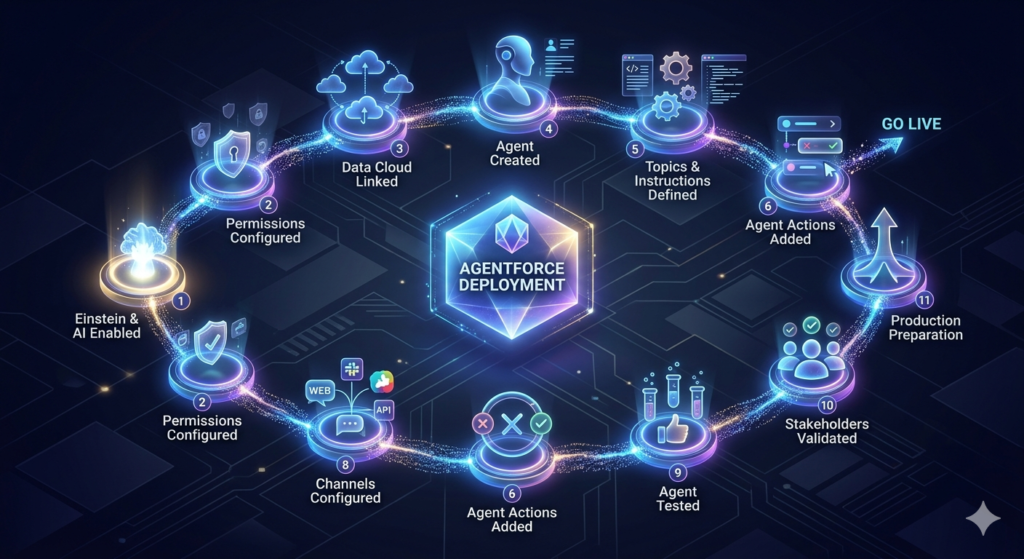
Step 1: Enable Einstein and AI Features in Your Sandbox
Agentforce depends on several underlying AI features that must be activated first.
- Navigate to Setup → Einstein Setup.
- Toggle on Einstein if it's not already enabled.
- Go to Setup → Einstein Generative AI and enable generative AI features.
- Accept the Einstein AI Terms of Service (this is required per sandbox—production acceptance doesn't carry over).
- Navigate to Setup → Agents (or search for "Agents" in Quick Find).
- Confirm that the Agentforce menu options are visible. If they're not, your sandbox may need a refresh or your licenses may not have propagated.
Important: License propagation to sandboxes can take up to 24 hours after a sandbox refresh. If you don't see Agentforce options, wait and check again before troubleshooting further.
Step 2: Configure Permissions and Permission Sets
Agentforce requires specific permissions that aren't included in standard admin profiles. Here's what to assign:
Key Permission Sets to Assign
- AgentforceServiceAgent (or the relevant agent-type permission set)
- Einstein Agent User
- Manage Agents (for admins and builders)
- Data Cloud Admin or Data Cloud User (if using Data Cloud-connected agents)
How to Assign Them
- Go to Setup → Permission Sets.
- Search for each permission set listed above.
- Click Manage Assignments → Add Assignment.
- Select the appropriate sandbox users.
- Save.
Custom Permissions to Verify
In some configurations, you may also need to enable:
UseAgentforcecustom permissionEinsteinGPTAgentActionscustom permission- Object-level CRUD permissions for any Salesforce objects your agent will read or modify
RizeX Labs Tip: Create a dedicated Agentforce Admin permission set group that bundles all required permissions. This makes it easy to assign everything at once and reduces the chance of missing a critical permission during setup.
Step 3: Set Up Data Cloud (If Applicable)
If your Agentforce agent needs to access unified customer profiles or cross-system data:
- Navigate to Setup → Data Cloud Setup.
- Verify that Data Cloud is provisioned in your sandbox.
- Check that your Data Streams are configured and data is flowing.
- Confirm that Data Model Objects (DMOs) are mapped correctly.
- Test a few unified profiles to ensure data accuracy.
If your sandbox is a Partial Copy, the Data Cloud data may be limited. For Full Copy sandboxes, verify that the data volume doesn't cause performance issues during testing.
Step 4: Create Your Agent in Agent Builder
Now for the exciting part—building the agent itself.
- Navigate to Setup → Agents (or App Launcher → Agentforce).
- Click New Agent.
- Choose the agent type:
- Service Agent (for case resolution)
- Sales Agent (for lead qualification)
- Custom Agent (for bespoke use cases)
- Name your agent and provide a description.
- Select the channel where the agent will operate (e.g., web chat, messaging, Slack, API).
Step 5: Define Topics and Instructions
Topics are the backbone of your agent's knowledge scope. Each topic defines a category of questions or tasks the agent can handle.
Creating a Topic
- Inside Agent Builder, click New Topic.
- Give it a clear name (e.g., "Order Status Inquiries").
- Write natural language instructions that tell the agent how to behave within this topic. For example:
textWhen a customer asks about their order status, look up the most recent Order
record associated with their Contact record. Provide the order number, current
status, and estimated delivery date. If no order is found, ask the customer
to verify their email address and try again.
- Set the scope (what questions fall under this topic and what doesn't).
- Define classification examples—sample utterances that help the agent correctly route inquiries to this topic.
Best Practices for Instructions
- Be specific. Vague instructions produce vague responses.
- Include edge case handling ("If the customer has multiple open orders, ask which one they're inquiring about").
- Define what the agent should not do ("Do not provide refund information—escalate to a human agent instead").
Step 6: Configure Agent Actions
Actions are what make your agent do things—not just talk. Each action connects to a Salesforce capability.
Types of Actions
- Flow Actions: Trigger an autolaunched flow (e.g., update a case status, create a task).
- Apex Actions: Call an Apex class for complex logic.
- Knowledge Actions: Search and retrieve Knowledge articles.
- Record Actions: Query, create, update, or delete Salesforce records.
- External Service Actions: Call external APIs via Named Credentials.
- Prompt Template Actions: Use Einstein Prompt Templates for generative responses.
Example: Adding a Flow Action
- In Agent Builder, navigate to the relevant Topic.
- Click Add Action → Flow.
- Select the autolaunched flow you want the agent to invoke.
- Map the input variables (e.g., the customer's case ID).
- Map the output variables (e.g., the updated case status to communicate back to the customer).
- Write instructions that tell the agent when to use this action.
Practical Example: Let's say you have a flow called "Escalate_Case_to_Tier2" that changes the case owner and sends an internal notification. You'd add this as an action under a "Case Escalation" topic, with instructions like: "If the customer expresses frustration or if the issue cannot be resolved within this conversation, use the Escalate Case to Tier 2 action."
Step 7: Configure Guardrails and Safety Settings
This step is often overlooked—and it's one of the most important.
- In Agent Builder, go to Guardrails or Safety Settings.
- Define:
- Prohibited topics: Subjects the agent must never discuss (e.g., legal advice, competitor comparisons).
- Data access boundaries: Which objects and fields the agent can access.
- Escalation triggers: Conditions that force handoff to a human agent.
- Response tone and style: Professional, casual, empathetic—define the voice.
- Set maximum conversation length to prevent infinite loops.
- Enable content safety filters for generative responses.
Step 8: Configure the Agent Channel
Depending on where your agent will interact with users, configure the appropriate channel:
For Web Chat (Service Cloud)
- Go to Setup → Embedded Service Deployments (or Messaging for Web).
- Create or update a deployment.
- Link the deployment to your Agentforce agent.
- Configure pre-chat forms, branding, and routing rules.
For Experience Cloud (Customer Portal)
- Open Experience Builder.
- Add the Agentforce chat component to the relevant pages.
- Configure visibility rules and guest user access.
For Slack
- Go to Setup → Slack App Setup.
- Connect your Agentforce agent to the appropriate Slack workspace.
- Define which channels or DMs the agent responds in.
For API-Based Access
- Set up the AgentRuntime API endpoint.
- Configure authentication (OAuth 2.0 with Connected App).
- Test API calls using Postman or a similar tool before integrating with external systems.
Step 9: Test the Agent in the Sandbox
This is where the real work happens. Testing an AI agent isn't like testing a flow—you can't just check a handful of scenarios and call it done.
Types of Testing
Functional Testing
- Does the agent correctly identify the topic for each inquiry?
- Does it execute the right actions?
- Does it handle edge cases gracefully?
Data Accuracy Testing
- Is the agent pulling correct data from Salesforce objects?
- Are Knowledge article results relevant and up to date?
- Does Data Cloud integration return accurate unified profiles?
Permission Testing
- Log in as different user personas and interact with the agent.
- Verify the agent only accesses data the user is authorized to see.
- Test with users who lack Agentforce permissions—does the system fail gracefully?
Guardrail Testing
- Deliberately ask about prohibited topics. Does the agent decline appropriately?
- Push boundary scenarios. Ask ambiguous questions that could fall in or out of scope.
- Test escalation triggers—does the handoff to a human agent work smoothly?
Load and Performance Testing
- Simulate multiple concurrent conversations (where possible in sandbox).
- Monitor response times.
- Check for timeout errors on complex actions.
Using the Agent Builder Testing Panel
Agent Builder includes a built-in testing panel (sometimes called the "Conversation Preview") that lets you:
- Simulate conversations without deploying to a channel.
- See the agent's reasoning chain—why it chose a specific topic and action.
- Identify misclassifications and instruction gaps.
- Iterate quickly on instructions and re-test.
RizeX Labs Tip: Keep a testing log. Document each test scenario, the expected outcome, the actual outcome, and any adjustments made. This log becomes invaluable for stakeholder reviews and future audits.
Step 10: Validate with Stakeholders
Before moving toward production, bring in key stakeholders for a sandbox demo:
- Business stakeholders: Show them real conversation scenarios. Get their feedback on tone, accuracy, and completeness.
- Compliance/legal teams: Walk them through guardrails, data access boundaries, and escalation protocols.
- IT/security teams: Review permission configurations, API integrations, and data flow diagrams.
- End users (pilot group): Let a small group of actual users interact with the agent and provide feedback.
Document all feedback and make adjustments in the sandbox before proceeding.
Step 11: Prepare for Production Deployment
Once sandbox testing is complete and stakeholders have signed off:
- Document your configuration: Topics, instructions, actions, guardrails, permissions—everything.
- Create a change set or use a CI/CD tool (like Salesforce CLI, Copado, Gearset, or Flosum) to package your Agentforce metadata.
- Plan a phased rollout: Don't go to 100% of users or channels on day one. Start with a pilot channel or a limited user group.
- Set up monitoring: Configure Einstein Analytics dashboards to track agent performance, resolution rates, escalation rates, and customer satisfaction scores.
- Establish a feedback loop: Create a mechanism for users and customers to flag incorrect or unhelpful agent responses.
Common Deployment Mistakes (And How to Avoid Them)
Even experienced Salesforce professionals stumble during Agentforce sandbox setup. Here are the most common mistakes we see at RizeX Labs—and how to sidestep them.
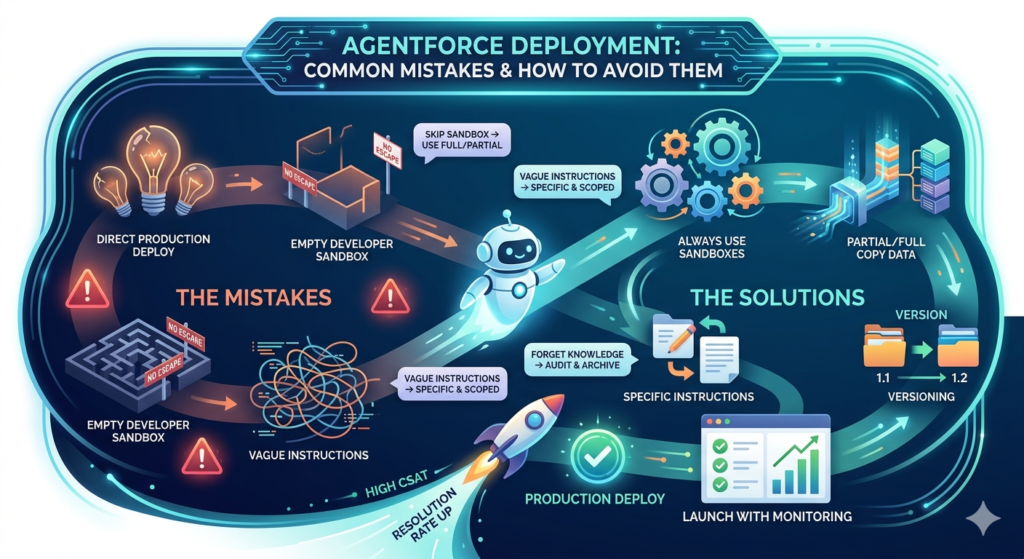
Mistake 1: Skipping the Sandbox Entirely
The Problem: Excitement about AI leads teams to deploy directly to production.
The Fix: Always deploy to a sandbox first. Period. No exceptions for Agentforce.
Mistake 2: Using a Developer Sandbox Without Data
The Problem: Agents are tested against an empty org and appear to work, but fail when encountering real data patterns.
The Fix: Use a Partial Copy or Full Copy sandbox with representative data.
Mistake 3: Overly Broad Instructions
The Problem: Instructions like "Help the customer with whatever they need" give the agent too much latitude, leading to unpredictable responses.
The Fix: Write specific, scoped instructions for each topic. Include examples and counter-examples.
Mistake 4: Ignoring Permission Testing
The Problem: The agent works for admins but breaks for standard users because of missing object permissions or field-level security gaps.
The Fix: Test with every user persona that will interact with the agent, including guest users on Experience Cloud sites.
Mistake 5: Not Testing Escalation Paths
The Problem: The agent can't handle a request but doesn't escalate, leaving the customer stuck.
The Fix: Deliberately test escalation scenarios. Verify that the human handoff works end-to-end, including queue assignments and agent notifications.
Mistake 6: Forgetting to Re-Accept AI Terms of Service
The Problem: After a sandbox refresh, Einstein AI is disabled because the Terms of Service need to be re-accepted.
The Fix: Add "Re-accept Einstein AI Terms of Service" to your post-refresh checklist.
Mistake 7: Neglecting Knowledge Base Quality
The Problem: The agent retrieves outdated or irrelevant Knowledge articles, eroding customer trust.
The Fix: Audit your Knowledge base before enabling Knowledge actions. Archive outdated articles, update content, and verify article visibility settings.
Mistake 8: Not Versioning Agent Configurations
The Problem: Changes are made directly in Agent Builder without tracking what changed and why. When something breaks, there's no way to roll back.
The Fix: Use version control. If your CI/CD pipeline supports Agentforce metadata, track changes there. If not, maintain manual version documentation.
Mistake 9: Underestimating Token and API Limits
The Problem: Agents that call generative AI models or external APIs hit rate limits during high-volume testing or production use.
The Fix: Understand your org's API limits and Einstein AI token quotas. Monitor consumption during sandbox testing to project production needs.
Mistake 10: Launching Without Monitoring
The Problem: The agent is deployed to production with no visibility into its performance.
The Fix: Set up dashboards and alerts before going live. Track metrics like resolution rate, average conversation length, escalation rate, and CSAT scores.
Best Practices for Salesforce Developers and Admins
Based on our experience helping organizations test AI agents in Salesforce, here are our top best practices for a successful Agentforce deployment.
1. Treat Agent Instructions Like Code
Agent instructions are natural language, but they have the same impact as code—they directly control system behavior. Review them with the same rigor you'd apply to an Apex class. Consider peer reviews, documentation, and version tracking.
2. Start Small, Scale Gradually
Don't try to build an agent that handles every possible customer inquiry on day one. Start with one or two high-volume, well-defined use cases (e.g., order status inquiries, password resets). Prove value, then expand.
3. Build a Robust Testing Framework
Create a library of test scenarios—at least 50-100 per topic—covering happy paths, edge cases, ambiguous inputs, and adversarial inputs. Re-run these tests after every significant change to instructions or actions.
4. Leverage Prompt Templates Wisely
If you're using Prompt Template actions, design your templates with clear grounding instructions. Always specify the data sources the template should reference and the format of the expected output.
5. Plan for Multilingual Support Early
If your organization serves customers in multiple languages, consider language capabilities during the sandbox phase—not as an afterthought. Test agent performance in each target language.
6. Integrate with Data Cloud for Richer Context
Agents that access Data Cloud unified profiles can deliver more personalized experiences. If Data Cloud is available, invest the time to integrate it during sandbox setup.
7. Document Everything
Create a comprehensive Agentforce runbook that includes:
- Architecture diagrams
- Topic and action inventories
- Permission set assignments
- Testing logs and results
- Escalation procedures
- Monitoring dashboards and alert thresholds
8. Stay Current with Salesforce Releases
Agentforce is evolving rapidly. Each Salesforce release (Spring, Summer, Winter) brings new features, improved capabilities, and occasionally breaking changes. Monitor release notes and adjust your sandbox configurations accordingly.
9. Collaborate Across Teams
Agentforce isn't just an IT project—it impacts customer experience, sales, service, marketing, and compliance. Involve representatives from each team during sandbox testing to ensure the agent meets cross-functional requirements.
10. Consider Ethical AI Principles
As AI agents make more autonomous decisions, ethical considerations become critical. During sandbox testing, evaluate:
- Bias: Does the agent treat all customer segments equitably?
- Transparency: Can customers tell they're interacting with an AI?
- Accountability: Is there a clear escalation path when the agent makes a mistake?
Looking Ahead: Agentforce in 2026 and Beyond
The AI landscape is evolving at breakneck speed, and Salesforce is keeping pace. Here's what we at RizeX Labs expect to see in the near future:
- Multi-Agent Orchestration: Multiple Agentforce agents collaborating on complex tasks—one handling customer inquiries while another processes backend operations simultaneously.
- Enhanced Reasoning Capabilities: Agents that can handle more complex, multi-step reasoning chains with fewer errors.
- Deeper Industry-Specific Agents: Pre-built agents for healthcare, financial services, manufacturing, and other verticals, with industry-specific compliance guardrails baked in.
- Improved DevOps Support: Better CI/CD tooling for Agentforce metadata, making sandbox-to-production deployments smoother and more automated.
- Real-Time Learning: Agents that improve their performance based on conversation outcomes, with appropriate human oversight and approval gates.
Mastering Agentforce sandbox setup now positions your team to adopt these advancements quickly as they roll out.
Conclusion: Deploy with Confidence
Deploying Agentforce in a sandbox isn't just a best practice—it's a necessity. AI agents are powerful, but their power comes with complexity. A disciplined sandbox deployment process protects your data, your customers, and your organization's reputation.
Here's your actionable takeaway:
- Start today. Provision or refresh a Partial Copy sandbox.
- Follow the steps in this guide sequentially—don't skip prerequisites.
- Test relentlessly. Aim for at least 100 test scenarios before considering production deployment.
- Document everything. Your future self (and your team) will thank you.
- Partner with experts. If you need help navigating the complexities of Agentforce deployment, RizeX Labs is here to guide you every step of the way.
The organizations that master AI agent deployment now will lead their industries in the years to come. Don't just deploy Agentforce—deploy it right.
About RizeX Labs
At RizeX Labs, we help businesses implement modern Salesforce AI solutions, automation workflows, and enterprise CRM systems. Our team specializes in Salesforce development, Agentforce implementation, Revenue Cloud, AI-powered customer engagement, and scalable cloud architecture.
With hands-on expertise in Salesforce ecosystem technologies, we guide organizations through secure sandbox testing, AI agent deployment, automation setup, and production-ready implementation strategies that improve operational efficiency and customer experience.
Internal Links:
- Salesforce Admin course page
- Salesforce Einstein Analytics for Beginners: Getting Started in 2026
- Agentforce vs ChatGPT for Enterprise: A Salesforce Developer's Perspective
- SFMC Data Extensions vs Lists: What Every Marketer Should Know
- SFMC Email Content Builder: Best Practices & Templates 2026
- SFMC Query Activity SQL: The Complete Guide to Marketing Cloud SQL for Data-Driven Marketers
- SFMC Einstein Send Time Optimization: How It Works
External Links:
McKinsey Sales Growth Reports