
How Long Does It Take to Learn Salesforce? That’s the first question most beginners ask when considering this career path. You’ve probably seen answers ranging from “get job-ready in 30 days” to “it takes 2 years.” The truth is, both are misleading.
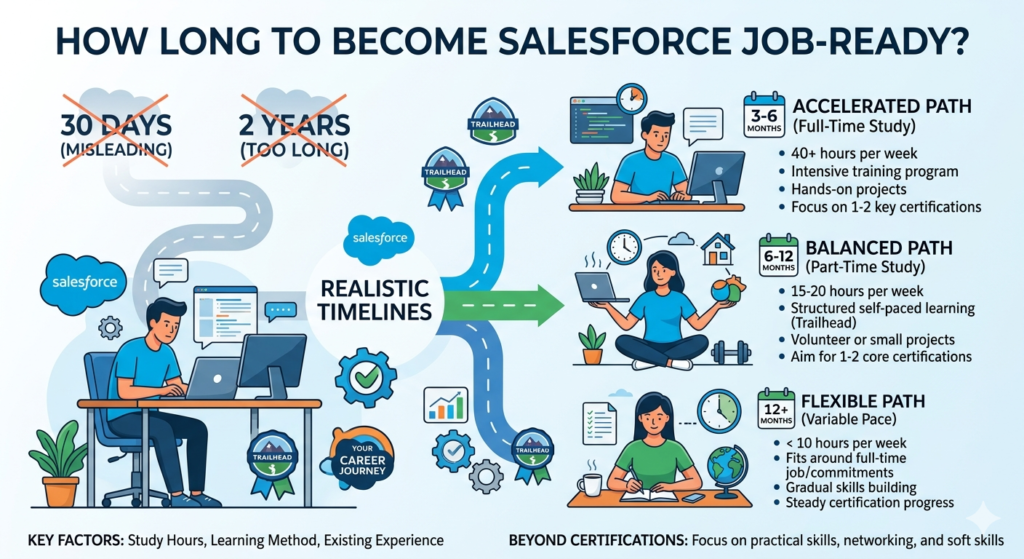
This guide cuts through the noise. You’ll get a realistic timeline based on how much time you can actually invest, a clear breakdown of what to learn at each stage, and a no-BS explanation of what “job-ready” really means in the Salesforce ecosystem.
The Short Answer: 3-6 Months to Job-Ready (With Caveats)
Here's the truth: most freshers need 3-6 months of consistent learning to reach a job-ready state for entry-level Salesforce positions. This assumes:
- You're dedicating 10-15 hours per week
- You're following a structured path (not randomly watching tutorials)
- You're doing hands-on practice, not just reading theory
- You're building demonstrable projects
- You're targeting Administrator or entry-level consultant roles
If you have more time or less time, your timeline shifts accordingly. We'll get into the specifics below.
Understanding "Job-Ready" in Salesforce
Before diving into timelines, let's define what "job-ready" actually means. It doesn't mean you know everything about Salesforce (nobody does). It means:
- You've passed at least one certification (typically Salesforce Administrator)
- You understand core platform functionality (objects, fields, workflows, security)
- You can navigate and configure basic requirements independently
- You have practical examples to discuss in interviews
- You understand business processes that Salesforce supports
You won't be an expert. You'll be someone who can start contributing under supervision and learn on the job.
Realistic Timeline Breakdown by Study Hours
Your salesforce learning time depends heavily on your weekly commitment. Here's how different time investments translate to reaching job-ready status:
Daily Time vs Timeline Comparison
| Hours Per Day | Hours Per Week | Beginner Phase | Intermediate Phase | Job-Ready Phase | Total Timeline |
|---|---|---|---|---|---|
| 1 hour | 7 hours | 6 weeks | 8 weeks | 6 weeks | 5 months |
| 2 hours | 14 hours | 3 weeks | 4 weeks | 3 weeks | 10 weeks (2.5 months) |
| 3 hours | 21 hours | 2 weeks | 3 weeks | 2 weeks | 7 weeks (1.75 months) |
| 4+ hours (full-time) | 28+ hours | 10 days | 2 weeks | 10 days | 5 weeks (1.25 months) |
Important note: These timelines assume focused, quality learning—not passive video watching while browsing your phone. One hour of genuine practice beats three hours of distracted studying.
The "Job-Ready Phase" includes certification preparation, project building, and interview prep—not just learning content.
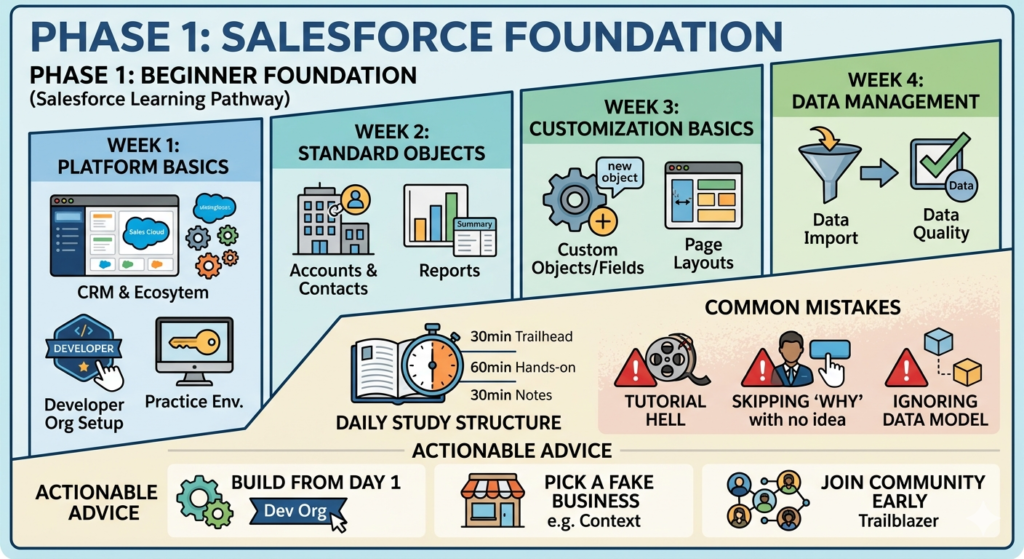
Phase 1: Beginner Foundation (Weeks 1-4 for Most Learners)
Goal: Understand what Salesforce is, basic navigation, and foundational concepts.
What to Learn
Week 1: Platform Basics
- What is CRM and what problems does Salesforce solve?
- Salesforce ecosystem overview (Sales Cloud, Service Cloud, etc.)
- Setting up your Developer Edition (free practice environment)
- Navigation: Apps, objects, tabs, records
- Understanding the data model: Objects and fields
Week 2: Standard Objects
- Accounts, Contacts, Leads, Opportunities
- Activities (Tasks and Events)
- Reports and Dashboards basics
- Chatter and collaboration tools
Week 3: Customization Basics
- Creating custom objects and fields
- Page layouts and record types
- Picklists, formulas (simple ones)
- Search and list views
Week 4: Data Management
- Importing data with Data Import Wizard
- Exporting data
- Mass update and mass delete
- Understanding data quality
Daily Study Structure (2 hours/day example)
- 30 minutes: Trailhead modules or video tutorials
- 60 minutes: Hands-on practice in your Developer org
- 30 minutes: Taking notes, documenting what you built
Common Mistakes at This Phase
Mistake #1: Tutorial Hell
Watching endless videos without building anything. Salesforce is a "doing" skill, not a "knowing" skill.
Fix: For every hour of learning, spend two hours building in your org. Create fields you don't need. Break things. Fix them.
Mistake #2: Skipping the "Why"
Learning buttons and clicks without understanding business context.
Fix: For each feature, ask: "What business problem does this solve?" A lookup relationship isn't just a feature—it's how businesses track customer relationships.
Mistake #3: Ignoring Data Model Basics
Jumping to automation before understanding objects and relationships.
Fix: Spend extra time on the data model. Everything in Salesforce builds on this. If you don't understand one-to-many relationships, you'll struggle later.
Actionable Advice for Beginners
- Set up your Developer org on Day 1. Don't wait until you "know enough." You learn by doing.
- Pick a fake business scenario. Pretend you're building for a real estate agency, a gym, or a coffee shop. This gives context to your learning.
- Document everything. Take screenshots of what you build. You'll use this for your portfolio later.
- Join Salesforce communities early. The Trailblazer Community can answer questions faster than you can search Google.
- Don't rush to certifications yet. Build a foundation first. Certifying too early leads to memorizing answers without understanding.
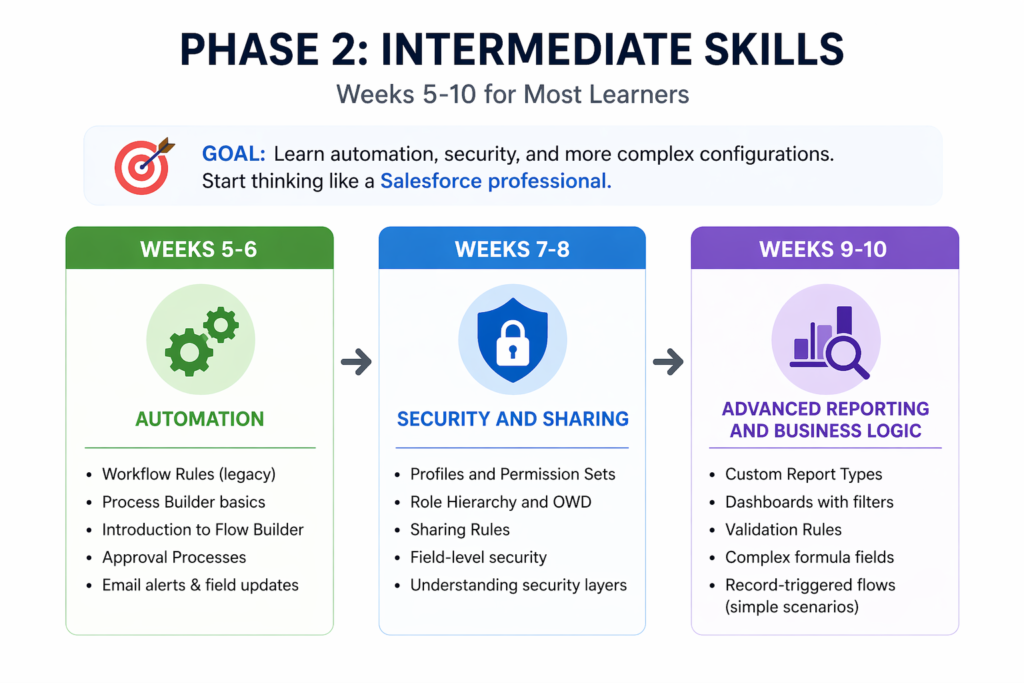
Phase 2: Intermediate Skills (Weeks 5-10 for Most Learners)
Goal: Learn automation, security, and more complex configurations. Start thinking like a Salesforce professional.
What to Learn
Weeks 5-6: Automation
- Workflow Rules (though being phased out, still useful to understand)
- Process Builder basics
- Introduction to Flow Builder (this is the future)
- Approval Processes
- Email alerts and field updates
Weeks 7-8: Security and Sharing
- Profiles and Permission Sets
- Role Hierarchy and OWD (Organization-Wide Defaults)
- Sharing Rules
- Field-level security
- Understanding the security model layers
Weeks 9-10: Advanced Reporting and Business Logic
- Custom Report Types
- Dashboards with filters and dynamic components
- Validation Rules
- Complex formula fields
- Record-triggered flows (simple scenarios)
Daily Study Structure (2 hours/day example)
- 20 minutes: Reviewing concepts or Trailhead
- 80 minutes: Building automation and security scenarios
- 20 minutes: Testing what you built, documenting edge cases
Common Mistakes at This Phase
Mistake #4: Automation Overload
Trying to learn Workflow Rules, Process Builder, and Flow simultaneously.
Fix: Understand the "why" behind each tool. Learn Workflow Rules conceptually (legacy), spend minimal time there, then focus 80% of automation learning on Flow. That's where Salesforce is headed.
Mistake #5: Ignoring Security Fundamentals
Rushing through the security model because it seems boring.
Fix: This is where many interviews trip up candidates. Spend extra time here. Build scenarios where users should and shouldn't see records. Security separates okay admins from good ones.
Mistake #6: Building Without Testing
Creating automation without checking all scenarios.
Fix: Always create test records that should AND shouldn't trigger your automation. This mindset prepares you for real work.
Actionable Advice for Intermediate Learners
- Build a complete project. Don't just create isolated fields and flows. Build an entire use case end-to-end. Example: "Lead comes in → gets assigned → follows up → converts → creates opportunity."
- Learn to troubleshoot. When something doesn't work, don't immediately ask for help. Check debug logs, verify your criteria, trace your logic. This skill is invaluable.
- Study real business processes. Watch YouTube videos about sales processes, customer service workflows, marketing campaigns. Understanding business makes you a better Salesforce professional.
- Start reading release notes. Salesforce updates three times a year. Get comfortable with their documentation style now.
- Begin certification study casually. Start reviewing the Administrator exam guide. Don't cram—just familiarize yourself with the topics.
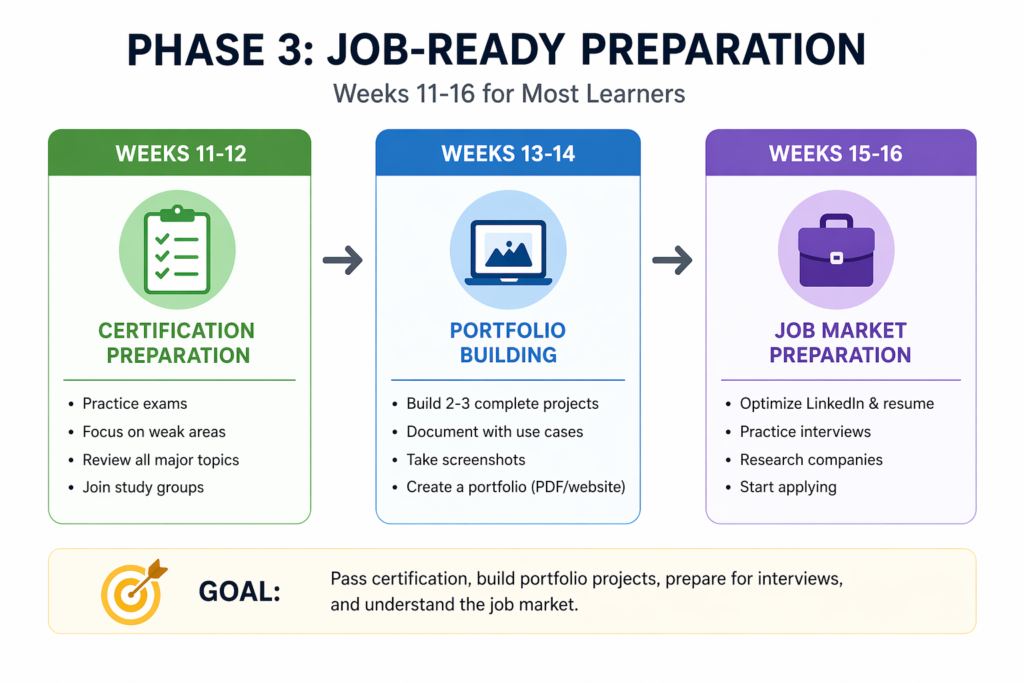
Phase 3: Job-Ready Preparation (Weeks 11-16 for Most Learners)
Goal: Pass certification, build portfolio projects, prepare for interviews, and understand the job market.
What to Focus On
Weeks 11-12: Certification Preparation
- Take a practice exam to identify weak areas
- Focus study on gaps
- Review all major topics systematically
- Join study groups or find a study partner
Weeks 13-14: Portfolio Building
- Create 2-3 complete projects in your Developer org
- Document each with business requirements and solution approach
- Take screenshots and write use cases
- Consider creating a simple website or PDF portfolio
Weeks 15-16: Job Market Preparation
- Optimize your LinkedIn profile with Salesforce keywords
- Write a Salesforce-focused resume
- Practice explaining your projects
- Research companies hiring entry-level Salesforce professionals
- Start applying (yes, even before you feel "ready")
Certification Strategy
The Salesforce Administrator certification is your primary target. Here's the realistic timeline for certification itself:
- If you've followed the previous phases: 2-3 weeks of focused study
- Practice exams: Take at least 3 full practice tests
- Schedule your exam when you're consistently scoring 75%+ on practice tests
- Budget for the exam: $200 (plus $100 for retake if needed)
Should you certify before applying?
Ideally, yes. The certification validates your knowledge and gets your resume past automated filters. However, if you're financially constrained, you can start applying while actively studying—just be transparent about your expected certification date.
Portfolio Projects That Matter
Don't build generic projects everyone builds. Create something that tells a story:
Example Project 1: Event Management System
- Custom objects for Events, Registrations, Speakers
- Approval process for event budgets
- Flow for automatic email confirmations
- Reports showing registration trends
Example Project 2: Sales Pipeline Automation
- Lead assignment rules based on territory
- Automated follow-up tasks
- Opportunity stage validation
- Dashboard for sales performance
Example Project 3: Service Request Tracking
- Case management with custom fields
- Escalation rules for high-priority cases
- Knowledge base integration
- Service level agreement (SLA) tracking
Document each project with:
- Business requirement (the "why")
- Your solution (the "what")
- Technical implementation (the "how")
- Challenges you faced and how you solved them
Common Mistakes at This Phase
Mistake #7: Analysis Paralysis
Waiting until you "know enough" before applying to jobs.
Fix: You'll never feel completely ready. If you have your certification or are scheduled to test, start applying. Entry-level jobs expect you to learn on the job.
Mistake #8: Applying Without Preparation
Submitting generic resumes to hundreds of jobs.
Fix: Customize your resume for each job. Use keywords from the job description. Write a brief cover letter explaining your transition to Salesforce.
Mistake #9: Neglecting Soft Skills
Focusing only on technical knowledge.
Fix: Practice explaining technical concepts in simple terms. Learn to ask clarifying questions. Work on communication skills—they matter as much as technical skills.
Mistake #10: Unrealistic Salary Expectations
Expecting senior-level pay as a certified fresher.
Fix: Research realistic entry-level salaries in your region. Your first Salesforce job is about gaining experience, not maximizing salary. You'll increase your earning potential rapidly after 6-12 months of real experience.
Actionable Advice for Job-Ready Phase
- Network actively. Attend Salesforce community events (virtual or in-person). Connect with Salesforce professionals on LinkedIn. Many jobs come through referrals.
- Contribute to the community. Answer questions on the Trailblazer Community or Stack Exchange. This demonstrates knowledge and builds your reputation.
- Create content. Write a blog post about what you learned, create a video tutorial, or share your project on LinkedIn. This differentiates you from other candidates.
- Practice interviews. Find common Salesforce interview questions and practice answering them out loud. Record yourself if needed.
- Consider contract/freelance initially. Your first Salesforce role might be a contract position or part-time work. That's fine—experience is experience.
- Apply to adjacent roles. Don't only look for "Junior Salesforce Administrator" titles. Consider "Business Analyst with Salesforce," "Sales Operations," or "CRM Coordinator" roles that touch Salesforce.
The Realistic Salesforce Learning Time for Different Backgrounds
Your background significantly impacts your salesforce study duration:
Complete Beginner (No Tech Background)
- Timeline: 5-6 months to job-ready
- Why longer: Need to learn tech fundamentals alongside Salesforce
- Focus areas: Spend extra time on data concepts, basic logic, and troubleshooting mindset
Career Switcher (Non-Tech Professional)
- Timeline: 3-5 months to job-ready
- Why moderate: Business understanding helps, but tech skills need development
- Advantage: Your domain knowledge (sales, marketing, customer service) is valuable
IT Background (But New to Salesforce)
- Timeline: 2-4 months to job-ready
- Why faster: Technical concepts familiar; mainly learning Salesforce-specific tools
- Advantage: Can potentially skip some basics and learn faster
Recent Graduate (Tech Degree)
- Timeline: 2-3 months to job-ready
- Why fastest: Learning ability sharp, tech concepts familiar
- Consideration: May lack business process understanding—focus on business context
Beyond Job-Ready: Continuous Learning
Getting your first job isn't the finish line—it's the starting line. Here's what ongoing learning looks like:
Months 7-12 (First Job Period)
- Learn your specific Salesforce implementation
- Understand company-specific business processes
- Work toward a second certification (Platform App Builder or specialized cert)
- Deepen knowledge in areas your job requires
Year 2+
- Specialize in an area (CPQ, Marketing Cloud, Industries, etc.)
- Consider advanced certifications
- Potentially learn Apex (coding) for developer track
- Build expertise that commands higher salaries
Salesforce professionals earning six figures typically have 3-5 years of experience and multiple certifications. It's a marathon, not a sprint.
Creating Your Personal Learning Plan
Here's how to create a realistic plan based on your situation:
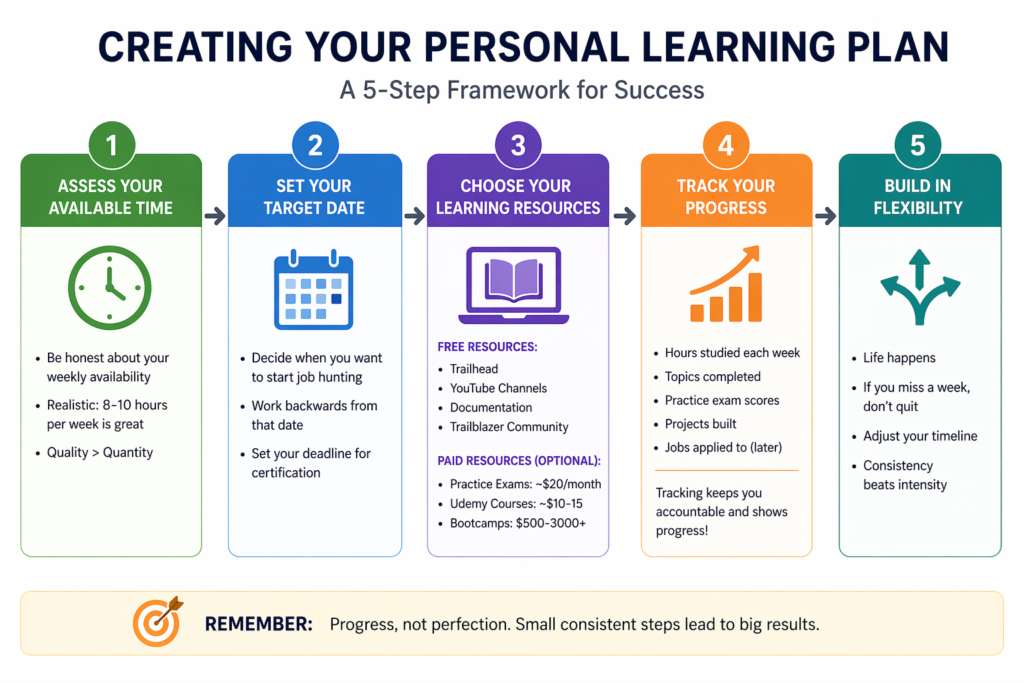
Step 1: Assess Your Available Time
Be honest. If you work full-time and have family commitments, you might realistically have 8-10 hours per week, not 20+. That's fine—adjust your timeline accordingly.
Step 2: Set Your Target Date
Work backwards from when you want to be job hunting. If you want to start applying in 4 months, that's your deadline for completing the intermediate phase and certifying.
Step 3: Choose Your Learning Resources
Free Resources:
- Salesforce Trailhead (primary learning platform)
- YouTube channels (Salesforce Hulk, Salesforce Made Simple)
- Salesforce documentation
- Trailblazer Community
Paid Resources (Optional):
- Focus on Force (practice exams): ~$20/month
- Udemy courses (during sales): ~$10-15
- Mike Wheeler's practice exams
- Bootcamps (if you learn better with structure): $500-3000+
Most people can learn effectively with mostly free resources plus paid practice exams ($20-40 total).
Step 4: Track Your Progress
Use a spreadsheet or app to track:
- Hours studied each week
- Topics completed
- Practice exam scores
- Projects built
- Jobs applied to (later)
Tracking keeps you accountable and shows progress when motivation dips.
Step 5: Build in Flexibility
Life happens. If you miss a week, don't quit—just adjust your timeline. Consistency beats intensity.
The Real Challenges Nobody Talks About
Challenge 1: Motivation Dips
Around week 6-8, the novelty wears off. Learning becomes work.
Solution: Join a study group or find an accountability partner. Break your learning into smaller wins. Reward yourself for completing phases.
Challenge 2: Information Overload
Salesforce is massive. You'll constantly discover new features and feel like you don't know enough.
Solution: Accept that you can't know everything. Focus on fundamentals first. Specialization comes later.
Challenge 3: Imposter Syndrome
You'll apply for jobs thinking "I'm not qualified enough."
Solution: Everyone feels this. If you meet 60% of job requirements and have a certification, apply anyway. Let the employer decide if you're qualified.
Challenge 4: First Job Hunt Takes Longer Than Expected
Entry-level Salesforce positions are competitive. You might apply to 50+ jobs before landing interviews.
Solution: Treat job hunting as a learning process. Improve your resume after every 10 rejections. Ask for feedback when possible. Stay persistent.
FAQ: Common Questions About Salesforce Learning Time
Can I really learn Salesforce in 30 days?
You can learn basics in 30 days of full-time study, but you won't be job-ready. Anyone promising "job-ready in 30 days" is either misleading you or defining "job-ready" very loosely.
Do I need to learn coding?
Not for Administrator roles. Salesforce has declarative tools (point-and-click) for most admin functions. Coding (Apex) becomes relevant if you pursue developer roles later.
Should I pay for a bootcamp?
Only if you genuinely need external structure and accountability. Most bootcamp content is available free through Trailhead. You're paying for structure, mentorship, and sometimes job placement assistance.
How many hours should I study daily?
Quality over quantity. Two focused hours beat four distracted hours. Aim for at least 1-2 hours daily if working full-time, or 3-4+ hours if unemployed and treating this as your job.
What if I fail the certification exam?
About 30% of first-time test-takers fail. It's not the end. Review what you missed, study those areas, and retake it. Most successful Salesforce professionals failed an exam at some point.
Your Next Steps (Starting Today)
If you're serious about learning Salesforce, here's what to do in the next 48 hours:
- Create your free Developer Edition org (go to developer.salesforce.com/signup)
- Sign up for Trailhead and complete the "Salesforce Platform Basics" module
- Join the Trailblazer Community and introduce yourself
- Block out 1-2 hours on your calendar for tomorrow's study session
- Choose one fake business scenario you'll use for practice projects
Don't overthink it. Start.
Final Thoughts: The Reality of Salesforce Learning Time
Learning Salesforce from beginner to job-ready realistically takes 3-6 months for most people putting in consistent effort. Not 3 weeks. Not 2 years. Somewhere in between.
Your timeline will vary based on:
- Your available study time
- Your prior background
- How efficiently you learn
- Whether you're pursuing just certification or also building projects
- The job market in your area
What doesn't vary is this: consistent action beats sporadic intensity. Someone studying 1 hour daily for 4 months will outperform someone who crams 8 hours on weekends.
Salesforce is a legitimate career path with strong earning potential, but it requires genuine effort. Treat this as a professional investment in yourself. Show up consistently, build real skills, and the job will come.
The question isn't really "how long does it take to learn Salesforce"—it's "how long am I willing to commit to learning Salesforce properly?"
The timeline is 3-6 months. The real question is: are you ready to start?
About RizeX Labs
At RizeX Labs, we specialize in delivering cutting-edge Salesforce solutions, helping freshers and professionals build real-world skills in Salesforce Admin, Development, and Cloud technologies.
Our approach combines hands-on training, industry-relevant projects, and expert mentorship to ensure learners gain practical knowledge—not just theory.
We help individuals transition from beginners to job-ready Salesforce professionals with structured learning paths and career-focused guidance.
nternal Links:
- Salesforce Admin course page
Salesforce Flows vs Apex: When Should You Use Code vs No-Code Automation? - Salesforce Nonprofit Cloud: Features, Use Cases, and Career Opportunities (2026 Guide)
- Salesforce Net Zero Cloud: What It Is and Why It's the Next Green Career Niche (2026 Guide)
- Salesforce Slack Integration: How It Works and What Developers Need to Know
- Salesforce Named Credentials: What They Are and How to Use Them Safely
- Salesforce Deployment Best Practices: Change Sets vs Salesforce CLI vs Gearset
External Links:
McKinsey Sales Growth Reports
Gartner Sales Automation Insights