
Introduction: Why Bad Data Models Kill Marketing Performance
Every marketing automation failure has a root cause, and more often than not, it's a poorly designed data model. When your SFMC Contact Builder isn't structured correctly, you're not just facing technical debt—you're sabotaging campaign performance, inflating costs, and creating operational nightmares for your team.
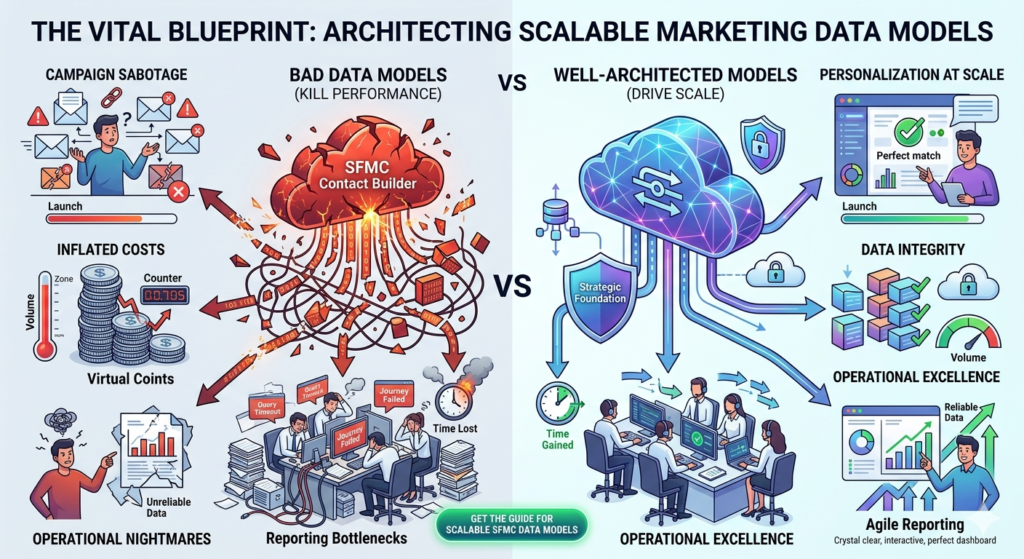
Consider this scenario: Your team launches a personalized campaign only to discover that customer data is duplicated across multiple data extensions. Send volumes double, costs skyrocket, and customers receive the same email twice—each with different product recommendations. This isn't a hypothetical situation; it's a reality for organizations that treat Contact Builder as an afterthought rather than the strategic foundation it should be.
The problem intensifies as your marketing operations scale. What worked for 100,000 contacts becomes a bottleneck at 1 million. Queries that once ran in seconds now timeout. Journey Builder activations fail. Reporting becomes unreliable. And your marketing team is left wondering why their sophisticated automation platform feels more like a constraint than an enabler.
The truth is simple: SFMC Contact Builder is only as powerful as the data model supporting it. A well-architected marketing cloud contact model enables personalization at scale, ensures data integrity, and provides the flexibility to adapt to evolving business requirements. A poorly designed one? It turns every campaign into a firefighting exercise.
This guide cuts through the generic advice and delivers practical, battle-tested strategies for building a Contact Builder data model that actually scales.
What is SFMC Contact Builder?
SFMC Contact Builder serves as the centralized data management hub within Salesforce Marketing Cloud, providing a unified view of your contacts across all marketing channels and touchpoints. Unlike traditional email marketing platforms that rely solely on lists, Contact Builder introduces a relational data model that mirrors enterprise database architecture.
At its core, Contact Builder consolidates subscriber data from multiple sources—data extensions, synchronized data from Sales Cloud or Service Cloud, Mobile Connect, MobilePush, and other channels—into a single contact record. This unified profile enables marketers to orchestrate cross-channel journeys, execute sophisticated segmentation, and deliver truly personalized experiences.
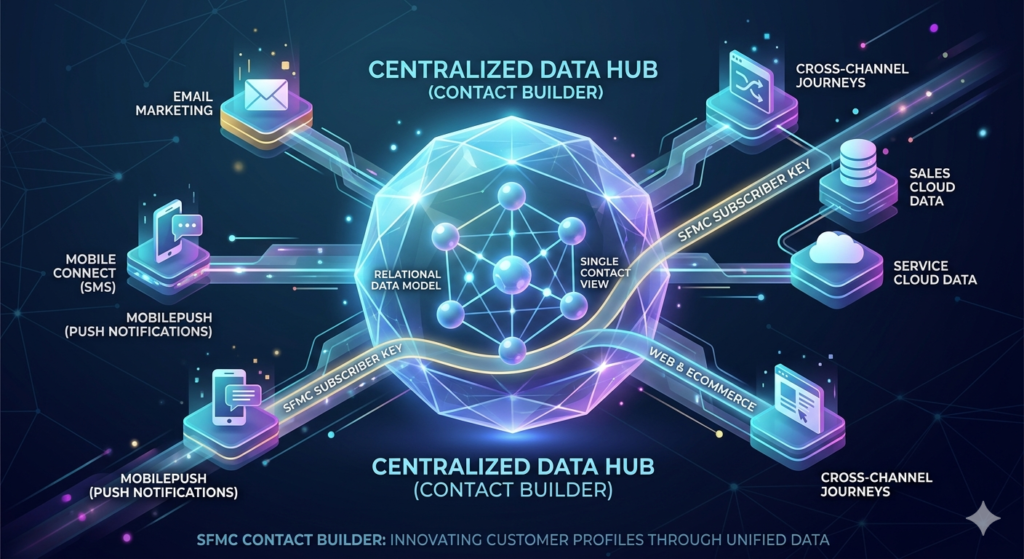
The platform operates on a relationship-based model where each contact is identified by a unique SFMC subscriber key. This identifier serves as the linking mechanism across all your data extensions and attribute groups, creating a coherent data ecosystem rather than fragmented data silos.
What sets Contact Builder apart is its flexibility. Unlike rigid data structures that lock you into predefined schemas, Contact Builder allows you to design a marketing cloud contact model that reflects your specific business logic, customer lifecycle, and data complexity. This flexibility, however, comes with responsibility—poor architectural decisions early in your implementation can create technical debt that compounds over time.
Understanding Contact Builder isn't just about knowing where to click in the interface. It's about grasping the underlying data architecture, recognizing how different components interact, and designing a model that supports both current requirements and future scalability.
Key Components of Contact Builder
Data Extensions
Data Extensions (DEs) form the foundational storage layer of your SFMC Contact Builder architecture. Think of them as database tables optimized for marketing operations—each with a defined schema, data retention policies, and specific use cases.
Unlike lists, which are one-dimensional subscriber repositories, Data Extensions support relational structures with multiple fields of various data types. You can store demographic information, behavioral data, transaction history, preference centers, and custom attributes—all within purpose-built Data Extensions that link back to your contact records.
Data Extensions come in two critical types for Contact Builder: standard and sendable. Sendable Data Extensions contain email addresses and must include a primary key, enabling them to serve as sending audiences. Standard Data Extensions store supplementary data that enriches contact profiles without directly serving as send targets.
The relationship between Data Extensions and Contact Builder is bidirectional. Data Extensions can populate Contact Builder attribute groups, and Contact Builder can reference Data Extensions for segmentation and journey triggers. This interconnection is where architectural decisions become critical—improper configuration creates data synchronization issues and performance degradation.
Understanding data retention policies is non-negotiable. All Rows, Individual Records, and On definitions determine how long data persists in each extension. Your marketing cloud contact model must account for compliance requirements, data minimization principles, and query performance implications when setting these policies.
Attribute Groups
Attribute Groups organize related contact data into logical categories within Contact Builder, creating a structured approach to data management that mirrors business concepts rather than technical implementations.
Each Attribute Group serves as a container for related attributes—customer demographics might live in one group, purchase history in another, and engagement metrics in a third. This logical separation improves data discoverability, simplifies maintenance, and enables role-based access controls.
The power of Attribute Groups emerges when you properly configure relationships. A single contact record can link to multiple Attribute Groups, each representing a different facet of the customer relationship. These relationships are defined through the SFMC subscriber key, which serves as the common identifier across all groups.
Attribute Groups connect directly to Data Extensions through a process called "linkage." When you link a Data Extension to Contact Builder, you specify which field serves as the relationship key (typically your subscriber key) and define the cardinality of the relationship—one-to-one, one-to-many, or many-to-many.
Strategic Attribute Group design reduces query complexity and improves performance. Rather than joining across numerous unrelated Data Extensions, you create a navigable data structure where related attributes cluster together, enabling faster queries and more intuitive segmentation logic.
Relationships and Cardinality
Relationships define how different data entities connect within your SFMC Contact Builder architecture, and cardinality specifies the nature of those connections. Getting this right is the difference between a flexible, performant data model and one that buckles under real-world complexity.
One-to-one relationships link a single contact to a single record in an Attribute Group. Example: Each contact has one demographic profile containing name, address, and basic information. This is your foundational relationship pattern, ensuring each contact has a unique primary profile.
One-to-many relationships allow a single contact to associate with multiple records in a related data entity. Example: Each contact can have multiple purchase transactions, support tickets, or event registrations. This is essential for tracking historical interactions and behavioral patterns.
Many-to-many relationships enable complex associations where multiple contacts relate to multiple records in another entity. Example: Multiple contacts within a household sharing the same loyalty account, or multiple email addresses belonging to the same individual across different business units.
The relationship model you design directly impacts query performance and data retrieval efficiency. Poorly defined relationships create Cartesian joins that multiply query execution times and strain system resources. Proper cardinality configuration ensures queries return accurate results while maintaining optimal performance.
Contact Builder surfaces these relationships in the visual interface, allowing marketers to navigate from contact to related records intuitively. However, the underlying SQL joins that power these relationships operate according to the cardinality you've defined—making accurate configuration critical for both user experience and system performance.
Best Practices for SFMC Contact Builder
Use a Consistent Subscriber Key Strategy
Your SFMC subscriber key is the foundational identifier that links all contact data across your marketing ecosystem. Choosing the wrong key or implementing it inconsistently creates data fragmentation that's extraordinarily difficult to remediate later.
Select a business-level unique identifier from day one. Email addresses seem like an obvious choice, but they change—people switch jobs, create new personal addresses, or update preferences. Using email as your subscriber key means losing historical continuity when addresses change. Instead, use a persistent identifier from your source system: CRM Contact ID, Customer Account Number, or a purpose-built unique identifier.
Ensure the subscriber key exists before any contact enters SFMC. Your data ingestion processes must validate that every record includes a properly formatted subscriber key before insertion. Missing or null subscriber keys create orphaned records that can't link to Contact Builder, undermining your unified contact view.
Maintain consistency across all business units. In multi-business unit implementations, inconsistent subscriber key strategies across BUs create data reconciliation nightmares. Establish a global standard and enforce it through data governance policies and technical validation rules.
Document your subscriber key strategy comprehensively. As teams change and implementations evolve, institutional knowledge fades. Explicit documentation ensures future developers, administrators, and marketing operations professionals understand the architectural decisions and implement changes consistently.
Plan for edge cases explicitly. What happens when your source system generates a new ID for a merged customer record? How do you handle prospects who don't yet exist in your CRM? Your subscriber key strategy must address these scenarios with clear business rules and technical implementations.
A properly implemented subscriber key strategy enables seamless data integration, accurate journey tracking, and reliable reporting. It's not glamorous work, but it's the difference between a marketing cloud contact model that scales and one that collapses under its own complexity.
Design a Scalable Data Model
Scalability isn't about handling your current contact volume—it's about architecting for 10x growth without fundamental restructuring. Your SFMC Contact Builder data model must accommodate increasing contact counts, expanding data attributes, and evolving business requirements.
Start with the end in mind. Map your customer lifecycle completely, identifying every stage from anonymous visitor to loyal advocate. Document the data attributes relevant to each stage and how they transition as contacts progress. This lifecycle perspective reveals the data entities you'll need and how they should relate.
Separate transactional data from profile data. Profile attributes change infrequently—name, account creation date, tier status. Transaction data proliferates continuously—purchases, website visits, email engagement. Mixing these in a single data structure creates bloated records and query inefficiency. Create separate Attribute Groups for profile vs. behavioral data, linking them through your subscriber key.
Design for attribute expansion. Your data model will evolve as marketing strategies mature and new channels emerge. Build Attribute Groups with logical buffers—if you're tracking six engagement metrics today, design the structure to accommodate twenty tomorrow. Avoid the antipattern of creating new Attribute Groups for every minor addition.
Implement layered data architecture. Establish clear tiers: raw ingestion layer (data as received from source systems), standardized layer (cleansed and normalized), and presentation layer (optimized for specific marketing use cases). This separation enables data quality improvements without impacting active campaigns.
Consider data retention lifecycle from the start. Not all data needs perpetual retention. Design your model with archival strategies built in—older transactional data moving to summary tables, expired promotional data purging automatically, and historical snapshots maintaining for compliance. Proactive retention management prevents data bloat that degrades performance.
Plan for multi-brand and multi-region expansion. Even if you're currently single-brand, single-region, your data model should accommodate expansion without restructuring. Use dimensional attributes (brand_id, region_code) rather than creating separate data structures for each variant.
Scalability emerges from intentional design decisions made early. Retrofitting scalability into an organically grown data model requires migration projects that put marketing operations at risk. Invest the planning time upfront, and your marketing cloud contact model becomes an enabler rather than a constraint.
Avoid Duplication and Data Silos
Data duplication is the silent killer of marketing effectiveness. When the same contact exists multiple times in your SFMC Contact Builder with slightly different attributes, you're not just wasting storage—you're destroying trust through inconsistent messaging and multiplying costs through redundant sends.
Implement single source of truth principles. For each data attribute, clearly designate which system and which data extension serves as the authoritative source. When customer name exists in your CRM, your email preference center, and your ecommerce platform, establish which source wins when conflicts occur.
Create data integration hygiene protocols. Every data import process must include deduplication logic before insertion. Check for existing records using your SFMC subscriber key, update existing records rather than creating duplicates, and flag potential duplicates for manual review when confidence is low.
Audit data extensions regularly for duplication. Build automated queries that identify contacts appearing multiple times within single data extensions or across multiple extensions that should be mutually exclusive. Schedule these audits monthly and trend the results—increasing duplication signals process failures that need investigation.
Break down departmental data silos. Marketing, sales, and service teams often create their own data extensions without coordination, fragmenting the contact view. Establish cross-functional data governance that enforces shared Contact Builder usage and prevents shadow data structures.
Use Contact Delete carefully and deliberately. When you discover duplicate contact records in Contact Builder, deletion seems straightforward—but it's permanent and affects all linked data. Document your deduplication logic, test in a sandbox environment, and maintain audit trails of all deletion activities.
Implement master data management (MDM) principles. If your organization operates multiple source systems, consider establishing an MDM layer that resolves identity conflicts before data enters SFMC. This prevents SFMC from becoming the battleground for data quality issues originating upstream.
Data silos and duplication don't appear overnight—they accumulate through small process deviations and undocumented exceptions. Preventing them requires vigilance, clear governance, and technical controls that enforce data integrity automatically.
Use Proper Cardinality
Cardinality defines the mathematical relationship between contact records and related data entities in your marketing cloud contact model. Configuring it incorrectly doesn't just cause query errors—it fundamentally misrepresents your business reality and produces unreliable segmentation.
Understand the business relationship before configuring technical relationships. Does each customer have exactly one loyalty account (one-to-one), can they have multiple loyalty accounts (one-to-many), or can multiple customers share a single account (many-to-many)? The business answer dictates the technical configuration.
Configure one-to-one relationships for unique contact attributes. Demographic profiles, account settings, and preference centers typically warrant one-to-one relationships. Each contact should have exactly one active record in these Attribute Groups. Enforce this through primary key constraints and upsert logic in your data imports.
Leverage one-to-many for historical and transactional data. Purchase history, email engagement metrics, website sessions, and support interactions naturally follow one-to-many patterns. A single contact associates with multiple events over time. Structure these Attribute Groups to support time-series analysis and behavioral segmentation.
Approach many-to-many relationships with caution. While sometimes necessary (household-level data, shared accounts, product watchlists), many-to-many relationships increase query complexity and potential for Cartesian explosions. When you need this pattern, implement it through junction tables that explicitly define the relationship rather than creating ambiguous direct links.
Test query performance under realistic data volumes. Cardinality configurations that perform adequately with 10,000 records may timeout with 10 million. Before finalizing your data model, populate test data extensions with production-scale volumes and validate that segmentation queries execute within acceptable timeframes.
Document cardinality decisions explicitly. When another administrator encounters your Contact Builder configuration six months later, they should immediately understand why you chose one-to-many versus many-to-many for specific relationships. Include business context in your documentation, not just technical specifications.
Anticipate cardinality changes as business evolves. What starts as one-to-one (single loyalty account per customer) might evolve to one-to-many (multiple accounts across brands). Design your initial model with enough flexibility to accommodate these transitions without complete restructuring.
Proper cardinality ensures your SFMC Contact Builder accurately represents business relationships, enables efficient querying, and supports reliable segmentation. It's foundational to data model integrity.
Optimize Attribute Groups
Attribute Group optimization directly impacts query performance, user experience, and system maintainability. A poorly optimized structure forces marketers to navigate unnecessarily complex interfaces and creates queries that strain system resources.
Group attributes by business function and access patterns. Demographic data that updates infrequently belongs together. Real-time behavioral signals that update constantly deserve separate grouping. This separation allows you to apply different retention policies, update frequencies, and access controls to each group.
Limit Attribute Group size strategically. While Contact Builder supports extensive attributes per group, massive Attribute Groups become unwieldy in the UI and slow to query. Aim for 20-30 attributes per group as a guideline, creating new groups when logical boundaries emerge rather than forcing everything into monolithic structures.
Name Attribute Groups descriptively and consistently. Use clear naming conventions that immediately communicate content and purpose: "Contact_Demographics," "Purchase_History," "Email_Engagement." Avoid cryptic abbreviations or version numbers that obscure meaning.
Consider query patterns when structuring groups. If certain attributes consistently appear together in segmentation logic, grouping them in the same Attribute Group reduces join complexity and improves query performance. Analyze your common audience queries and structure groups accordingly.
Use data type appropriately for each attribute. Text fields that store numeric data prevent mathematical operations in queries. Date fields stored as text can't support chronological filtering. Proper data typing enables efficient indexing and accurate query results.
Implement calculated fields judiciously. Some platforms support calculated fields that derive values from other attributes. While convenient, excessive calculated fields increase processing overhead. Calculate values during data ingestion when possible rather than at query time.
Prune obsolete attributes regularly. As campaigns end and strategies evolve, some attributes become obsolete. Rather than letting them accumulate indefinitely, establish quarterly reviews that archive or delete unused attributes, keeping your Attribute Groups lean and relevant.
Optimized Attribute Groups make Contact Builder intuitive for marketers while ensuring queries execute efficiently. This balance between usability and performance separates professional implementations from amateur ones.
Normalize vs Denormalize Data
The normalization vs. denormalization debate represents a fundamental tension in database design—between data integrity and query performance. Your SFMC Contact Builder requires strategic decisions about where this spectrum to operate.
Normalization reduces redundancy and improves data integrity. In a fully normalized model, each piece of information exists in exactly one place. Customer names appear once in a demographic table, product information lives in a product catalog, and transactional data references these entities through keys. Updates affect one record, eliminating synchronization issues.
Denormalization optimizes query performance at the cost of redundancy. When you store customer names alongside every purchase transaction, you create redundancy—but you also eliminate joins when querying transaction history. For high-volume operational queries, this performance gain often justifies the storage cost.
Apply normalization for master data entities. Contact profiles, product catalogs, store locations, and other master data benefit from normalization. These entities change infrequently, and maintaining single authoritative sources ensures consistency across all marketing operations.
Denormalize for performance-critical operational data. Email send logs, journey tracking data, and real-time personalization attributes often warrant denormalization. When milliseconds matter and query volumes are high, storing redundant data in a query-optimized format delivers necessary performance.
Use selective denormalization rather than wholesale approaches. You don't need to choose entirely normalized or entirely denormalized models. Identify specific query bottlenecks through performance monitoring, then denormalize strategically to address those specific pain points.
Maintain synchronization processes for denormalized data. When you store customer tier status redundantly across multiple data extensions for query performance, establish automated processes that keep all instances synchronized when the authoritative source updates. Unsynchronized denormalized data creates worse problems than normalized data ever would.
Consider SFMC's query capabilities when deciding. Unlike traditional databases with sophisticated query optimizers, SFMC's query performance degrades more rapidly with complex joins. This reality pushes optimal SFMC data models toward more denormalization than you might implement in a traditional RDBMS.
Document normalization decisions and their rationale. When future administrators encounter seemingly redundant data, they should understand whether it's intentional denormalization or accidental duplication. Clear documentation prevents well-intentioned "cleanup" that breaks operational queries.
The normalization spectrum isn't about right or wrong—it's about conscious tradeoffs aligned with your specific performance requirements and operational constraints. Strategic decisions here separate high-performing marketing cloud contact models from struggling ones.
Maintain Data Hygiene
Data hygiene isn't a one-time implementation task—it's an ongoing operational discipline that determines whether your SFMC Contact Builder remains a reliable marketing foundation or degrades into a swamp of dirty data that undermines every campaign.
Establish data quality rules at ingestion. Validate data before it enters Contact Builder, not after. Implement checks for required fields, format validation (email addresses, phone numbers, dates), range validation (age between 0-120), and business rule compliance. Reject or quarantine records that fail validation rather than accepting dirty data.
Implement automated data cleansing routines. Standardize address formatting, normalize phone numbers to consistent formats, title-case names, and trim whitespace. These transformations should execute automatically during data import, ensuring consistency without manual intervention.
Monitor data quality metrics continuously. Track percentages of records with missing email addresses, invalid phone numbers, null critical fields, and other quality indicators. Dashboard these metrics and establish thresholds that trigger alerts when quality degrades beyond acceptable levels.
Schedule regular data enrichment activities. Email verification services validate deliverability, postal address verification corrects formatting and confirms accuracy, and demographic enrichment fills gaps in profile data. These services prevent degradation and enhance targeting precision.
Implement data decay management. Contact information ages—people change jobs, move residences, and update preferences. Establish processes that periodically verify critical data and flag aged records for revalidation or suppression.
Create feedback loops from campaign results. Hard bounces indicate invalid email addresses, unsubscribes reveal preference changes, and SMS opt-outs signal phone number issues. Feed these signals back to Contact Builder, updating contact records to reflect current reality.
Enforce consistent data entry standards. When data enters Contact Builder from forms, APIs, or manual imports, enforce consistent formatting and validation rules. Inconsistent entry—"California" vs "CA" vs "ca"—creates segmentation failures and reporting inconsistencies.
Audit and remediate orphaned data. Records that exist in data extensions but don't link properly to Contact Builder, or Attribute Group records missing corresponding contact records, represent data integrity failures. Regular audits identify these orphans for investigation and remediation.
Data hygiene degradation happens gradually through thousands of small compromises. Preventing it requires automated controls, continuous monitoring, and organizational commitment to data quality as a foundational principle rather than an optional enhancement.
Common Mistakes to Avoid
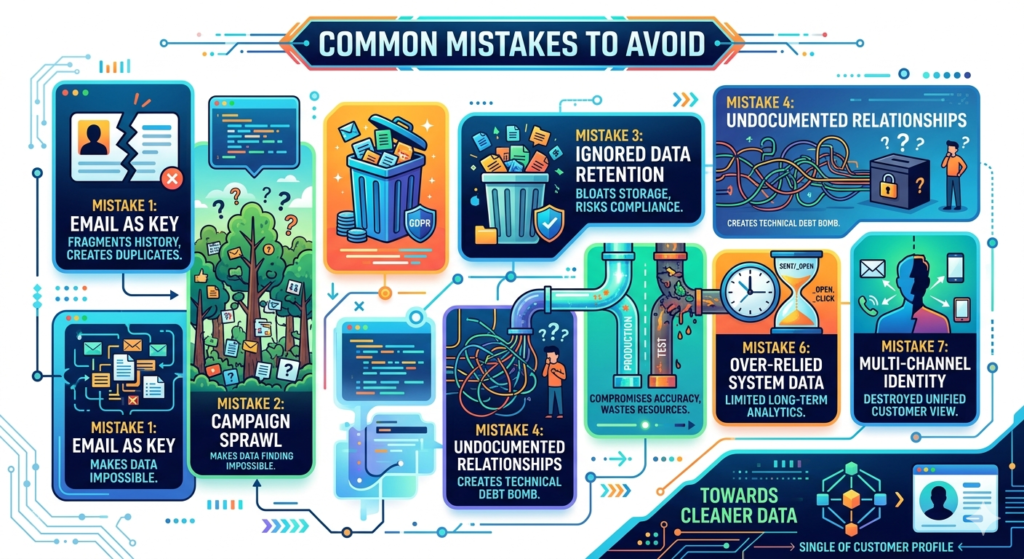
Mistake 1: Using Email Address as the Subscriber Key
This remains the most common architectural error in SFMC Contact Builder implementations. Email addresses change—frequently. When your subscriber key is the email address and a contact updates their email, you create a new contact record rather than updating the existing one, fragmenting history and creating duplication.
The consequences compound over time. Customer lifecycle tracking breaks because early-stage and late-stage interactions belong to different "contacts." Journey Builder activations fail when subscriber keys don't match across data sources. Reporting undercounts actual audience size because the same person exists multiple times.
The fix: Use a stable, business-level unique identifier from your CRM or customer database as your SFMC subscriber key. Email address belongs as an attribute within the contact profile, not as the linking mechanism.
Mistake 2: Creating Attribute Groups for Every Campaign
When each campaign generates its own Attribute Group, you're creating unsustainable sprawl that makes Contact Builder virtually unusable. Marketers can't find relevant data among hundreds of campaign-specific groups, queries become increasingly complex, and your data model provides no coherent view of the customer.
This mistake stems from treating Contact Builder like a folder structure rather than a relational database. Campaign-specific data belongs in data extensions outside Contact Builder's linked structure, or in properly designed transactional Attribute Groups that accommodate multiple campaigns within a consistent schema.
The fix: Design Attribute Groups around business entities and data types (demographics, transactions, preferences) rather than campaigns. Use data extension fields to filter campaign-specific data within these consistent structures.
Mistake 3: Ignoring Data Retention Policies
Setting all Data Extensions to "All Rows" retention means data accumulates indefinitely, bloating storage costs and degrading query performance. More critically, it creates compliance risks when you're retaining personal data beyond legal or contractual limitations.
Many organizations discover this mistake during GDPR or CCPA compliance reviews, finding they've retained data for years beyond necessity and lacking automated purge processes to remediate the situation.
The fix: Explicitly define retention policies for each Data Extension based on business need, compliance requirements, and performance implications. Implement automated archival processes for historical data that must be retained but doesn't need operational access.
Mistake 4: Creating Undocumented Custom Relationships
Complex marketing cloud contact models include custom relationships beyond the standard Contact Builder interface. When these relationships exist only in one administrator's head—undocumented and unexplained—they become technical debt bombs waiting to explode when that person leaves the organization.
Future administrators encounter data structures they don't understand, can't safely modify, and desperately work around rather than fixing properly. The data model becomes an untouchable legacy system despite being relatively young.
The fix: Document every relationship, cardinality decision, and architectural choice explicitly. Use data extension descriptions, maintain architecture diagrams, and create runbooks that explain the reasoning behind non-obvious design decisions.
Mistake 5: Mixing Production and Test Data
Development and testing are critical, but they must happen in sandboxes, not production Contact Builder. When test contacts, fake transactions, and development data pollute production, you compromise reporting accuracy, waste send volumes on fake addresses, and risk embarrassing sends to test accounts that somehow make it to production.
The fix: Enforce strict separation between production and development environments. Use sandboxes for testing, implement data generation tools for realistic test datasets, and establish clear promotion processes for moving validated configurations to production.
Mistake 6: Over-Relying on System Data Extensions
System data extensions like _Sent, _Open, _Click provide valuable engagement data, but they're not designed for long-term storage or complex analysis. Over-relying on these extensions for reporting and segmentation creates performance issues and limits analytical capabilities.
These system extensions retain data for only six months, meaning historical analysis becomes impossible. They're also not optimized for complex queries, causing timeouts and failures in sophisticated segmentation logic.
The fix: Extract engagement data from system extensions into purpose-built analytical data extensions with appropriate retention policies, indexing, and structure for your specific reporting needs.
Mistake 7: Ignoring Multi-Channel Identity Resolution
When contacts interact through email, SMS, push notifications, and web personalization, they generate separate identities unless you've implemented explicit identity resolution. Without it, Contact Builder fragments the same individual across multiple partial profiles.
This fragmentation destroys the unified customer view that Contact Builder promises. Journey orchestration fails because the platform doesn't recognize that the same person who received an email also engaged via SMS.
The fix: Implement identity resolution processes that link email addresses, mobile numbers, device IDs, and other identifiers to a single subscriber key, creating truly unified contact profiles across all channels.
Real-World Use Case: Retail Multi-Channel Customer Journey
Consider a mid-sized retail organization implementing SFMC Contact Builder to support an omnichannel customer experience. They operate both e-commerce and physical stores, with customers interacting through web, email, SMS, mobile app, and in-store.
The Challenge
Their legacy approach maintained separate systems for each channel. Email lists in SFMC, SMS subscribers in a separate platform, mobile app users in a third database, and in-store customers in their point-of-sale system. When customers interacted across channels, the organization had no unified view—the same person appeared as four different entities.
Marketing campaigns operated in silos. Email promoted products customers already purchased in-store. SMS messages recommended items sitting in abandoned online carts. Mobile app push notifications offered deals customers had already redeemed. The disjointed experience frustrated customers and wasted marketing budget.
The Solution Architecture
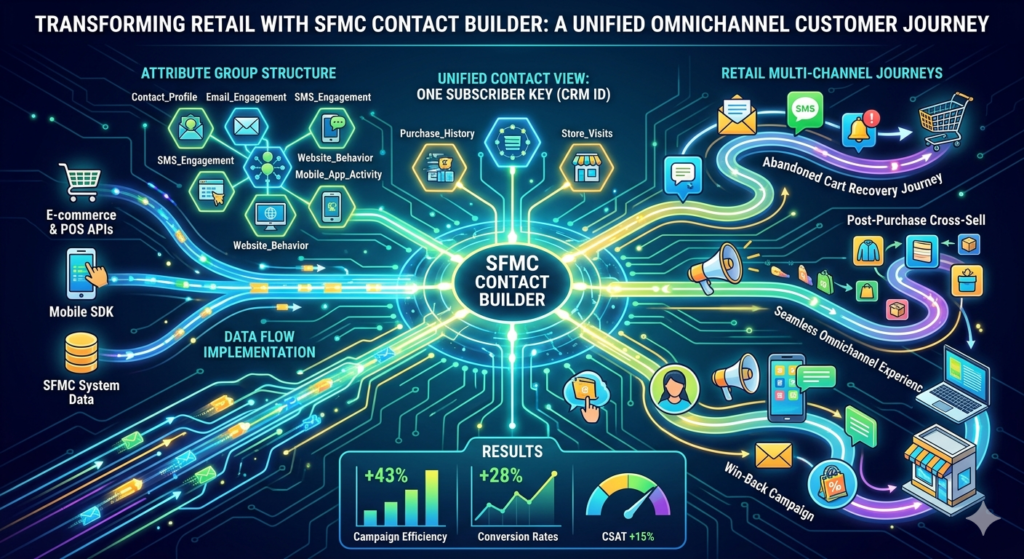
They redesigned their marketing cloud contact model around a unified subscriber key: the customer ID from their CRM system, which was already assigned to online and in-store customers through their loyalty program.
Attribute Group Structure:
- Contact_Profile (one-to-one): Core demographic data, loyalty tier, account creation date, and communication preferences
- Email_Engagement (one-to-many): Email send history, opens, clicks, and unsubscribes
- SMS_Engagement (one-to-many): SMS send history and responses
- Purchase_History (one-to-many): All transactions, online and in-store, with product details denormalized for query performance
- Website_Behavior (one-to-many): Page views, cart additions, cart abandonments
- Mobile_App_Activity (one-to-many): App sessions, feature usage, push engagement
- Store_Visits (one-to-many): Physical store check-ins and browsing tracked via mobile app
Data Flow Implementation:
- Nightly batch processes synchronized CRM customer data to Contact_Profile
- Real-time APIs pushed purchase transactions from e-commerce and POS systems to Purchase_History
- Mobile app events streamed to Mobile_App_Activity via Marketing Cloud SDK
- Email and SMS engagement populated automatically from SFMC system data extensions
- Website behavior captured through Marketing Cloud tracking and populated via API
The Results
With unified contact profiles in place, they implemented sophisticated cross-channel journeys:
Abandoned Cart Recovery Journey: When customers added items to online carts but didn't purchase, Journey Builder triggered email reminders. If email didn't convert within 24 hours, the journey sent SMS (for opted-in customers). If still no conversion, mobile app push notifications offered a limited-time discount. The journey checked Purchase_History before each send to prevent messages after in-store purchase completion.
Post-Purchase Cross-Sell: After online purchases, the journey waited 14 days, then recommended complementary products based on purchase history. The recommendations excluded items already purchased in-store (visible through unified Purchase_History) and prioritized products frequently browsed in the mobile app.
Win-Back Campaign: Contacts with no purchases (online or in-store) for 90 days entered a win-back journey. The journey personalized messaging based on previous purchase categories and tailored offers to the customer's preferred shopping channel (determined by historical engagement patterns).
Performance improvements were substantial:
- Campaign efficiency increased 43%: Unified data eliminated duplicate sends and irrelevant messaging
- Conversion rates improved 28%: Personalization based on complete customer view drove relevance
- Customer satisfaction scores rose 15%: Consistent, informed messaging across channels improved experience
- Data management effort decreased 60%: Unified model eliminated manual data reconciliation
The transformation didn't happen overnight. They invested three months in data model design, migration, and testing before launching the first unified journey. But this upfront investment created a scalable foundation that supported increasingly sophisticated marketing as their team's capabilities matured.
Key Success Factors
Several decisions proved critical to this implementation's success:
Starting with data architecture before campaigns: Rather than retrofitting a data model around existing campaigns, they designed the optimal structure first, then migrated campaigns to leverage it.
Enforcing subscriber key consistency across source systems: They modified CRM, e-commerce, and POS systems to ensure every customer record included the subscriber key before any SFMC integration.
Implementing automated data quality controls: Validation rules at ingestion prevented dirty data from entering Contact Builder, maintaining integrity as data volume scaled.
Comprehensive team training: Marketing operations, developers, and campaign managers all received training on the data model, ensuring everyone understood how to leverage it properly.
This use case demonstrates how proper SFMC Contact Builder architecture transforms marketing capabilities. The technical foundation enabled marketing sophistication that simply wasn't possible with fragmented data structures.
Conclusion: Building for Long-Term Scalability and Performance
Your SFMC Contact Builder data model isn't just a technical implementation detail—it's the foundation that determines whether your marketing automation scales gracefully or collapses under complexity. The architectural decisions you make today will either enable sophisticated marketing capabilities years from now or create technical debt that constrains every future initiative.
Scalability emerges from intentional design: consistent SFMC subscriber key strategy, properly configured cardinality, strategic normalization decisions, and disciplined data hygiene practices. These aren't glamorous activities that deliver immediate campaign wins, but they're the difference between marketing technology that empowers your organization and marketing technology that becomes the bottleneck.
Performance isn't just about query speed—it's about marketing agility. When your marketing cloud contact model is properly architected, creating new segments takes minutes instead of days. Launching cross-channel journeys doesn't require custom development projects. Reporting accurately reflects business reality instead of requiring manual reconciliation.
The cost of getting Contact Builder wrong compounds over time. Initial workarounds become standard practice. Data quality degrades gradually until reporting becomes unreliable. Marketing operations teams spend more time fighting the platform than leveraging its capabilities. Eventually, organizations face expensive migration projects to fix problems that proper initial design would have prevented.
Conversely, investing in proper Contact Builder architecture upfront creates compounding returns. Each new campaign leverages existing data structures. Additional channels integrate seamlessly into the unified contact model. Marketing sophistication increases without corresponding increases in operational complexity.
Your Contact Builder implementation should outlast current campaign strategies, organizational changes, and technology evolution. Build it with that longevity in mind—documenting decisions, enforcing governance, and designing for flexibility. The marketers who inherit your architecture years from now will either thank you for a scalable foundation or curse you for technical debt that constrains their capabilities.
The best time to implement Contact Builder properly was during initial SFMC implementation. The second-best time is now. Whether you're architecting from scratch or remediating an existing implementation, the principles remain constant: unified identity through consistent subscriber keys, logical Attribute Group structure, appropriate cardinality, strategic normalization, and relentless data hygiene.
Marketing automation platforms like SFMC democratize sophisticated marketing capabilities—but only when the underlying data architecture supports that sophistication. Invest in your SFMC Contact Builder data model as the strategic asset it is, and it becomes the competitive advantage that enables marketing excellence at scale.
Internal Links:
- Salesforce Admin course page
- Salesforce Marketing Cloud vs Pardot: Which Is Right for You in 2026
- Salesforce Data Import Wizard vs Data Loader: Full Comparison (2024 Guide)
- SFMC Data Extensions vs Lists: What Every Marketer Should Know
- Salesforce Headless 360: The Complete Guide to Building the Agentic Enterprise
- Salesforce Mobile App: Complete Admin Configuration Guide for Enterprise Deployment
- Salesforce Marketing Cloud Automation Studio: Complete Guide
External Links:
McKinsey Sales Growth Reports