
Introduction: Why SFMC Content Builder Mastery Matters More Than Ever in 2026
Email marketing remains one of the highest ROI channels in 2026, but there's a catch: inbox competition has never been fiercer. The average business user receives over 120 emails daily, and email clients have become increasingly sophisticated at filtering, categorizing, and deprioritizing messages that don't meet strict technical and engagement standards.

For Salesforce Marketing Cloud (SFMC) users, this presents both a challenge and an opportunity. While many marketers still rely on outdated email builders or generic templates that produce cookie-cutter campaigns, those who master SFMC Content Builder best practices gain a significant competitive advantage. The difference between an email that converts and one that gets ignored often comes down to how well you leverage Content Builder's advanced capabilities.
Here's the reality: In 2026, subscribers expect personalized, mobile-optimized, lightning-fast emails that respect their preferences and deliver genuine value. Generic batch-and-blast campaigns no longer cut it. Email providers like Gmail and Outlook have implemented AI-driven filtering that analyzes everything from code quality to engagement patterns. A poorly constructed email in Content Builder doesn't just look bad—it can harm your sender reputation and deliverability.
This comprehensive guide will walk you through everything you need to know about content builder SFMC implementation, from foundational concepts to advanced techniques that professional email developers use to achieve open rates above 40% and click-through rates exceeding 8%. Whether you're building your first template or optimizing an existing email program, you'll find actionable strategies you can implement immediately.
Let's dive into why Content Builder has become the cornerstone of successful SFMC email marketing and how you can use it to create campaigns that actually perform.
What is SFMC Content Builder?
Content Builder is Salesforce Marketing Cloud's centralized content management system designed specifically for creating, storing, managing, and deploying email content across your marketing campaigns. Think of it as your email marketing command center—a powerful workspace where creative assets, email templates, content blocks, and dynamic elements come together to create sophisticated, personalized email experiences.
The Evolution from Classic to Content Builder
If you're transitioning from SFMC Classic Email, understanding this shift is crucial. Classic Email operated as a separate application with its own folder structure, template system, and workflow. Content Builder represents a complete architectural redesign that offers:
Unified Content Management: All your content assets—emails, images, content blocks, templates—live in one organized workspace with intuitive folder structures and powerful search capabilities.
Drag-and-Drop Simplicity with Code-Level Control: You're not forced to choose between visual simplicity and technical capability. Content Builder offers both a visual editor for non-technical users and full HTML/CSS/AMPscript access for developers.
Reusable Content Blocks: Create once, use everywhere. Content blocks can be updated globally across all emails that use them, ensuring brand consistency and dramatically reducing maintenance time.
Enhanced Collaboration: Multiple team members can work simultaneously with version control, approval workflows, and clear asset ownership.
Why Content Builder Matters in 2026
The email marketing landscape has transformed dramatically. Modern SFMC Content Builder addresses challenges that didn't exist when Classic Email was designed:
- Mobile-First Reality: Over 73% of emails are now opened on mobile devices. Content Builder's responsive design capabilities are built-in, not bolted on.
- Personalization at Scale: Consumers expect individualized experiences. Content Builder's integration with SFMC's data extensions and AMPscript allows for sophisticated personalization that goes far beyond "Hi [FirstName]."
- Speed and Agility: Marketing teams need to move fast. Content Builder's modular approach means you can launch campaigns in hours, not days.
- Compliance and Accessibility: GDPR, CAN-SPAM, and accessibility standards aren't optional. Content Builder provides the framework to maintain compliance systematically.
For beginners, Content Builder offers an approachable entry point with pre-built templates and intuitive interfaces. For intermediate users, it unlocks advanced capabilities like dynamic content, AMPscript personalization, and sophisticated automated journeys. This makes mastering marketing cloud email templates through Content Builder essential for anyone serious about email marketing success.
Key Features of Content Builder You Need to Know
Understanding Content Builder's core features is essential before diving into best practices. These aren't just technical specifications—they're the building blocks of high-performing email campaigns.

1. Visual Content Editor with Drag-and-Drop Interface
The visual editor allows marketers without coding experience to build professional emails by dragging pre-configured content blocks into place. You can add text, images, buttons, social media icons, and custom HTML blocks without writing a single line of code.
Practical Application: A marketing coordinator can assemble a promotional email in 15 minutes using approved brand blocks, while a developer can simultaneously create advanced custom blocks that the coordinator will use in future campaigns.
2. Content Block Library
Content blocks are reusable components—headers, footers, product showcases, social media sections—that maintain consistency across your email program. The game-changing feature: global content blocks update everywhere they're used when you modify the master.
Real-World Scenario: Your company updates its social media links or legal footer. Instead of manually updating hundreds of templates, you update one global footer block, and every email automatically reflects the change.
3. Template-Based Email Creation
Content Builder supports multiple template types:
- Base templates: The HTML/CSS foundation defining layout structure
- Template layouts: Pre-configured content block arrangements
- Ready-to-send emails: Fully populated templates requiring minimal customization
This hierarchical approach means your development team builds the foundation once, and your marketing team can create infinite variations without breaking brand standards or responsive design.
4. Dynamic Content and Personalization
Dynamic content allows you to create one email that displays different content to different subscribers based on attributes, preferences, or behavior. Combined with AMPscript (SFMC's scripting language), you can create hyper-personalized experiences at scale.
Intermediate Use Case: An e-commerce brand sends one campaign where:
- New customers see a welcome message with tutorial content
- Active customers see personalized product recommendations based on browsing history
- Lapsed customers receive a re-engagement offer with their favorite product category
All from a single email send, using dynamic content rules and AMPscript.
5. Mobile Optimization and Preview Tools
Content Builder includes built-in mobile preview functionality showing how your email renders across devices and email clients. The responsive design framework automatically adjusts layouts for different screen sizes.
Critical Feature in 2026: With mobile-first indexing now standard across email providers, emails that don't render properly on mobile devices face significant deliverability penalties beyond just poor user experience.
6. Asset Management and Organization
The Content Builder workspace functions as a digital asset management system with:
- Folder structures for logical organization
- Tagging capabilities for cross-campaign asset discovery
- Search functionality to find content quickly
- Sharing permissions to control access across business units
7. Integration with Journey Builder and Automation Studio
Content Builder emails integrate seamlessly with SFMC's automation tools. Create your email in Content Builder, then deploy it through:
- Journey Builder: For triggered, personalized customer journeys
- Automation Studio: For scheduled sends and complex automation workflows
- Email Studio: For traditional one-time or recurring sends
This integration is what transforms Content Builder from a template creation tool into a comprehensive email marketing platform.
8. A/B Testing Capabilities
Built-in A/B testing allows you to test subject lines, sender names, content variations, and send times directly within Content Builder. The system automatically identifies winning variations and can deploy them to the remaining audience.
Advanced Tip: Intermediate users should test beyond subject lines. Test content block arrangements, CTA button colors, and personalization strategies to continuously optimize performance.
Understanding these features provides the foundation for implementing SFMC Content Builder best practices that drive measurable results. Next, we'll explore how to use these features strategically.
SFMC Content Builder Best Practices: Detailed Implementation Guide
Mastering Content Builder requires more than knowing what features exist—you need to understand how to implement them strategically. These best practices come from real-world implementations across industries, tested and refined for 2026's email landscape.
1. Modular Design Architecture: Build Once, Use Everywhere
The Principle: Structure your email program around reusable, interchangeable content blocks rather than one-off custom emails. This approach dramatically reduces development time, ensures brand consistency, and simplifies maintenance.
Implementation Steps:
Step 1: Audit Your Email Patterns
Before building anything, analyze your existing email campaigns. Identify recurring elements:
- Header configurations (with/without navigation, different logo treatments)
- Hero sections (full-width images, split layouts, video backgrounds)
- Content sections (text blocks, product showcases, testimonials)
- Call-to-action patterns (button styles, placement variations)
- Footer elements (social icons, legal disclaimers, unsubscribe)
Step 2: Create a Block Taxonomy
Organize blocks into categories:
- Structural blocks: Define layout (1-column, 2-column, 3-column)
- Brand blocks: Headers, footers, navigation (usually global)
- Content blocks: Reusable promotional, informational, or product sections
- Functional blocks: CTAs, social sharing, preference centers
Step 3: Develop Your Core Block Library
Start with 15-20 essential blocks covering 80% of your use cases:
textBrand Blocks (Global):
├── Primary Header (with navigation)
├── Secondary Header (logo only)
├── Primary Footer (full legal + social)
└── Secondary Footer (minimal legal)

Content Blocks (Free):
├── Hero - Full Width Image + CTA
├── Hero - Split Layout (50/50)
├── Text Block - Single Column
├── Text Block - Two Column
├── Product Showcase - Single Item
├── Product Showcase - Grid (3 items)
├── Testimonial - Single Quote
├── Testimonial - Multi-Quote Carousel
└── Video Embed Block

CTA Blocks (Free):
├── Primary Button - Centered
├── Primary Button - Left Aligned
├── Secondary Button - Outlined
└── Text Link CTA
Step 4: Establish Block Standards
Document specifications for each block:
- Mobile behavior (how it stacks or collapses)
- Personalization fields available
- Character limits for optimal display
- Image specifications and aspect ratios
- Required vs. optional elements
Real-World Example: A B2B SaaS company implemented modular design with 22 core blocks. Their email production time dropped from 4-6 hours per campaign to 45 minutes, and brand consistency scores improved by 89% in quality audits.
Advanced Modular Techniques:
Nested Content Blocks: Create blocks that contain other blocks for ultimate flexibility. For example, a "Feature Section" block might contain three "Feature Item" sub-blocks that can be individually customized.
Conditional Block Display: Use AMPscript to show/hide entire blocks based on subscriber attributes:
JavaScript%%[
IF @subscriberType == "Enterprise" THEN
]%%
  <!-- Enterprise-specific content block -->
  <table><!-- Enterprise feature content --></table>
%%[
ELSEIF @subscriberType == "Professional" THEN
]%%
  <!-- Professional-tier content block -->
  <table><!-- Professional feature content --></table>
%%[
ENDIF
]%%
Version-Controlled Blocks: Maintain multiple versions of key blocks (Holiday Header, Standard Header, Sale Header) and swap them based on campaign timing or business priorities.
2. Strategic Personalization with AMPscript
Generic emails fail in 2026. Effective personalization goes beyond inserting a first name—it creates genuinely relevant experiences using subscriber data intelligently.
Foundational Personalization Techniques:
Basic Attribute Personalization:
JavaScript%%[
VAR @firstName, @lastName, @preferredName
SET @firstName = AttributeValue("FirstName")
SET @lastName = AttributeValue("LastName")
SET @preferredName = AttributeValue("PreferredName")

IF NOT EMPTY(@preferredName) THEN
  SET @greeting = @preferredName
ELSEIF NOT EMPTY(@firstName) THEN
  SET @greeting = @firstName
ELSE
  SET @greeting = "Valued Customer"
ENDIF
]%%

<h1>Welcome back, %%=v(@greeting)=%%!</h1>
Why This Works: This simple script creates three tiers of personalization with a fallback, ensuring every subscriber sees appropriate content even with incomplete data.
Intermediate Personalization Strategies:
Behavioral Personalization Based on Data Extensions:
JavaScript%%[
VAR @subscriberKey, @lastPurchaseDate, @daysSinceLastPurchase, @messageContent
SET @subscriberKey = AttributeValue("_subscriberkey")

SET @lastPurchaseDate = Lookup("PurchaseHistory", "LastPurchaseDate", "SubscriberKey", @subscriberKey)
SET @daysSinceLastPurchase = DateDiff(@lastPurchaseDate, Now(), "D")

IF @daysSinceLastPurchase < 30 THEN
  SET @messageContent = "Thanks for your recent purchase! Here are complementary products..."
ELSEIF @daysSinceLastPurchase >= 30 AND @daysSinceLastPurchase < 90 THEN
  SET @messageContent = "We've got new arrivals in your favorite categories..."
ELSE
  SET @messageContent = "We miss you! Here's an exclusive comeback offer..."
ENDIF
]%%

<p>%%=v(@messageContent)=%%</p>
Real-World Impact: An outdoor retailer implemented purchase recency personalization and saw a 34% increase in click-through rates and 28% higher conversion rates compared to their standard batch campaigns.
Product Recommendation Engine:
JavaScript%%[
VAR @subscriberKey, @recommendedProduct1, @recommendedProduct2, @recommendedProduct3
VAR @productName, @productPrice, @productImage, @productURL
SET @subscriberKey = AttributeValue("_subscriberkey")

/* Lookup top 3 recommended products from recommendation engine */
SET @recommendedProduct1 = Lookup("ProductRecommendations", "ProductID1", "SubscriberKey", @subscriberKey)
SET @recommendedProduct2 = Lookup("ProductRecommendations", "ProductID2", "SubscriberKey", @subscriberKey)
SET @recommendedProduct3 = Lookup("ProductRecommendations", "ProductID3", "SubscriberKey", @subscriberKey)
]%%

<!-- Product 1 -->
%%[
SET @productName = Lookup("ProductCatalog", "ProductName", "ProductID", @recommendedProduct1)
SET @productPrice = Lookup("ProductCatalog", "Price", "ProductID", @recommendedProduct1)
SET @productImage = Lookup("ProductCatalog", "ImageURL", "ProductID", @recommendedProduct1)
SET @productURL = Lookup("ProductCatalog", "ProductURL", "ProductID", @recommendedProduct1)
]%%

<table>
  <tr>
    <td><img src="%%=v(@productImage)=%%" alt="%%=v(@productName)=%%" /></td>
  </tr>
  <tr>
    <td><h3>%%=v(@productName)=%%</h3></td>
  </tr>
  <tr>
    <td><p>$%%=v(@productPrice)=%%</p></td>
  </tr>
  <tr>
    <td><a href="%%=v(@productURL)=%%">Shop Now</a></td>
  </tr>
</table>
Advanced Personalization Patterns:
Countdown Timers for Individual Users:
JavaScript%%[
VAR @subscriberKey, @offerExpirationDate, @daysRemaining, @urgencyMessage
SET @subscriberKey = AttributeValue("_subscriberkey")
SET @offerExpirationDate = Lookup("CustomerOffers", "ExpirationDate", "SubscriberKey", @subscriberKey)
SET @daysRemaining = DateDiff(Now(), @offerExpirationDate, "D")

IF @daysRemaining <= 1 THEN
  SET @urgencyMessage = "⏰ Last Day! Your offer expires tonight at midnight"
ELSEIF @daysRemaining <= 3 THEN
  SET @urgencyMessage = "⏰ Only " + FormatNumber(@daysRemaining, "N0") + " days left on your exclusive offer"
ELSEIF @daysRemaining <= 7 THEN
  SET @urgencyMessage = "Your offer expires in " + FormatNumber(@daysRemaining, "N0") + " days"
ELSE
  SET @urgencyMessage = "Your exclusive offer is waiting"
ENDIF
]%%

<div class="urgency-banner">%%=v(@urgencyMessage)=%%</div>
Geographic Personalization:
JavaScript%%[
VAR @state, @localizedContent, @storeLocator, @weatherMessage
SET @state = AttributeValue("State")

IF @state == "FL" OR @state == "CA" OR @state == "AZ" THEN
  SET @weatherMessage = "Perfect weather for outdoor activities!"
  SET @localizedContent = "sun-protection"
ELSEIF @state == "MN" OR @state == "WI" OR @state == "ME" THEN
  SET @weatherMessage = "Stay warm out there!"
  SET @localizedContent = "winter-gear"
ELSE
  SET @localizedContent = "seasonal"
ENDIF

SET @storeLocator = "https://stores.example.com?state=" + @state
]%%
Personalization Best Practices Checklist:
- ✅ Always include fallback values for missing data
- ✅ Test personalization logic with diverse data scenarios
- ✅ Limit data extension lookups (each lookup impacts send speed)
- ✅ Use AttributeValue() for subscriber attributes, Lookup() for data extensions
- ✅ Consider privacy regulations when using behavioral data
- ✅ Document your personalization variables for team collaboration
3. Dynamic Content Rules for Segment Targeting
Dynamic content allows one email to display different content blocks to different audience segments. This is more sophisticated than personalization—you're showing entirely different sections based on rules.
When to Use Dynamic Content:
- Audience segmentation: Different messaging for different customer tiers
- Geographic targeting: Region-specific offers or information
- Lifecycle stages: Different content for new vs. loyal customers
- Behavioral triggers: Content based on browsing or purchase behavior
- Preference-based content: Display content matching stated interests
Implementation Process:
Step 1: Set Up Dynamic Content Rules in Content Builder
Within Content Builder, select a content area and choose "Create Dynamic Content." Define your rule sets:
textRule Set Name: Customer Tier Targeting
├── Rule 1: Premium Customers
│   Condition: CustomerTier EQUALS "Premium"
│   Content: Premium product announcements, VIP event invitations
├── Rule 2: Standard Customers
│   Condition: CustomerTier EQUALS "Standard"
│   Content: Standard product announcements, upgrade incentives
└── Default Content: General announcements for undefined tiers
Step 2: Create Content Variations
For each rule, develop the appropriate content. Key principle: maintain similar structure across variations to avoid rendering issues.
Bad Practice: Premium version has 3 content sections, Standard has 1 section
Good Practice: Both versions have 3 sections, but content differs
Step 3: Test Across Segments
Use Content Builder's preview function with test subscribers from each segment. Verify:
- All dynamic content displays correctly
- No broken layouts or orphaned elements
- Mobile rendering for each variation
- Personalization works within dynamic sections
Advanced Dynamic Content Pattern:
Nested Dynamic Content with AMPscript Enhancement:
JavaScript%%[
VAR @customerTier, @purchaseFrequency, @contentPriority
SET @customerTier = AttributeValue("CustomerTier")
SET @purchaseFrequency = AttributeValue("PurchaseFrequency")

IF @customerTier == "Premium" AND @purchaseFrequency == "High" THEN
  SET @contentPriority = "VIP-Frequent"
ELSEIF @customerTier == "Premium" AND @purchaseFrequency == "Low" THEN
  SET @contentPriority = "VIP-Reactivate"
ELSEIF @customerTier == "Standard" AND @purchaseFrequency == "High" THEN
  SET @contentPriority = "Standard-UpgradeOpportunity"
ELSE
  SET @contentPriority = "Standard-General"
ENDIF
]%%

<!-- Dynamic content area controlled by @contentPriority variable -->
This creates hyper-targeted content segments beyond simple dynamic content rules.
Real-World Case Study: A financial services company used dynamic content to create one email newsletter that served:
- New account holders: Educational content about services
- Active users: Advanced feature tips and usage analytics
- Inactive users: Re-engagement content with simplified access instructions
- VIP customers: Exclusive insights and dedicated account manager information
Result: 52% higher engagement rates compared to sending separate emails, with 75% reduction in email production time.
4. Mobile-First Design Principles
With 73%+ of emails opened on mobile devices, mobile-first design isn't optional—it's the foundation of effective email marketing in 2026.
Core Mobile-First Strategies:
Single Column Layouts:
Mobile screens can't effectively display multi-column layouts without excessive zooming or horizontal scrolling. Design for single-column flow, then enhance for desktop.
HTML<!-- Good: Mobile-first responsive structure -->
<table width="100%" border="0" cellpadding="0" cellspacing="0">
  <tr>
    <td>
      <!-- Single column content -->
    </td>
  </tr>
</table>
Touch-Friendly CTA Buttons:
Mobile users tap with fingers, not click with precision mice. Minimum specifications for 2026:
- Button height: Minimum 44 pixels (Apple's recommended touch target)
- Button width: Minimum 150 pixels for text buttons
- Spacing: 10-15 pixels between tappable elements
- Full-width buttons often perform better on mobile
HTML<!-- Mobile-optimized CTA button -->
<table width="100%" border="0" cellpadding="0" cellspacing="0">
  <tr>
    <td align="center">
      <a href="%%=RedirectTo(@ctaURL)=%%">
        Shop Now
      </a>
    </td>
  </tr>
</table>
Readable Typography:
- Minimum font size: 14px for body text, 16px preferred
- Minimum font size for CTA: 16px
- Line height: 1.5-1.6 for optimal readability
- Limit line length to 50-60 characters for mobile
Optimized Images:
- Use responsive images that scale:
width: 100%; max-width: [original size]; height: auto; - Image file size: Maximum 200KB per image, total email under 1MB
- Alt text for all images (essential for accessibility and when images are blocked)
- Test with images off—email should still be comprehensible
Advanced Mobile Optimization:
Responsive Media Queries:
HTML<style>
  /* Desktop styles */
  .two-column {
    width: 50%;
    display: inline-block;
  }

  /* Mobile overrides */
  @media only screen and (max-width: 600px) {
    .two-column {
      width: 100% !important;
      display: block !important;
    }

    .mobile-padding {
      padding: 15px !important;
    }

    .hide-mobile {
      display: none !important;
    }

    .mobile-font-size {
      font-size: 16px !important;
    }
  }
</style>
Mobile-Specific Content:
Use responsive design techniques to show different content on mobile vs. desktop:
HTML<!-- Show on mobile only -->
<div class="show-mobile">
  <table>
    <tr>
      <td>
        <a href="tel:1-800-555-0100">
          📞 Call Us Now
        </a>
      </td>
    </tr>
  </table>
</div>

<!-- Show on desktop only -->
<div class="hide-mobile">
  <table>
    <tr>
      <td>
        <p>Call us at 1-800-555-0100</p>
      </td>
    </tr>
  </table>
</div>

<style>
  @media only screen and (max-width: 600px) {
    .show-mobile {
      display: block !important;
      max-height: none !important;
      overflow: visible !important;
    }
    .hide-mobile {
      display: none !important;
    }
  }
</style>
Mobile Testing Checklist:
- ✅ Preview in Content Builder mobile view
- ✅ Send tests to actual devices (iPhone, Android)
- ✅ Test in Gmail app, Apple Mail, Outlook mobile
- ✅ Verify all links are tappable with adequate spacing
- ✅ Check image loading and alt text display
- ✅ Confirm text is readable without zooming
- ✅ Test both portrait and landscape orientations
- ✅ Verify forms are mobile-friendly (if applicable)
5. Performance Optimization for Faster Loading
Email loading speed impacts engagement and deliverability. Slow-loading emails frustrate subscribers and trigger spam filters.
Image Optimization:
Compression: Use tools like TinyPNG or ImageOptim before uploading to Content Builder
- JPEG: 60-80% quality for photographs
- PNG: Use PNG-8 instead of PNG-24 when possible
- Target: Under 100KB per image
Proper Sizing: Upload images at their display size
- Bad: Upload 2000px wide image, display at 600px
- Good: Resize to 1200px wide (2x for retina), upload that version
Format Selection:
- Photographs: JPEG
- Graphics with transparency: PNG
- Simple graphics/logos: PNG or SVG (when supported)
Progressive Enhancement: Don't rely solely on images for critical information
HTML<!-- Good: Critical info in text, enhanced by image -->
<table>
  <tr>
    <td>
      <h2>50% Off Summer Collection</h2>
      <p>Refresh your wardrobe with our biggest sale of the season.</p>
      <img src="summer-sale-banner.jpg" alt="Summer collection preview" />
    </td>
  </tr>
</table>
Code Optimization:
Minimize Code Bloat:
- Remove unnecessary HTML comments
- Eliminate unused CSS
- Avoid excessive nested tables
- Use inline CSS (email clients don't consistently support
<style>tags)
Efficient AMPscript:
- Minimize data extension lookups (each adds processing time)
- Cache lookup values if used multiple times
- Use rowsets efficiently for multiple records
JavaScript/* Inefficient: Multiple lookups for same subscriber */
%%[
SET @firstName = Lookup("Contacts", "FirstName", "SubscriberKey", @subscriberKey)
SET @lastName = Lookup("Contacts", "LastName", "SubscriberKey", @subscriberKey)
SET @email = Lookup("Contacts", "Email", "SubscriberKey", @subscriberKey)
]%%

/* Efficient: Single lookup, multiple attributes */
%%[
SET @contactRow = LookupRows("Contacts", "SubscriberKey", @subscriberKey)
IF RowCount(@contactRow) > 0 THEN
  SET @contact = Row(@contactRow, 1)
  SET @firstName = Field(@contact, "FirstName")
  SET @lastName = Field(@contact, "LastName")
  SET @email = Field(@contact, "Email")
ENDIF
]%%
Link Structure:
- Use RedirectTo() for tracking while maintaining clean links
- Implement link shortening for long URLs
- Test all links before sending
Content Builder Performance Best Practices:
- Limit total email size to under 102KB (Gmail clips larger emails)
- Use no more than 15-20 images per email
- Limit AMPscript complexity in high-volume sends
- Test send speed with different data volumes
- Monitor send metrics for performance degradation indicators
Real-World Performance Impact: A retail brand reduced their email size from 850KB to 95KB through image optimization and code cleanup. Results:
- Load time decreased from 8.2 seconds to 1.4 seconds
- Open rates increased by 18%
- Click-through rates improved by 23%
- Spam complaints dropped by 34%
Email Template Types in SFMC: Strategic Use Cases
Different email types serve different purposes and require different approaches in Content Builder. Understanding these distinctions ensures you build the right template for each campaign objective.
1. Promotional Email Templates
Purpose: Drive immediate action—sales, event registrations, product launches, limited-time offers.
Structural Characteristics:
- Strong visual hierarchy emphasizing the offer
- Clear, prominent call-to-action (often multiple instances)
- Urgency or scarcity elements (countdown timers, limited stock indicators)
- Benefits-focused copy
- Eye-catching imagery
Content Builder Implementation:
Template Structure:
textPromotional Template Layout:
├── Header Block (minimal, don't distract from offer)
├── Hero Block (large visual + primary headline)
├── Offer Details Block (value proposition)
├── Primary CTA Block (prominent button)
├── Supporting Benefits Block (why act now)
├── Product Showcase Block (optional)
├── Secondary CTA Block
├── Social Proof Block (testimonials/reviews - optional)
├── Urgency Block (timer/deadline)
└── Footer Block (minimal legal)
Best Practices for Promotional Templates:
Visual Hierarchy: Use size, color, and whitespace to guide attention:
HTML<table width="100%" border="0" cellpadding="0" cellspacing="0">
  <tr>
    <td>
      <!-- Hero Headline -->
      <h1>
        Flash Sale: 50% Off Everything
      </h1>

      <!-- Supporting Subhead -->
      <p>
        24 Hours Only - Ends Tonight at Midnight
      </p>

      <!-- Primary CTA -->
      <a href="%%=RedirectTo(@saleURL)=%%">
        Shop the Sale →
      </a>
    </td>
  </tr>
</table>
Urgency Elements with AMPscript:
JavaScript%%[
VAR @saleEndDate, @hoursRemaining, @urgencyMessage
SET @saleEndDate = "2026-06-30 23:59:59"
SET @hoursRemaining = DateDiff(Now(), @saleEndDate, "H")

IF @hoursRemaining <= 3 THEN
  SET @urgencyMessage = "⏰ FINAL HOURS! Sale ends in " + FormatNumber(@hoursRemaining, "N0") + " hours"
ELSEIF @hoursRemaining <= 12 THEN
  SET @urgencyMessage = "⏰ Ending Soon! " + FormatNumber(@hoursRemaining, "N0") + " hours left"
ELSE
  SET @urgencyMessage = "Limited Time: Sale ends tonight"
ENDIF
]%%

<div>
  <p>
    %%=v(@urgencyMessage)=%%
  </p>
</div>
Multiple CTA Strategy: Include 2-3 CTA instances throughout promotional emails:
- Primary CTA: Above the fold in hero section
- Secondary CTA: After benefits/features section
- Tertiary CTA: Just before footer
Real-World Promotional Template Example:
A fashion retailer's seasonal sale template includes:
- Animated GIF header showing product variety
- Hero section with sale percentage and primary CTA
- 3-column product grid with individual "Shop Now" buttons
- Testimonial section with 5-star reviews
- Countdown timer showing hours until sale ends
- "Don't miss out" CTA block
- Footer with customer service information
Performance: 42% open rate, 12% CTR, 3.2% conversion rate
2. Transactional Email Templates
Purpose: Confirm actions, provide receipts, deliver account information, reset passwords, send shipping notifications.
Critical Differences from Promotional:
- Legally required in many cases (must not be suppressed by unsubscribe)
- Time-sensitive and expected by recipients
- Functional rather than persuasive
- Higher open rates (typically 70-90%)
- Should include relevant promotional content carefully
Structural Characteristics:
- Clear, descriptive subject lines (not promotional)
- Transaction details prominently displayed
- Account/order information clearly organized
- Next steps or action items
- Support contact information
- Minimal but strategic promotional content
Content Builder Implementation:
Template Structure:
textTransactional Template Layout:
├── Header Block (brand + "Order Confirmation" type indicator)
├── Confirmation Message Block ("Thank you for your order")
├── Transaction Details Block (order number, date, amount)
├── Itemized Details Block (products, quantities, prices)
├── Account Information Block (shipping address, payment method)
├── Next Steps Block (tracking info, expected delivery)
├── Support Block (how to get help)
├── Strategic Cross-sell Block (optional, minimal)
└── Footer Block (full legal, account management links)
Order Confirmation Template Example:
JavaScript%%[
VAR @orderNumber, @orderDate, @orderTotal, @shippingAddress, @estimatedDelivery
VAR @firstName, @subscriberKey

SET @subscriberKey = AttributeValue("_subscriberkey")
SET @firstName = AttributeValue("FirstName")
SET @orderNumber = AttributeValue("OrderNumber")
SET @orderDate = AttributeValue("OrderDate")
SET @orderTotal = AttributeValue("OrderTotal")
SET @shippingAddress = AttributeValue("ShippingAddress")
SET @estimatedDelivery = AttributeValue("EstimatedDelivery")
]%%

<table width="100%" border="0" cellpadding="0" cellspacing="0">
  <!-- Header -->
  <tr>
    <td>
      <h1>Order Confirmed!</h1>
    </td>
  </tr>

  <!-- Confirmation Message -->
  <tr>
    <td>
      <p>
        Hi %%=v(@firstName)=%%,
      </p>
      <p>
        Thank you for your order! We've received your purchase and are preparing it for shipment.
      </p>
    </td>
  </tr>

  <!-- Order Details -->
  <tr>
    <td>
      <table width="100%" border="0" cellpadding="15" cellspacing="0">
        <tr>
          <td>
            <p>Order Number</p>
            <p>%%=v(@orderNumber)=%%</p>
          </td>
          <td>
            <p>Order Date</p>
            <p>%%=FormatDate(@orderDate, "MMMM d, yyyy")=%%</p>
          </td>
        </tr>
        <tr>
          <td colspan="2">
            <p>Total</p>
            <p>$%%=v(@orderTotal)=%%</p>
          </td>
        </tr>
      </table>
    </td>
  </tr>

  <!-- Items Ordered (Dynamic Rowset) -->
  <tr>
    <td>
      <h2>Items Ordered</h2>

      %%[
      VAR @orderItems, @itemCount, @i
      VAR @itemName, @itemQuantity, @itemPrice, @itemImage

      SET @orderItems = LookupRows("OrderItems", "OrderNumber", @orderNumber)
      SET @itemCount = RowCount(@orderItems)

      IF @itemCount > 0 THEN
        FOR @i = 1 TO @itemCount DO
          SET @orderItem = Row(@orderItems, @i)
          SET @itemName = Field(@orderItem, "ProductName")
          SET @itemQuantity = Field(@orderItem, "Quantity")
          SET @itemPrice = Field(@orderItem, "Price")
          SET @itemImage = Field(@orderItem, "ImageURL")
      ]%%

      <!-- Item Row -->
      <table width="100%" border="0" cellpadding="10" cellspacing="0">
        <tr>
          <td>
            <img src="%%=v(@itemImage)=%%" alt="%%=v(@itemName)=%%" />
          </td>
          <td>
            <p>%%=v(@itemName)=%%</p>
            <p>Quantity: %%=v(@itemQuantity)=%%</p>
          </td>
          <td>
            <p>$%%=v(@itemPrice)=%%</p>
          </td>
        </tr>
      </table>

      %%[
        NEXT @i
      ENDIF
      ]%%
    </td>
  </tr>

  <!-- Shipping Information -->
  <tr>
    <td>
      <h2>Shipping Details</h2>
      <p>%%=v(@shippingAddress)=%%</p>
      <p>
        Estimated Delivery: %%=FormatDate(@estimatedDelivery, "MMMM d, yyyy")=%%
      </p>
    </td>
  </tr>

  <!-- Track Order CTA -->
  <tr>
    <td>
      <a href="%%=RedirectTo(Concat('https://example.com/track?order=', @orderNumber))=%%">
        Track Your Order
      </a>
    </td>
  </tr>
</table>
Transactional Best Practices:
- Send Immediately: Transactional emails should trigger within seconds of the action
- Include All Relevant Details: Don't force users to log in to find basic information
- Clear Contact Path: Make it easy to get support if needed
- Account Security: For password resets or sensitive actions, include security best practices
- Strategic Upsell: Can include "Customers also bought" or "Complete your order" sections, but keep them secondary
Shipping Notification Template:
These typically have even higher open rates than order confirmations (85-95%) because customers actively await delivery information.
Key elements:
- Tracking number prominently displayed
- Carrier information with link to carrier's tracking page
- Expected delivery date/window
- What to do if package doesn't arrive
- Return policy reminder
- "Shop similar items" cross-sell (appropriate after confirmed delivery)
3. Newsletter Email Templates
Purpose: Provide ongoing value, build relationships, maintain brand presence, nurture leads, share content.
Structural Characteristics:
- Content-rich with multiple sections
- Clear navigation/table of contents
- Variety of content types (articles, updates, tips)
- Moderate CTAs (informational rather than aggressive)
- Consistent format/structure for recognition
- Personality and editorial voice
Content Builder Implementation:
Template Structure:
textNewsletter Template Layout:
├── Header Block (brand + newsletter name/edition)
├── Hero/Featured Story Block (primary content)
├── Content Section 1 (secondary story)
├── Content Section 2 (third story)
├── Content Section 3 (additional content)
├── Curated Links Block (quick hits/round-up)
├── Community/Social Block (engagement opportunity)
├── Preference Management Block (update interests)
└── Footer Block (comprehensive)
Monthly Newsletter Template Example:
HTML<table width="100%" border="0" cellpadding="0" cellspacing="0">
  <!-- Header with Newsletter Branding -->
  <tr>
    <td>
      <img src="logo.png" alt="Company Name" />
      <p>
        Monthly Insights Newsletter | June 2026
      </p>
    </td>
  </tr>

  <!-- Personal Greeting -->
  <tr>
    <td>
      %%[
      VAR @firstName
      SET @firstName = AttributeValue("FirstName")
      IF EMPTY(@firstName) THEN
        SET @firstName = "Reader"
      ENDIF
      ]%%

      <p>
        Hi %%=v(@firstName)=%%,
      </p>
      <p>
        Welcome to this month's edition! Here's what we're covering:
      </p>
    </td>
  </tr>

  <!-- Table of Contents -->
  <tr>
    <td>
      <table width="100%" border="0" cellpadding="15" cellspacing="0">
        <tr>
          <td>
            <p>In This Issue</p>
            <ul>
              <li><a href="#article1">5 Trends Reshaping Email Marketing in 2026</a></li>
              <li><a href="#article2">Customer Spotlight: How Brand X Achieved 40% Engagement</a></li>
              <li><a href="#article3">New Feature Release: AI-Powered Send Time Optimization</a></li>
              <li><a href="#roundup">This Month's Top Resources</a></li>
            </ul>
          </td>
        </tr>
      </table>
    </td>
  </tr>

  <!-- Featured Article -->
  <tr>
    <td>
      <a name="article1"></a>
      <img src="featured-article-image.jpg" alt="Email marketing trends" />

      <h2>
        5 Trends Reshaping Email Marketing in 2026
      </h2>

      <p>
        The email landscape continues to evolve rapidly. From AI-driven personalization to privacy-first strategies, marketers must adapt to stay effective. Here are the five trends you can't afford to ignore this year...
      </p>

      <a href="%%=RedirectTo('https://example.com/blog/email-trends-2026')=%%">
        Read Full Article →
      </a>
    </td>
  </tr>

  <!-- Secondary Articles (Repeated Block) -->
  <tr>
    <td>
      <a name="article2"></a>

      <!-- Two-column layout for secondary stories -->
      <table width="100%" border="0" cellpadding="0" cellspacing="0">
        <tr>
          <td width="40%">
            <img src="case-study-image.jpg" alt="Customer success story" />
          </td>
          <td width="60%">
            <h3>
              Customer Spotlight: Brand X's Success Story
            </h3>
            <p>
              Discover how this e-commerce brand used dynamic content and segmentation to achieve remarkable results...
            </p>
            <a href="%%=RedirectTo('https://example.com/case-studies/brand-x')=%%">
              Read Case Study →
            </a>
          </td>
        </tr>
      </table>
    </td>
  </tr>

  <!-- Quick Links/Resources Roundup -->
  <tr>
    <td>
      <a name="roundup"></a>
      <h3>📚 This Month's Top Resources</h3>

      <ul>
        <li>
          <span>►</span>
          <a href="%%=RedirectTo('https://example.com/resource1')=%%">
            Complete Guide to SFMC AMPscript
          </a>
        </li>
        <li>
          <span>►</span>
          <a href="%%=RedirectTo('https://example.com/resource2')=%%">
            Email Deliverability Checklist 2026
          </a>
        </li>
        <li>
          <span>►</span>
          <a href="%%=RedirectTo('https://example.com/resource3')=%%">
            Webinar Recording: Mastering Journey Builder
          </a>
        </li>
      </ul>
    </td>
  </tr>

  <!-- Engagement/Feedback Section -->
  <tr>
    <td>
      <p>
        💬 What topics would you like to see in future newsletters?
      </p>
      <a href="%%=RedirectTo('https://example.com/feedback')=%%">
        Share Your Feedback
      </a>
    </td>
  </tr>
</table>
Newsletter Best Practices:
- Consistent Schedule: Monthly, bi-weekly, or weekly—pick a cadence and stick to it
- Clear Value Proposition: Readers should know exactly what they'll get
- Scannable Format: Use headings, bullets, and visual breaks
- Content Variety: Mix educational, entertaining, and promotional content (80/20 rule)
- Preference Management: Let subscribers choose topics or frequency
- Archive Access: Provide links to previous editions
Dynamic Content in Newsletters:
JavaScript%%[
VAR @subscriberInterest, @contentBlock
SET @subscriberInterest = AttributeValue("PrimaryInterest")

IF @subscriberInterest == "Technical" THEN
  SET @contentBlock = "technical-deep-dive"
ELSEIF @subscriberInterest == "Strategy" THEN
  SET @contentBlock = "strategy-insights"
ELSEIF @subscriberInterest == "Design" THEN
  SET @contentBlock = "design-trends"
ELSE
  SET @contentBlock = "general-overview"
ENDIF
]%%

<!-- Display personalized content section based on interest -->
%%[ IF @contentBlock == "technical-deep-dive" THEN ]%%
  <!-- Technical content block -->
  <h3>Deep Dive: Advanced AMPscript Techniques</h3>
  <p>This month we're exploring complex lookup functions...</p>
%%[ ELSEIF @contentBlock == "strategy-insights" THEN ]%%
  <!-- Strategy content block -->
  <h3>Strategic Perspective: ROI Measurement Frameworks</h3>
  <p>How leading marketers quantify email program success...</p>
%%[ ENDIF ]%%
This creates a single newsletter that feels personalized to each subscriber's interests, dramatically improving engagement.
Common Mistakes to Avoid in SFMC Content Builder
Even experienced SFMC users fall into predictable traps. Recognizing and avoiding these mistakes will save you significant time, frustration, and performance issues.
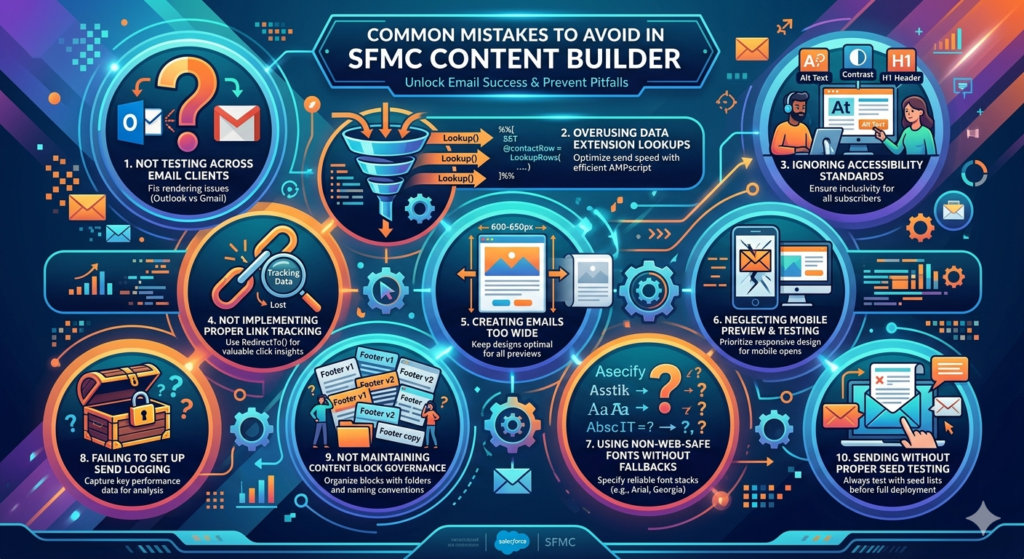
1. Not Testing Across Email Clients
The Mistake: Building an email that looks perfect in Content Builder preview and Gmail, then discovering it breaks completely in Outlook.
Why It Happens: Different email clients render HTML/CSS differently. Outlook uses Microsoft Word's rendering engine (yes, really), which doesn't support many modern CSS properties. Apple Mail handles CSS differently than Gmail. Mobile apps have their own quirks.
The Solution:
- Use Litmus or Email on Acid for comprehensive client testing
- Test on actual devices, not just emulators
- Maintain a testing checklist covering major clients:
- Gmail (desktop, mobile app)
- Apple Mail (macOS, iOS)
- Outlook (2016, 2019, Office 365, Outlook.com)
- Yahoo Mail
- Samsung Email (increasingly popular)
Real-World Impact: A B2B company discovered 35% of their audience used Outlook 2016, where their multi-column layout collapsed incorrectly. After fixing rendering issues, engagement from Outlook users increased 47%.
2. Overusing Data Extension Lookups
The Mistake: Performing excessive Lookup() functions within a single email, dramatically slowing send times.
Why It Happens: Lookups are powerful and convenient, making them easy to overuse without realizing the performance impact.
The Solution:
JavaScript/* Bad: Multiple lookups for same subscriber */
%%[
SET @firstName = Lookup("Contacts", "FirstName", "Email", @emailAddress)
SET @lastName = Lookup("Contacts", "LastName", "Email", @emailAddress)
SET @company = Lookup("Contacts", "Company", "Email", @emailAddress)
SET @industry = Lookup("Contacts", "Industry", "Email", @emailAddress)
]%%

/* Good: Single lookup, extract multiple fields */
%%[
SET @contactRow = LookupRows("Contacts", "Email", @emailAddress)
IF RowCount(@contactRow) > 0 THEN
  SET @contact = Row(@contactRow, 1)
  SET @firstName = Field(@contact, "FirstName")
  SET @lastName = Field(@contact, "LastName")
  SET @company = Field(@contact, "Company")
  SET @industry = Field(@contact, "Industry")
ENDIF
]%%
Performance Guideline: Limit lookups to 3-5 per email for optimal send speed in high-volume campaigns.
3. Ignoring Accessibility Standards
The Mistake: Creating emails that are unusable for subscribers using screen readers or who have visual impairments.
Why It Happens: Accessibility often isn't visible in testing, so it gets overlooked.
The Solution:
- Alt text for all images: Descriptive, not just decorative
- Semantic HTML: Use proper heading hierarchy (H1, H2, H3)
- Sufficient color contrast: Minimum 4.5:1 ratio for text
- Readable without images: Core message should work with images disabled
- Keyboard navigation: Links and buttons should be keyboard-accessible
- Avoid text in images: Especially for critical information
HTML<!-- Bad: No alt text, unclear link text -->
<img src="sale.jpg" />
<a href="shop.html">Click here</a>

<!-- Good: Descriptive alt text, clear link text -->
<img src="sale.jpg" alt="50% off summer collection sale, ends June 30" />
<a href="shop.html">Shop the Summer Sale</a>
Why It Matters: 15-20% of your audience may use accessibility features. Plus, accessible emails often perform better for everyone.
4. Not Implementing Proper Link Tracking
The Mistake: Using direct URLs instead of SFMC's RedirectTo() function, losing valuable click tracking data.
Why It Happens: Direct links are simpler and some marketers don't realize the tracking implications.
The Solution:
JavaScript/* Bad: Direct link, no tracking */
<a href="https://example.com/products">Shop Now</a>

/* Good: Tracked link with alias */
%%[
VAR @productURL
SET @productURL = "https://example.com/products"
]%%
<a href="%%=RedirectTo(@productURL)=%%" alias="Shop Products CTA">Shop Now</a>

/* Better: Tracked link with personalization */
%%[
VAR @productURL, @subscriberKey
SET @subscriberKey = AttributeValue("_subscriberkey")
SET @productURL = Concat("https://example.com/products?ref=email&id=", @subscriberKey)
]%%
<a href="%%=RedirectTo(@productURL)=%%" alias="Shop Products CTA - Personalized">Shop Now</a>
Analytics Impact: Proper link tracking enables you to measure which CTAs perform best, inform content decisions, and attribute conversions accurately.
5. Creating Emails Too Wide
The Mistake: Designing emails wider than 600-650 pixels, causing horizontal scrolling on many email clients.
Why It Happens: Designers working on large monitors don't realize the constraints of email client preview panes.
The Solution:
- Maximum email width: 600-650 pixels
- Use max-width instead of width for responsive scaling
- Test in narrow preview panes (Outlook side panel, Gmail three-pane view)
HTML<!-- Optimal email container -->
<table width="100%" border="0" cellpadding="0" cellspacing="0">
  <tr>
    <td align="center">
      <table border="0" cellpadding="0" cellspacing="0">
        <!-- Email content -->
      </table>
    </td>
  </tr>
</table>
6. Neglecting Mobile Preview and Testing
The Mistake: Designing for desktop and assuming mobile will "work fine."
Why It Happens: Desktop development is easier and many marketers still primarily use desktop for their own email.
The Reality: 73% of email opens are on mobile. Mobile-broken emails are immediately deleted.
The Solution:
- Design mobile-first
- Use Content Builder's mobile preview during development
- Send test emails to actual mobile devices
- Check touch target sizes (minimum 44x44 pixels)
- Verify text is readable without zooming (minimum 14-16px)
7. Using Non-Web-Safe Fonts Without Fallbacks
The Mistake: Specifying custom fonts that don't render consistently, breaking your design.
Why It Happens: Designers want brand-consistent typography without understanding email client limitations.
The Solution:
HTML<!-- Bad: Custom font with no fallback -->
<p>Text here</p>

<!-- Good: Font stack with web-safe fallbacks -->
<p>Text here</p>

<!-- Better: Custom font with comprehensive fallback stack -->
<p>Text here</p>
Web-Safe Font Stack Recommendations:
- Sans-serif: Arial, Helvetica, Verdana, Tahoma, Geneva
- Serif: Georgia, Times New Roman, Times
- Monospace: Courier, Courier New, Monaco
8. Failing to Set Up Send Logging
The Mistake: Not capturing send data for long-term analysis and troubleshooting.
Why It Happens: It's an administrative step that doesn't seem urgent until you need the data and it's not there.
The Solution:
- Configure send logging to capture subscriber, send, bounce, and click data
- Set up data extensions for historical tracking
- Implement data retention policies
- Create dashboards for ongoing monitoring
Value: Send logging enables sophisticated analysis like lifetime engagement scoring, win-back automation triggers, and deliverability troubleshooting.
9. Not Maintaining Content Block Governance
The Mistake: Creating dozens of similar content blocks without organization, leading to confusion and duplication.
Why It Happens: Multiple team members creating content without coordination.
The Solution:
- Establish naming conventions (e.g., "CB_Category_Description_Version")
- Create folder structure by campaign type or brand
- Document which blocks are global vs. free
- Regular audits to archive unused blocks
- Approval workflows for new block creation
Example Naming Convention:
textCB_Header_Primary_With_Nav_v2
CB_CTA_Primary_Centered_Blue_v1
CB_Footer_Standard_Legal_Social_v3
CB_Product_Grid_3Column_v1
10. Sending Without Proper Seed Testing
The Mistake: Sending directly to your full list without testing on seed addresses first.
Why It Happens: Time pressure and overconfidence in the template.
The Solution:
- Always send to seed list first (internal team + test accounts)
- Include seed addresses across different domains (Gmail, Outlook, Yahoo)
- Check for:
- Broken personalization (missing or incorrect data)
- Broken links
- Rendering issues
- Spelling/grammar errors
- Correct dynamic content display
Seed List Best Practice: Maintain a data extension with test contacts representing different segments, ensuring dynamic content displays correctly for each.
Avoiding these common mistakes will dramatically improve your SFMC Content Builder best practices implementation and campaign performance.
Pro Tips for Better Engagement in Content Builder
Beyond avoiding mistakes, these advanced strategies will elevate your marketing cloud email templates from functional to exceptional.
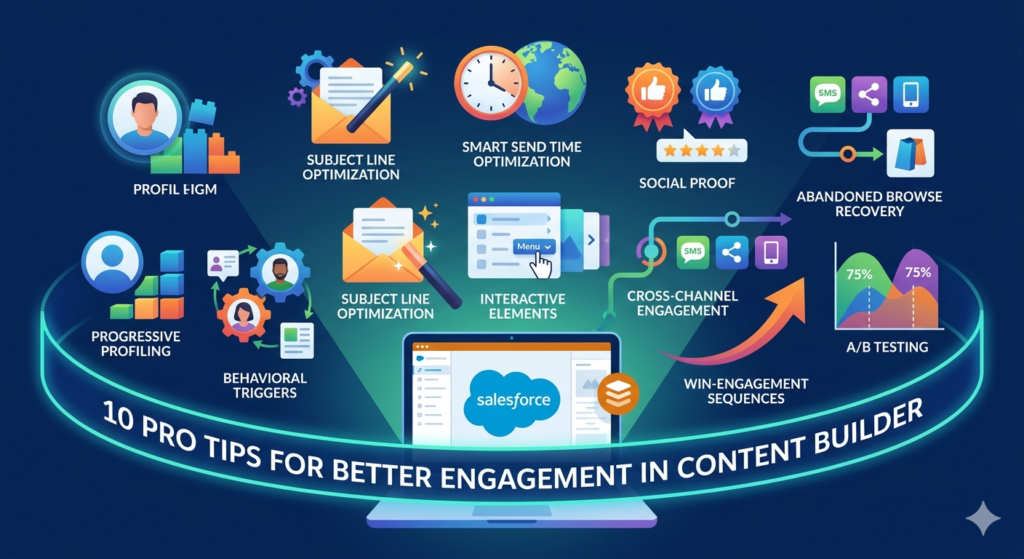
1. Implement Progressive Profiling Through Email
The Strategy: Gradually collect subscriber information through email interactions rather than demanding it all upfront.
Implementation:
JavaScript%%[
VAR @subscriberKey, @hasProvidedInterests, @profileCompletionCTA
SET @subscriberKey = AttributeValue("_subscriberkey")
SET @hasProvidedInterests = Lookup("Contacts", "InterestsProvided", "SubscriberKey", @subscriberKey)

IF @hasProvidedInterests != "true" THEN
  SET @profileCompletionCTA = "Help us personalize your experience"
ENDIF
]%%

%%[ IF NOT EMPTY(@profileCompletionCTA) THEN ]%%
<table width="100%" border="0" cellpadding="0" cellspacing="0">
  <tr>
    <td>
      <p>
        %%=v(@profileCompletionCTA)=%%
      </p>
      <a href="%%=RedirectTo(Concat('https://example.com/preferences?id=', @subscriberKey))=%%">
        Update Your Preferences
      </a>
    </td>
  </tr>
</table>
%%[ ENDIF ]%%
Why It Works: Asking for information gradually feels less intrusive and shows you're using data to improve their experience.
2. Use Behavioral Triggers for Dynamic Content
The Strategy: Display different content based on actual subscriber behavior, not just demographics.
Example - Engagement-Based Content:
JavaScript%%[
VAR @subscriberKey, @lastOpenDate, @daysSinceOpen, @engagementLevel
SET @subscriberKey = AttributeValue("_subscriberkey")
SET @lastOpenDate = Lookup("EngagementTracking", "LastOpenDate", "SubscriberKey", @subscriberKey)
SET @daysSinceOpen = DateDiff(@lastOpenDate, Now(), "D")

IF @daysSinceOpen <= 7 THEN
  SET @engagementLevel = "highly_engaged"
ELSEIF @daysSinceOpen <= 30 THEN
  SET @engagementLevel = "moderately_engaged"
ELSE
  SET @engagementLevel = "at_risk"
ENDIF
]%%

%%[ IF @engagementLevel == "highly_engaged" THEN ]%%
  <!-- Advanced content for engaged users -->
  <h2>Exclusive Early Access</h2>
  <p>As one of our most engaged subscribers, you get first access to our new collection...</p>

%%[ ELSEIF @engagementLevel == "at_risk" THEN ]%%
  <!-- Re-engagement content -->
  <h2>We Miss You!</h2>
  <p>It's been a while since we've seen you. Here's what you've been missing...</p>

%%[ ELSE ]%%
  <!-- Standard content -->
%%[ ENDIF ]%%
3. Optimize Subject Lines with AMPscript
The Strategy: Personalize subject lines beyond just first name for higher open rates.
Implementation in Content Builder:
JavaScript%%[
VAR @subscriberKey, @firstName, @lastPurchaseCategory, @subjectLine
SET @subscriberKey = AttributeValue("_subscriberkey")
SET @firstName = AttributeValue("FirstName")
SET @lastPurchaseCategory = Lookup("PurchaseHistory", "LastCategory", "SubscriberKey", @subscriberKey)

IF NOT EMPTY(@lastPurchaseCategory) AND NOT EMPTY(@firstName) THEN
  SET @subjectLine = Concat(@firstName, ", new arrivals in ", @lastPurchaseCategory)
ELSEIF NOT EMPTY(@firstName) THEN
  SET @subjectLine = Concat(@firstName, ", check out what's new")
ELSE
  SET @subjectLine = "New arrivals you'll love"
ENDIF
]%%
Then use %%=v(@subjectLine)=%% in your subject line field.
Performance Impact: Behaviorally personalized subject lines can increase open rates by 15-25% compared to generic alternatives.
4. Implement Smart Send Time Optimization
The Strategy: Send emails when individual subscribers are most likely to engage, not at one universal time.
Manual Implementation with AMPscript:
JavaScript%%[
VAR @subscriberKey, @optimalSendHour, @timezone
SET @subscriberKey = AttributeValue("_subscriberkey")

/* Lookup historical best engagement hour for this subscriber */
SET @optimalSendHour = Lookup("EngagementProfile", "BestHour", "SubscriberKey", @subscriberKey)
SET @timezone = Lookup("Contacts", "Timezone", "SubscriberKey", @subscriberKey)

/* Use this in Journey Builder's wait activity or Automation Studio scheduling */
]%%
Advanced Approach: Use Einstein Send Time Optimization (SFMC's AI feature) which automatically determines optimal send times based on individual engagement patterns.
5. Create Interactive Email Elements
The Strategy: Increase engagement by incorporating interactive elements that work in supported email clients with fallbacks for others.
Accordion Content Example:
HTML<!-- Accordion using checkbox hack (works in Apple Mail, some others) -->
<style>
  .accordion-content {
    max-height: 0;
    overflow: hidden;
    transition: max-height 0.3s ease;
  }
  #accordion-toggle:checked ~ .accordion-content {
    max-height: 500px;
  }
</style>

<input type="checkbox" id="accordion-toggle" />
<label for="accordion-toggle">
  Click to Learn More ▼
</label>
<div class="accordion-content">
  <p>Hidden content that expands when clicked...</p>
</div>

<!-- Fallback for email clients that don't support interactive elements -->
<!--[if mso]>
<table><tr><td>
  <p>Content displayed by default in Outlook...</p>
</td></tr></table>
<![endif]-->
Image Carousels, Rollover Effects, and Surveys: All possible with progressive enhancement approach.
6. Leverage Social Proof Dynamically
The Strategy: Display real-time or personalized social proof to increase conversions.
Implementation:
JavaScript%%[
VAR @productID, @reviewCount, @averageRating, @popularityBadge
SET @productID = AttributeValue("RecommendedProduct")

SET @reviewCount = Lookup("ProductReviews", "ReviewCount", "ProductID", @productID)
SET @averageRating = Lookup("ProductReviews", "AverageRating", "ProductID", @productID)

IF @reviewCount >= 100 THEN
  SET @popularityBadge = "⭐ Customer Favorite"
ELSEIF @reviewCount >= 50 THEN
  SET @popularityBadge = "✓ Verified Reviews"
ENDIF
]%%

<div>
  <p>
    %%[ IF NOT EMPTY(@popularityBadge) THEN ]%%
      <strong>%%=v(@popularityBadge)=%%</strong><br />
    %%[ ENDIF ]%%
    ⭐ %%=v(@averageRating)=%% / 5.0 (%%=v(@reviewCount)=%% reviews)
  </p>
</div>
7. Implement Abandoned Browse Recovery
The Strategy: Send targeted emails featuring products subscribers viewed but didn't purchase.
Implementation Approach:
- Track browsing behavior via Web Analytics or API
- Store viewed products in data extension with timestamps
- Create Journey Builder automation triggering after 24 hours of inactivity
- Use Content Builder email with dynamic product display
Email Template AMPscript:
JavaScript%%[
VAR @subscriberKey, @viewedProducts, @productCount, @i
VAR @productName, @productImage, @productPrice, @productURL

SET @subscriberKey = AttributeValue("_subscriberkey")
SET @viewedProducts = LookupRows("BrowsingHistory", "SubscriberKey", @subscriberKey)
SET @productCount = RowCount(@viewedProducts)

IF @productCount > 0 THEN
]%%

<h2>Still Thinking About These?</h2>

%%[
  FOR @i = 1 TO IIF(@productCount > 3, 3, @productCount) DO
    SET @product = Row(@viewedProducts, @i)
    SET @productName = Field(@product, "ProductName")
    SET @productImage = Field(@product, "ImageURL")
    SET @productPrice = Field(@product, "Price")
    SET @productURL = Field(@product, "ProductURL")
]%%

<table width="100%" border="0" cellpadding="10">
  <tr>
    <td>
      <img src="%%=v(@productImage)=%%" alt="%%=v(@productName)=%%" />
    </td>
    <td>
      <h3>%%=v(@productName)=%%</h3>
      <p>$%%=v(@productPrice)=%%</p>
      <a href="%%=RedirectTo(@productURL)=%%">
        View Details
      </a>
    </td>
  </tr>
</table>

%%[
  NEXT @i
ENDIF
]%%
Expected Results: Browse abandonment emails typically achieve 5-8% conversion rates, significantly higher than promotional emails.
8. Use Email to Drive Cross-Channel Engagement
The Strategy: Use email as an orchestration channel driving engagement across social, SMS, web, and mobile app.
Implementation:
- Social integration: Include Instagram feed or recent posts
- SMS opt-in: Offer exclusive SMS-only deals
- App download prompts: For mobile app users
- Webinar/event registration: Seamless registration CTAs
- Community engagement: Links to forums, user groups, review sections
Multi-Channel CTA Block:
HTML<table width="100%">
  <tr>
    <td>
      <h2>Connect With Us Everywhere</h2>

      <table width="100%" border="0" cellpadding="10">
        <tr>
          <td align="center">
            <a href="%%=RedirectTo(@instagramURL)=%%">
              <img src="instagram-icon.png" alt="Instagram" />
            </a>
            <a href="%%=RedirectTo(@facebookURL)=%%">
              <img src="facebook-icon.png" alt="Facebook" />
            </a>
            <a href="%%=RedirectTo(@smsOptInURL)=%%">
              <img src="sms-icon.png" alt="SMS Alerts" />
            </a>
          </td>
        </tr>
      </table>
    </td>
  </tr>
</table>
9. Implement Win-Back Sequences with Progressive Incentives
The Strategy: Rather than one win-back email, create a sequence with escalating incentives.
Sequence Structure:
- Day 30: Reminder email, no discount ("We miss you")
- Day 45: 10% off incentive
- Day 60: 20% off + free shipping
- Day 75: Final 25% off + free shipping + bonus item
- Day 90: Sunset email (confirm they want to remain subscribed)
Dynamic Incentive Display:
JavaScript%%[
VAR @subscriberKey, @daysSinceLastPurchase, @discountPercent, @incentiveMessage
SET @subscriberKey = AttributeValue("_subscriberkey")

SET @lastPurchaseDate = Lookup("PurchaseHistory", "LastPurchaseDate", "SubscriberKey", @subscriberKey)
SET @daysSinceLastPurchase = DateDiff(@lastPurchaseDate, Now(), "D")

IF @daysSinceLastPurchase >= 75 THEN
  SET @discountPercent = "25"
  SET @incentiveMessage = "Final Offer: 25% Off + Free Shipping + Free Gift"
ELSEIF @daysSinceLastPurchase >= 60 THEN
  SET @discountPercent = "20"
  SET @incentiveMessage = "20% Off + Free Shipping"
ELSEIF @daysSinceLastPurchase >= 45 THEN
  SET @discountPercent = "10"
  SET @incentiveMessage = "Welcome Back: 10% Off Your Next Order"
ELSE
  SET @discountPercent = "0"
  SET @incentiveMessage = "We Miss You!"
ENDIF
]%%
10. A/B Test Systematically and Continuously
The Strategy: Make A/B testing a standard practice, not a special occasion, and test elements beyond subject lines.
Elements to Test:
- Subject line variations (obvious, but still valuable)
- From name (brand name vs. person name vs. combination)
- Preview text
- Email layout structure
- CTA button color and text
- Image vs. no image in hero
- Content length (short vs. comprehensive)
- Personalization level
- Send time
- Emoji in subject lines
Testing Framework:
- Hypothesis: "Personal from name will increase open rates"
- Test Setup: 50/50 split, minimum 1,000 subscribers per variation
- Success Metric: Open rate, click rate, or conversion rate
- Implementation: Winner to remaining 80% of list
- Documentation: Record results for institutional knowledge
AMPscript for Random Assignment (if not using built-in A/B):
JavaScript%%[
VAR @subscriberKey, @randomNumber, @testGroup
SET @subscriberKey = AttributeValue("_subscriberkey")

/* Generate random number 1-100 based on subscriber key */
SET @randomNumber = Mod(SubscriberKey, 100) + 1

IF @randomNumber <= 50 THEN
  SET @testGroup = "A"
ELSE
  SET @testGroup = "B"
ENDIF
]%%

%%[ IF @testGroup == "A" THEN ]%%
  <!-- Version A content -->
%%[ ELSE ]%%
  <!-- Version B content -->
%%[ ENDIF ]%%
Testing Discipline: Commit to testing one element per campaign, documenting results, and implementing learnings systematically.
Conclusion: The Future of SFMC Content Builder and Email Marketing
As we move deeper into 2026 and beyond, SFMC Content Builder best practices will continue to evolve alongside technological advancement and changing subscriber expectations. Understanding where email marketing is heading will help you build templates and strategies that remain effective in the years ahead.
Emerging Trends Shaping Content Builder Usage
1. AI-Powered Personalization at Scale
Salesforce Einstein's integration with Content Builder will become increasingly sophisticated, enabling:
- Predictive content recommendations based on individual likelihood to engage
- Automated subject line generation optimized for each subscriber
- Dynamic product recommendations that update in real-time when emails are opened
- Sentiment analysis to adjust messaging tone based on customer journey stage
Preparation Strategy: Start collecting and organizing behavioral data now. AI requires robust data foundations to deliver meaningful personalization. Implement comprehensive tracking of opens, clicks, purchases, and browsing behavior.
2. Interactive Email Becoming Standard
AMP for Email and similar technologies are expanding support across major email clients. By 2027, interactive elements will be expected, not exceptional:
- In-email purchases without redirecting to websites
- Real-time inventory updates
- Form submissions directly in email
- Interactive product galleries and carousels
- In-email appointment booking
Implementation Approach: Begin experimenting with progressive enhancement—build a solid HTML foundation, then layer interactive elements for supported clients with fallbacks for others.
3. Privacy-First Personalization
With increasing privacy regulations (GDPR, CCPA, and emerging laws), email marketers must balance personalization with privacy:
- Zero-party data (information subscribers explicitly provide) becomes more valuable than third-party data
- Transparent data usage becomes a competitive advantage
- Preference centers evolve into comprehensive relationship management tools
Content Builder Application: Build templates with flexible data points that work whether you have comprehensive behavioral data or minimal information. Focus on creating value that encourages subscribers to share information willingly.
4. Accessibility as a Requirement, Not a Nice-to-Have
Legal requirements and ethical considerations are making email accessibility mandatory:
- Screen reader optimization
- Sufficient color contrast ratios
- Keyboard navigation support
- Clear heading hierarchies
- Alternative text for all images
Best Practice: Build accessibility into your marketing cloud email templates from the beginning. Retrofitting is always more difficult than building correctly from the start.
5. Mobile-Only Email Experiences
With mobile email opens exceeding 75% for many industries, some brands are beginning to design mobile-only emails with desktop as the fallback scenario—a complete reversal of traditional approaches.
Implication for Content Builder: Single-column, thumb-friendly, visually simple designs will dominate. Complex multi-column layouts will become rare exceptions rather than the standard.
The Enduring Importance of Fundamentals
Despite technological advancement, fundamental principles remain constant:
Value First: No amount of sophisticated personalization can compensate for emails that don't deliver genuine value to subscribers. Whether educational, entertaining, or commercially beneficial, every email must answer "Why should I care?"
Respect Attention: Inbox competition intensifies yearly. Subscribers ruthlessly filter low-quality senders. Earning and maintaining attention requires consistency, relevance, and respect for their preferences.
Test and Iterate: The highest-performing email programs share one characteristic: continuous testing and optimization. What works today may not work tomorrow. Systematic experimentation creates sustainable competitive advantages.
Technical Excellence: Deliverability remains foundational. Beautiful, personalized emails that land in spam folders deliver zero value. Authentication (SPF, DKIM, DMARC), list hygiene, and engagement management will always matter.
Your Content Builder Journey Forward
Whether you're just beginning with SFMC Content Builder or optimizing an established program, your path to mastery involves:
1. Master the Fundamentals: Before pursuing advanced techniques, ensure you've built a solid foundation:
- Clean, organized folder structure
- Well-documented content blocks
- Consistent naming conventions
- Thorough testing procedures
- Mobile-optimized responsive design
2. Implement Personalization Incrementally: Don't attempt to personalize everything immediately. Start with:
- Basic attribute personalization (name, location)
- Simple dynamic content (customer tier, purchase status)
- Behavioral triggers (purchase confirmation, abandoned cart)
- Progressive complexity as you gain confidence and data
3. Build Your AMPscript Capabilities: AMPscript is the key to unlocking Content Builder's full potential. Invest time in:
- Understanding fundamental syntax and functions
- Practicing with data extension lookups
- Building reusable code snippets
- Joining SFMC communities to learn from others
4. Establish Governance and Documentation: As your Content Builder usage grows, governance becomes critical:
- Document your content block library
- Establish approval workflows
- Create template usage guidelines
- Train team members consistently
- Maintain versioning and change logs
5. Connect Email to the Broader Customer Experience: Email doesn't exist in isolation. Integrate Content Builder with:
- Journey Builder for sophisticated automation
- Salesforce CRM for sales and service alignment
- Mobile Studio for SMS and push notifications
- Advertising Studio for cross-channel consistency
- Web analytics for comprehensive attribution
Final Thoughts
Content Builder represents far more than a technical tool for creating emails—it's your platform for building meaningful, profitable relationships with subscribers at scale. The difference between email programs that drive significant business value and those that deliver mediocre results often comes down to how thoroughly marketers master their tools.
The SFMC Content Builder best practices outlined in this guide provide a comprehensive framework for excellence. But reading alone doesn't create results. Implementation does. Start with one technique, master it, then add another. Build systematically, test continuously, and always prioritize your subscribers' experience.
The brands that thrive in 2026 and beyond won't be those with the largest lists or the most frequent sends. They'll be those who use tools like Content Builder to create genuinely valuable, respectful, personalized experiences that subscribers actually want to receive.
Your Content Builder mastery journey begins now. Start building, start testing, and start creating email experiences that truly matter.
About RizeX Labs
At RizeX Labs, we specialize in delivering advanced Salesforce Marketing Cloud (SFMC) solutions, with a strong focus on Email Content Builder optimization. Our expertise combines technical precision, marketing strategy, and real-world implementation to help businesses create high-performing email campaigns.
We help organizations move from basic email creation to scalable, data-driven content systems—ensuring consistency, personalization, and measurable results across all campaigns.
Internal Links:
- Salesforce Admin course page
- Salesforce Marketing Cloud vs Pardot: Which Is Right for You in 2026
- Salesforce Data Import Wizard vs Data Loader: Full Comparison (2024 Guide)
- SFMC Data Extensions vs Lists: What Every Marketer Should Know
- Salesforce Headless 360: The Complete Guide to Building the Agentic Enterprise
- Salesforce Mobile App: Complete Admin Configuration Guide for Enterprise Deployment
- Salesforce Marketing Cloud Automation Studio: Complete Guide
External Links:
McKinsey Sales Growth Reports