
Introduction: Why Data Migration Is the Make-or-Break Phase of Salesforce Implementations
Every enterprise Salesforce implementation eventually confronts a critical truth: the platform is only as valuable as the data it contains. You can have perfectly configured workflows, beautifully designed Lightning pages, and flawlessly integrated third-party systems—but if your data is incomplete, inaccurate, duplicated, or missing entirely, your Salesforce investment will fail to deliver its promised value.
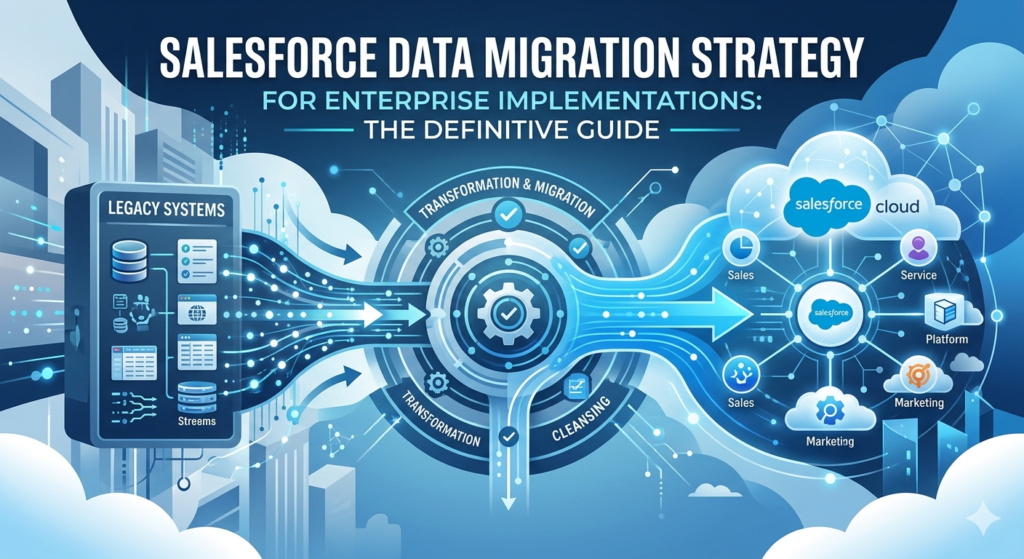
Data migration is the bridge between your organization’s past and its future on Salesforce. It’s the process of extracting data from legacy systems, transforming it to fit Salesforce’s data model, and loading it into your new environment—ideally without losing anything critical along the way. Simple in concept. Extraordinarily complex in execution.
The statistics paint a sobering picture. According to Gartner, 83% of data migration projects either fail outright or exceed their budgets and timelines. IBM estimates that poor data quality costs U.S. businesses over $3.1 trillion annually. And in the specific context of CRM implementations, research consistently shows that data-related issues are the number one cause of project failure—ahead of user adoption challenges, technical complexity, or budget constraints.
Why do so many Salesforce data migration projects struggle? The reasons are numerous and interconnected:
Data Loss and Corruption: Records that exist in legacy systems mysteriously disappear or arrive in Salesforce with missing field values, broken relationships, or corrupted formatting. In enterprise scenarios involving millions of records, even a 0.1% error rate translates to thousands of problematic records.
Poor Data Quality: Legacy systems often contain decades of accumulated data debt—duplicate records, inconsistent formatting, outdated information, orphaned records, and fields repurposed far beyond their original intent. Migration doesn’t fix bad data; it merely relocates it.
Downtime and Business Disruption: Enterprises cannot afford extended periods where critical business systems are unavailable. Poorly planned migrations can force organizations into prolonged cutover windows that disrupt sales, service, and operations.
Integration Failures: Salesforce rarely operates in isolation. Migrated data must maintain integrity across integrations with ERP systems, marketing platforms, data warehouses, and custom applications. A single broken relationship can cascade into system-wide failures.
Compliance and Security Risks: Sensitive data—financial records, personal information, healthcare data—must be migrated in compliance with GDPR, HIPAA, SOX, and other regulations. Mishandling during migration can create legal exposure and reputational damage.
Relationship Integrity: Salesforce’s relational data model depends on properly maintained lookup and master-detail relationships. Migrating parent records before children, maintaining external ID mappings, and preserving referential integrity requires meticulous planning.
Despite these challenges, successful data migration is absolutely achievable. Organizations that approach migration with a comprehensive Salesforce data migration strategy—one that addresses data quality, transformation logic, tooling, testing, and rollback planning—consistently deliver successful outcomes. Those that treat migration as an afterthought or underestimate its complexity consistently struggle.
This guide provides the complete framework for planning and executing enterprise-scale Salesforce data migrations. Whether you’re migrating from a legacy CRM, consolidating multiple systems, or moving from on-premises infrastructure to the cloud, the principles, practices, and patterns outlined here will dramatically increase your probability of success.
What Is Salesforce Data Migration?
Defining Data Migration in the Salesforce Context
Salesforce data migration is the systematic process of extracting data from one or more source systems, transforming it to conform to Salesforce’s data model and business requirements, and loading it into a Salesforce org—whether that’s a sandbox for testing or a production environment for go-live.
Unlike simple data import (loading a spreadsheet of new leads), enterprise data migration involves:
- Multiple source systems with different schemas, formats, and data quality levels
- Complex data relationships that must be preserved across objects
- Data transformation including field mapping, value translation, format conversion, and business rule application
- Large data volumes often involving millions or tens of millions of records
- Historical data spanning years or decades of business operations
- Attachments and files including documents, images, and binary content
- Validation and reconciliation ensuring that migrated data matches source data accurately
Types of Data in Enterprise Migrations
Understanding the different categories of data you’ll encounter helps inform your migration approach:
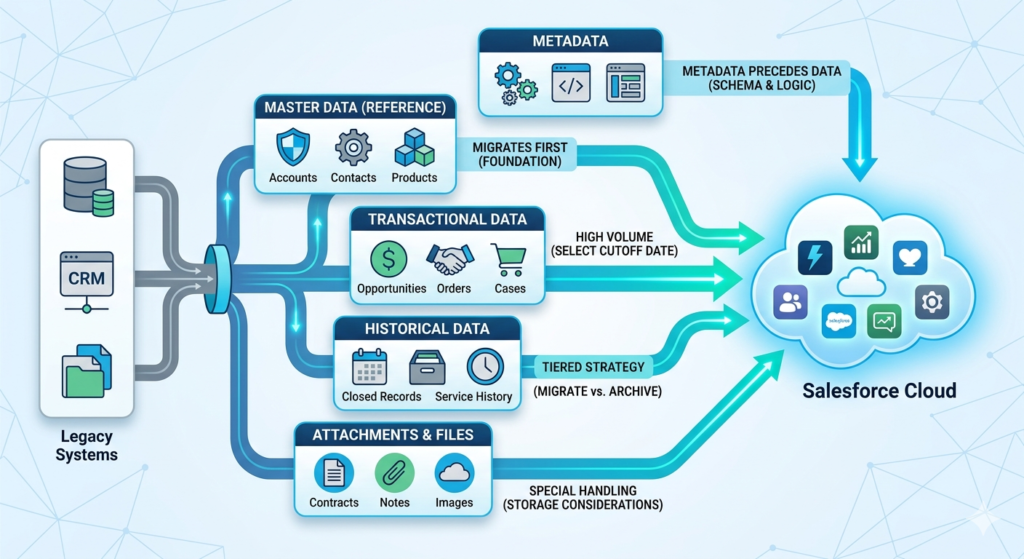
Master Data (Reference Data)
Master data represents the core business entities that remain relatively stable over time and are referenced across multiple transactions and processes. Examples include:
- Accounts (customers, partners, vendors)
- Contacts (individuals associated with accounts)
- Products and price books
- Users and organizational hierarchies
- Geographic territories and regions
Master data typically migrates first because transactional data depends on it. Quality issues in master data propagate to everything that references it.
Transactional Data
Transactional data captures business events and activities that occur over time. Examples include:
- Opportunities and opportunity line items
- Orders and order products
- Cases and case comments
- Invoices and payments
- Activities (tasks, events, calls)
Transactional data volumes are typically much larger than master data and often require decisions about historical cutoff dates—how far back do you really need to migrate?
Historical Data
Historical data encompasses older records that may no longer be operationally active but remain valuable for reporting, analytics, compliance, or institutional knowledge. Considerations include:
- Closed/won and closed/lost opportunities from previous years
- Resolved cases and service history
- Completed contracts and renewals
- Historical account interactions and touchpoints
Many organizations adopt tiered strategies—migrating recent history to Salesforce while archiving older records in external systems accessible through integration.
Attachments and Files
File-based content presents unique migration challenges:
- Documents attached to records (contracts, proposals, images)
- Notes and content stored in legacy content management systems
- Email attachments and correspondence archives
- Salesforce Files, Attachments (legacy), and ContentDocument structures
Files consume storage (which has cost implications), require different loading mechanisms than structured data, and may contain sensitive content requiring special handling.
Metadata vs Data
While this guide focuses on data migration, it’s important to distinguish data from metadata. Metadata includes:
- Object and field definitions
- Validation rules and workflows
- Apex code and Lightning components
- Reports, dashboards, and page layouts
Metadata migration (typically handled through change sets, packages, or DevOps tools) usually precedes data migration—you can’t load data into fields that don’t exist yet.
Common Enterprise Migration Scenarios
Legacy CRM to Salesforce
Organizations replacing outdated CRM systems (Siebel, Microsoft Dynamics, SAP CRM, custom-built systems, or even spreadsheet-based tracking) with Salesforce face the challenge of mapping proprietary data models to Salesforce’s standard and custom objects. This scenario often involves significant data transformation and cleansing.
System Consolidation
Large enterprises—especially those that have grown through acquisition—often operate multiple CRM instances or disparate customer databases across business units. Migration consolidates these into a unified Salesforce org, requiring deduplication, data harmonization, and conflict resolution.
On-Premises to Cloud Migration
Organizations moving from self-hosted infrastructure to Salesforce (cloud-native) must address not just data migration but also changes in integration patterns, security models, and operational procedures.
Salesforce Org Consolidation
Some organizations operate multiple Salesforce orgs (perhaps due to acquisitions or historical architectural decisions) and need to consolidate them into a single org—a complex scenario involving migrating data between Salesforce environments.
Platform Upgrade or Re-Implementation
Organizations that implemented Salesforce years ago may undertake re-implementations to leverage new features, redesign data models, or reset after accumulated technical debt. This involves migrating data from Salesforce to Salesforce with significant transformation.
Step-by-Step Enterprise Salesforce Data Migration Strategy
A successful Salesforce data migration strategy follows a structured methodology that addresses planning, preparation, execution, and validation. The following framework represents industry best practices refined through thousands of enterprise implementations.
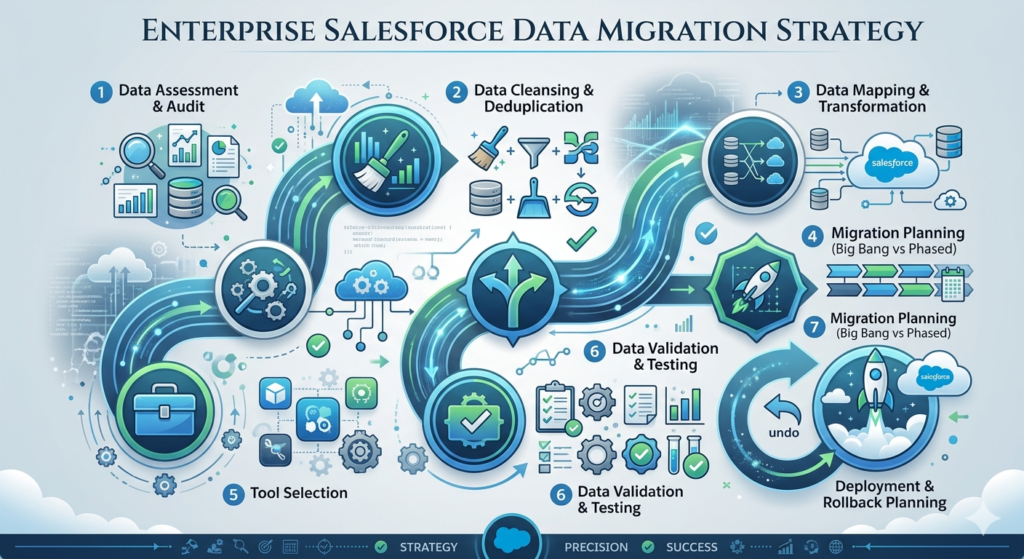
Phase 1: Data Assessment and Audit
Before migrating a single record, you must thoroughly understand your source data landscape. This discovery phase answers critical questions:
Inventory Source Systems
Document every system containing data destined for Salesforce:
- System name and type (CRM, ERP, database, spreadsheet)
- Data owners and technical contacts
- Access methods (direct database, API, export)
- Documentation availability
Analyze Data Volumes
Quantify the migration scope:
- Record counts by object/entity type
- File/attachment volumes and storage requirements
- Historical depth (how many years of data)
- Growth rates and cutoff date considerations
Assess Data Quality
Identify quality issues that will impact migration:
- Completeness: Missing required fields, sparse records
- Accuracy: Outdated information, incorrect values
- Consistency: Different formats for same data (phone numbers, addresses)
- Duplication: Multiple records representing the same entity
- Validity: Values outside acceptable ranges or domains
- Integrity: Broken relationships, orphaned child records
Document Data Relationships
Map how entities relate to each other in source systems:
- Parent-child hierarchies
- Many-to-many relationships
- Self-referential relationships (account hierarchies)
- Cross-system references
Identify Sensitive Data
Flag data requiring special handling:
- Personally Identifiable Information (PII)
- Protected Health Information (PHI)
- Financial data subject to SOX or PCI
- Data subject to GDPR, CCPA, or other privacy regulations
Deliverable: Data Assessment Report documenting source systems, volumes, quality issues, relationships, and risks.
Phase 2: Data Cleansing and Deduplication
The cardinal rule of data migration: never migrate dirty data. Cleansing before migration is dramatically more efficient than attempting to fix data after it’s in Salesforce.
Establish Data Quality Rules
Define what “clean” means for each data type:
- Required field standards
- Format specifications (phone: (XXX) XXX-XXXX)
- Valid value ranges and picklist mappings
- Deduplication matching rules
Execute Deduplication
Identify and resolve duplicate records before migration:
- Define matching criteria (exact email, fuzzy name matching)
- Establish survivorship rules (which record “wins”)
- Merge or link duplicate records in source systems
- Document decisions for audit purposes
Standardize and Normalize
Transform data to consistent formats:
- Address standardization (USPS validation)
- Phone number formatting
- Name parsing and capitalization
- Date format conversion
Enrich and Complete
Fill gaps in critical records:
- Append missing data from third-party sources
- Infer values from related records
- Apply default values where appropriate
- Flag records requiring manual review
Archive and Exclude
Not all data needs to migrate:
- Identify obsolete, test, or junk records for exclusion
- Archive historical data beyond operational cutoff
- Document exclusion criteria and decisions
Deliverable: Cleansed data extracts ready for transformation; Data Quality Report documenting remediation performed.
Phase 3: Data Mapping and Transformation
Data mapping translates source system structures into Salesforce’s data model. This phase requires deep knowledge of both environments.
Object Mapping
Map source entities to Salesforce objects:
- Standard objects (Account, Contact, Opportunity, Case)
- Custom objects for unique business entities
- Junction objects for many-to-many relationships
- Consider object limits and design implications
Field Mapping
Create detailed field-level mappings:
| Source Field | Source Type | Target Object | Target Field | Transformation |
|---|---|---|---|---|
| CUST_NAME | VARCHAR(100) | Account | Name | Trim, Title Case |
| CUST_TYPE | CHAR(1) | Account | Type__c | Value map: A=Enterprise, B=SMB |
| PHONE_NUM | VARCHAR(20) | Account | Phone | Format: (XXX) XXX-XXXX |
| CREATED_DT | DATETIME | Account | Legacy_Created_Date__c | Convert timezone to UTC |
Value Transformation
Define transformation rules for data conversion:
- Picklist value mappings (source values to Salesforce values)
- Data type conversions (string to date, currency formatting)
- Concatenation or parsing (splitting full name to first/last)
- Calculated fields and derived values
- Default values for missing data
Relationship Mapping
Plan how to maintain referential integrity:
- Identify external ID fields for parent record references
- Map source system keys to Salesforce external IDs
- Plan load order (parents before children)
- Handle self-referential relationships (account hierarchies)
Deliverable: Complete Data Mapping Specification document; Transformation rules documentation.
Phase 4: Migration Planning (Big Bang vs Phased Approach)
Enterprise migrations require strategic decisions about timing, sequencing, and cutover approach.
Big Bang Migration
All data migrates in a single, compressed cutover window.
Advantages:
- Clean break from legacy systems
- Simpler to manage single cutover
- No ongoing synchronization required
- Complete data available from day one
Disadvantages:
- Higher risk—failures impact everything
- Requires longer downtime window
- Rollback is complex
- Intense resource concentration
Best for: Smaller data volumes; organizations comfortable with risk; scenarios where legacy systems will be immediately decommissioned.
Phased Migration
Data migrates in stages over an extended period.
Advantages:
- Lower risk per phase
- Lessons learned improve subsequent phases
- Shorter individual downtime windows
- Easier rollback if issues arise
Disadvantages:
- Requires coexistence strategy
- May need bidirectional synchronization
- Extended timeline and resource commitment
- Users operate in split environment temporarily
Best for: Large data volumes; complex transformations; risk-averse organizations; scenarios requiring parallel operation.
Hybrid Approach
Many enterprises adopt hybrid strategies:
- Migrate master data first (accounts, contacts) in initial phase
- Migrate recent transactional data (current year opportunities) in second phase
- Migrate historical data incrementally post-go-live
- Keep legacy system read-only for historical reference
Migration Sequencing
Plan the order of object migration based on dependencies:
- Users and ownership data (needed for record ownership)
- Reference data (picklist values, record types)
- Parent objects (Accounts before Contacts)
- Child objects (Contacts, Opportunities)
- Junction objects (many-to-many relationships)
- Transactional details (Opportunity Line Items)
- Activities and history (Tasks, Events, Field History)
- Attachments and files (ContentDocument, Attachment)
Deliverable: Migration Plan document specifying approach, phases, sequencing, timeline, and resource requirements.
Phase 5: Tool Selection
Selecting appropriate Salesforce data migration tools is critical for efficiency and reliability.
Salesforce Native Tools
Data Import Wizard
- Web-based, point-and-click interface
- Supports Accounts, Contacts, Leads, Solutions, Campaign Members, Custom Objects
- Maximum 50,000 records per import
- Best for: Simple migrations, small volumes, non-technical users
Data Loader
- Desktop application (Windows/Mac) or command-line interface
- Supports all objects including custom objects
- Handles up to 5 million records
- Supports insert, update, upsert, delete, export, hard delete
- Schedulable via command line for automated loads
- Best for: Medium-volume migrations, developers, automated processes
Enterprise ETL Tools
For large-scale enterprise migrations, dedicated ETL (Extract, Transform, Load) platforms offer significant advantages:
Informatica Cloud Data Integration
- Enterprise-grade data integration platform
- Pre-built Salesforce connectors
- Complex transformation capabilities
- Robust error handling and logging
- Best for: Large enterprises with existing Informatica investments
MuleSoft Anypoint Platform
- Salesforce-owned integration platform
- Native Salesforce connectivity
- API-led connectivity approach
- Reusable integration assets
- Best for: Organizations standardizing on MuleSoft; complex integration scenarios
Talend Data Integration
- Open-source and enterprise editions
- Visual job design interface
- Extensive connector library
- Strong data quality features
- Best for: Cost-conscious organizations; teams with Talend experience
Jitterbit
- Cloud-native integration platform
- Salesforce-specific accelerators
- Visual design environment
- Good balance of power and usability
- Best for: Mid-market organizations; rapid implementation needs
Comparison Table: Salesforce Data Migration Tools
| Tool | Best For | Volume Capacity | Complexity Handling | Cost | Technical Skill Required |
|---|---|---|---|---|---|
| Data Import Wizard | Simple imports | Up to 50K records | Low | Free (included) | Low |
| Data Loader | Standard migrations | Up to 5M records | Medium | Free (included) | Medium |
| Informatica Cloud | Enterprise transformations | Unlimited | Very High | High ($$$$) | High |
| MuleSoft | Integration-heavy migrations | Unlimited | Very High | High ($$$$) | High |
| Talend | Mid-market, cost-sensitive | Unlimited | High | Medium ($$$) | Medium-High |
| Jitterbit | Rapid implementations | Unlimited | High | Medium ($$$) | Medium |
Deliverable: Tool selection decision with justification; Tool configuration and setup.
Phase 6: Data Validation and Testing
Rigorous testing prevents migration disasters. Never proceed to production without exhaustive validation.
Unit Testing
Test individual transformation rules and mappings:
- Verify field-level transformations produce expected results
- Validate picklist mappings cover all source values
- Confirm date/time conversions handle edge cases
- Test handling of null values and special characters
Integration Testing
Test complete migration flows end-to-end:
- Execute full migration in sandbox environment
- Verify record counts match expectations
- Confirm relationships are correctly established
- Validate files and attachments are accessible
Reconciliation Testing
Compare source and target data systematically:
- Record count reconciliation: Source counts = Target counts
- Field-level reconciliation: Sample records match exactly
- Aggregate reconciliation: Sum of amounts, totals match
- Relationship reconciliation: Child records correctly linked
User Acceptance Testing (UAT)
Business users validate migrated data meets operational needs:
- Key users verify their accounts/contacts migrated correctly
- Reports produce expected results with migrated data
- Workflows and automation function properly
- Integrations successfully process migrated data
Performance Testing
Validate migration performs acceptably at scale:
- Time full migration to estimate cutover window
- Identify bottlenecks in transformation or loading
- Test concurrent user access during migration
- Verify system performance post-migration
Deliverable: Test Plan; Test Results documentation; UAT sign-off.
Phase 7: Deployment and Rollback Planning
Production migration requires meticulous execution planning.
Cutover Runbook
Create a detailed, step-by-step execution guide:
- Pre-migration checklist (backups, notifications, system locks)
- Exact sequence of migration jobs
- Estimated duration per step
- Success criteria for each step
- Go/no-go decision points
- Responsible parties for each action
Rollback Strategy
Plan for the worst-case scenario:
- Define rollback triggers (what failures warrant rollback)
- Document rollback procedure step-by-step
- Ensure backup data is accessible for restoration
- Test rollback procedure in sandbox
- Establish rollback decision authority and timeline
Communication Plan
Keep stakeholders informed:
- Pre-migration notifications (downtime announcements)
- Progress updates during migration
- Completion notification and system availability
- Issue communication protocols
Deployment Execution
Execute migration with discipline:
- Follow runbook precisely—no improvisation
- Log actual timings and issues
- Execute validation checkpoints before proceeding
- Maintain communication cadence
- Document any deviations from plan
Deliverable: Cutover Runbook; Rollback Plan; Communication Plan; Execution Log.
Phase 8: Post-Migration Monitoring and Optimization
Migration doesn’t end at go-live. Post-migration activities ensure long-term success.
Immediate Monitoring (First 24-48 Hours)
- Monitor system performance and error logs
- Track user-reported issues
- Verify scheduled jobs and integrations function
- Address critical data issues immediately
Short-Term Validation (First 1-2 Weeks)
- Execute comprehensive reconciliation reports
- Analyze support tickets for migration-related issues
- Verify reporting accuracy
- Complete outstanding UAT items
Data Quality Monitoring (Ongoing)
- Establish ongoing data quality dashboards
- Implement duplicate prevention rules
- Monitor validation rule exceptions
- Track data completeness metrics
Optimization Activities
- Address performance issues revealed by real usage
- Tune indexes and queries based on actual patterns
- Clean up migration artifacts (temporary fields, staging objects)
- Document lessons learned for future migrations
Deliverable: Post-Migration Monitoring Report; Lessons Learned Document; Data Quality Baseline.
Manual vs Automated Migration Approaches
Understanding when manual versus automated approaches are appropriate helps optimize your enterprise data migration Salesforce strategy.
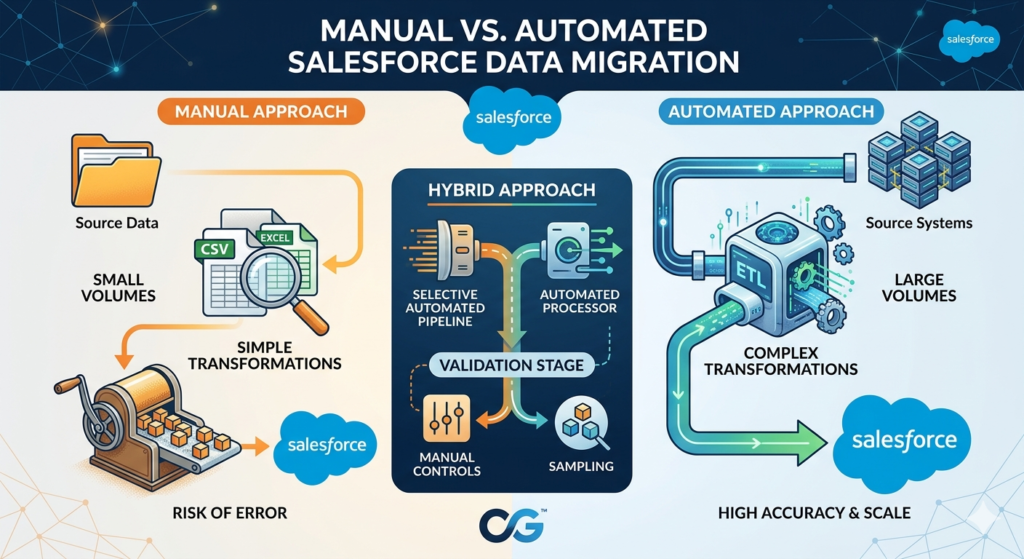
Manual Migration Approach
Characteristics:
- Data exported to CSV/Excel files from source systems
- Transformations performed using spreadsheet functions or manual editing
- Data loaded using Data Import Wizard or Data Loader
- Heavy reliance on human review and intervention
When Manual Makes Sense:
- Small data volumes (under 50,000 total records)
- Simple, one-time migrations
- Limited budget for tooling
- Highly irregular data requiring human judgment
- Pilot or proof-of-concept migrations
Risks and Limitations:
- Error-prone (manual transformation mistakes)
- Not repeatable (hard to re-execute consistently)
- Difficult to scale
- Limited audit trail
- Resource-intensive for large volumes
Automated Migration Approach
Characteristics:
- Programmatic data extraction from source systems
- Transformation rules codified in scripts or ETL tools
- Automated loading with error handling and retry logic
- Minimal human intervention during execution
When Automation Makes Sense:
- Large data volumes (millions of records)
- Complex transformations requiring consistency
- Iterative migrations with multiple dry runs
- Ongoing synchronization requirements
- Regulatory requirements for audit trails
- Enterprise-scale implementations
Benefits:
- Repeatable and consistent
- Faster execution at scale
- Comprehensive logging and audit trails
- Testable transformation logic
- Handles complexity systematically
Hybrid Approach
Most enterprise migrations adopt hybrid strategies:
- Automated extraction and loading for high-volume objects
- Manual review and cleansing for critical or exception records
- Automated reconciliation with manual verification sampling
- Scripted transformations with business user validation
Real-World Challenges in Enterprise Data Migration
Challenge 1: Handling Large Data Volumes
Migrating millions of records introduces challenges not present in smaller migrations.
Volume-Related Issues:
- Data Loader becomes slow or times out
- API limits constrain daily load capacity
- Memory constraints in transformation tools
- Extended migration windows
Solutions:
- Bulk API: Use Bulk API mode in Data Loader for high volumes
- Parallel processing: Split data into batches and load concurrently
- Off-peak loading: Schedule migrations during low-usage periods
- Incremental loads: Migrate in phases rather than all at once
- API limit planning: Calculate required limits and request increases if needed
Challenge 2: Maintaining Data Relationships
Salesforce’s relational model requires careful relationship management.
Relationship Challenges:
- Child records cannot be created without parent references
- Master-detail relationships require valid parent at all times
- Circular dependencies (Account hierarchy)
- Many-to-many relationships requiring junction objects
Solutions:
- External IDs: Use external ID fields to reference records by legacy system keys
- Upsert operations: Match and update existing records without needing Salesforce IDs
- Load sequencing: Strictly sequence parent objects before children
- Two-pass loading: For circular dependencies, create records first, update relationships second
- Relationship maps: Maintain mapping tables between legacy IDs and Salesforce IDs
Challenge 3: Ensuring Data Security and Compliance
Enterprise migrations often involve sensitive data subject to regulations.
Security Concerns:
- PII exposure during extraction and transformation
- Data in transit between systems
- Temporary storage of sensitive data
- Access controls during migration
- Audit requirements
Solutions:
- Encryption: Encrypt data at rest and in transit
- Minimization: Migrate only necessary fields
- Masking: Use masked data in non-production environments
- Access controls: Restrict migration access to authorized personnel
- Audit logging: Maintain comprehensive logs of all migration activities
- Data residency: Ensure data remains in compliant geographic regions
Challenge 4: Minimizing Downtime
Business operations cannot pause for extended migration windows.
Downtime Concerns:
- Users unable to access critical data
- Integrations failing during migration
- Revenue impact during sales blackouts
- Customer service disruptions
Solutions:
- Phased migration: Minimize per-phase downtime
- Parallel operation: Run legacy and Salesforce simultaneously
- Off-hours migration: Execute during nights or weekends
- Delta synchronization: Migrate bulk data early, synchronize changes at cutover
- Read-only periods: Lock legacy system for writes but allow reads during final sync
Best Practices for Enterprise Salesforce Data Migration
Governance and Documentation
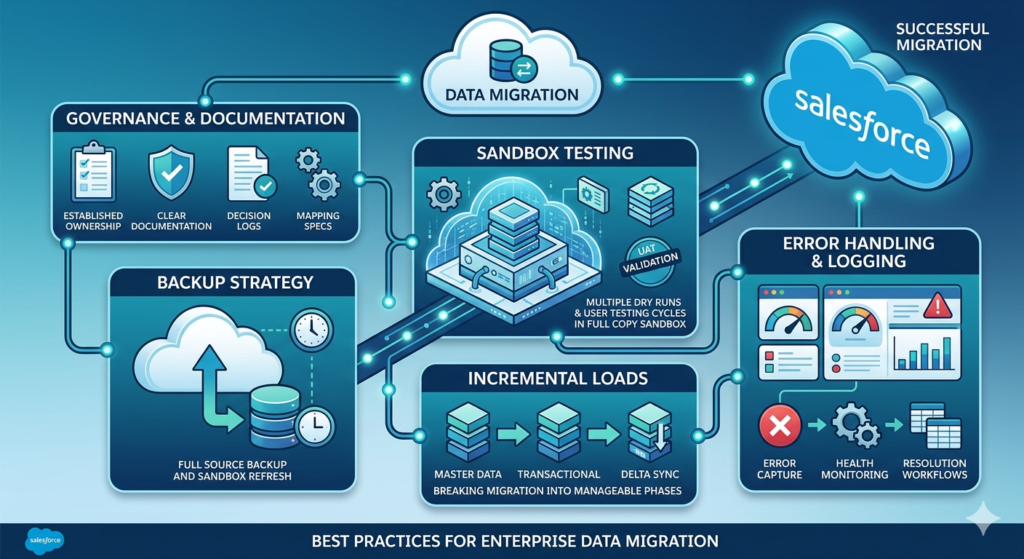
Establish Clear Ownership:
- Assign executive sponsor accountable for migration success
- Define data stewards responsible for each data domain
- Establish technical leads for migration execution
- Create RACI matrix for all migration activities
Document Everything:
- Data mapping specifications
- Transformation rules with business justification
- Decision logs for data quality choices
- Runbooks for execution procedures
- Lessons learned throughout the project
Backup Strategy
Never migrate without comprehensive backups:
- Full export of source system data before migration
- Salesforce sandbox refresh before loading
- Weekly full exports during migration project
- Document backup locations and restoration procedures
Sandbox Testing
Test exhaustively before production:
- Use Full Copy sandbox for realistic testing when possible
- Execute multiple dry runs of complete migration
- Validate with production-equivalent data volumes
- Include UAT cycles with actual business users
- Test rollback procedures in sandbox
Incremental Loads
Break migration into manageable increments:
- Load master data first, validate, then proceed
- Migrate recent transactional data before historical
- Consider weekly incremental loads during parallel operation
- Plan delta synchronization for cutover window
Error Handling and Logging
Plan for failures:
- Implement comprehensive error capture in all jobs
- Create staging tables for rejected records
- Define error severity levels and response procedures
- Build dashboards to monitor migration health
- Establish error resolution workflows
Practical Use Case: Legacy Banking System to Salesforce Migration
To illustrate these principles in action, consider a realistic enterprise migration scenario.
Scenario Overview
Organization: Regional bank with 15 branches and 500,000 customers
Source System: 20-year-old custom-built core banking CRM (Oracle database)
Target: Salesforce Financial Services Cloud
Data Volume:
- 500,000 customer records (Accounts)
- 1.2 million contact records
- 3.5 million service interaction records (Cases)
- 850,000 financial account records (custom objects)
- 2.1 million transaction records (historical)
- 500 GB of documents and correspondence
Timeline: 6 months from project initiation to go-live
Migration Strategy Executed
Phase 1: Assessment (Weeks 1-4)
- Discovered 23% duplicate customer records in source system
- Identified 180 data quality issues requiring remediation
- Documented 47 data entities requiring mapping
- Assessed 8 integration touchpoints
Phase 2: Data Quality (Weeks 5-10)
- Deduplicated customer records (reduced 500K to 385K unique)
- Standardized addresses using USPS validation
- Enriched incomplete records with third-party data
- Established master data governance for ongoing quality
Phase 3: Design and Mapping (Weeks 6-12)
- Mapped legacy entities to Financial Services Cloud model
- Designed 12 custom objects for banking-specific data
- Created comprehensive field mapping specifications
- Defined transformation rules for 200+ fields
Phase 4: Build and Test (Weeks 10-18)
- Configured Informatica Cloud integration jobs
- Executed 5 full dry-run migrations in sandbox
- Performed UAT with 25 business users across branches
- Achieved 99.7% reconciliation accuracy
Phase 5: Deployment (Weeks 22-24)
- Migrated master data (customers, contacts) in Phase 1 (Week 22)
- Migrated financial accounts and recent cases in Phase 2 (Week 23)
- Migrated historical transactions in Phase 3 (Week 24)
- Documents migrated incrementally post-go-live
Results:
- Zero data loss incidents
- 99.94% data accuracy achieved
- 4-hour cutover window for each phase
- Full production operation achieved on schedule
- 15% improvement in data quality versus source system
Common Mistakes to Avoid: Why Most Data Migrations Fail
Understanding failure patterns helps you avoid them.
Mistake 1: Underestimating Data Quality Issues
The Trap: Organizations assume source data is “good enough” and skip thorough assessment.
The Reality: Legacy systems accumulate data debt for years. What looks manageable in sampling becomes catastrophic at scale.
The Fix: Invest significant effort in data profiling, quality assessment, and cleansing before migration begins.
Mistake 2: Inadequate Testing
The Trap: Time pressure leads to abbreviated testing cycles or skipping UAT.
The Reality: Issues not caught in testing become production incidents affecting real users and customers.
The Fix: Build comprehensive testing into the plan from the start. Never sacrifice testing to meet deadlines.
Mistake 3: Ignoring Relationship Complexity
The Trap: Teams focus on individual objects without understanding how they interconnect.
The Reality: Salesforce’s relational model is unforgiving. Broken relationships cascade into widespread data integrity failures.
The Fix: Map relationships thoroughly. Test relationship integrity explicitly. Plan load sequencing meticulously.
Mistake 4: No Rollback Plan
The Trap: Teams assume migration will succeed and don’t plan for failure.
The Reality: Production issues occur even in well-planned migrations. Without rollback capability, you’re trapped with broken data.
The Fix: Design, document, and test rollback procedures before executing production migration.
Mistake 5: Treating Migration as a Technical Exercise
The Trap: Migration is delegated entirely to technical teams without business involvement.
The Reality: Data decisions require business judgment. Technical teams can’t determine what data matters, how to handle duplicates, or what constitutes acceptable quality.
The Fix: Engage business stakeholders throughout. Data stewards must own quality decisions.
Mistake 6: Unrealistic Timelines
The Trap: Project managers underestimate migration complexity and compress timelines.
The Reality: Data migration consistently takes longer than planned. Rushed migrations fail.
The Fix: Build realistic buffers into timelines. Plan for multiple testing iterations.
Mistake 7: Migrating Everything
The Trap: Organizations attempt to migrate every record from legacy systems.
The Reality: Not all data is valuable. Migrating junk data wastes effort and pollutes the new system.
The Fix: Apply ruthless filtering. Archive what’s not needed. Migrate only what delivers value.
About RizeX Labs
At RizeX Labs, we help enterprises and Salesforce professionals execute complex Salesforce implementations through expert consulting, architecture guidance, and real-world implementation expertise.
Our team specializes in enterprise Salesforce delivery, large-scale data migrations, system integrations, and platform optimization—helping organizations transition to Salesforce efficiently and with minimal risk.
Whether you’re planning a CRM migration, consolidating legacy systems, or designing enterprise data strategies, RizeX Labs provides the expertise needed for successful Salesforce implementations at scale.
Internal Linking Opportunities:
- Link to your Salesforce Implementation Services page
- Salesforce Shield: Encryption, Event Monitoring and Field Audit Trail Explained
- DevOps Roadmap for Salesforce: Tools, Skills, and Certifications You Need in 2026
- How to Build a Salesforce Portfolio That Gets You Hired (With Project Ideas)
- Salesforce Admin vs Developer: Which Career Path is Right for You in 2026?
- Wealth Management App in Financial Services Cloud
External Linking Opportunities:
- Salesforce Official Website
- Salesforce Data Migration Guide
- Salesforce Data Loader Documentation
- Salesforce Data Import Wizard Docs
- Salesforce Architect Center
Quick Summary
A successful Salesforce data migration strategy is critical for enterprise implementations where large volumes of business-critical data must be moved from legacy systems into Salesforce accurately, securely, and efficiently.
Enterprise data migration involves more than importing records—it requires careful planning around data quality, transformation, mapping, governance, validation, and rollback strategies to minimize risk during implementation.
By following a structured Salesforce migration strategy, organizations can ensure clean data, smooth go-lives, and scalable Salesforce environments that support long-term business growth.
