
Introduction: Why Agentforce Is the Biggest Shift in CRM Since the Cloud
Let’s be honest — automation in Salesforce has always been powerful. Flows, Process Builder, Einstein Bots… they’ve all helped businesses work smarter. But most of these tools still required humans to set the rules, define every decision path, and babysit the process whenever something unexpected happened.
That’s about to change. Dramatically.
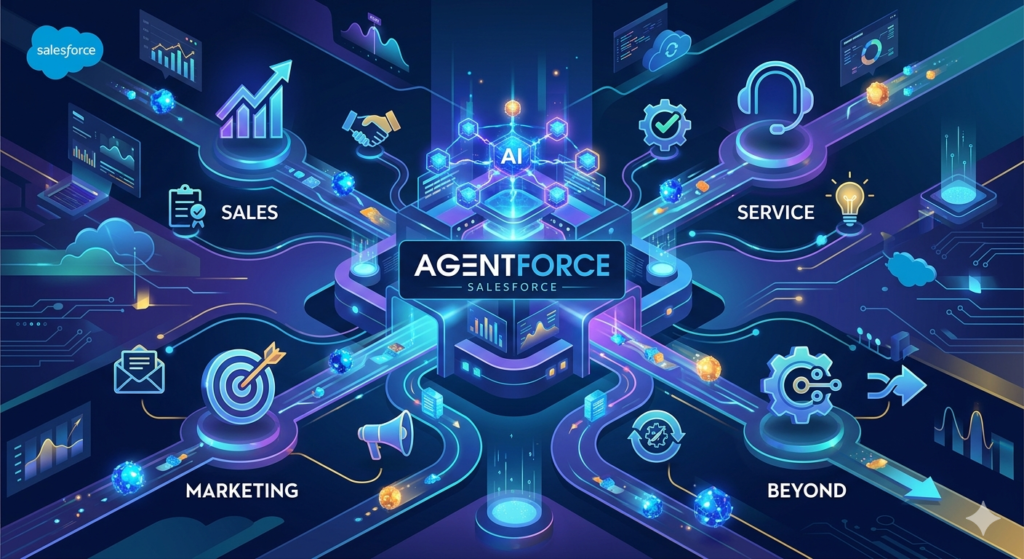
Agentforce is Salesforce’s next-generation AI platform — and it doesn’t just automate tasks. It creates autonomous AI agents that can think, decide, and act on behalf of your team across sales, service, marketing, and beyond. If you’re looking for a build agentforce agent tutorial that actually walks you through the real setup — step by step, no fluff — you’re in the right place.
In this guide, we’re going to take you from zero to having a fully functional Agentforce agent running in your Salesforce org. Whether you’re a Salesforce admin, a developer, a CRM consultant, or just someone who’s heard the buzz and wants to understand what this really means — this tutorial is built for you.
Quick Stat: According to Salesforce’s own research, businesses using AI-powered agents report up to 30% improvement in customer response times and significant reductions in manual workload. Agentforce is built to deliver exactly that — at scale.
Let’s dive in.
What Is Agentforce? A Plain-English Explanation
Before we start building, let’s make sure we’re on the same page about what Agentforce actually is.
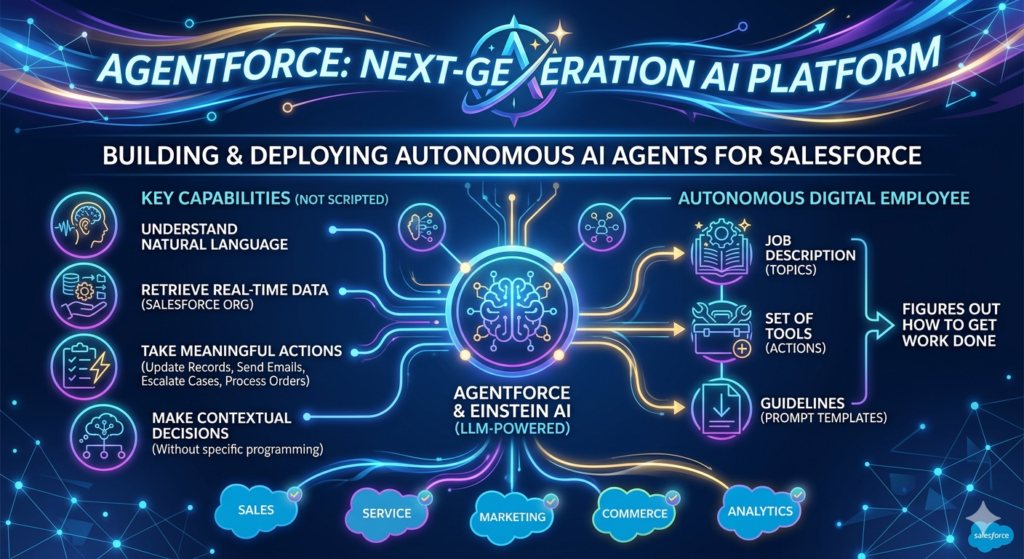
Agentforce is Salesforce’s platform for building and deploying autonomous AI agents. These aren’t your grandma’s chatbots that follow a script. Agentforce agents are powered by large language models (LLMs) and Salesforce’s own Einstein AI layer, which means they can:
- Understand natural language from customers or employees
- Retrieve relevant data from your Salesforce org in real time
- Take meaningful actions — update records, send emails, escalate cases, process orders
- Make contextual decisions without being programmed for every possible scenario
Think of an Agentforce agent as a highly capable digital employee. You give it a job description (topics), a set of tools (actions), and guidelines (prompt templates) — and it figures out how to get the work done.
How Agentforce Fits Into the Salesforce Ecosystem
Agentforce sits at the intersection of several powerful Salesforce technologies:
| Technology | Role in Agentforce |
|---|---|
| Einstein AI | Powers reasoning, language understanding, and decision-making |
| Salesforce Data Cloud | Provides real-time, unified customer data to the agent |
| Flows | Executes business processes when the agent triggers them |
| Prompt Builder | Manages the AI instructions that shape agent behavior |
| MuleSoft / APIs | Extends agent capabilities to external systems |
Think of it this way: Einstein AI is the brain, Data Cloud is the memory, Flows are the hands, and Agentforce is the whole person putting it all together.
Benefits of AI Agents in Salesforce
Before we get into the agentforce setup guide, let’s talk about why you’d want to build one in the first place.
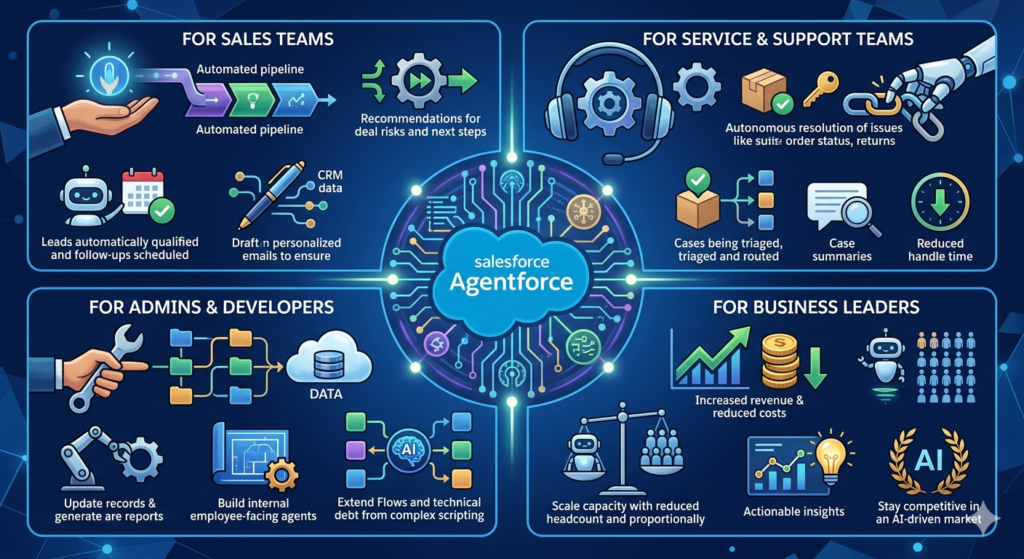
For Sales Teams
- Automatically qualify leads and schedule follow-ups
- Draft personalized outreach emails using CRM data
- Surface deal risks and next-best-action recommendations
- Handle routine prospect questions 24/7
For Service & Support Teams
- Resolve common customer issues autonomously (order status, returns, password resets)
- Intelligently triage and route complex cases to the right agents
- Summarize case history before a human takes over
- Reduce average handle time significantly
For Admins & Developers
- Automate repetitive admin tasks like record updates and report generation
- Build internal employee-facing agents for HR, IT, or operations
- Extend existing Flows and automations with AI-powered decision-making
- Reduce technical debt from complex chatbot scripting
For Business Leaders
- Reduce operational costs without sacrificing customer experience
- Scale support capacity without proportionally scaling headcount
- Get actionable insights from AI interaction data
- Stay competitive in a rapidly AI-driven market
Agentforce vs. Traditional Chatbots: What’s Actually Different?
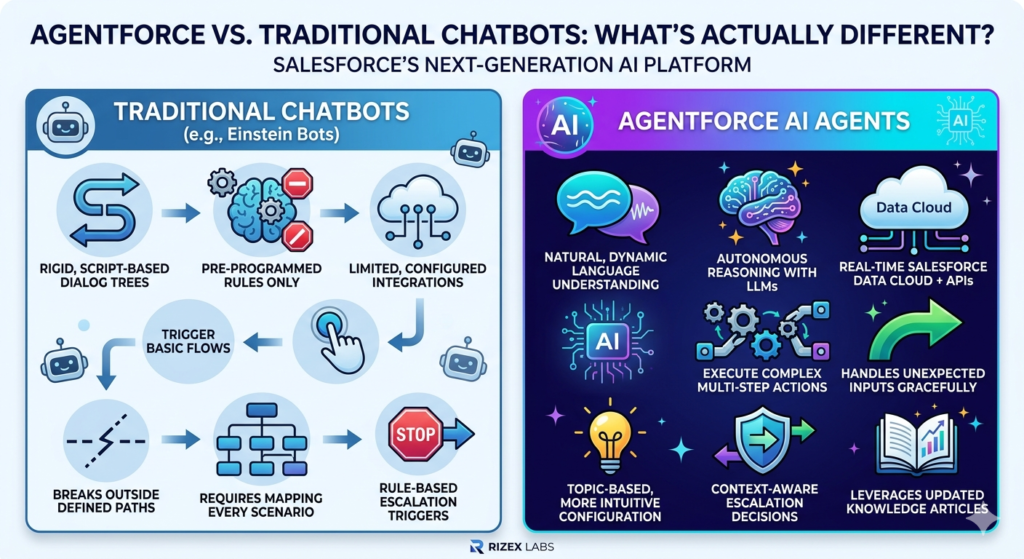
This is one of the most common questions we get at RizeX Labs when working with clients who’ve used Einstein Bots or other chatbot tools before. Here’s a clear side-by-side comparison:
| Feature | Traditional Chatbots (Einstein Bots) | Agentforce AI Agents |
|---|---|---|
| Conversation Style | Rigid, script-based dialog trees | Natural, dynamic language understanding |
| Decision Making | Pre-programmed rules only | Autonomous reasoning with LLMs |
| Data Access | Limited, configured integrations | Real-time Salesforce Data Cloud + APIs |
| Actions | Trigger basic flows | Execute complex multi-step actions |
| Adaptability | Breaks outside defined paths | Handles unexpected inputs gracefully |
| Setup Complexity | Requires mapping every scenario | Topic-based, more intuitive to configure |
| Escalation Intelligence | Rule-based escalation triggers | Context-aware escalation decisions |
| Learning | Static unless manually updated | Can leverage updated knowledge articles |
The bottom line? Traditional chatbots are great for simple, predictable interactions. Agentforce agents are built for complex, real-world conversations where customers don’t always follow the script — because they never do.
Prerequisites Before You Start
Before jumping into the how to create AI agent Salesforce steps, make sure you have the following in place.
Salesforce Org Requirements
- Salesforce Edition: Enterprise, Unlimited, or Developer Edition (Agentforce is not available on Professional Edition by default)
- Agentforce License: You need the Agentforce for Service, Sales, or Platform add-on license depending on your use case
- Einstein AI Enabled: Verify Einstein features are turned on in your org
- Data Cloud (Recommended): While not strictly required for basic agents, Data Cloud significantly enhances agent intelligence
Permissions & Access
- System Administrator profile or a custom profile with:
- “Manage Bots” permission
- “Einstein Agent” feature access
- Access to Setup, Flows, and Prompt Builder
- Ensure your user is assigned the Agentforce User permission set
Knowledge & Skills Checklist
You don’t need to be a developer, but it helps to be familiar with:
- Salesforce Setup navigation
- Basic Flows (Screen Flows or Auto-launched Flows)
- Salesforce Objects and fields
- Basic understanding of what prompts/instructions mean in AI context
Pro Tip from RizeX Labs: If you’re working in a production org, always build and test your Agentforce agent in a Sandbox first. Use a Developer Sandbox or Full Copy Sandbox for realistic testing before going live.
Step-by-Step Hands-On Tutorial: Build Your First Agentforce Agent
Alright — let’s build. We’re going to create a Customer Service AI Agent that can handle common support queries, check order status, and escalate complex issues to a human agent.
Step 1: Enable Agentforce in Your Salesforce Org
The first step in our agentforce setup guide is making sure the feature is activated.
- Go to Setup (gear icon in the top-right corner)
- In the Quick Find search bar, type “Agentforce”
- Click on Agentforce Agents under the Einstein section
- If prompted, click Get Started or Enable Agentforce
- Accept any terms of service if shown
- Confirm Einstein AI features are enabled by navigating to Setup → Einstein → Einstein Features and toggling on relevant capabilities
[Insert Screenshot: Agentforce Setup Screen]
Note: If you don’t see Agentforce in your Setup menu, your org may not have the required license. Contact your Salesforce Account Executive or check AppExchange for trial options.
Step 2: Create Your First Agent
Now for the fun part — creating your actual agent.
- In Setup, navigate to Agentforce Agents (Quick Find: “Agentforce Agents”)
- Click New Agent
- You’ll be presented with agent type options:
- Agentforce Service Agent (for customer-facing service)
- Agentforce Sales Agent (for sales-related tasks)
- Agentforce Internal Agent (for employee-facing use)
- Custom Agent (full control over configuration)
- For this tutorial, select Agentforce Service Agent
- Give your agent a name:
RizeX Support Agent - Add a description:
Handles customer support queries, checks order status, and escalates complex issues - Choose the channel where this agent will be deployed (e.g., Messaging, Experience Cloud, or Embedded Service Chat)
- Click Save & Continue
[Insert Screenshot: Agentforce Agent Creation Form]
You’re now inside the Agentforce Agent Builder — the visual workspace where you’ll configure everything your agent knows and can do.
Step 3: Define Agent Topics
Topics are essentially the “job descriptions” for your agent. They tell the agent what kinds of conversations it’s responsible for handling.
Think of topics like departments: Order Management, Returns & Refunds, Technical Support, Account Information, etc.
To create a Topic:
- Inside Agent Builder, click on the Topics tab
- Click New Topic
- Fill in the following:
- Topic Label:
Order Status Inquiries - Description:
Handles customer questions about their order status, shipping updates, and estimated delivery times - Scope (Instructions to the AI):
You handle all questions related to order tracking and delivery. Always greet the customer, retrieve their order information using their order number or email, and provide clear status updates. If an order is delayed more than 5 days, escalate to a human agent.
- Topic Label:
- Click Save
Repeat this to create additional topics such as:
Returns & Refund RequestsAccount & Billing InquiriesGeneral FAQ
Important: The Topic Description and Scope are prompt instructions fed directly to the Einstein AI model. Write them in clear, specific language. The more precise you are, the better your agent will behave. Vague instructions lead to vague responses.
Step 4: Configure Agent Actions
Actions are what your agent can actually do. This is where the magic happens. An agent isn’t useful if it can only talk — it needs to act.
Agentforce supports several types of actions:
| Action Type | What It Does |
|---|---|
| Flow | Triggers a Salesforce Flow (auto-launched) |
| Apex | Calls custom Apex logic |
| API Call | Hits an external API endpoint |
| Knowledge Search | Searches Knowledge Articles |
| Record CRUD | Creates, reads, updates, or deletes Salesforce records |
| Prompt Template | Uses a predefined AI prompt to generate a response |
To add an Action to a Topic:
- Inside your
Order Status Inquiriestopic, click Add Action - Select Flow as the action type
- Click Select Flow — you’ll need to have a Flow already built (we’ll cover this in Step 6)
- For now, let’s add a Knowledge Search action:
- Action Type:
Knowledge Search - Label:
Search Order FAQs - Description:
Searches the knowledge base for answers to common order-related questions - Select relevant knowledge article categories
- Action Type:
- Click Save Action
Pro Tip: Add a “Transfer to Human Agent” action to every topic. This ensures your agent always has an exit strategy for conversations it can’t handle. Never leave a customer stuck.
Step 5: Build Prompt Templates
Prompt Templates are pre-built instructions that shape how the AI generates its responses. They’re managed in Prompt Builder and can be linked to your agent actions.
To create a Prompt Template:
- Go to Setup → Prompt Builder
- Click New Prompt Template
- Choose template type:
- Sales Email — for generating outreach emails
- Field Generation — for auto-populating record fields
- Flex Template — for custom use cases (we’ll use this)
- Select Flex Template
- Name it:
Order Status Response Template - In the Prompt Editor, write your template. Example:
textYou are a helpful customer service agent for RizeX Labs clients.
The customer is asking about their order.

Customer Name: {!Order.CustomerName}
Order Number: {!Order.OrderNumber}
Order Status: {!Order.Status}
Estimated Delivery: {!Order.EstimatedDeliveryDate}

Generate a friendly, professional response updating the customer on their order status.
If the order is delayed, apologize and offer to escalate if needed.
Keep the response under 100 words.
- Use Merge Fields (the curly brace syntax) to dynamically pull in real Salesforce data
- Click Activate to make the template available to your agent
[Insert Screenshot: Einstein AI Prompt Template Editor in Agentforce]
Key Insight: Prompt Templates are where you inject your brand voice, compliance requirements, and specific business logic into the AI’s behavior. Take time to refine these — they have enormous impact on response quality.
Step 6: Connect Flows to Your Agent
For actions that require actual data retrieval or record manipulation, you’ll use Salesforce Flows. Let’s build a simple Auto-launched Flow that retrieves order information.
Build the Order Lookup Flow:
- Go to Setup → Flows → New Flow
- Select Auto-launched Flow (No Trigger)
- Name it:
Get_Order_Status_Flow - Add an Input Variable:
- Variable Name:
OrderNumber - Data Type: Text
- Available for Input:
- Variable Name:
- Add a Get Records element:
- Object:
Order(or your custom order object) - Filter:
Order Number equals {!OrderNumber} - Store result in:
OrderRecord
- Object:
- Add Output Variables for the fields you need (Status, Delivery Date, etc.)
- Save and Activate the Flow
Connect the Flow to Your Agent Action:
- Back in Agent Builder, go to your topic
- Click Add Action → Flow
- Select
Get_Order_Status_Flow - Map the input variable: Agent collects
OrderNumberfrom the customer and passes it to the Flow - Map output variables back to your Prompt Template merge fields
- Save
Note: Flows connected to Agentforce agents must be Auto-launched Flows. Screen Flows won’t work here since the agent controls the conversation UI.
Step 7: Test Your Agent in Agent Builder
This is one of the most important — and most fun — steps. Agentforce includes a built-in Conversation Simulator so you can test your agent before anyone else sees it.
How to Test:
- Inside Agent Builder, click the Preview button (usually in the top-right)
- A chat window will appear — this is the conversation simulator
- Start typing as if you were a customer:
- “Hi, I want to check on my order”
- “My order number is 12345”
- “When will it arrive?”
- Watch how the agent responds, what actions it triggers, and how it handles the conversation
- Check the Debug Panel (usually on the right side of the simulator) to see:
- Which topic was activated
- Which actions were triggered
- What data was retrieved
- How the prompt template was populated
What to Look for During Testing:
- Does the agent correctly identify the topic?
- Are actions triggering at the right moment?
- Is the language natural and on-brand?
- Does it handle unexpected inputs gracefully?
- Does it escalate when it should?
- Watch for hallucinated information (AI making up data not in your org)
- Watch for off-topic responses if the agent scope is too broad
Iterate on your topic instructions, actions, and prompt templates until the behavior is consistently what you expect.
Step 8: Deploy Your Agent
Once you’re happy with testing, it’s time to go live.
Deployment Steps:
- In Agent Builder, click Activate Agent
- Choose your Deployment Channel:
- Embedded Service Chat — for website chat widgets
- Experience Cloud — for community portals
- Messaging (SMS/WhatsApp) — via Salesforce Messaging
- Slack — for internal agents
- Custom API — for custom frontend integrations
- Configure Channel Settings (branding, operating hours, fallback behavior)
- Copy the Deployment Code Snippet if deploying to a website
- Paste it into your website’s HTML or Experience Cloud page
- Set Operating Hours — decide if your agent runs 24/7 or only during business hours
- Configure Escalation Rules — define when and how the agent transfers to a human
- Click Go Live
[Insert Screenshot: Agentforce Deployment Screen with Activation Toggle]
Congratulations! Your first Agentforce agent is live. You’ve just deployed an autonomous AI agent in Salesforce — something that would have required significant developer effort and expensive third-party tools just a few years ago.
Real-World Use Case: AI-Powered Service Agent for a Retail Company
To make this concrete, let’s look at how a mid-sized retail company might use the exact agent we just built.
Company: StyleForward Retail (fictional example)
Challenge: Their support team was overwhelmed with repetitive queries — order status, return eligibility, store hours — handling 800+ tickets per day with a team of 12 agents.
Agentforce Solution Built by RizeX Labs:
| Agent Topic | Actions Configured | Result |
|---|---|---|
| Order Status | Get Order Flow + Knowledge Search | 60% of order queries handled autonomously |
| Returns | Check Return Eligibility Flow + Create Return Case | 40% reduction in return-related tickets |
| Store Hours & FAQs | Knowledge Article Search | Instant answers, no human needed |
| Complex Issues | Transfer to Human Agent + Case Summary Prompt | Humans receive context-rich handoffs |
Results After 60 Days:
- 55% reduction in average first response time
- Customer satisfaction (CSAT) improved by 18 points
- 68% of incoming chats fully resolved by the AI agent
- Estimated $180K annual savings in support operational costs
This is a realistic representation of what Agentforce can deliver when implemented correctly. The RizeX Labs team worked with StyleForward to configure topics, build custom Flows, and tune prompt templates over a 6-week implementation engagement.
Common Mistakes & Troubleshooting Tips
Even experienced Salesforce professionals run into issues when first working with Agentforce. Here are the most common ones — and how to fix them.
Mistake 1: Writing Vague Topic Instructions
Problem: Agent gives generic, unhelpful responses.
Fix: Be hyper-specific in your Topic Scope. Define what the agent should do, what it shouldn’t do, what tone to use, and when to escalate.
Mistake 2: Not Testing Edge Cases
Problem: Agent works perfectly in scripted tests but fails in real conversations.
Fix: Test with unexpected inputs, typos, and off-topic messages. Make sure the agent has graceful fallback responses.
Mistake 3: Forgetting to Activate Flows
Problem: Agent triggers an action but nothing happens; Flow doesn’t execute.
Fix: Always ensure Flows linked to agent actions are in Active status.
Mistake 4: Prompt Templates Without Dynamic Data
Problem: Agent gives static responses that don’t reference actual customer data.
Fix: Always use Merge Fields in your Prompt Templates to pull real-time data from Salesforce records.
Mistake 5: Skipping the Human Escalation Path
Problem: Customers get stuck in loops when the agent can’t resolve their issue.
Fix: Every topic must have a “Transfer to Human” action as a fallback. Configure it with a graceful handoff message and a case summary for the human agent.
Mistake 6: Deploying Directly to Production
Problem: Bugs, unexpected behaviors, and embarrassing AI responses go live to real customers.
Fix: Always test in Sandbox. Use UAT (User Acceptance Testing) with internal team members before enabling for customers.
Troubleshooting: Agent Not Recognizing Topics
- Review your Topic Description — is it clear enough for the AI to match conversations to it?
- Check if your agent has been Activated (not just saved)
- Ensure the correct topics are enabled for the deployment channel you’re testing
Troubleshooting: Flow Not Firing
- Confirm the Flow is Active
- Check that input variable names match exactly between the agent action configuration and the Flow
- Review Flow debug logs in Setup → Flows → Debug
Best Practices for Production-Ready Agentforce Agents
Building a working agent is step one. Building a production-ready agent that performs reliably for real customers is the real goal. Here’s what the RizeX Labs implementation team recommends:
1. Start Narrow, Then Expand
Don’t try to build an agent that handles everything on day one. Start with 2–3 high-volume, well-defined use cases. Master those, then layer in complexity.
2. Build a Knowledge Base First
Your agent is only as good as the information it can access. Before launch, make sure your Salesforce Knowledge base is populated with accurate, up-to-date articles.
3. Establish Clear Escalation Rules
Define exactly when your agent should hand off to a human:
- Customer requests a human
- Issue requires approval or judgment
- Safety or legal topics arise
- Agent has attempted resolution 2+ times unsuccessfully
4. Monitor Agent Performance Regularly
Use Salesforce’s built-in Agentforce Analytics to track:
- Containment rate (conversations resolved without human)
- Escalation rate
- Topic distribution
- Customer satisfaction ratings
5. Iterate on Prompt Templates Monthly
AI behavior can drift as customer language evolves. Review and refine prompt templates on a regular cadence based on real conversation data.
6. Implement Guardrails
Use Topic Scope instructions to explicitly tell the agent what it should never do:
- “Do not make promises about refunds without checking policy”
- “Never share other customers’ personal data”
- “Do not discuss competitor products”
7. Maintain Compliance Documentation
If your business operates in regulated industries (healthcare, finance, etc.), document your agent’s behavior, guardrails, and data access for compliance purposes.
8. Version Control Your Flows
Treat Flows connected to agents like code. Use Salesforce Change Sets or Salesforce DX to track changes and enable rollback if something breaks.
RizeX Labs Insight: The most successful Agentforce implementations we’ve delivered share one common trait — a dedicated “Agent Owner” on the client team. This is someone responsible for monitoring performance, gathering feedback, and managing the agent’s ongoing improvement. Think of it as hiring a manager for your AI employee.
How RizeX Labs Can Help You Implement Agentforce
We know the tutorial above covers a lot of ground — and we’ve kept it as practical as possible. But real-world Agentforce implementations often involve additional complexity:
- Custom objects and complex data models that require specialized Flow logic
- Multi-channel deployment across chat, SMS, Slack, and Experience Cloud simultaneously
- Integration with external systems via APIs and MuleSoft
- Regulated industry requirements with specific AI governance needs
- Change management and training for human agents working alongside AI
That’s where RizeX Labs comes in.
As a specialized Salesforce AI and Agentforce implementation partner, our team has hands-on experience designing, building, and deploying production-ready Agentforce agents for businesses across retail, financial services, healthcare, and technology.
What we offer:
- Agentforce Readiness Assessment
- End-to-End Agent Design & Build
- CRM + AI Integration Services
- AI Performance Monitoring & Optimization
- Admin & User Training Programs
Whether you want us to build your first agent from scratch or optimize an existing one that’s not performing, we’re here to help.
[Internal Link: Salesforce AI Services]
Ready to get started? Contact RizeX Labs today for a free Agentforce consultation.
Conclusion: Your Journey with Agentforce Starts Now
We’ve covered a lot in this build agentforce agent tutorial — from understanding what Agentforce actually is, to walking through every step of building, testing, and deploying your first AI agent in Salesforce.
Here’s a quick recap of what you’ve learned:
- What Agentforce is and how it differs from traditional chatbots
- The business benefits of deploying AI agents in Salesforce
- Prerequisites and org requirements to get started
- How to enable Agentforce and navigate Agent Builder
- How to configure Topics, Actions, Prompt Templates, and Flows
- How to test using the Conversation Simulator
- How to deploy your agent to a live channel
- Real-world results and common pitfalls to avoid
- Best practices for keeping your agent production-ready
The era of autonomous AI agents in Salesforce isn’t coming — it’s here. And the organizations that learn to build, deploy, and optimize these agents now will have a significant competitive advantage in their industries.
Start small. Build one agent for one use case. Learn from real data. Then expand.
Your AI workforce is waiting to be hired.
About RizeX Labs
We’re Pune’s leading IT training institute specializing in emerging technologies like Salesforce, AI, and data analytics. At RizeX Labs, we help professionals master cutting-edge tools like Agentforce, Einstein AI, and Data Cloud through hands-on training, real-world projects, and expert mentorship. Our programs are designed to transform learners into job-ready AI specialists and Salesforce professionals with the technical skills to lead the next wave of CRM innovation.
Internal Links:
- Salesforce AI & Agentforce Specialist Training
- Mastering Salesforce Data Cloud: A Comprehensive Guide
- Salesforce Flows vs. Apex: When to Use Which for AI Actions
