
Introduction: Why GDPR Compliance in Salesforce Can't Wait
Data is the lifeblood of modern business. But with great data comes great responsibility — and in 2026, that responsibility has never been heavier. Regulatory scrutiny is tightening, enforcement actions are increasing, and customers are more aware than ever of their privacy rights.
If your organization uses Salesforce to manage customer data — and millions of businesses worldwide do — then understanding Salesforce GDPR compliance isn't optional. It's a fundamental business requirement.
The General Data Protection Regulation (GDPR) has been in effect since May 2018, but many organizations still struggle with inconsistent implementation, especially within complex CRM environments like Salesforce. With evolving interpretations of the regulation, growing data volumes, and increasingly sophisticated integration ecosystems, 2026 presents new challenges — and new urgency.
The stakes are real. Non-compliance can result in fines of up to €20 million or 4% of annual global turnover — whichever is higher. Beyond the financial penalties, data breaches and compliance failures can irreparably damage customer trust, disrupt operations, and invite prolonged regulatory investigations.
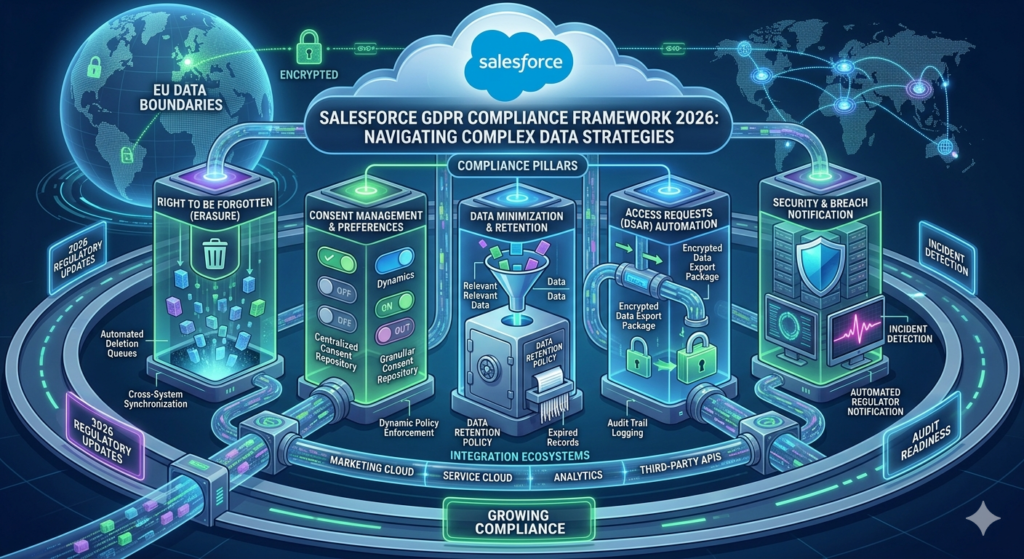
In this guide, RizeX Labs breaks down exactly what Salesforce admins, IT leaders, and business decision-makers need to know to build a robust, future-proof Salesforce data privacy framework. From configuration steps to native tools to common pitfalls, this is your comprehensive roadmap for GDPR compliance in Salesforce.
What Is GDPR and Why It Matters in Salesforce
The Core Principles of GDPR
GDPR is a comprehensive data protection regulation established by the European Union. While it originated in the EU, its scope extends to any organization that processes or stores personal data of EU residents — regardless of where the company is headquartered. This extraterritorial reach means businesses in the US, UK, Australia, and beyond must comply if they serve European customers.
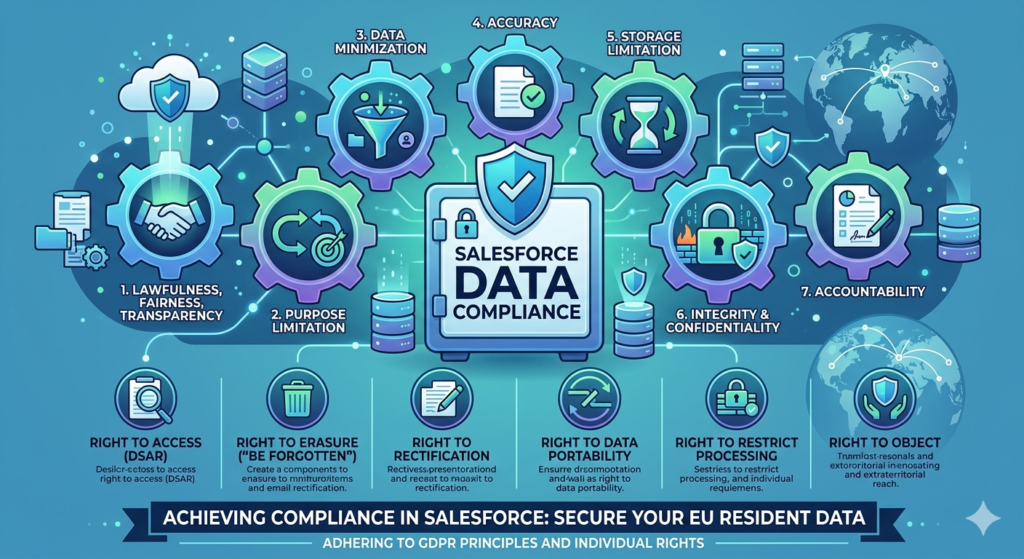
At its core, GDPR is built on seven foundational principles:
- Lawfulness, Fairness, and Transparency — Data must be collected and processed with a clear legal basis and communicated transparently to individuals.
- Purpose Limitation — Data collected for one purpose cannot be repurposed without additional consent.
- Data Minimization — Organizations should only collect the minimum data necessary for the stated purpose.
- Accuracy — Personal data must be kept accurate and up to date.
- Storage Limitation — Data should not be retained longer than necessary.
- Integrity and Confidentiality — Data must be secured against unauthorized access, loss, or destruction.
- Accountability — Organizations must be able to demonstrate compliance through documentation and controls.
Beyond these principles, GDPR grants individuals several key rights:
- Right to Access (DSAR): Individuals can request a copy of their data.
- Right to Erasure ("Right to Be Forgotten"): Individuals can request deletion of their data under certain conditions.
- Right to Rectification: Individuals can request correction of inaccurate data.
- Right to Data Portability: Individuals can request their data in a machine-readable format.
- Right to Restrict Processing: Individuals can limit how their data is used.
- Right to Object: Individuals can object to certain types of data processing, including direct marketing.
How Salesforce Stores and Processes Customer Data
Salesforce is a cloud-based CRM platform that stores vast amounts of personal data — contact information, communication histories, behavioral data, transaction records, support tickets, and more. As a data processor on behalf of its customers, Salesforce operates under its own compliance framework. However, the data controller — the business using Salesforce — remains primarily responsible for ensuring that how data is collected, stored, and used aligns with GDPR requirements.
Within Salesforce, personal data can live in:
- Standard objects (Contacts, Leads, Accounts, Cases)
- Custom objects built by your team
- Custom fields added to standard objects
- Files and attachments
- Chatter posts and activity logs
- Third-party application data synced via APIs or AppExchange apps
Because data is spread across multiple objects, fields, and systems, achieving true visibility — and therefore true compliance — requires deliberate, structured effort.
Key Challenges in Salesforce GDPR Compliance
Before diving into solutions, it's worth acknowledging the specific challenges that make GDPR Salesforce compliance uniquely complex.
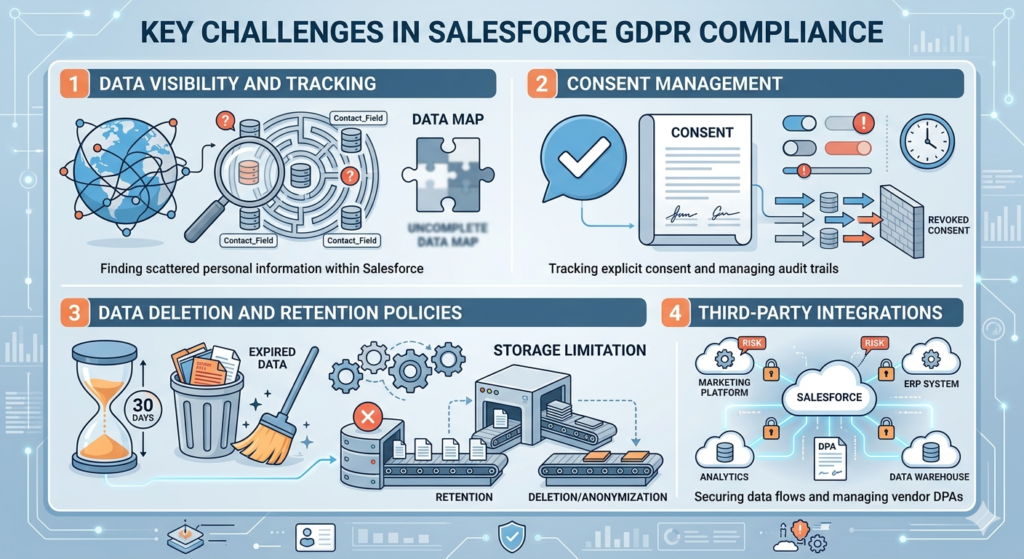
1. Data Visibility and Tracking
Most organizations that have been using Salesforce for several years have accumulated data without a clear map of where personal information lives. Contacts may appear in multiple records; custom fields may store sensitive data without proper labeling; and historical integrations may have imported data that no longer has a clear legal basis.
Without a complete data map, you cannot comply — because you don't know what you're protecting.
2. Consent Management
GDPR requires that consent for data processing be explicit, informed, and freely given. In Salesforce, tracking the source and status of consent across thousands or millions of records is a significant operational challenge. Many organizations lack the consent objects, workflows, and audit trails needed to prove that consent was obtained, recorded, and respected.
3. Data Deletion and Retention Policies
When a customer exercises their right to erasure, your team must be able to locate all instances of their data across Salesforce and connected systems, and delete or anonymize them within 30 days. Without proper workflows and automation, this process is manual, inconsistent, and error-prone.
Similarly, GDPR's storage limitation principle requires that data not be retained beyond its useful purpose. Many Salesforce orgs have no automated retention policies, leading to bloated databases full of data with questionable legal grounds.
4. Third-Party Integrations
Most businesses integrate Salesforce with marketing platforms (Pardot/Marketing Cloud, Mailchimp), ERP systems, data warehouses, analytics tools, and more. Each integration point represents a potential compliance risk — data flowing out of Salesforce may not receive the same level of protection, and Data Processing Agreements (DPAs) must be in place with every third-party processor.
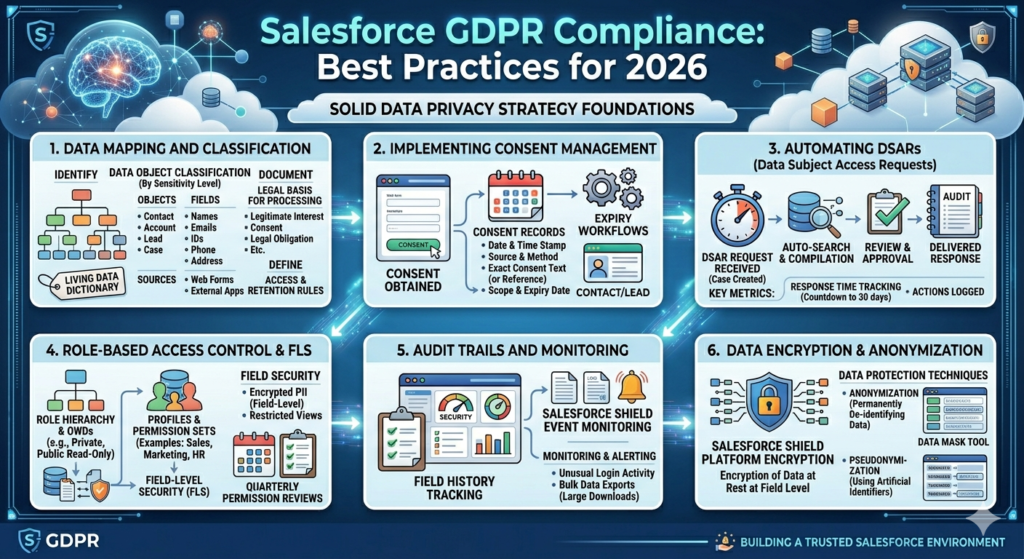
Salesforce GDPR Compliance: Best Practices for 2026
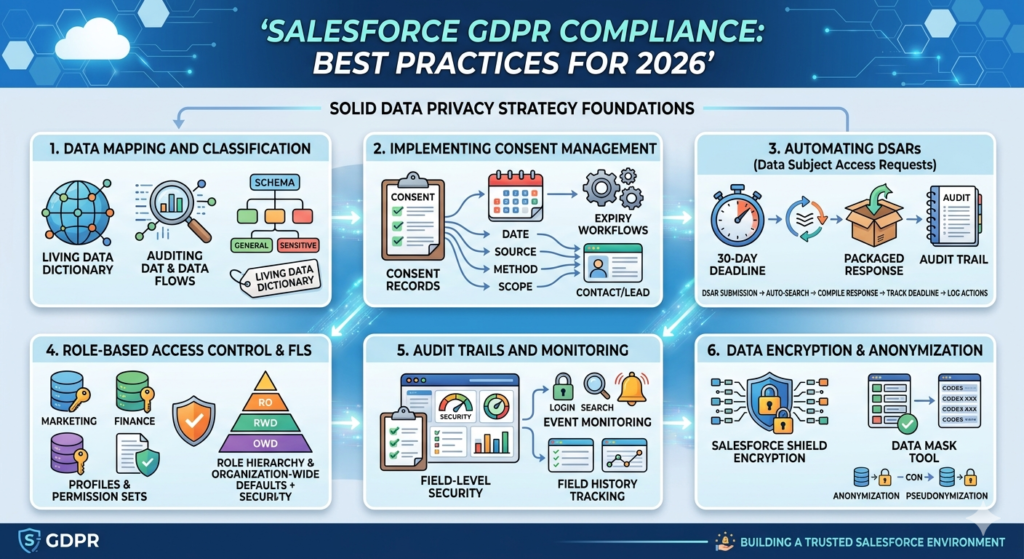
Now that we understand the challenge landscape, let's explore the best practices that form the foundation of a solid Salesforce data privacy strategy.
1. Data Mapping and Classification
Data mapping is the essential first step. Before you can protect data, you must know where it lives.
Conduct a thorough audit of your Salesforce org to identify:
- Which objects and fields contain personal data
- The source of that data (web forms, integrations, manual entry)
- The legal basis for processing each category of data
- Who has access to that data internally
- How long data should be retained
Once mapped, classify your data by sensitivity level. Create a schema that distinguishes between general personal data (name, email), sensitive data (health, financial, biometric information), and data with special regulatory requirements. Document this classification within Salesforce itself using custom metadata or a data dictionary.
Pro Tip from RizeX Labs: Use Salesforce's Field-Level Help text and custom metadata types to tag fields with classification labels. This creates a living data dictionary within your org.
2. Implementing Consent Management in Salesforce
Consent management is one of the most critical — and most frequently under-implemented — aspects of GDPR compliance.
Best practices for consent management in Salesforce:
- Create a dedicated Consent object (Salesforce has a native
Individualobject designed for this purpose under its Privacy Center) - Record the date, source, method, and scope of consent for each individual
- Link consent records to Contact, Lead, and Person Account records
- Implement consent expiry workflows that flag records when consent needs renewal
- Store the exact consent text or a reference to it so you can demonstrate what individuals agreed to
- Ensure marketing preferences are synced with connected platforms like Marketing Cloud
Salesforce's native Individual Object and Data Privacy records provide a foundational framework. For more complex needs, Salesforce's Privacy Center (available as a managed package) extends this capability significantly.
3. Automating Data Subject Access Requests (DSARs)
When a customer submits a DSAR, your organization has 30 days to respond. In a manual environment, this is a race against the clock that often ends in failure. Automation is the answer.
Build workflows in Salesforce that:
- Receive DSAR submissions via a web form or email that creates a Case record
- Automatically trigger a data search across relevant objects using reports or custom automation
- Compile a packaged response with the individual's data
- Track the 30-day deadline and escalate automatically if the deadline approaches
- Log every action taken as part of the DSAR for audit purposes
Salesforce Flow, Process Builder (though being phased out in favor of Flow), and Apex can all be used to build these automations. For erasure requests, your workflow must include steps to either delete or anonymize data across every relevant object.
4. Role-Based Access Control and Field-Level Security
Limiting who can see and interact with personal data is a core GDPR principle — and Salesforce offers robust tools to enforce it.
Implement the following access controls:
- Profiles and Permission Sets: Grant data access based on job function. Marketing users don't need access to financial data; support agents don't need access to raw contact databases.
- Field-Level Security (FLS): Control visibility and editability at the field level. Sensitive fields like national ID numbers, health information, or financial data should be restricted to those with a genuine need.
- Record-Level Sharing: Use Organization-Wide Defaults (OWDs), Sharing Rules, and Role Hierarchy to control which records users can see.
- Data Access Requests Logging: Enable audit trails so you can track who accessed sensitive data and when.
Review your permission sets and profiles at least quarterly. Permission creep — where users accumulate access over time without regular review — is one of the most common compliance vulnerabilities.
5. Audit Trails and Monitoring
GDPR's accountability principle requires that you can demonstrate compliance, not just claim it. This means maintaining comprehensive audit trails.
In Salesforce, enable and configure:
- Field History Tracking: Track changes to sensitive fields, including who made the change, when, and what the previous value was.
- Setup Audit Trail: Monitor configuration changes to your Salesforce org itself.
- Event Monitoring (Salesforce Shield): Gain granular visibility into user activity — who logged in, what they searched for, what records they accessed, and what reports they ran.
- Login and API Usage Logs: Monitor for unusual access patterns that may indicate unauthorized data access.
Establish a regular cadence for reviewing audit logs. For high-risk orgs, consider automated alerting when certain thresholds are breached — for example, a user downloading an unusually large data set.
6. Data Encryption and Anonymization
Encryption protects data at rest and in transit. GDPR doesn't mandate encryption, but it's considered a baseline security measure — and in the event of a breach, encryption can significantly reduce your legal exposure.
Salesforce Shield Platform Encryption allows you to encrypt data at rest at the field level, including data in files, attachments, and custom fields. This is distinct from Salesforce's standard encryption, which is less comprehensive.
Anonymization and pseudonymization are also critical for GDPR compliance:
- Anonymization removes all identifying information so that the data can no longer be linked to an individual. Truly anonymized data falls outside GDPR's scope.
- Pseudonymization replaces identifying data with artificial identifiers. The original data can be retrieved with a key. Pseudonymized data still falls under GDPR but is treated more favorably.
Use Salesforce's Data Mask tool (available in Salesforce Developer and Sandbox environments) to anonymize data in non-production environments, ensuring that testing and development teams don't have access to live personal data.
Step-by-Step Guide to GDPR Salesforce Setup
Knowing the best practices is one thing. Implementing them in your Salesforce org is another. Here's a practical, high-level setup guide.
Step 1: Configure Data Protection Settings
- Navigate to Setup > Data Protection and Privacy
- Enable the Individual Object to start creating data privacy records linked to contacts and leads
- Configure the default data privacy setting for new records
- Enable Tracking field to record how consent was collected
Step 2: Set Up Consent Objects and Fields
- Create or configure the Individual object to store consent and communication preference data
- Add fields for: Consent Date, Consent Source, Consent Type, Consent Expiry Date, and Consent Text Reference
- Link Individual records to Contact and Lead records via the standard
HasOptedOutOfEmailfield and custom consent fields - Create a Consent History custom object or leverage related lists to store a log of all consent changes
Step 3: Create Workflows and Automations for Compliance
- Build Salesforce Flows to:
- Automatically create a DSAR Case when a request is received
- Trigger a 30-day countdown with escalation alerts
- Route erasure or rectification requests to appropriate team members
- Send automated acknowledgment emails to data subjects
- Create scheduled flows to flag records whose consent has expired or whose retention period has passed
- Build data retention dashboards in Salesforce Reports and Dashboards to give compliance officers visibility into aging data
Step 4: Leverage Salesforce Tools for GDPR
- Salesforce Shield: Enables Platform Encryption, Event Monitoring, and Field Audit Trail — critical for enterprise compliance
- Salesforce Privacy Center: A managed package that provides a structured framework for handling DSARs, consent management, and data retention policies
- Data Mask: For anonymizing data in sandbox and development environments
- Salesforce Health Check: Use regularly to identify security configuration gaps that could lead to compliance issues
Step 5: Document Everything
Documentation is your compliance safety net. Maintain:
- A Record of Processing Activities (RoPA) that maps every data processing activity to a legal basis
- Data Processing Agreements with every Salesforce integration partner
- Internal privacy policies and user training records
- DSAR logs and response records
Tools and Features in Salesforce for GDPR Compliance
Salesforce has invested significantly in building native compliance capabilities. Here's a consolidated overview:
Native Salesforce Tools
| Tool/Feature | What It Does | Compliance Use Case |
|---|---|---|
| Individual Object | Stores data privacy preferences | Consent management |
| Privacy Center | Managed package for DSARs and retention | End-to-end compliance workflow |
| Field History Tracking | Tracks changes to specific fields | Audit trails |
| Salesforce Shield | Encryption, event monitoring, audit trail | Security and monitoring |
| Data Mask | Anonymizes sandbox data | Dev/test environment compliance |
| Health Check | Evaluates security configurations | Proactive risk identification |
| Salesforce Flows | Automation builder | DSAR automation, consent workflows |
Native vs. Third-Party Tools
Native Salesforce tools offer the advantage of deep platform integration, no additional data transfer risks, and seamless upgrades with Salesforce releases. For most mid-market businesses, native tools combined with the Privacy Center managed package provide sufficient functionality.
Third-party tools (such as Onetrust, TrustArc, or specialized AppExchange apps) may be appropriate when:
- Your compliance requirements span multiple platforms beyond Salesforce
- You need more sophisticated consent management workflows
- You require centralized GDPR management across an enterprise with dozens of systems
RizeX Labs can help you assess whether native tools meet your needs or whether a third-party solution would better serve your compliance goals — without over-engineering your stack.
Common Mistakes to Avoid in Salesforce GDPR Compliance
Even well-intentioned organizations make avoidable mistakes. Here are the most common — and most costly.
1. Over-Collecting Data
The data minimization principle is frequently violated not through malice but through habit. Forms collect fields that were "nice to have" years ago. Integrations import entire data sets when only a subset is needed. Over time, your Salesforce org becomes a repository of personal data with no clear processing purpose.
Fix: Conduct a data minimization review annually. For every field containing personal data, ask: "Do we actually need this, and can we demonstrate why?" If not, delete it.
2. Ignoring Data Retention Policies
Many organizations operate with an informal policy of "keep everything." Under GDPR, this is indefensible. Retention periods must be defined, documented, and enforced.
Fix: Define retention policies for each category of data (e.g., leads not converted within 24 months, closed cases after 5 years). Build automated workflows in Salesforce that flag or archive records when they reach their retention limit.
3. Assuming Salesforce Is Compliant by Default
Salesforce is a GDPR-compliant platform as a data processor. But it does not configure itself for your specific compliance needs. The responsibility for configuring consent management, access controls, audit trails, and retention policies falls squarely on you as the data controller.
Fix: Treat compliance as an ongoing configuration and governance project, not a one-time setup.
4. Neglecting Third-Party Integration Compliance
Every AppExchange app, every API integration, every data sync creates a data flow that must be accounted for. Organizations often focus on their core Salesforce org while leaving integrations unexamined.
Fix: Audit every integration for data flows involving personal data. Ensure DPAs are in place with every third-party processor. Review integration permissions and data access scopes.
5. Lack of Employee Training
Technology can only do so much. If your sales reps are storing sensitive customer information in Chatter notes, or your admins don't know how to handle a DSAR, your technical controls are undermined.
Fix: Implement role-specific GDPR training for all Salesforce users. Document procedures for handling DSARs, data breaches, and consent requests. Revisit training annually and when significant regulatory changes occur.
6. No Ongoing Compliance Monitoring
GDPR compliance is not a project with a finish line. It's an ongoing operational discipline. Organizations that treat it as a one-time implementation quickly find themselves out of compliance as their data landscape evolves.
Fix: Establish a compliance monitoring cadence. Schedule quarterly reviews of access permissions, retention policies, and consent records. Conduct annual compliance audits — ideally with the support of an experienced Salesforce consulting partner like RizeX Labs.
How RizeX Labs Can Help
At RizeX Labs, we specialize in helping businesses navigate the intersection of Salesforce configuration and regulatory compliance. Whether you're starting from scratch with a GDPR Salesforce setup or looking to audit and improve an existing compliance framework, our team of certified Salesforce consultants brings deep expertise in data privacy implementation.
Our services include:
- GDPR Readiness Assessments: A comprehensive audit of your Salesforce org to identify compliance gaps and prioritize remediation efforts
- Salesforce Privacy Center Implementation: End-to-end setup of consent management, DSAR workflows, and retention policies
- Custom Compliance Workflows: Tailored Salesforce Flow automation built around your specific data processing activities and regulatory requirements
- Salesforce Shield Configuration: Advanced security implementation including Platform Encryption, Event Monitoring, and Field Audit Trail
- Ongoing Compliance Monitoring: Regular health checks and compliance reviews to keep your org aligned with evolving regulatory requirements
- Employee Training Programs: Customized training for Salesforce users, admins, and leadership on data privacy best practices
Our approach is always collaborative. We don't just configure your system and walk away — we partner with you to build a culture of data privacy that permeates your organization.
Conclusion: Make 2026 the Year You Get Serious About Salesforce GDPR Compliance
GDPR compliance in Salesforce is not a checkbox exercise. It's a strategic commitment to responsible data stewardship — one that protects your customers, your business, and your reputation.
The good news is that Salesforce provides powerful native tools to build a robust compliance framework. The challenge lies in configuring, connecting, and maintaining those tools in a way that genuinely aligns with GDPR's requirements — and that's where many organizations fall short.
In 2026, the regulatory environment continues to evolve. Enforcement actions are becoming more frequent and more significant. Customer expectations around data privacy are higher than ever. Organizations that treat Salesforce data privacy as a core business priority — rather than an IT afterthought — will be better positioned to earn and retain customer trust, avoid regulatory penalties, and build sustainable competitive advantage.
Whether you're a Salesforce admin trying to get your org into shape, an IT leader building a compliance roadmap, or a business executive evaluating your data risk exposure, the time to act is now.
RizeX Labs is here to help. Reach out to our team today for a complimentary GDPR readiness consultation and let's build a Salesforce compliance framework that stands up to scrutiny in 2026 and beyond.
About RizeX Labs
We are Pune’s leading IT training institute, specializing in empowering professionals to master emerging technologies like Salesforce and data analytics. At RizeX Labs, we help you navigate complex CRM environments through expert mentorship and real-world projects, ensuring your Salesforce org is both powerful and compliant.
Internal Links:
- Salesforce Admin & Development Training
- Salesforce Apex Triggers: Beginner’s Guide
- LWC vs Aura: Which Should You Learn First?
External Links: