
Introduction: Why Your Data Model Decision Matters More Than You Think
If you're managing email campaigns in Salesforce Marketing Cloud (SFMC), you've likely encountered the fundamental question: should you use Data Extensions or Lists to store your subscriber data? This isn't just a technical choice—it's a strategic decision that will impact your campaign performance, data management capabilities, and ultimately, your marketing ROI.

The debate around SFMC data extensions vs lists has become increasingly one-sided in recent years, yet many marketers continue using Lists simply because "that's how we've always done it." This article cuts through the confusion and provides actionable guidance on when (and why) to use each data structure.
Understanding the differences between Data Extensions and Lists is crucial because your choice affects:
- Scalability: How much data you can store and how efficiently you can access it
- Personalization capabilities: The depth of customer insights you can leverage
- Integration potential: How well your data connects with other Salesforce clouds and external systems
- Compliance readiness: Your ability to manage consent and data privacy requirements
- Campaign sophistication: The complexity of segmentation and automation you can achieve
Let's be clear from the outset: for most modern marketing operations, Salesforce Marketing Cloud data extensions represent the superior choice. However, understanding both options—including when Lists might still be appropriate—ensures you make informed decisions rather than defaulting to outdated practices.
Understanding Lists: The Legacy Data Structure
What Are Lists in SFMC?
Lists in Salesforce Marketing Cloud are the original subscriber data structure, designed primarily for straightforward email marketing. Think of Lists as simple spreadsheets where each row represents a subscriber and columns contain basic attributes like email address, first name, last name, and a handful of custom fields.

Lists were built during an era when email marketing meant batch-and-blast campaigns to large audiences with minimal personalization. They're tightly coupled with the All Subscribers list—a master table that contains every contactable subscriber in your SFMC account.
Structure and Characteristics of SFMC Lists
Lists operate with a relatively rigid structure:
- Maximum of 100 attributes per subscriber (including system fields)
- Text-only data types for custom attributes (no dates, numbers with specific formatting, or Boolean values)
- Automatic addition to All Subscribers when a contact is added to any list
- Profile Center integration that allows subscribers to manage their list subscriptions
- Subscriber Key as the primary identifier, linking all list data back to All Subscribers
When you send an email to a List, SFMC references the All Subscribers table to retrieve the most current contact information, then applies any list-specific attributes for personalization.
When Lists Might Still Be Appropriate
Despite their limitations, Lists aren't entirely obsolete. They can still serve specific use cases:
Publication-based subscription management: If you operate multiple newsletters or publications where subscribers opt in and out of specific content streams, Lists provide a straightforward subscription management interface that subscribers can control via Profile Centers.
Simple marketing operations: Small businesses or organizations with basic email needs (under 100,000 subscribers, minimal personalization, and no integration requirements) might find Lists sufficient.
Quick campaign testing: For rapid prototyping of simple campaigns without data relationship complexity, Lists offer faster initial setup.
Preference center functionality: The native Profile Center functionality works seamlessly with Lists for basic subscription preferences.
However—and this is important—these use cases represent a shrinking portion of modern marketing requirements.
Understanding Data Extensions: The Modern Data Foundation
What Are Salesforce Marketing Cloud Data Extensions?
Salesforce Marketing Cloud data extensions are relational database tables that provide flexible, scalable data storage within SFMC. Unlike Lists, Data Extensions function as independent tables that can be structured to match your specific business needs without the constraints of the All Subscribers model.
Think of Data Extensions as custom database tables where you define every aspect: the fields (attributes), data types, relationships between tables, and retention policies. This flexibility makes them the backbone of sophisticated marketing automation.
Structure and Characteristics of Data Extensions
Data Extensions offer significantly more power and flexibility:
- Virtually unlimited attributes (practical limit is around 300-500 fields per table, but you can create multiple related tables)
- Multiple data types: Text, Number, Date, Boolean, Decimal, Email Address, Phone, and more
- Data relationships: Can link multiple Data Extensions together using shared keys
- Sendable vs. Non-sendable: Can be configured to send emails directly (sendable) or used purely for data storage and segmentation (non-sendable)
- Retention policies: Automatic data cleanup based on date fields or row count
- No automatic All Subscribers addition: Subscribers exist only in the Data Extensions you create
- Import and automation flexibility: Robust options for data ingestion, manipulation, and automation
Key Data Extension Configurations
When creating a Salesforce Marketing Cloud data extension, you'll configure several critical settings:
Primary Key: One or more fields that uniquely identify each record (like Subscriber Key or Contact ID)
Sendable Configuration: If sendable, you designate which field contains the email address and which field serves as the Subscriber Key for tracking
Data Retention Policy: Options to automatically delete records after a specified period (individual records, all records, or reset to empty)
Field Definitions: Precise control over data types, length, default values, and whether fields are required or nullable
This granular control enables you to design data structures that precisely match your business requirements.
The Comprehensive Comparison: SFMC Data Extensions vs Lists
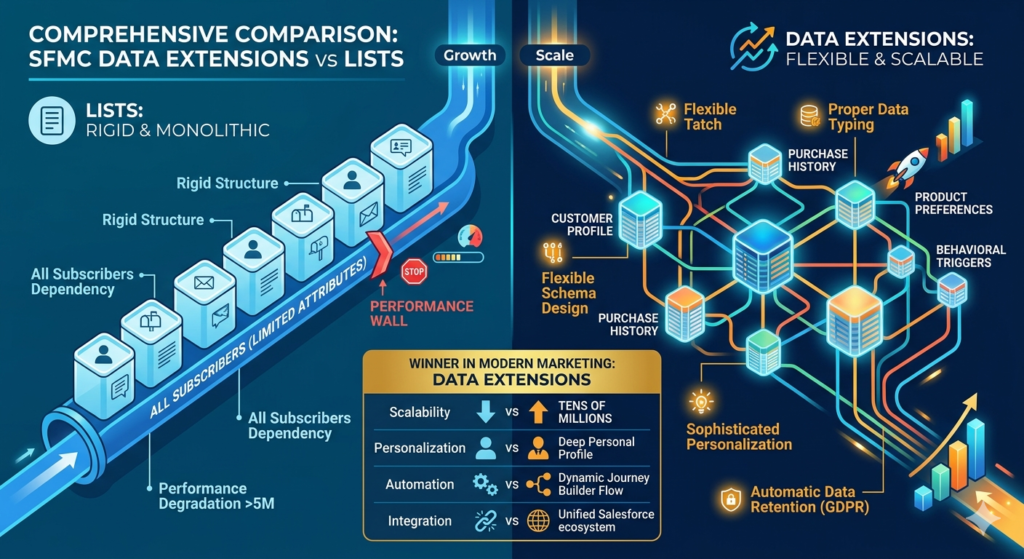
Data Structure and Flexibility
Lists: Rigid structure with a maximum of 100 attributes, all stored as text. Every subscriber on any List must exist in the All Subscribers table, creating a monolithic data model that becomes cumbersome as your marketing sophistication grows.
Data Extensions: Flexible schema design with proper data typing. You can create dozens or hundreds of related tables to model complex customer data hierarchies—customer profiles, purchase history, product preferences, behavioral triggers, and more.
Winner: Data Extensions, without question. Modern marketing requires data flexibility that Lists simply cannot provide.
Scalability and Performance
Lists: Performance degrades as your All Subscribers list grows beyond several million records. The monolithic structure creates bottlenecks for queries, imports, and sends. Many organizations hit practical performance walls around 5-10 million subscribers.
Data Extensions: Designed for enterprise-scale data management. Properly indexed Data Extensions can handle tens of millions of records with minimal performance degradation. Distributed data across multiple tables prevents the monolithic bottlenecks inherent to Lists.
Winner: Data Extensions scale dramatically better for growing organizations.
Personalization Capabilities
Lists: Limited to the 100 attributes maximum, with all data stored as text. This constrains your ability to perform date-based calculations, numeric comparisons, or complex segmentation logic. Personalization remains surface-level.
Data Extensions: Enable sophisticated personalization through:
- Multiple related data sources (customer profile + purchase history + browsing behavior)
- Proper data types enabling calculations and comparisons
- Integration with AMPscript, SSJS, and SQL for dynamic content
- Lookup functions to pull data from related tables during send time
Winner: Data Extensions enable the depth of personalization modern customers expect.
Data Retention and Compliance
Lists: No built-in data retention policies. Records remain in All Subscribers indefinitely unless manually removed. This creates compliance risks and data bloat.
Data Extensions: Configurable retention policies that automatically delete old records based on date fields or maintain specific row counts. Critical for GDPR, CCPA, and other privacy regulations requiring data minimization.
Winner: Data Extensions provide essential compliance capabilities that Lists lack.
Integration with Other Salesforce Products
Lists: Limited integration with Salesforce Sales Cloud, Service Cloud, and other Marketing Cloud Studios. The All Subscribers model doesn't map cleanly to other Salesforce data structures.
Data Extensions: Designed for integration across the Salesforce ecosystem:
- Marketing Cloud Connect synchronizes Sales/Service Cloud data into Data Extensions
- Journey Builder runs on Data Extensions, not Lists
- Einstein features and AI-driven recommendations require Data Extension data
- Cross-cloud reporting and analytics depend on Data Extension structures
Winner: Data Extensions are essential for leveraging the full Salesforce ecosystem.
Use in Automation and Journey Builder
Lists: Limited automation capabilities. Journey Builder doesn't support List-based entry events (you must use Data Extensions). Complex multi-step campaigns become difficult or impossible to orchestrate.
Data Extensions: Native integration with Automation Studio and Journey Builder:
- Entry events based on Data Extension updates
- Data extracts, filters, and transformations via SQL activities
- Multi-step journeys that track customer progress across touchpoints
- Decision splits based on Data Extension values and relationships
Winner: Data Extensions are required for sophisticated marketing automation.
Subscriber Management
Lists: Built-in Profile Center functionality allows subscribers to manage their List subscriptions easily. Unsubscribe management flows naturally through the All Subscribers model.
Data Extensions: Require custom development for subscription preferences and unsubscribe management. You must build profile centers using CloudPages and handle unsubscribe logic through automation or custom coding.
Winner: Lists have an edge here for simple subscription management, though this advantage diminishes as your needs grow complex.
Learning Curve and Implementation Complexity
Lists: Simpler to understand initially. Point-and-click interface for most operations. New users can create Lists and send campaigns with minimal training.
Data Extensions: Steeper learning curve requiring understanding of:
- Relational database concepts
- SQL for queries and data manipulation
- Data modeling best practices
- Sendable vs. non-sendable configurations
- Primary keys and data relationships
Winner: Lists are easier for beginners, but this is a short-term advantage that becomes a long-term limitation.
Real-World Marketing Scenarios: Choosing the Right Tool
Scenario 1: E-commerce Company with Complex Customer Journeys
Requirement: An online retailer needs to track customer browsing behavior, purchase history, abandoned carts, product reviews, and loyalty status. They want to trigger personalized campaigns based on purchase frequency, product categories, and cart value.
Solution: Data Extensions are essential. You'd create multiple related tables:
- Customer Profile (sendable Data Extension with demographic data)
- Purchase History (transaction records with date, product, and value)
- Browse Behavior (product views and timestamps)
- Abandoned Carts (cart items and abandonment date)
- Loyalty Status (tier level and points balance)
SQL queries combine these tables to create sophisticated segments like "VIP customers who browsed winter coats in the last week but haven't purchased in 60 days." Journey Builder orchestrates multi-touch campaigns that adapt based on behavior.
Why Lists Fail Here: The 100-attribute limit makes storing this data impossible. Even if you crammed some data into Lists, you couldn't create the temporal queries or multi-table relationships needed for effective segmentation.
Scenario 2: Non-Profit with Multiple Newsletters
Requirement: A non-profit publishes five different newsletters (policy updates, fundraising appeals, event announcements, volunteer opportunities, and educational content). Subscribers can opt into any combination. Personalization is limited to first name and location.
Solution: Lists could work acceptably. Each newsletter becomes a List, and subscribers manage their preferences via a Profile Center. The All Subscribers table stores basic contact information.
Why Data Extensions Might Still Be Better: Even here, Data Extensions offer advantages:
- Better reporting on cross-newsletter engagement
- Ability to track donation history alongside newsletter preferences
- Integration with Salesforce Nonprofit Cloud if they expand
- Flexibility to add behavioral triggers later (send volunteer opportunities to active volunteers)
However, if the organization is small, has limited technical resources, and no plans for sophisticated automation, Lists provide a functional solution.
Scenario 3: B2B Company with Account-Based Marketing
Requirement: A B2B software company wants to target specific accounts with personalized campaigns. They need to track multiple contacts within each account, account-level attributes (industry, company size, current products), and engagement across contacts.
Solution: Data Extensions are non-negotiable. You'd model:
- Accounts (company-level data, non-sendable)
- Contacts (individual-level data, sendable)
- Opportunities (sales pipeline data)
- Engagement History (email opens, clicks, downloads)
- Product Usage (feature adoption and usage metrics)
SQL activities aggregate contact-level engagement to the account level. Campaigns target accounts based on combined contact engagement scores. Journey Builder orchestrates coordinated touchpoints across multiple stakeholders.
Why Lists Fail Here: Lists have no concept of account hierarchies or multi-level relationships. The one-subscriber-per-row model can't capture the many-to-one relationship between contacts and accounts.
Scenario 4: Financial Services Firm with Compliance Requirements
Requirement: A bank must retain customer communication data for seven years for regulatory compliance, then automatically delete it. They need detailed audit trails of consent and preference changes.
Solution: Data Extensions with retention policies. Create:
- Customer Profile (with consent status and timestamps)
- Communication History (all sends with retention set to seven years)
- Preference Change Log (audit trail of every consent update)
Automation Studio jobs enforce data retention policies automatically, and date-typed fields enable precise temporal queries for compliance reporting.
Why Lists Fail Here: No retention policy options, no audit trail capabilities, and limited ability to timestamp changes with proper date fields.
Advantages and Disadvantages: The Complete Picture

Data Extensions: Advantages
- Unlimited scalability: Handle millions or billions of records across multiple tables
- Proper data typing: Store dates, numbers, Booleans, and text with appropriate formatting
- Relational data modeling: Link related data across tables for complex queries
- Journey Builder integration: Required for sophisticated customer journeys
- Data retention policies: Automated compliance with privacy regulations
- SQL query power: Complex segmentation and data manipulation
- Cross-cloud integration: Seamless data sharing across Salesforce ecosystem
- Future-proof: Supports emerging SFMC features and capabilities
- Enterprise-grade performance: Optimized for large-scale operations
- Granular control: Configure every aspect to match business needs
Data Extensions: Disadvantages
- Steeper learning curve: Requires database knowledge and technical skills
- Manual subscription management: Must build custom Profile Centers
- Implementation complexity: Requires careful planning and data modeling
- Potential for misconfiguration: Incorrect primary key or sendable settings cause issues
- Testing overhead: More components to validate before production use
Lists: Advantages
- Simple to understand: Intuitive for users new to email marketing
- Built-in Profile Centers: Native subscription management functionality
- Quick setup: Faster to create and deploy for simple campaigns
- All Subscribers integration: Centralized subscriber management
- Lower technical requirements: Less database knowledge needed
Lists: Disadvantages
- Severely limited attributes: Maximum 100 fields constrains data richness
- Text-only data types: No dates, proper numbers, or Booleans
- Poor scalability: Performance degrades with subscriber growth
- No Journey Builder support: Can't use Lists for journey entry
- Limited automation: Restricted in Automation Studio capabilities
- No data retention: Compliance risks from indefinite data storage
- Weak cross-cloud integration: Doesn't connect well with other Salesforce products
- Outdated architecture: Not optimized for modern marketing needs
- All Subscribers bottleneck: Monolithic table creates performance issues
- Limited personalization: Shallow data prevents sophisticated targeting
Why Data Extensions Are Preferred in Modern Marketing Setups
The marketing technology landscape has fundamentally shifted in the past decade. Modern marketing demands capabilities that simply didn't exist when Lists were designed:
Customer Journey Orchestration
Today's customers interact with brands across multiple touchpoints—email, mobile, social, web, and in-person. Journey Builder enables marketers to orchestrate cohesive experiences across these channels, but it requires Data Extensions. Lists cannot serve as journey entry sources or data sources for journey decision splits.
If you're building customer journeys (and you should be), Data Extensions are mandatory.
Real-Time Personalization
Customers expect personalized experiences based on their current context, not static demographic data. Real-time personalization requires:
- Behavioral data (browsing, purchases, engagement)
- Temporal queries (what did they do in the last 24 hours?)
- Complex calculations (lifetime value, engagement scores)
- Data from external systems (CRM, e-commerce platforms)
Data Extensions enable all of this through proper data typing, SQL queries, and cross-cloud integration. Lists support only the most basic personalization tokens.
Privacy and Compliance
GDPR, CCPA, and emerging privacy regulations require marketers to:
- Implement data minimization (delete old data)
- Maintain consent audit trails
- Provide data portability
- Honor "right to be forgotten" requests
Data Extensions' retention policies, date fields, and automation capabilities make compliance manageable. Lists offer virtually no compliance tooling, putting organizations at risk.
Omnichannel Marketing
Salesforce Marketing Cloud has evolved beyond email to encompass mobile (MobilePush, SMS), advertising (Advertising Studio), social (Social Studio), and web (CloudPages). These channels integrate through Contact Builder, which uses Data Extensions as its foundation.
A List-based architecture isolates you from these capabilities, limiting you to email-only marketing in an omnichannel world.
AI and Machine Learning
Einstein features in SFMC—Einstein Send Time Optimization, Einstein Engagement Scoring, Einstein Copy Insights—analyze customer data to provide AI-driven recommendations. These features pull from Data Extensions, not Lists.
As AI becomes increasingly central to marketing effectiveness, Data Extensions provide the data infrastructure that powers these capabilities.
The Bottom Line
Data Extensions aren't just "better" than Lists—they're fundamentally aligned with how modern marketing operates. Organizations committed to customer-centricity, personalization, and marketing sophistication have no real choice: Data Extensions are the only viable path forward.
Best Practices for Using Data Extensions Effectively
1. Design Your Data Model Before Building
Don't create Data Extensions ad hoc. Map your customer data requirements:
- What customer attributes do you need to capture?
- What behavioral events should you track?
- How do different data entities relate to each other?
- What segments will you need to create?
Create a data model diagram showing tables, fields, and relationships before building anything in SFMC.
2. Establish Naming Conventions
Implement consistent naming standards for Data Extensions and fields:
- Data Extension names: Use descriptive names with prefixes indicating purpose (e.g.,
DE_Master_CustomerProfile,DE_Journey_AbandonedCart,DE_Sync_SalesforceLead) - Field names: Use clear, consistent naming without spaces (e.g.,
SubscriberKey,EmailAddress,FirstName, notSK,email,fname) - Date fields: Suffix with
_Datefor clarity (e.g.,PurchaseDate,OptInDate)
Consistent naming prevents confusion as your Data Extension library grows.
3. Use Sendable Data Extensions Strategically
Only make Data Extensions sendable when they directly contain contact records for email campaigns. Create separate non-sendable Data Extensions for:
- Reference data (product catalogs, store locations)
- Transaction history
- Behavioral event logs
- Intermediate query results
This separation improves performance and clarifies data purpose.
4. Configure Primary Keys Correctly
Always define a primary key that uniquely identifies each record. Common approaches:
- Single field:
SubscriberKeyorEmailAddressfor simple contact tables - Composite key: Combination of fields for transaction tables (e.g.,
SubscriberKey+OrderID)
Enable the "Used for Sends" option sparingly—only for fields that should prevent duplicate sends (typically SubscriberKey or EmailAddress).
5. Implement Data Retention Policies
Configure retention policies for Data Extensions that accumulate records over time:
- Individual records: Delete records based on a date field (e.g., delete transactions older than two years)
- All records: Delete all records on a schedule (e.g., empty a temporary staging table weekly)
- Reset: Maintain only the most recent X records
Retention policies keep your data environment clean and support compliance requirements.
6. Index for Query Performance
While SFMC doesn't expose traditional database indexes, optimize query performance by:
- Using
SubscriberKeyin WHERE clauses (it's always indexed) - Limiting SELECT queries to necessary fields
- Filtering on date ranges to reduce record scans
- Avoiding unnecessary JOINs in SQL queries
Test query performance in Automation Studio before scheduling production jobs.
7. Leverage Shared Data Extensions
Use shared Data Extensions to make data accessible across multiple business units in Enterprise 2.0 accounts:
- Master customer profiles
- Product catalogs
- Reference data (states, countries, categories)
This prevents data duplication and ensures consistency across business units.
8. Document Your Data Extensions
Maintain documentation for each Data Extension including:
- Purpose and use cases
- Field definitions and data types
- Data sources (imports, API, automation)
- Update frequency
- Related Data Extensions
- Dependencies (automations, journeys, SQL queries that reference it)
This documentation is invaluable for onboarding new team members and troubleshooting issues.
9. Test Before Production
Before using a Data Extension in production:
- Import test data and verify data types and formatting
- Test sendable configuration with a small audience
- Validate SQL queries return expected results
- Verify retention policies don't delete needed data
- Test any Journey Builder integrations
Finding configuration issues in development is far cheaper than fixing broken production campaigns.
10. Monitor Data Extension Growth
Regularly review Data Extension row counts and storage:
- Set up alerts for Data Extensions exceeding expected sizes
- Investigate unexpected growth patterns
- Audit for orphaned or unused Data Extensions
- Clean up test Data Extensions
SFMC contracts include data storage limits; uncontrolled growth can incur additional costs.
Common Mistakes Marketers Make When Using Lists
Despite their limitations, many marketers continue using Lists out of habit or lack of awareness. Here are the most common mistakes:

Mistake 1: Hitting the 100-Attribute Wall
Marketers build their marketing programs on Lists, gradually adding attributes as needs evolve. Eventually, they hit the 100-attribute limit and discover they can't add the fields they need without removing existing ones.
The Fix: Migrate to Data Extensions before you hit limits. If you're approaching 50-60 attributes on a List, start planning your Data Extension migration now.
Mistake 2: Storing Everything as Text
Because Lists only support text data types, marketers store dates as "12/25/2024" text strings and numbers as text. This prevents date-based queries (e.g., "customers who purchased in the last 30 days") and numeric comparisons (e.g., "customers with order value > $100").
The Fix: Recognize when your data has inherent types (dates, numbers, Booleans) and migrate to Data Extensions that support proper typing.
Mistake 3: Creating List Sprawl
Without proper planning, marketers create dozens or hundreds of Lists for different campaigns, audiences, and purposes. The All Subscribers table becomes a mess of unrelated contacts, and managing subscriptions becomes impossible.
The Fix: Consolidate to Data Extensions where you control relationships and structure instead of managing List proliferation.
Mistake 4: Ignoring Journey Builder Limitations
Marketers design sophisticated customer journeys only to discover they can't implement them because their data lives in Lists, not Data Extensions.
The Fix: If you plan to use Journey Builder (and you should), migrate to Data Extensions immediately. Don't build Lists-based programs you'll need to rebuild later.
Mistake 5: Neglecting Compliance Requirements
Lists provide no automated way to delete old data, creating liability under privacy regulations that require data minimization.
The Fix: Implement Data Extensions with retention policies that automatically enforce your data retention requirements.
Mistake 6: Manual Subscription Management at Scale
As marketing programs grow, managing subscriptions across dozens of Lists becomes unwieldy. Subscribers receive irrelevant emails because List management hasn't kept pace with segmentation needs.
The Fix: Move to Data Extension-based segmentation using SQL queries to create precise audiences based on actual behavior and attributes, not just List membership.
Mistake 7: Assuming Lists Are "Simpler"
New marketers often choose Lists because they seem simpler initially. But as requirements grow, the limitations create complexity—workarounds, manual processes, and technical debt that exceeds the initial learning curve of Data Extensions.
The Fix: Invest time learning Data Extensions upfront rather than building Lists-based programs you'll need to rebuild when limitations become apparent.
Mistake 8: Trying to Force Relational Data into Lists
Marketers attempt to store relational data (customers and their orders, accounts and contacts) in Lists by creating separate fields for each relationship (Order1Date, Order1Amount, Order2Date, Order2Amount). This quickly becomes unmaintainable and doesn't scale.
The Fix: Recognize when your data has inherent relationships and use Data Extensions with proper relational modeling.
Mistake 9: Ignoring Integration Requirements
Organizations implement Salesforce Sales Cloud or Service Cloud later and discover their List-based marketing data can't integrate properly.
The Fix: Consider your broader Salesforce ecosystem roadmap. If you're using or planning to use other Salesforce products, choose Data Extensions from the start.
Mistake 10: Defaulting to Lists Because "That's How We've Always Done It"
The most common mistake is simply continuing to use Lists because they're familiar, without evaluating whether they still serve current needs.
The Fix: Conduct an honest assessment of your marketing requirements. If you need personalization, automation, Journey Builder, or integration capabilities, acknowledge that Lists can't meet these needs and plan your migration to Data Extensions.
The Migration Path: Moving from Lists to Data Extensions
If you're currently using Lists and recognize the need to migrate, here's a practical approach:
Phase 1: Assessment (2-4 weeks)
- Audit all existing Lists and their usage
- Document current attributes and data relationships
- Identify active campaigns and automations using Lists
- Map current functionality to Data Extension requirements
- Estimate data volumes and growth projections
Phase 2: Data Modeling (2-3 weeks)
- Design your Data Extension architecture
- Define primary keys and relationships
- Plan field definitions and data types
- Determine sendable vs. non-sendable Data Extensions
- Configure retention policies
- Document the new data model
Phase 3: Build and Test (3-4 weeks)
- Create Data Extensions in a development environment
- Build import processes to migrate historical data
- Develop SQL queries for segmentation
- Recreate key audiences in Data Extensions
- Test sendable configurations with small audiences
- Build custom Profile Center if needed
Phase 4: Parallel Run (2-4 weeks)
- Run Lists and Data Extensions simultaneously
- Compare results and validate data accuracy
- Identify and fix discrepancies
- Train team members on new processes
- Document new workflows
Phase 5: Cutover (1-2 weeks)
- Migrate all active campaigns to Data Extensions
- Update automations and journeys
- Redirect imports to Data Extensions
- Update external integrations
- Archive old Lists (don't delete immediately)
- Monitor closely for issues
Phase 6: Optimization (Ongoing)
- Refine SQL queries for performance
- Expand personalization using new data capabilities
- Implement new journey-based campaigns
- Clean up archived Lists after validation period
This migration requires commitment but pays dividends in expanded capabilities and future flexibility.
Conclusion
The question of SFMC data extensions vs lists shouldn't really be a debate anymore. While Lists served email marketing well in a simpler era, modern marketing demands the flexibility, scalability, and integration capabilities that only Salesforce Marketing Cloud data extensions provide. From Journey Builder requirements to compliance needs, from real-time personalization to omnichannel orchestration, Data Extensions form the essential foundation of sophisticated marketing operations.
Yes, Data Extensions require more upfront learning and careful implementation. But this investment pays compound returns in expanded capabilities, future-proofing, and marketing effectiveness. Organizations still relying on SFMC Lists aren't just using a legacy technology—they're actively constraining their marketing potential and accumulating technical debt that becomes more expensive to address over time. Make the strategic choice: embrace Data Extensions as the cornerstone of your SFMC architecture, and unlock the full potential of modern marketing automation.
Internal Links:
- Salesforce Admin course page
- Salesforce Marketing Cloud vs Pardot: Which Is Right for You in 2026
- Salesforce Data Import Wizard vs Data Loader: Full Comparison (2024 Guide)
- Salesforce Custom Objects: Complete Build Guide for Beginners
- Salesforce Headless 360: The Complete Guide to Building the Agentic Enterprise
- Salesforce Mobile App: Complete Admin Configuration Guide for Enterprise Deployment
- Salesforce Currency Management: Multi-Currency Setup Guide
External Links:
McKinsey Sales Growth Reports