
Introduction
picture this: A sales rep wraps up a critical call with a prospect, fires off a follow-up email, and schedules a demo meeting — all from their inbox. Hours later, their manager checks Salesforce and sees… nothing. No email logged. No meeting recorded. Just a blank activity timeline that tells an incomplete story of a deal that could be worth six figures.
This is the problem Salesforce Einstein Activity Capture was built to solve.
In modern sales environments, the gap between what actually happens in email and calendars and what gets recorded in the CRM is one of the most persistent productivity and visibility challenges organizations face. Reps don’t log activities because it’s manual, repetitive, and time-consuming. Managers can’t coach effectively because they lack visibility. Leadership can’t forecast accurately because the data is incomplete.
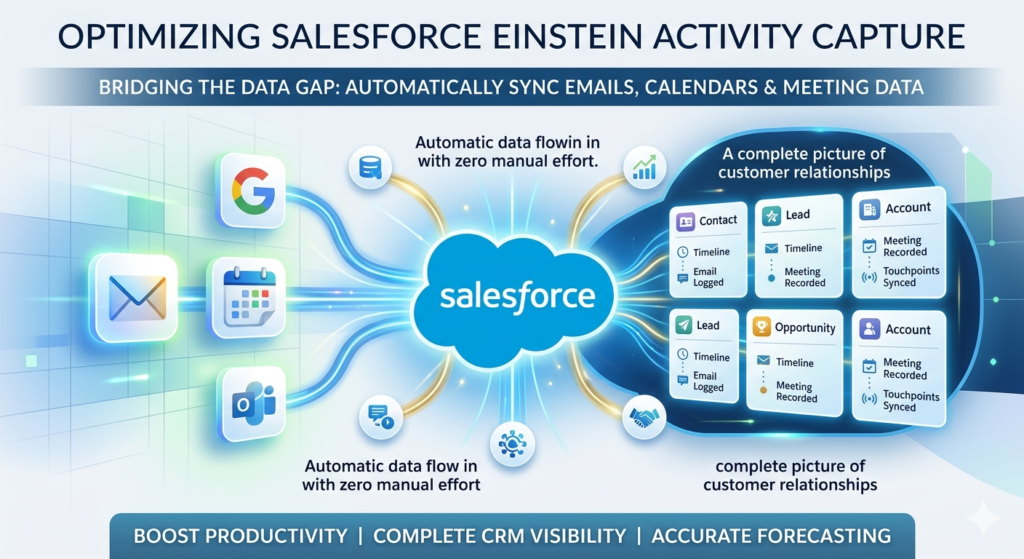
Activity capture Salesforce functionality bridges this gap by automatically syncing emails, calendar events, and meeting data between your team’s email platform — whether that’s Gmail, Google Calendar, Microsoft Outlook, or Office 365 — and Salesforce records, with zero manual effort required from your sales reps.
The result is a CRM that reflects reality. Every touchpoint, every meeting, every email thread automatically associated with the right contact, lead, opportunity, or account — creating a complete, accurate picture of customer relationships without burdening your team with administrative tasks.
In this guide, we’ll walk through everything you need to know about Salesforce Einstein Activity Capture: what it is, how it works, how to set it up correctly, what its real limitations are (yes, there are some), and the best practices that separate successful implementations from frustrating ones.
Whether you’re a Salesforce Admin configuring this for the first time, a Sales Ops manager evaluating whether EAC fits your team, or a consultant implementing it for a client, this guide gives you the practical knowledge you need.
Let’s get started.
2. What Is Salesforce Einstein Activity Capture?
Salesforce Einstein Activity Capture (EAC) is a native Salesforce feature that automatically syncs emails and calendar events from a user’s email platform into Salesforce, eliminating the need for manual activity logging. It connects to Gmail, Google Calendar, Microsoft Outlook, and Microsoft 365, working silently in the background to keep your CRM current.
Core Functionality
At its heart, EAC does three things:
- Email Sync — Captures sent and received emails and associates them with the relevant Salesforce records (Contacts, Leads, Accounts, Opportunities)
- Calendar Sync — Synchronizes calendar events bidirectionally between Salesforce and the user’s email calendar
- Relationship Intelligence — Analyzes email patterns to surface insights about customer engagement frequency, relationship strength, and communication gaps
How It Differs from Manual Logging
| Approach | How It Works | Rep Effort Required | Data Completeness |
|---|---|---|---|
| Manual Logging | Rep manually creates Task/Event in Salesforce | High | Low (reps forget or skip) |
| Salesforce Inbox | BCC/sidebar logging tool | Medium | Medium |
| Einstein Activity Capture | Automatic background sync | None | High (captures everything within policy) |
Where Does the Data Appear?
This is where many admins are surprised. Captured activities appear in the Activity Timeline on Salesforce records — but with an important caveat: EAC activities are stored in Salesforce’s separate activity data store, not in the standard Task and Event objects. This has significant implications for reporting, which we’ll cover in detail in Section 6.
You’ll see captured emails and meetings directly on:
- Contact records
- Lead records
- Account records
- Opportunity records
Relationship Intelligence Overview
Beyond simple logging, EAC’s Relationship Intelligence feature analyzes communication patterns to show:
- Who your team knows — contact relationship scoring
- Engagement frequency — how often communication occurs with a given contact
- Relationship gaps — contacts or accounts that haven’t been touched recently
- Email sentiment indicators (in certain configurations)
This transforms EAC from a simple logging tool into a genuine relationship management intelligence layer within your CRM.
3. Key Benefits of Salesforce Einstein Activity Capture
Understanding why organizations implement Salesforce Einstein Activity Capture helps you make the business case internally and set realistic expectations for your team. Here are the four core benefit areas.
3a. Automatic Email Logging
The most immediate and tangible benefit of activity capture Salesforce is the elimination of manual email logging.
The problem it solves: Research consistently shows that sales reps spend 20–30% of their time on administrative tasks, with CRM data entry being one of the top complaints. When logging is manual, it either doesn’t happen or happens inconsistently — creating an unreliable CRM that reps trust even less, creating a vicious cycle.
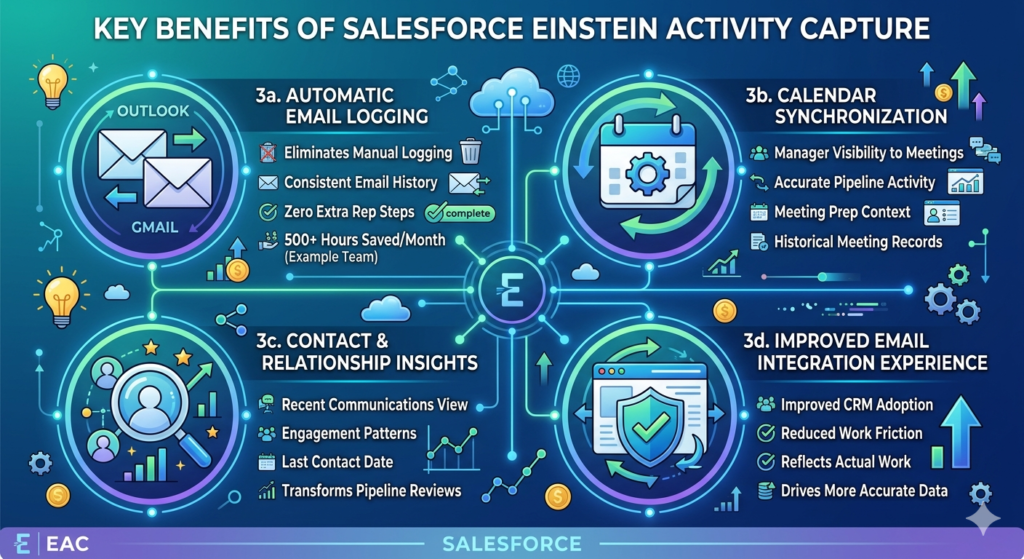
What EAC delivers:
- Every qualifying email automatically associated with the right Salesforce records
- Zero additional steps required from sales reps
- Consistent, complete email history on every record
- Historical context available to anyone viewing a record, including new reps taking over accounts
Real impact: A 50-person sales team sending an average of 40 emails per day each. That’s 2,000 manual logging actions per day EAC eliminates — or roughly 500 hours of administrative time saved per month.
3b. Calendar Synchronization
Bidirectional calendar sync means events created in Salesforce appear in the rep’s Outlook or Gmail calendar, and events created in their email calendar appear in Salesforce — automatically.
Benefits include:
- Manager visibility into upcoming meetings without asking reps to report them
- Accurate pipeline activity data for forecasting conversations
- Meeting prep context — reps can view related Salesforce records before a meeting directly from their calendar (when combined with Salesforce Inbox)
- Historical meeting records tied to opportunities for deal review
3c. Contact & Relationship Insights
EAC’s activity timeline populates automatically, giving anyone who opens a Salesforce record an immediate view of:
- Recent email communications
- Upcoming and past meetings
- Last contact date
- Overall engagement pattern
This is transformative for:
- Sales managers conducting pipeline reviews
- New reps inheriting accounts who need historical context
- Customer success teams monitoring engagement health
- Executives reviewing key account relationships
3d. Improved Email Integration Salesforce Experience
A properly configured EAC implementation improves overall CRM adoption because reps no longer feel punished for using Salesforce. The friction that comes from “I have to go into Salesforce AND my email separately” disappears.
When the CRM updates automatically, reps spend more time in Salesforce because it reflects their actual work — making the data more accurate, which in turn drives more usage. This positive feedback loop is one of the most underappreciated benefits of solid email integration Salesforce implementation.
4. Salesforce Einstein Activity Capture Setup (Step-by-Step)
This section walks through the complete setup process for Salesforce Einstein Activity Capture. Follow these steps carefully, and you’ll have EAC running in your org with a clean, tested configuration.
4a. Prerequisites
Before you begin setup, verify the following:
Salesforce Edition Requirements:
| Edition | EAC Available? | Notes |
|---|---|---|
| Enterprise | ✅ Yes | Full feature set |
| Unlimited | ✅ Yes | Full feature set |
| Professional | ⚠️ Limited | Requires add-on |
| Essentials | ❌ No | Not available |
| Developer Edition | ✅ Yes | For testing only |
Admin Requirements:
- System Administrator profile
- “Manage Einstein Activity Capture” permission
- Access to Setup
Email Platform Eligibility:
- Microsoft Outlook 2016 or later
- Microsoft 365 (Exchange Online)
- Gmail (Google Workspace — Business or Enterprise tier)
- Google Calendar
Important: Personal Gmail accounts (@gmail.com) are not supported. EAC requires organizational Google Workspace accounts.
4b. Enable Einstein Activity Capture
Navigation Path:Setup → Search "Einstein Activity Capture" → Settings
Step-by-Step:
- Navigate to Setup — Click the gear icon in the top right corner of Salesforce
- Search for EAC — Type “Einstein Activity Capture” in the Quick Find box
- Open Settings — Click “Settings” under the Einstein Activity Capture menu
- Enable the Feature — Toggle “Enable Einstein Activity Capture” to ON
- Accept the Terms — Review and accept Salesforce’s data processing agreement
- Configure Sync Settings — Choose your global sync direction:
- Salesforce to Email System (one-way)
- Email System to Salesforce (one-way)
- Both Directions (bidirectional — recommended for most organizations)
- Set Email Sync Scope — Define which emails are captured:
- All emails
- Emails related to Salesforce contacts only
- Emails with specific domains (useful for excluding internal emails)
- Save Configuration
4c. Connect Email Accounts
Gmail Integration
- Go to EAC Settings → Connected Accounts
- Click “Connect Gmail Account”
- Users will be redirected to Google OAuth flow
- Grant the required permissions (Calendar access, Gmail read access)
- Verify connection status shows “Active”
Admin Tip: For bulk Gmail connection in large organizations, work with your Google Workspace admin to pre-authorize the Salesforce OAuth app, eliminating the need for each user to manually grant permissions.
Outlook / Microsoft 365 Integration
- Go to EAC Settings → Connected Accounts
- Click “Connect Microsoft Account”
- Users authenticate via Microsoft OAuth (Azure AD)
- Grant Calendar and Email permissions
- For organization-wide deployment, work with your Microsoft 365 admin to:
- Register Salesforce as an approved OAuth application in Azure AD
- Configure Exchange Online permissions
- Enable Modern Authentication (required — Basic Auth is not supported)
4d. User Assignment & Testing
Assigning Users to EAC:
- Navigate to EAC Settings → Configurations
- Click “New Configuration”
- Name your configuration (e.g., “Sales Team — Full Sync”)
- Select sync settings for this configuration
- Assign users or profiles to this configuration
- Save
Pilot Testing Checklist:
Before rolling out to your full organization, test with 3–5 pilot users:
- Send a test email to an existing Salesforce Contact
- Verify the email appears in the Contact’s Activity Timeline within 15 minutes
- Create a calendar event with a known Contact
- Verify the event appears on the Contact’s record in Salesforce
- Check that bidirectional sync works (create event in Salesforce, verify it appears in Outlook/Gmail)
- Confirm internal emails (colleague-to-colleague) are excluded if configured
- Verify no duplicate records are being created
5. Salesforce Einstein Activity Capture vs Inbox vs Manual Logging
One of the most common questions admins face is how Salesforce Einstein Activity Capture compares to Salesforce Inbox and traditional manual logging. Here’s a comprehensive comparison.
Feature Comparison Table
| Feature | Manual Logging | Salesforce Inbox | Einstein Activity Capture |
|---|---|---|---|
| Setup Complexity | None | Medium | Medium-High |
| Rep Effort | High | Low-Medium | None |
| Email Logging | Manual | Semi-automatic (sidebar) | Automatic |
| Calendar Sync | Manual | Partial | Full bidirectional |
| Data in Standard Objects | ✅ Yes (Tasks/Events) | ✅ Yes | ⚠️ Separate data store |
| Reportable in Standard Reports | ✅ Yes | ✅ Yes | ⚠️ Limited |
| Relationship Intelligence | ❌ No | ❌ No | ✅ Yes |
| Cost | Free | Paid add-on | Included in Enterprise+ |
| Email Tracking (Opens/Clicks) | ❌ No | ✅ Yes | ❌ No |
| Send Later / Templates | ❌ No | ✅ Yes | ❌ No |
| Best For | Small teams, budget-limited | Power users, sales reps | Large teams, automated data capture |
Which Option Fits Which Business?
Choose Manual Logging if:
- Your team is small (under 10 reps)
- You need full reporting on all activity data
- Budget is the primary constraint
- Your reps are disciplined about logging (rare, but it happens)
Choose Salesforce Inbox if:
- Reps want email tracking and productivity features
- You need templates and scheduling from within Outlook/Gmail
- Partial automation is sufficient
Choose Einstein Activity Capture if:
- You have a larger sales team (10+ reps)
- CRM data completeness is a top priority
- Rep time savings is the primary goal
- You can accept the reporting limitations
- You want Relationship Intelligence insights
Best combination for enterprise teams: EAC for automatic data capture plus Salesforce Inbox for rep-facing productivity features. They are complementary, not competing.
6. Best Practices for Salesforce Einstein Activity Capture
A technically correct EAC setup is just the starting point. Long-term success depends on these best practices for activity capture Salesforce implementations.
6a. Define Clear Sync Policies Before Going Live
Before enabling EAC for any user, document your sync policy:
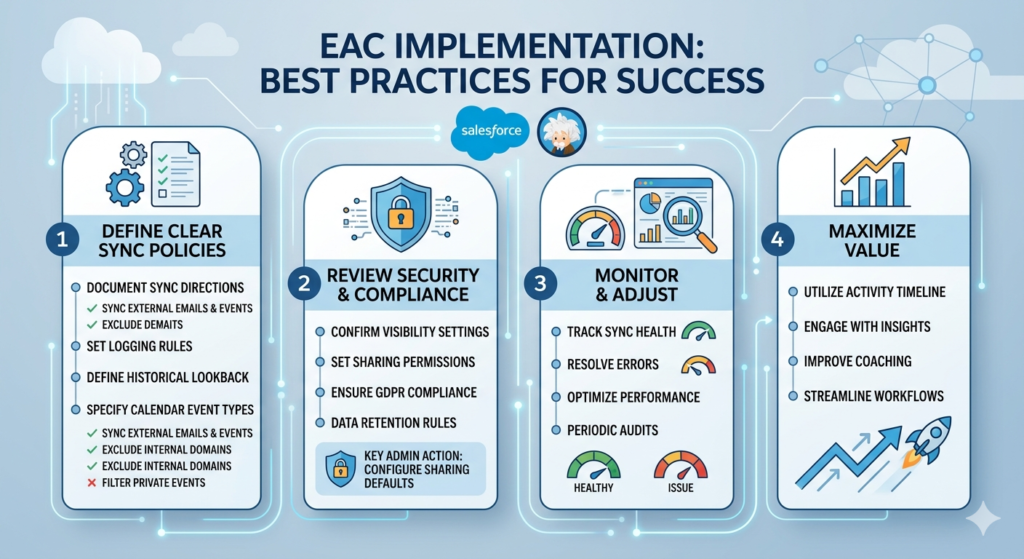
Questions to answer:
- Which email directions sync? (Sent only? Received only? Both?)
- Should internal company emails sync? (Usually no — add your domain to the exclusion list)
- How far back should historical emails sync? (EAC can capture historical emails — define the lookback period)
- Which calendar event types sync? (All? Only events with external participants?)
- What happens with personal calendar events? (Configure visibility settings carefully)
Recommended base policy for most organizations:
- ✅ Sync sent and received emails with external contacts
- ✅ Sync all calendar events with external participants
- ❌ Exclude internal email addresses (add company domain to exclusion list)
- ❌ Exclude personal calendar categories (mark as private in calendar)
6b. Review Security & Compliance Before Enabling
Data Visibility Rules:
By default, captured emails are visible to:
- The email sender/recipient (the Salesforce user)
- System Administrators
- Other users based on sharing rules
Critical admin action: Review and configure the “Everyone can see all activities” setting. If left at default, captured emails may be visible to all Salesforce users — including colleagues and managers — which can create privacy concerns or compliance issues.
GDPR & Compliance Considerations:
- Obtain clear employee consent before enabling email monitoring
- Document your data processing basis in your privacy notice
- Configure data retention policies to align with your organization’s records retention schedule
- For EU-based organizations, verify that Salesforce’s data storage location meets your data residency requirements
- Consider excluding emails with legal, HR, or finance contacts from sync
6c. Train Users Properly
User training is where most EAC implementations succeed or fail. Cover these topics:
For Sales Reps:
- How to mark emails as private to exclude them from sync
- How to review and confirm email associations
- What the Activity Timeline shows and how to use it
- Calendar privacy settings
- How to report sync issues
For Managers:
- How to read Activity Timelines for coaching conversations
- What data is and isn’t available in reports
- How to interpret Relationship Intelligence scores
For Admins:
- How to monitor sync health
- How to troubleshoot common errors
- How to adjust configurations without disrupting active users
6d. Monitor Performance After Launch
Set up a regular monitoring cadence:
| Metric | Where to Find It | Target |
|---|---|---|
| Sync Error Rate | EAC Settings → Sync Errors | <2% of users |
| User Adoption | EAC Adoption Dashboard | >80% active |
| Average Emails Captured/Rep | Custom EAC Report | Baseline in week 1 |
| Activity Timeline Completeness | Sample record audit | >90% of contacts have recent activity |
7. Common Limitations & Challenges
Honest disclosure: Salesforce Einstein Activity Capture has real limitations that admins must understand and communicate clearly to stakeholders before implementation. Discovering these post-rollout damages trust and wastes implementation effort.
Reporting Limitations — The Biggest Challenge
This is the most significant limitation of EAC and affects almost every organization that implements it.
The problem: EAC-captured activities are stored in Salesforce’s separate activity data store (Amazon Web Services infrastructure), not in the standard Salesforce Task and Event objects. This means:
- Standard Salesforce reports on Activities do not include EAC-captured data
- Custom report types built on Tasks/Events exclude EAC data
- Activity-based dashboard metrics may significantly undercount actual activity
- Einstein Analytics / Tableau CRM has some access to EAC data, but requires additional configuration
The workaround: For full reporting on captured activities, organizations typically need to:
- Use Einstein Analytics (Tableau CRM) with EAC data connectors
- Build custom visualizations outside of standard reporting
- Supplement with manual logging for activities that must appear in standard reports
Activity Data Storage Concerns
Because EAC data lives outside standard Salesforce storage:
- It does not count against your Salesforce data storage limits (this is actually a benefit)
- It cannot be exported via standard Data Export tools
- It may not be accessible to certain third-party apps that read from standard objects
- Backup and recovery procedures are different from standard Salesforce records
Customization Constraints
- You cannot add custom fields to EAC-captured activities
- You cannot build triggers or automation that fires based on EAC activity
- Workflow Rules and Process Builder cannot react to captured activities
- Limited ability to customize what appears in the Activity Timeline
Shared Mailbox Concerns
EAC does not support shared mailboxes or group email addresses (e.g., sales@company.com). Only individual user mailboxes can be connected. Organizations using shared inboxes for customer communication need alternative solutions.
Other Known Limitations
- Attachment content is not synced (attachments are noted but not stored in Salesforce)
- Email threading may occasionally create duplicate activity entries
- Some email platforms with custom security configurations may block OAuth connections
- EAC does not support on-premises Exchange Server (Exchange Online only)
8. Troubleshooting Common Setup Issues
Even careful setups encounter issues. Here’s a practical troubleshooting guide for the most common Salesforce Einstein Activity Capture problems.
Issue 1: Gmail Authentication Failing
Symptoms: User cannot complete OAuth flow; error message during Google sign-in
Common causes and fixes:
- Google Workspace admin has not pre-authorized the Salesforce app → Ask your Google Workspace admin to approve the Salesforce OAuth client in the Admin Console
- User’s Google account has 2-factor authentication with a security key → Ensure the OAuth flow supports hardware security keys
- Browser blocking third-party cookies → Try in an incognito window or different browser
- VPN interference → Temporarily disable VPN during authentication
Issue 2: Outlook/Microsoft 365 Sync Errors
Symptoms: Connected account shows “Error” status; emails not appearing in Salesforce
Common causes and fixes:
- Modern Authentication not enabled → Work with your Microsoft 365 admin to enable Modern Authentication in Exchange Online
- Conditional Access Policy blocking Salesforce → Add Salesforce to the approved apps list in Azure AD Conditional Access
- Expired OAuth token → Ask the user to disconnect and reconnect their account
- Exchange Online throttling → Contact Salesforce Support for throttling configuration assistance
Issue 3: Emails Not Appearing in Activity Timeline
Symptoms: User’s email is connected and shows Active, but emails don’t appear on records
Checklist:
- Is the email recipient an existing Salesforce Contact or Lead?
- Is the email address exactly matching a Contact’s email (including case, no typos)?
- Has sufficient time passed? EAC sync can take up to 15–30 minutes
- Is the email being excluded by a domain filter or sync policy?
- Does the user have the correct EAC Configuration assigned?
Issue 4: Duplicate Records Being Created
Cause: EAC attempts to match emails to existing records and may create new ones if no match is found
Fix:
- Audit and clean Contact/Lead email addresses before enabling EAC
- Configure EAC to not create new records automatically (Settings → “Don’t create records for unmatched emails”)
- Implement a duplicate management rule using Salesforce Duplicate Rules
Issue 5: Calendar Events Not Syncing Bidirectionally
Fix: Verify that the sync direction in the user’s EAC Configuration is set to “Both Directions” and that the event is not marked as “Private” in the user’s calendar.
9. Real-World Use Cases
Understanding how real organizations apply Salesforce Einstein Activity Capture brings the feature to life beyond configuration screens.
Use Case 1: Mid-Market Sales Team Email Automation
Organization: 75-person SaaS company with inside sales team
Challenge: CRM activity data was only 30% complete because reps manually logged fewer than a third of their actual emails. Pipeline reviews were based on guesswork, not data.
EAC Implementation:
- Connected all Microsoft 365 accounts
- Excluded internal @company.com emails
- Configured bidirectional calendar sync
- Disabled “create new records” to prevent contact duplication
Result: Activity capture completeness jumped to 94%. Pipeline reviews became data-driven. Sales managers identified reps with low engagement frequencies and provided targeted coaching. Win rates increased 12% over two quarters.
Use Case 2: Executive Visibility into Key Account Activity
Organization: Enterprise software company with strategic accounts managed by senior reps
Challenge: C-suite had no visibility into how frequently their team was engaging with key accounts. Account reviews were anecdotal.
EAC Implementation:
- Enabled Relationship Intelligence for strategic account team
- Built Tableau CRM dashboard showing engagement frequency by account
- Set alerts for accounts with no activity in 14+ days
Result: Executives could see, at a glance, which strategic accounts were receiving attention and which were at risk due to low engagement. Customer retention improved as at-risk accounts were proactively contacted.
Use Case 3: SDR Productivity Improvement
Organization: Fast-growth startup with 20-person SDR team
Challenge: SDRs were spending 45 minutes per day logging emails — time taken away from prospecting.
EAC Implementation:
- Connected Gmail accounts for all SDRs
- Combined with Salesforce Inbox for email templates and tracking
- Used EAC data in SDR leaderboard dashboards
Result: SDRs reclaimed 45 minutes per day for prospecting. SDR team increased outbound email volume by 25% with the same headcount. CRM data completeness improved to 96%.
10. Security, Compliance & Data Governance
For enterprise organizations, email integration Salesforce through EAC introduces important security and governance considerations that must be addressed before rollout.
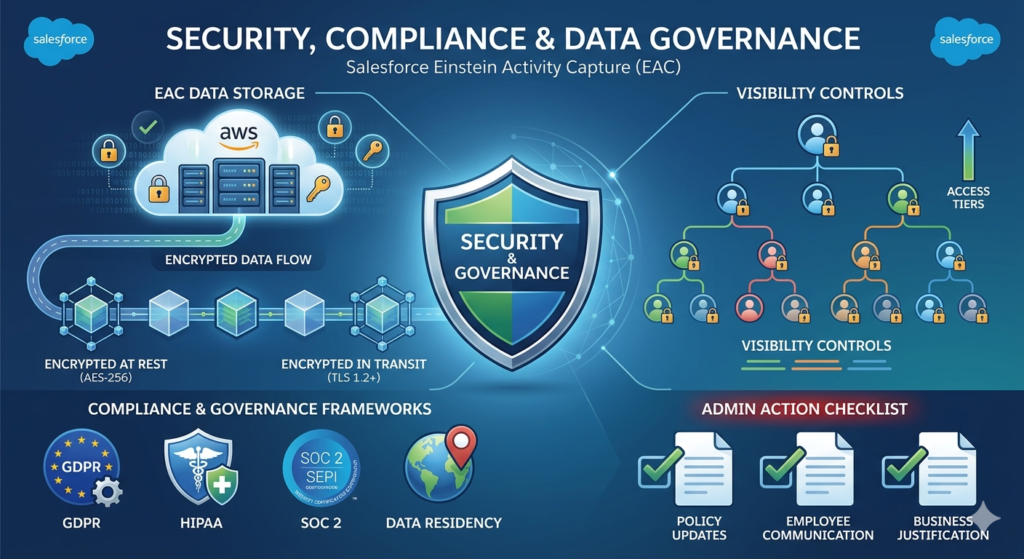
How Salesforce Stores Captured Activity Data
EAC activity data is stored on AWS infrastructure managed by Salesforce, separate from your Salesforce org’s primary data storage. Key facts:
- Data is encrypted at rest using AES-256 encryption
- Data is encrypted in transit using TLS 1.2+
- Salesforce acts as a Data Processor for EAC data under most privacy frameworks
- Data retention follows Salesforce’s standard terms unless custom retention is configured
Visibility Controls
Admins can configure who sees captured activity data:
- User only — Only the connected user sees their captured activities
- User and manager — Activities visible to the user and their direct manager
- All Salesforce users — Activities visible org-wide (default — review carefully before leaving at this setting)
Compliance Recommendations
| Compliance Area | Recommendation |
|---|---|
| GDPR | Document EAC in your data processing register; obtain employee consent |
| HIPAA | Consult Salesforce about BAA coverage for EAC data |
| SOC 2 | Include EAC in your vendor security assessment |
| Data Residency | Verify Salesforce data center location meets your requirements |
| Employee Privacy | Create and distribute a clear email monitoring policy before enabling |
Critical admin action: Before enabling EAC for any user, ensure your legal and HR teams have:
- Updated the employee privacy policy
- Communicated the email monitoring policy to all affected employees
- Documented the business justification for email monitoring
11. Expert Recommendations
After years of implementing Salesforce Einstein Activity Capture across organizations of all sizes, here’s what the most successful implementations have in common — and where teams go wrong.
When to Use Salesforce Einstein Activity Capture
EAC is the right choice when:
- ✅ Your primary goal is CRM data completeness without burdening reps
- ✅ You have 10+ Salesforce users on Enterprise or Unlimited edition
- ✅ Your team uses Gmail (Google Workspace) or Microsoft 365 exclusively
- ✅ You can accept the reporting limitations or use Tableau CRM
- ✅ Legal/HR have cleared the employee privacy considerations
When Alternative Email Integration Tools May Be Better
Consider alternatives when:
- ❌ You need all activity data in standard Salesforce reports
- ❌ Your team uses on-premises Exchange Server
- ❌ You need custom fields on captured activities
- ❌ Your organization has strict email monitoring restrictions
- ❌ You primarily need rep-facing productivity tools (consider Salesforce Inbox instead)
Admin Checklist Before Full Rollout
- Confirmed Salesforce edition eligibility
- Obtained legal/HR approval for email monitoring policy
- Documented sync policy (inclusions, exclusions, directions)
- Configured domain exclusion list for internal emails
- Set appropriate visibility settings (not default “everyone”)
- Tested with 3–5 pilot users for minimum 2 weeks
- Validated no duplicate records being created
- Created user training materials
- Built monitoring dashboard for sync health
- Communicated rollout plan to all affected users
[Internal Link: Salesforce Inbox vs Einstein Activity Capture — Detailed comparison for sales teams]
12. Conclusion
Salesforce Einstein Activity Capture solves one of CRM’s most stubborn problems: the gap between what actually happens in email and calendars and what gets recorded in Salesforce. When implemented correctly, it transforms your CRM from an administrative burden into an accurate, real-time reflection of your team’s customer relationships — without requiring a single extra click from your sales reps.
The key takeaways from this guide:
- EAC automatically syncs emails and calendar events from Gmail and Microsoft 365 into Salesforce, eliminating manual logging
- Proper setup requires careful attention to sync policies, visibility settings, and compliance considerations
- The reporting limitation (EAC data lives outside standard objects) is the most important challenge to communicate to stakeholders upfront
- Best practices — clear sync policies, user training, ongoing monitoring — separate successful implementations from frustrating ones
- For most enterprise sales teams, EAC combined with Salesforce Inbox delivers the optimal email integration Salesforce experience
If you’re evaluating EAC for your organization, start small: connect a pilot group of 5 users, run for 2 weeks, measure the impact on activity completeness, and use that data to build the business case for broader rollout.
The sales teams that win in 2026 are the ones with the most complete, most accurate CRM data — and Salesforce Einstein Activity Capture is one of the most powerful tools available to get you there.
About RizeX Labs
At RizeX Labs, we specialize in delivering cutting-edge Salesforce solutions, including intelligent automation tools like Salesforce Einstein Activity Capture.
Our expertise combines deep technical knowledge, industry best practices, and real-world implementation experience to help businesses streamline communication tracking, enhance productivity, and improve customer relationship management.
We empower organizations to move from manual activity logging to fully automated, AI-driven insights—ensuring better visibility into sales activities and stronger data-driven decisions.
Internal Links:
- Link to your Salesforce course page
- How to Build a Salesforce Portfolio That Gets You Hired (With Project Ideas)
- Salesforce Admin vs Developer: Which Career Path is Right for You in 2026?
- Wealth Management App in Financial Services Cloud
- Salesforce Admin And Development Course
External Links:
- Salesforce official website
- Einstein Activity Capture overview
- Salesforce Help documentation
- Salesforce AppExchange
- Google Workspace integration
- Microsoft Outlook integration
- Data privacy and compliance (GDPR overview)
Quick Summary
Einstein Activity Capture (EAC) is a powerful feature in Salesforce that automatically syncs emails and calendar events to Salesforce without manual data entry. It helps sales teams focus more on selling rather than logging activities.
By implementing EAC, organizations can capture customer interactions in real time, maintain accurate records, and gain AI-driven insights into engagement patterns.
With proper setup and best practices, businesses can avoid common issues like data visibility gaps, storage limitations, and sync errors. A well-configured EAC system ensures improved productivity, better reporting, and enhanced customer relationship tracking—making it a critical component for modern Salesforce implementations.
