
Introduction
Health Cloud APIs power Salesforce Health Cloud’s position at the intersection of healthcare delivery and enterprise CRM, requiring robust integration capabilities to connect with Electronic Health Records (EHRs), Health Information Exchanges (HIEs), medical devices, and third-party healthcare applications. The platform exposes three primary API paradigms—REST API, Bulk API, and FHIR API—each architected for distinct integration patterns, data volumes, and healthcare interoperability requirements.
This analysis examines the technical architecture, practical use cases, and decision frameworks for selecting the appropriate API approach in Health Cloud implementations. We'll move beyond surface-level definitions to explore the engineering trade-offs, compliance implications, and real-world constraints that healthcare IT professionals face when designing integration architectures.
Understanding the Health Cloud API Landscape
Before diving into individual APIs, it's critical to understand that Health Cloud extends Salesforce's standard API capabilities with healthcare-specific objects, relationships, and FHIR-compliant resources. Your API selection directly impacts:
- Data synchronization latency (real-time vs. near-real-time vs. batch)
- Transaction throughput and governor limit consumption
- Interoperability standards compliance (HL7 FHIR, CDA, X12)
- PHI security architecture and audit trail granularity
- Development complexity and maintenance overhead
- Vendor ecosystem compatibility
The fundamental principle: Choose the API that matches your integration pattern, not the one you're most comfortable with.
REST API: Synchronous Transactional Integration
Technical Architecture
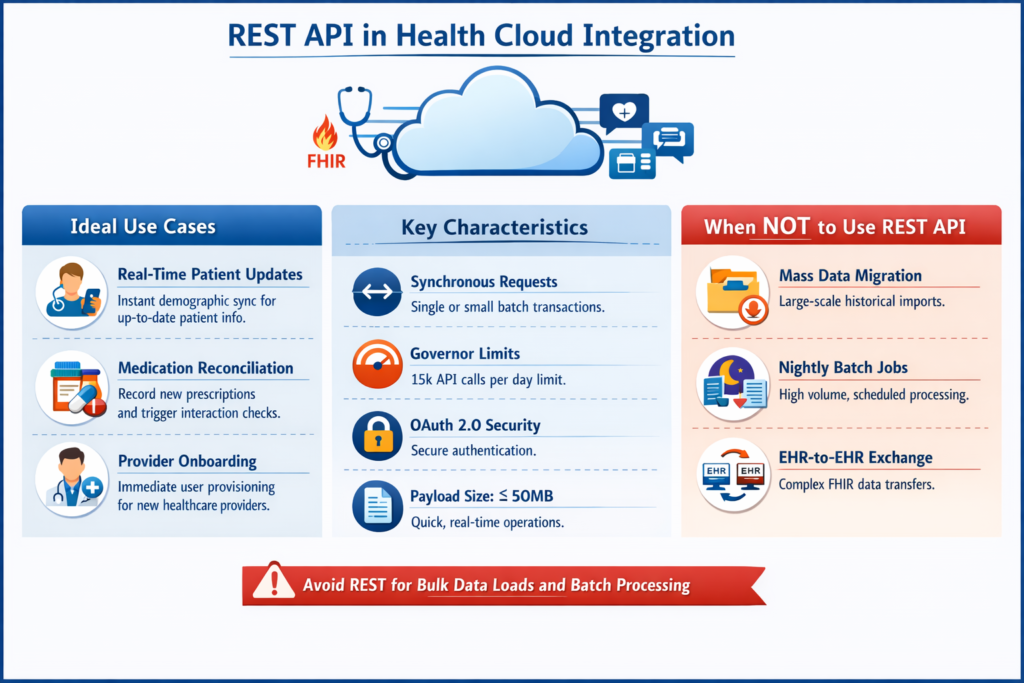
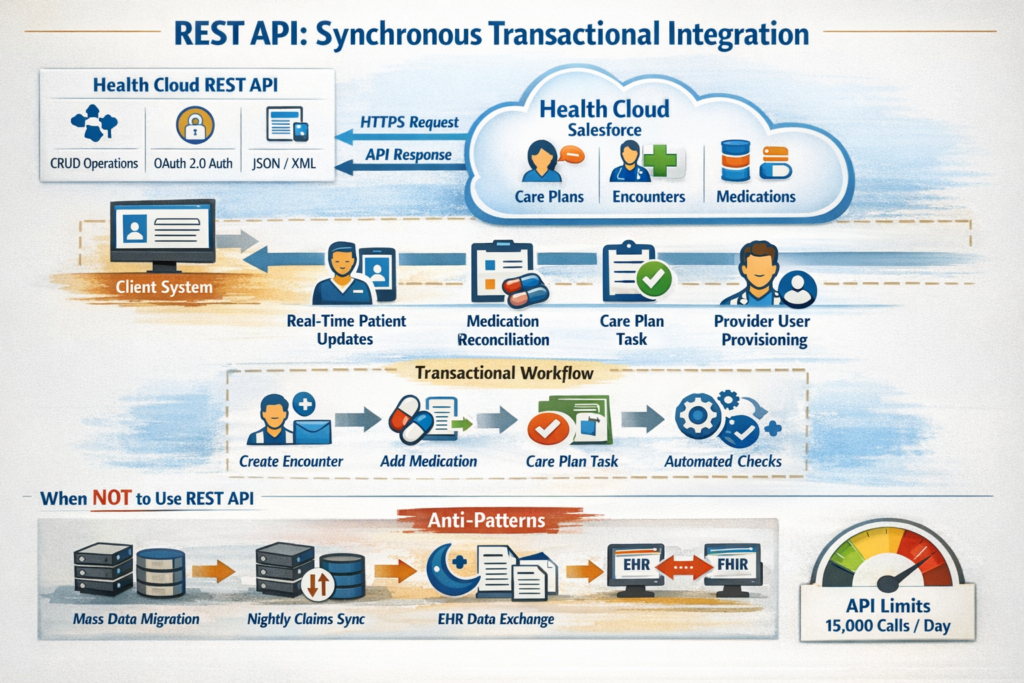
Health Cloud's REST API extends Salesforce's standard REST API with healthcare-specific endpoints and objects. It operates over HTTPS using JSON or XML payloads, supporting CRUD operations on both standard and custom objects, including Health Cloud data models like Care Plans, Care Plan Problems, Clinical Encounters, and Medications.
Key Characteristics:
- Request-response model: Synchronous, blocking operations
- Governor limits: 15,000 API calls per 24-hour period (Enterprise Edition baseline)
- Payload constraints: 50MB request size, 120-second timeout
- Authentication: OAuth 2.0, JWT Bearer Token Flow, SAML
- Transaction granularity: Single record or small batch operations (typically ≤200 records per request)
Healthcare-Specific Use Cases
1. Real-Time Patient Demographic Updates
Scenario: A patient updates their contact information at a specialty clinic, which must immediately sync to Health Cloud to ensure care coordinators have current details.
Implementation Pattern:
textPOST /services/data/v58.0/sobjects/Account
Authorization: Bearer {access_token}
Content-Type: application/json

{
  "RecordTypeId": "012...",
  "PersonEmail": "patient@example.com",
  "PersonMobilePhone": "+1-555-0123",
  "HealthCloudGA__SourceSystem__c": "EpicMyChart",
  "HealthCloudGA__SourceSystemId__c": "E12345"
}
Why REST API:
- Sub-second latency requirement for care coordination
- Single patient transaction
- Immediate user feedback required
- Supports conditional logic and real-time validation
2. Medication Reconciliation During Clinical Encounters
Scenario: During a telehealth visit, a provider prescribes a new medication. The prescription must be recorded in Health Cloud and trigger automated interactions checking for drug-drug interactions.
Architecture Consideration:
REST API enables chaining related records in a single transaction:
- Create Clinical Encounter record
- Create Medication Statement linked to encounter
- Create Care Plan Task for follow-up
- Trigger Process Builder/Flow for interaction checking
Why REST API:
- Transactional consistency across related healthcare objects
- Immediate workflow automation triggering
- Small payload (single encounter context)
- Enables rollback on validation failures
3. Provider Portal User Provisioning
Scenario: New providers joining a care network need immediate access to patient panels, requiring Health Cloud user creation, permission set assignment, and contact record linkage.
Why REST API:
- Sequential dependencies (user → permission sets → contact linkage)
- Requires immediate confirmation for onboarding workflow
- Involves metadata operations (permission sets) not suited for bulk processing
When NOT to Use REST API
Anti-Pattern 1: Historical Data Migration
Migrating 500,000 patient records from a legacy EHR to Health Cloud via REST API will consume API limits rapidly and execute inefficiently. A single-threaded approach would require ~33,333 requests (at 15 records per batch), exhausting daily limits and taking weeks.
Anti-Pattern 2: Nightly Claims Data Synchronization
Processing 50,000 insurance claims nightly from a claims management system strains REST API limits and creates unnecessary overhead. The synchronous nature provides no benefit for batch data flows.
Anti-Pattern 3: EHR-to-EHR Data Exchange
Using REST API as an intermediary for FHIR-compliant data exchange between EHR systems bypasses interoperability standards and creates unnecessary transformation logic.
Architectural Decision Factors
| Factor | Use REST API | Consider Alternative |
|---|---|---|
| Record Volume | <5,000 records/day | >10,000 records/day |
| Latency Requirement | <3 seconds | >30 seconds acceptable |
| User Interaction | Synchronous user action | Background process |
| Data Complexity | Related records, triggers | Flat data structures |
| API Call Budget | Ample daily limit | Approaching limit |
Bulk API: High-Volume Asynchronous Data Operations
Technical Architecture
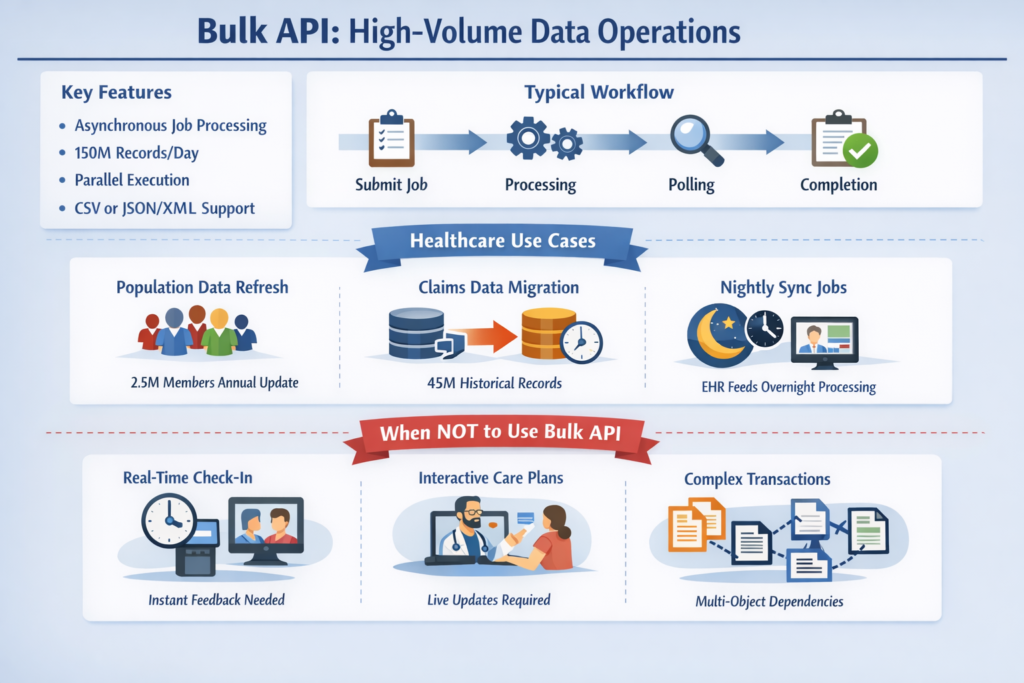
Bulk API 2.0 (the current version) is purpose-built for processing large datasets asynchronously, optimized for inserting, updating, upserting, or deleting millions of records with minimal API call consumption.
Key Characteristics:
- Asynchronous job-based model: Submit job, poll for completion
- Throughput: 150 million records per 24 hours (org-wide limit)
- API call efficiency: Single API call to create job + polling calls (not counted against limits in Bulk 2.0)
- Parallel processing: Automatic chunking and parallel execution
- Payload format: CSV (Bulk 2.0), JSON/XML (Bulk 1.0)
- Governor limits: 10,000 concurrent batches, 15,000 batch processing hours per 24-hour period
Healthcare-Specific Use Cases
1. Annual Patient Population Health Data Refresh
Scenario: A health plan loads the complete membership roster (2.5 million members) into Health Cloud annually for care gap analysis and population health management.
Implementation Pattern:
textPOST /services/data/v58.0/jobs/ingest
Content-Type: application/json

{
  "object": "Account",
  "contentType": "CSV",
  "operation": "upsert",
  "externalIdFieldName": "HealthCloudGA__SourceSystemId__c",
  "lineEnding": "LF"
}

# Follow-up with CSV upload:
PUT /services/data/v58.0/jobs/ingest/{jobId}/batches
Content-Type: text/csv

HealthCloudGA__SourceSystemId__c,FirstName,LastName,PersonBirthdate,...
PLAN001,John,Smith,1965-03-15,...
Why Bulk API:
- Processes millions of records without API limit concerns
- Parallel processing reduces total execution time to hours vs. days
- Upsert operation handles both new and existing members efficiently
- Automatic retry mechanisms for transient failures
2. Historical Claims Data Migration
Scenario: Migrating 10 years of historical claims data (45 million records) from a legacy system to Health Cloud for longitudinal analytics.
Architecture Consideration:
Bulk API enables staged migration strategy:
- Phase 1: Patient/Member accounts (2.5M records)
- Phase 2: Provider contacts (150K records)
- Phase 3: Claims headers (45M records)
- Phase 4: Claims line items (180M records)
Each phase runs as separate Bulk API jobs with external ID-based relationships, maintaining referential integrity without complex transaction management.
Why Bulk API:
- Handles multi-million record volumes efficiently
- Declarative relationship mapping via external IDs
- Built-in error handling with failed record CSV output
- Minimal custom code requirements
3. Nightly Clinical Data Synchronization
Scenario: A regional health system syncs overnight clinical data feeds from multiple EHRs (patient demographics, encounters, diagnoses, procedures) into a unified Health Cloud instance.
Implementation Strategy:
Use Bulk API with scheduled batch jobs:
textDaily 2:00 AM: Load encounter data (avg. 25,000 records)
Daily 2:30 AM: Load diagnosis codes (avg. 75,000 records)
Daily 3:00 AM: Load procedure codes (avg. 50,000 records)
Daily 3:30 AM: Run validation and data quality flows
Why Bulk API:
- Predictable nightly processing window
- Tolerates variable record volumes without architecture changes
- Failed record isolation enables data quality workflows
- No real-time latency requirement
When NOT to Use Bulk API
Anti-Pattern 1: Real-Time Patient Check-In
A patient arrives at a clinic and checks in via a kiosk. Using Bulk API to create the encounter record creates unacceptable latency (minutes vs. seconds) and prevents immediate appointment confirmation.
Anti-Pattern 2: Interactive Care Plan Updates
A care manager updates a patient's care plan during a video consultation. Bulk API's asynchronous nature prevents real-time feedback and validation, degrading user experience.
Anti-Pattern 3: Complex Multi-Object Transactions
Creating a Clinical Encounter with 15 related medication statements, 8 diagnoses, and 5 care team members requires transactional consistency. Bulk API's asynchronous, batch-oriented processing cannot guarantee atomic commits across related objects.
Architectural Decision Factors
| Factor | Use Bulk API | Consider Alternative |
|---|---|---|
| Record Volume | >10,000 records | <1,000 records |
| Latency Requirement | Minutes to hours acceptable | Real-time required |
| Frequency | Scheduled batch windows | Event-driven triggers |
| Error Handling | Record-level isolation acceptable | Atomic transaction required |
| Complexity | Flat or simple relationships | Complex multi-object graphs |
FHIR API: Standards-Based Healthcare Interoperability
Technical Architecture
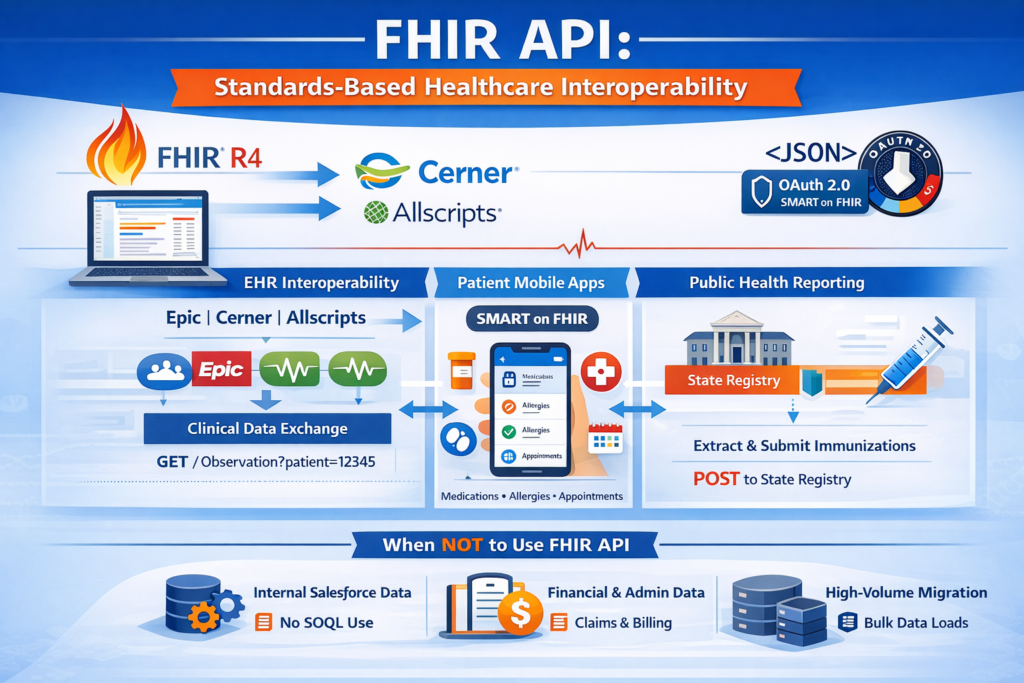
Health Cloud's FHIR API implements the HL7 Fast Healthcare Interoperability Resources (FHIR) standard, exposing Health Cloud data as FHIR resources (Patient, Observation, Condition, MedicationRequest, etc.) and supporting RESTful interactions defined by the FHIR specification.
Key Characteristics:
- FHIR version: R4 (current Health Cloud support)
- Resource coverage: Patient, Practitioner, Observation, Condition, MedicationRequest, AllergyIntolerance, Appointment, and 30+ additional resources
- Interaction patterns: Read, Search, Create, Update, Delete, Patch
- Search parameters: Standard FHIR search (e.g.,
Patient?family=Smith&birthdate=ge1980-01-01) - Authentication: OAuth 2.0 with SMART on FHIR scopes
- Payload format: JSON (primary), XML (supported)
- Conformance: FHIR Capability Statement advertises supported resources and interactions
Healthcare-Specific Use Cases
1. EHR Interoperability for Care Coordination
Scenario: A Health Cloud-based care coordination platform needs to retrieve patient clinical data from multiple EHR systems (Epic, Cerner, Allscripts) for comprehensive care planning.
Implementation Pattern:
text# Query patient clinical observations from external EHR via FHIR
GET /services/data/v58.0/fhir/r4/Observation?patient=Patient/12345&category=vital-signs
Authorization: Bearer {access_token}
Accept: application/fhir+json

# Response includes vital signs in standardized FHIR format
{
  "resourceType": "Bundle",
  "type": "searchset",
  "entry": [
    {
      "resource": {
        "resourceType": "Observation",
        "code": {
          "coding": [{"system": "http://loinc.org", "code": "85354-9"}]
        },
        "valueQuantity": {
          "value": 120,
          "unit": "mm[Hg]",
          "system": "http://unitsofmeasure.org"
        }
      }
    }
  ]
}
Why FHIR API:
- Native EHR vendor support (Epic, Cerner expose FHIR endpoints)
- Eliminates custom transformation logic for each EHR
- Standards-based clinical terminology (LOINC, SNOMED CT, RxNorm)
- Satisfies ONC interoperability requirements (21st Century Cures Act)
2. Patient-Facing Mobile Applications
Scenario: A health system develops a mobile app allowing patients to view medications, allergies, and upcoming appointments stored in Health Cloud.
Architecture Consideration:
Implement SMART on FHIR authorization flow:
- App redirects patient to Health Cloud authorization endpoint
- Patient authenticates and grants access to specific resources
- App receives scoped access token (e.g.,
patient/MedicationRequest.read) - App queries FHIR API with patient-specific token
Why FHIR API:
- SMART on FHIR provides patient-centric authorization model
- Standard patient access scopes align with HIPAA minimum necessary principle
- Mobile SDKs available (iOS, Android) with FHIR support
- Future-proof against evolving interoperability regulations
3. Public Health Reporting and Registry Submissions
Scenario: A health system must submit immunization data from Health Cloud to state public health registries for compliance with reporting mandates.
Implementation Strategy:
text# Extract immunization records as FHIR Immunization resources
GET /services/data/v58.0/fhir/r4/Immunization?patient=Patient/12345&date=ge2024-01-01

# Transform to state-specific format and submit to registry
POST https://state-registry.gov/fhir/Immunization
Content-Type: application/fhir+json
Why FHIR API:
- Many state registries now accept FHIR-formatted submissions
- Standardized vaccine codes (CVX, NDC) embedded in FHIR resources
- Supports bulk data export for large-scale reporting
- Audit trail for compliance documentation
When NOT to Use FHIR API
Anti-Pattern 1: Internal Salesforce Data Operations
Using FHIR API to query Health Cloud data for internal Salesforce processes (e.g., Flow automation, Apex batch jobs) adds unnecessary transformation overhead. Standard REST/SOQL is more efficient for intra-Salesforce operations.
Anti-Pattern 2: Financial/Administrative Data
Attempting to map insurance claims, billing codes, or administrative workflows to FHIR resources creates semantic mismatches. FHIR focuses on clinical data; financial data integration should use REST/Bulk APIs with custom objects or ANSI X12 standards.
Anti-Pattern 3: High-Volume Batch Data Migration
Migrating millions of historical records via FHIR API is inefficient compared to Bulk API. FHIR's resource-oriented model and rich metadata increase payload sizes and processing overhead.
Architectural Decision Factors
| Factor | Use FHIR API | Consider Alternative |
|---|---|---|
| Data Type | Clinical/patient data | Financial/administrative |
| Interoperability | EHR/HIE integration | Internal Salesforce ops |
| Standards Compliance | Required (ONC, CMS) | Not mandated |
| Partner Ecosystem | FHIR-enabled vendors | Proprietary systems |
| Patient Access | Patient-facing apps | Provider-only workflows |
Comparative Analysis: When to Use Which API
| Dimension | REST API | Bulk API | FHIR API |
|---|---|---|---|
| Primary Use Case | Real-time transactions | High-volume batch | Healthcare interoperability |
| Typical Volume | 1-5,000 records/day | 10,000+ records/batch | Varies by use case |
| Latency | <3 seconds | Minutes to hours | <5 seconds (read), varies (write) |
| Data Model | Salesforce objects | Salesforce objects | FHIR resources |
| Complexity | Medium (API structure) | Low (CSV-based) | High (FHIR specification) |
| Standards Alignment | Proprietary | Proprietary | HL7 FHIR R4 |
| API Call Consumption | 1 call per operation | 1 call per job + polling | 1 call per resource interaction |
| Best for Developers | Salesforce-native apps | Data migration teams | Healthcare interop specialists |
| Authentication | OAuth 2.0, SAML | OAuth 2.0 | OAuth 2.0 + SMART on FHIR |
| Error Handling | Immediate response | Failed record CSV | FHIR OperationOutcome |
| Transaction Support | Yes (multi-object) | No (record-level) | Limited (bundle transactions) |
Security and Compliance Considerations
HIPAA Security Rule Alignment
All three APIs must operate within a HIPAA-compliant technical architecture:
Encryption in Transit:
- TLS 1.2+ required for all API communications
- Certificate pinning recommended for mobile applications
- VPN tunneling for private network integrations
Encryption at Rest:
- Health Cloud Shield Platform Encryption for PHI fields
- Key management via Salesforce Shield or external HSM
- Field-level encryption for highly sensitive data (SSN, genetic information)
Access Controls:
- OAuth 2.0 scope-based authorization limits API access to necessary resources
- FHIR API: Patient-specific scopes prevent over-broad data access
- REST/Bulk APIs: Profile and permission set enforcement on object/field level
- API-only user profiles for system integrations (no UI login)
Audit Logging:
- Enable Event Monitoring for API usage tracking
- FHIR API: Maintain AuditEvent resources for interoperability activities
- REST API: Log all PHI access in custom audit objects
- Bulk API: Track job execution and data volume metrics
Interoperability Mandates
21st Century Cures Act (Patient Access):
- Requirement: Patients must access their health data via API without special effort
- Implementation: FHIR API with patient-authorized SMART apps
- Timeline: Compliance required since April 2021
- Health Cloud Approach: Expose Patient, Condition, MedicationRequest, AllergyIntolerance resources via FHIR API with patient-scoped access
CMS Interoperability and Patient Access Rule:
- Payer-to-Payer: FHIR-based data exchange between health plans
- Provider Directory: FHIR Practitioner and Organization resources
- Health Cloud Strategy: Map coverage and claim data to FHIR ExplanationOfBenefit, Coverage resources
ONC Certification (for EHR Vendors):
While Health Cloud isn't typically ONC-certified itself, integrations with certified EHRs must maintain certification:
- Use standardized FHIR API endpoints (no proprietary extensions for certified functions)
- Support USCDI (United States Core Data for Interoperability) data elements
- Document FHIR API capabilities in CapabilityStatement
Data Governance for Each API Type
REST API:
- Data minimization: Query only required fields via field parameter:
/Account/001.../select=Id,Name,PersonEmail - Purpose limitation: Create integration users with purpose-specific permission sets
- Access logging: Custom logging on managed package or middleware layer
Bulk API:
- Batch validation: Pre-process CSVs to validate PHI before upload
- Data retention: Automatically delete job result files after required retention period
- Export controls: Restrict Bulk API query access to prevent unauthorized mass data extraction
FHIR API:
- Resource filtering: Use FHIR search parameters to limit returned resources
- Consent directives: Implement FHIR Consent resources to enforce patient opt-outs
- De-identification: Support
_summaryand_elementsparameters to return limited datasets
Architectural Patterns and Anti-Patterns
Pattern 1: Hybrid API Architecture
Scenario: Regional health system integrating multiple data sources with varying requirements.
Implementation:
- FHIR API: Inbound clinical data from Epic, Cerner EHRs (real-time)
- Bulk API: Nightly claims data from Facets claims system (batch)
- REST API: Provider portal for real-time care plan updates (interactive)
Rationale: Each integration uses the API optimized for its specific data pattern, volume, and latency requirements.
Pattern 2: API Gateway with Protocol Translation
Scenario: Legacy systems without FHIR support require integration with Health Cloud's FHIR resources.
Implementation:
text[Legacy System] --> [API Gateway: HL7 v2.x/CDA Input]
                    --> [Transform to FHIR]
                    --> [Health Cloud FHIR API]
Rationale: Centralized transformation logic maintains standards compliance while supporting legacy systems during migration periods.
Anti-Pattern 1: FHIR API as Internal Data Layer
Problem: Development team uses FHIR API for all Health Cloud data access, including Apex classes and Lightning components.
Why This Fails:
- Unnecessary serialization/deserialization overhead
- Complex FHIR resource mapping for simple Salesforce operations
- Inefficient SOQL alternatives (FHIR search vs. native queries)
- Increased API call consumption
Correct Approach: Use FHIR API only for external interoperability; use SOQL/DML for internal operations.
Anti-Pattern 2: Bulk API for Event-Driven Updates
Problem: Care manager actions (e.g., closing care gaps) queued to a Bulk API job that runs every 15 minutes.
Why This Fails:
- Unacceptable latency for user-initiated actions
- Batch processing delays impact care coordination timeliness
- No immediate user feedback on validation errors
Correct Approach: Use REST API for user-driven transactions; reserve Bulk API for scheduled batch processes.
Performance Optimization Strategies
REST API Optimization
Composite API Requests:
Reduce API calls by bundling operations:
JSONPOST /services/data/v58.0/composite/sobjects

{
  "allOrNone": true,
  "records": [
    {"attributes": {"type": "Account"}, "FirstName": "John"},
    {"attributes": {"type": "Contact"}, "LastName": "Smith"}
  ]
}
Single API call creates multiple records with transaction consistency.
Field-Level Projection:
Query only necessary fields to reduce payload size and processing time:
textGET /services/data/v58.0/sobjects/Account/001.../select=Id,Name,HealthCloudGA__SourceSystemId__c
Conditional Updates:
Use If-Modified-Since headers to avoid redundant updates:
textPATCH /services/data/v58.0/sobjects/Account/001...
If-Match: "previous-etag-value"
Bulk API Optimization
Optimal Batch Sizing:
- CSV row count: 10,000-50,000 rows per batch
- File size: Target 10-100MB per CSV (under Bulk 2.0 single-file model)
- Parallel jobs: Run up to 5 concurrent Bulk jobs for different object types
External ID Strategy:
Use indexed external ID fields for upsert operations:
textHealthCloudGA__SourceSystemId__c (External ID, Unique, Indexed)
Dramatically improves upsert performance vs. matching on email or name.
Incremental Loading:
Track high-water marks (e.g., last modified timestamp) to load only changed records:
SQL-- Source system query
SELECT * FROM patients WHERE modified_date > '2024-01-15 00:00:00'
FHIR API Optimization
Search Parameter Optimization:
Use indexed search parameters:
text# Efficient: Uses indexed patient reference
GET /Observation?patient=Patient/12345&date=ge2024-01-01

# Inefficient: Non-indexed general search
GET /Observation?_content=diabetes
Pagination Strategy:
Implement _count parameter for large result sets:
textGET /Patient?_count=50&_offset=0
Retrieve manageable pages rather than entire result sets.
Resource Bundling:
Use FHIR transaction bundles to create related resources:
JSONPOST /services/data/v58.0/fhir/r4/

{
  "resourceType": "Bundle",
  "type": "transaction",
  "entry": [
    {"resource": {"resourceType": "Patient", ...}, "request": {"method": "POST", "url": "Patient"}},
    {"resource": {"resourceType": "Observation", ...}, "request": {"method": "POST", "url": "Observation"}}
  ]
}
Monitoring and Troubleshooting
REST API Monitoring
Key Metrics:
- API call consumption (daily limit tracking)
- Response time percentiles (p50, p95, p99)
- Error rate by endpoint and operation type
- Governor limit near-miss events
Tools:
- Salesforce Event Monitoring (API Event Type)
- Custom Apex logging framework for detailed diagnostics
- External APM tools (DataDog, New Relic) via API gateway instrumentation
Bulk API Monitoring
Key Metrics:
- Job completion time trends
- Failed record rates by object type
- Batch processing hours consumption
- Data volume per job (records processed)
Tools:
- Bulk API job status queries:
GET /services/data/v58.0/jobs/ingest/{jobId} - Failed record analysis from downloadable CSV
- Custom monitoring dashboards querying AsyncApexJob object
FHIR API Monitoring
Key Metrics:
- FHIR resource access patterns (Patient, Observation most common)
- Search parameter performance
- OperationOutcome error analysis
- SMART app authorization grant rates
Tools:
- FHIR AuditEvent resource analysis
- Health Cloud FHIR API usage reports (if available)
- External FHIR analytics platforms (Firely, Smile CDR)
Conclusion: Decision Framework
When architecting Health Cloud integrations, apply this decision tree:
1. Is this healthcare interoperability with external systems?
- Yes, with FHIR-capable partners: Use FHIR API
- Yes, but partners lack FHIR: Use REST API with potential API gateway for transformation
- No, internal Salesforce: Use REST API or Platform Events
2. What is the data volume?
- <5,000 records/day: REST API likely sufficient
- 5,000-50,000 records/day: Evaluate latency requirements—Bulk if batch acceptable
- >50,000 records/day: Bulk API strongly recommended
3. What is the latency requirement?
- Real-time (<3 seconds): REST or FHIR API only
- Near-real-time (<30 seconds): REST or FHIR API with async processing
- Batch (minutes to hours): Bulk API preferred
4. Are there compliance/interoperability mandates?
- ONC, CMS patient access rules: FHIR API required
- Internal care coordination only: Any API acceptable based on other factors
- Public health reporting: Verify registry requirements (many now FHIR)
5. What is the integration pattern?
- Event-driven, user-initiated: REST API
- Scheduled batch ETL: Bulk API
- Clinical data exchange: FHIR API
- Hybrid requirements: Multi-API architecture
The maturity of healthcare interoperability standards and the regulatory push toward FHIR-based data exchange increasingly favor FHIR API for external integrations. However, the reality of Health Cloud implementations often requires a pragmatic blend of all three API types, each applied to the integration scenarios where it provides the greatest technical and regulatory value.
About RizeX Labs
At RizeX Labs, we specialize in delivering advanced Salesforce solutions tailored for healthcare organizations, including deep expertise in Salesforce Health Cloud integrations.
Our team combines hands-on implementation experience with strong architectural knowledge to help healthcare providers, payers, and health-tech platforms build scalable, compliant, and high-performance integrations.
We enable organizations to move from fragmented systems to unified, API-driven healthcare ecosystems that improve patient outcomes, operational efficiency, and regulatory compliance.
Internal Links:
- Salesforce Admin & Development Training
- Remote Patient Monitoring (RPM) in Salesforce Health Cloud: Transforming Connected Healthcare Delivery
- How to Use AI in Salesforce Health Cloud for Predictive Patient Care (Einstein + Real Use Cases)
- New Releases in Salesforce Health Cloud Spring '26: What Healthcare Organizations Need to Know
- How to Customize Salesforce Health Cloud Using Lightning Web Components (LWC) for Healthcare Use Cases
- 30 Essential Questions About Salesforce Health Cloud Answered: Beginner to Advanced Guide
- Salesforce Sales Cloud vs Health Cloud: The Strategic CRM Decision That Defines Your Healthcare Business Trajectory
- Using Salesforce Health Cloud for Insurance & Claims Coordination: Beyond the Hospital Walls