
Introduction: The Cyber Threat That Changed Everything
It's 3 AM. Your company's security operations center (SOC) receives an alert — a critical vulnerability has been exploited, and sensitive customer data may be compromised. The clock is ticking. Every second of delayed response means more damage, more liability, and more headlines for the wrong reasons.

This is not a hypothetical scenario. In 2025 alone, the average cost of a data breach reached $4.45 million (IBM Security Report). Organizations worldwide are scrambling to find smarter, faster ways to respond to security threats — and that's precisely where ServiceNow SecOps enters the picture.
Whether you're an IT professional looking to upskill, or a seasoned security analyst exploring automation possibilities — this guide is crafted just for you. We'll walk through everything from the basics of SecOps to advanced configurations, sprinkled with real-world examples that make the concepts stick.
Let's dive in. 🚀
What Is SecOps? Understanding the Foundation
Before we jump into ServiceNow's implementation, let's establish a solid understanding of what SecOps actually means.
SecOps stands for Security Operations. It's the strategic integration of security practices with IT operations to create a unified, proactive approach to identifying, managing, and resolving security threats.
The Traditional Problem
Historically, security teams and IT operations teams worked in silos. Security would identify a vulnerability and toss it over the wall to IT. IT, buried under helpdesk tickets, wouldn't prioritize it correctly. By the time remediation happened, the damage was already done.
The SecOps Solution
SecOps breaks down these silos by:
- Unifying communication between security and IT teams
- Automating repetitive tasks like ticket creation and assignment
- Prioritizing threats based on real risk, not just severity scores
- Measuring response time through clear SLAs and KPIs
💡 Simple Analogy: Think of SecOps like an emergency room in a hospital. Patients (threats) come in with different severity levels. Triage (prioritization) determines who gets treated first. Doctors (IT/security teams) respond based on urgency. Everyone works together using a shared system — not separate paper files.
What Is ServiceNow SecOps?
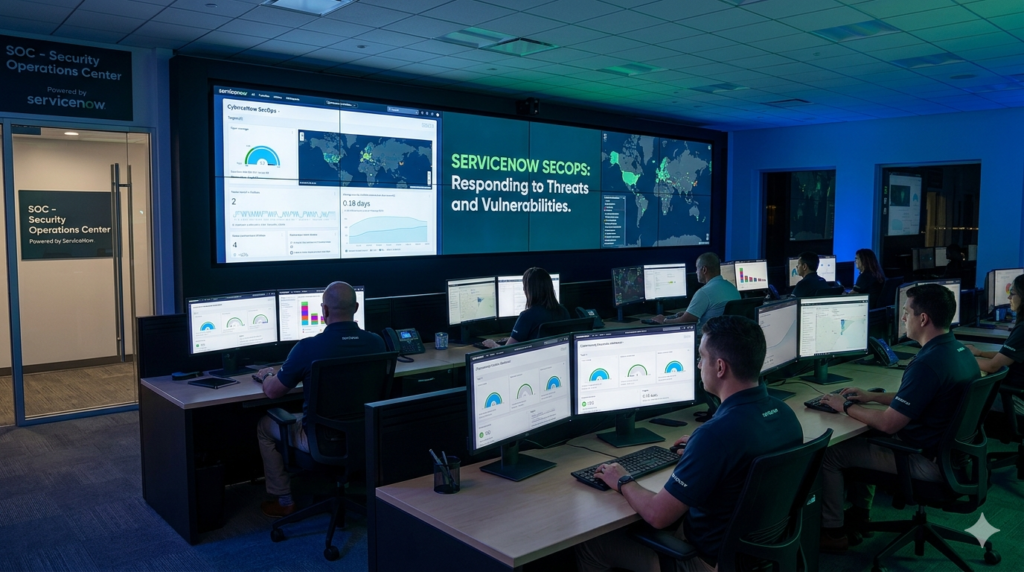
ServiceNow SecOps is a dedicated suite of applications within the ServiceNow platform designed to streamline and automate security operations. It connects your existing security tools, automates workflows, and gives your teams a single pane of glass to manage everything.
ServiceNow SecOps is part of the broader ServiceNow Security Operations product family, which integrates with your SIEM (Security Information and Event Management) tools, vulnerability scanners, threat intelligence platforms, and more.
Why ServiceNow for SecOps?
Here's why organizations choose ServiceNow as their SecOps platform:
| Feature | Benefit |
|---|---|
| Centralized platform | One place for IT + Security teams |
| Automation capabilities | Reduces manual, repetitive tasks |
| Integration ecosystem | Connects with 50+ security tools |
| Real-time dashboards | Instant visibility into threats |
| Workflow automation | Consistent, repeatable response processes |
| Compliance support | Helps meet GDPR, HIPAA, ISO standards |
Core Modules of ServiceNow SecOps
ServiceNow SecOps is built around two primary modules, each addressing a distinct aspect of security operations.
Module 1: 🛡️ Security Incident Response (SIR)
Security Incident Response (SIR) is the cornerstone of ServiceNow SecOps. It automates the entire lifecycle of a security incident — from initial detection to final resolution.
What SIR Does:
- Receives alerts from SIEM tools like Splunk, IBM QRadar, or Microsoft Sentinel
- Automatically creates security incident records
- Assigns incidents to the right team members
- Tracks response activities and timelines
- Provides post-incident reporting
Real-Time Example: Phishing Attack Response
Scenario: An employee at a financial company clicks on a suspicious link in an email. The company's email security gateway flags it.
Without SIR:
- The alert is buried in a security tool dashboard
- A security analyst notices it 4 hours later
- Manual emails are sent to IT for investigation
- Response is slow, uncoordinated, and undocumented
With ServiceNow SIR:
- ✅ The email security gateway sends an alert via API to ServiceNow
- ✅ SIR automatically creates a Security Incident record
- ✅ The incident is categorized as "Phishing" and assigned a P2 priority
- ✅ An automated playbook kicks off:
- Notifies the SOC team via email/Slack
- Isolates the affected endpoint (via integration with CrowdStrike)
- Blocks the malicious URL in the firewall
- ✅ The incident is resolved and documented within 45 minutes
- ✅ A post-incident report is auto-generated
That's the power of SIR. What used to take hours now takes under an hour — with full audit trails.
Key Fields in a Security Incident Record:
- Category (Phishing, Malware, Unauthorized Access, etc.)
- Priority (P1-P4)
- Affected CIs (Configuration Items)
- Assigned To (SOC Analyst or Team)
- Playbook (automated response steps)
- State (New → In Progress → Resolved → Closed)
Module 2: 🔍 Vulnerability Response (VR)
Vulnerability Response (VR) manages the entire lifecycle of vulnerabilities discovered across your IT infrastructure. It ingests data from vulnerability scanners and turns it into actionable remediation tasks.
What VR Does:
- Integrates with scanners like Qualys, Tenable, Rapid7
- Imports vulnerability data and maps it to your CMDB
- Calculates risk scores based on asset criticality
- Creates remediation tasks and assigns them to IT teams
- Tracks SLA compliance for patching
Real-Time Example: Critical CVE Management
Scenario: Your organization's vulnerability scanner (Qualys) detects CVE-2023-44487 (HTTP/2 Rapid Reset Attack) on 15 of your production servers.
Without VR:
- The scanner report is a 200-page PDF
- Security manually emails IT about 15 different servers
- IT has no context on which server is most critical
- Patching happens inconsistently, some servers remain vulnerable for weeks
With ServiceNow VR:
- ✅ Qualys pushes vulnerability data to ServiceNow via integration
- ✅ VR maps the CVE to the 15 affected Configuration Items (CIs) in the CMDB
- ✅ Risk scoring is calculated:
- CVSS Score: 7.5 (High)
- Asset Criticality: Critical (Production Servers)
- Combined Risk Score: 9.2 — Immediate Action Required
- ✅ Remediation tasks are auto-created and assigned to the patch management team
- ✅ SLA timer starts — patches must be applied within 72 hours
- ✅ Managers receive a real-time dashboard showing patch progress
The VR Risk Score Formula (Simplified):
textRisk Score = CVSS Score × Asset Criticality Weight × Exposure Factor
This ensures your team patches the right things first, not just the most recently discovered ones.
ServiceNow SecOps Architecture: How It All Connects
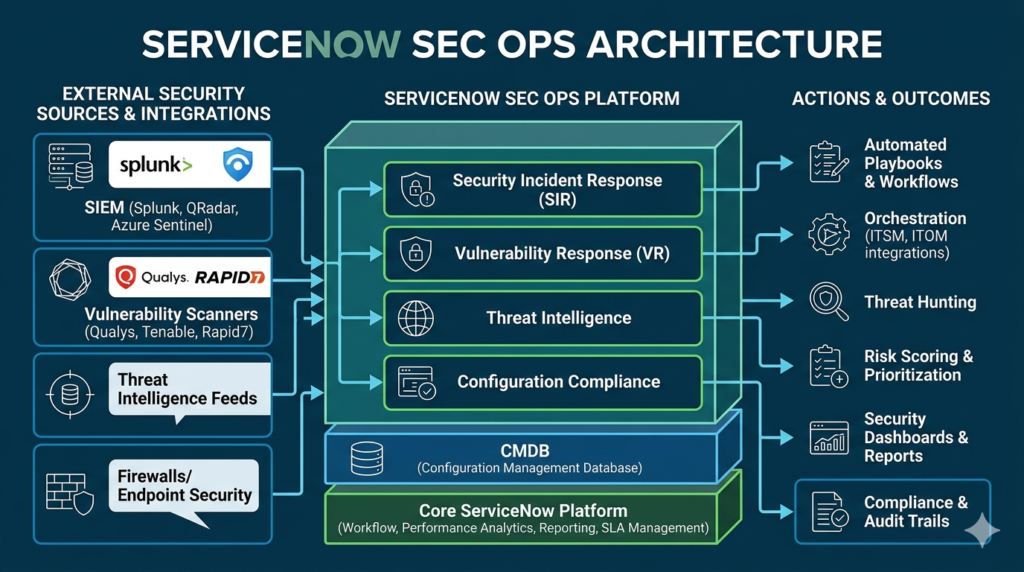
Understanding the architecture helps you see the bigger picture. Here's how ServiceNow SecOps fits into your security ecosystem:
textExternal Security Tools
        ↓
[SIEM: Splunk/QRadar] → ServiceNow SIR
[Scanners: Qualys/Tenable] → ServiceNow VR
[Threat Intel: VirusTotal/MISP] → Threat Intelligence
        ↓
   ServiceNow Platform (CMDB + Workflows + Automation)
        ↓
   IT Operations & Security Teams
        ↓
   Dashboards + Reports + Compliance
Key Integration Points:
| Tool Category | Examples | Connected Module |
|---|---|---|
| SIEM | Splunk, QRadar, Sentinel | SIR |
| Vulnerability Scanners | Qualys, Tenable, Rapid7 | VR |
| Endpoint Security | CrowdStrike, Carbon Black | SIR |
| Threat Intelligence | VirusTotal, MISP, Recorded Future | Both |
| Ticketing/ITSM | ServiceNow ITSM | Both |
| Email Security | Proofpoint, Mimecast | SIR |
SecOps Workflow: End-to-End Process
Let's walk through a complete SecOps workflow inside ServiceNow:
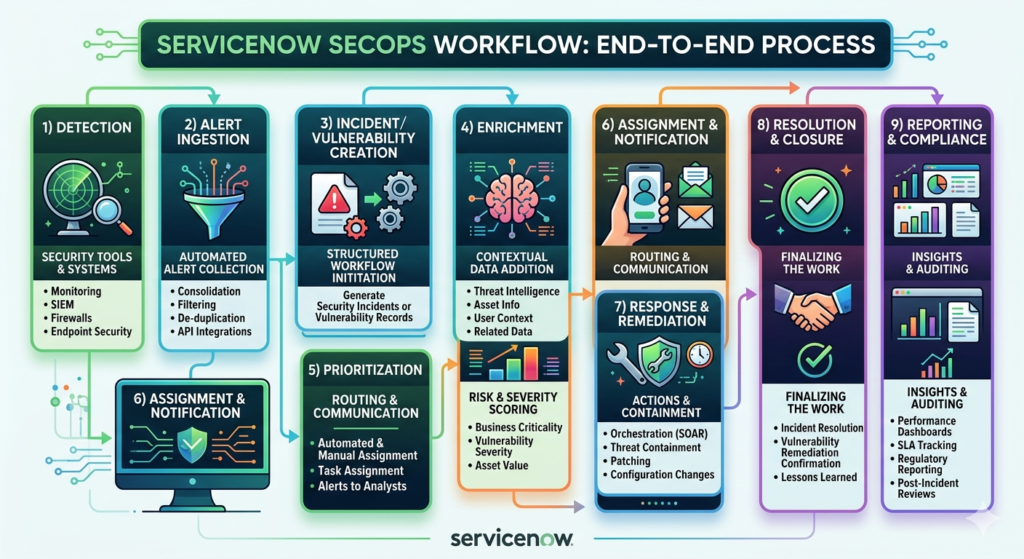
Step 1: Detection
A security tool detects a potential threat — a suspicious login, a malware signature, or a critical vulnerability.
Step 2: Alert Ingestion
The alert is sent to ServiceNow via REST API, email, or native integration.
Step 3: Incident/Vulnerability Creation
ServiceNow automatically creates a Security Incident (SIR) or Vulnerable Item (VR) record with pre-populated details.
Step 4: Enrichment
ServiceNow enriches the record by:
- Looking up the affected CI in the CMDB
- Pulling threat intelligence from integrated sources
- Calculating the risk score
Step 5: Prioritization
Based on enriched data, the record is assigned a priority level (P1-P4 for incidents, Critical/High/Medium/Low for vulnerabilities).
Step 6: Assignment & Notification
The record is assigned to the right team/individual. Automated notifications are sent via email, Slack, or Teams.
Step 7: Response & Remediation
The assigned team works through the playbook or remediation tasks, taking action directly within ServiceNow or through integrated tools.
Step 8: Resolution & Closure
Once resolved, the record is updated with:
- Root cause analysis
- Actions taken
- Time to resolve
- Lessons learned
Step 9: Reporting & Compliance
Management gets automated reports on:
- MTTR (Mean Time to Resolve)
- SLA compliance rates
- Threat trends
- Team performance metrics
Playbooks in ServiceNow SecOps: Automation at Its Best
Playbooks are one of the most powerful features of ServiceNow SecOps. They define a structured, step-by-step response process that can be fully or partially automated.
Types of Playbook Actions:
- Manual Tasks — A human must perform an action (e.g., "Call the affected user")
- Automated Tasks — ServiceNow executes the action automatically (e.g., "Block IP in firewall")
- Approval Steps — Requires manager sign-off before proceeding
Real-Time Example: Ransomware Playbook
When ransomware is detected, the playbook automatically:
- 🔒 Isolates the affected machine from the network
- 📧 Notifies the CISO and IT Director
- 🔍 Initiates a forensic investigation task
- 💾 Triggers backup verification
- 📋 Creates a Change Request for system recovery
- 📊 Generates an executive summary report
All of this happens within minutes, with full documentation, without manual coordination.
CMDB's Role in SecOps: The Hidden Hero
The Configuration Management Database (CMDB) is the backbone of ServiceNow SecOps. Without accurate CMDB data, SecOps loses its contextual intelligence.
How CMDB Helps SecOps:
- Asset Identification: Knows which servers, applications, and devices are in your environment
- Criticality Mapping: Tags assets as Critical, High, Medium, Low based on business impact
- Relationship Mapping: Understands dependencies (e.g., "This server supports the payment application")
- Risk Scoring: Uses asset criticality to prioritize incidents and vulnerabilities
💡 Pro Tip: Always ensure your CMDB is clean and up-to-date. Garbage in = Garbage out. Poor CMDB data leads to incorrect prioritization and missed threats.
Threat Intelligence in ServiceNow SecOps
ServiceNow SecOps includes a Threat Intelligence module that aggregates data from multiple threat feeds to enrich security incidents with contextual information.
What Threat Intelligence Provides:
- IP Reputation: Is this IP address known to be malicious?
- File Hash Analysis: Has this file been flagged as malware?
- Domain Analysis: Is this domain associated with phishing campaigns?
- MITRE ATT&CK Mapping: Which attack technique is being used?
Integrated Threat Intelligence Sources:
- VirusTotal
- Recorded Future
- MISP (Malware Information Sharing Platform)
- IBM X-Force
- Palo Alto XSOAR
Beginner's Checklist: Getting Started with SecOps 🟢
If you're new to ServiceNow SecOps, here's your starter roadmap:
- Get a free ServiceNow Developer Instance at developer.servicenow.com
- Explore the Security Incident Response application
- Create a manual security incident and walk through its lifecycle
- Familiarize yourself with the CMDB and Configuration Items
- Learn the difference between a Security Incident and a regular ITSM Incident
- Explore the Vulnerability Response module
- Watch ServiceNow's official SecOps product demos on YouTube
- Complete the ServiceNow SecOps Fundamentals course on Now Learning
Advanced Configuration Tips for SecOps Pros 🔴
Ready to go deeper? Here's what advanced practitioners focus on:
1. Flow Designer for Playbook Automation
Use Flow Designer to build no-code/low-code automated playbooks that integrate with third-party tools via REST API.
2. Performance Analytics Dashboards
Build custom PA dashboards to track SecOps KPIs:
- MTTA (Mean Time to Acknowledge)
- MTTR (Mean Time to Resolve)
- Vulnerability aging reports
- SLA breach predictions
3. MITRE ATT&CK Framework Integration
Map security incidents to MITRE ATT&CK tactics and techniques within ServiceNow for better threat analysis and reporting.
4. Custom Risk Scoring Models
Override the default risk scoring with custom algorithms that align with your organization's specific risk appetite and business context.
5. Security Orchestration with SOAR
Connect ServiceNow SecOps with SOAR (Security Orchestration, Automation and Response) platforms for even deeper automation capabilities.
6. Scheduled Vulnerability Group Reviews
Set up automated vulnerability group reviews with scheduled tasks, escalation rules, and stakeholder notifications to ensure nothing falls through the cracks.
Top ServiceNow SecOps Interview Questions & Answers
Q1: What is the difference between a Security Incident and an ITSM Incident?
Answer:
| Aspect | Security Incident (SIR) | ITSM Incident |
|---|---|---|
| Nature | Security breach or threat | IT service disruption |
| Example | Phishing attack, malware | Server down, printer issue |
| Team | SOC / Security team | IT Support team |
| Priority | Based on risk & threat severity | Based on business impact |
| Playbook | Security-specific response steps | Standard resolution steps |
Q2: How does Vulnerability Response prioritize vulnerabilities?
Answer: VR uses a combination of:
- CVSS Score (severity of the vulnerability)
- Asset Criticality (how important is the affected system)
- Exposure (is the system internet-facing?)
- Threat Intelligence (is this CVE being actively exploited?)
The resulting Risk Score helps teams focus on what truly matters, not just what's newest.
Q3: What is a Playbook in ServiceNow SecOps?
Answer: A Playbook is a structured, step-by-step response workflow that guides and automates how security incidents are handled. It can include manual tasks, automated actions, approval steps, and integration calls to external tools.
Q4: Name three tools that integrate with ServiceNow SIR.
Answer: Splunk (SIEM), CrowdStrike (Endpoint Security), and Proofpoint (Email Security).
Q5: What role does the CMDB play in SecOps?
Answer: The CMDB provides asset context — it tells SecOps which assets are affected, how critical they are, and what they're connected to. This context drives accurate prioritization and faster response.
Internal Resources You'll Love
- 📖 ServiceNow ITSM Complete Guide
- 📖 Top ServiceNow Interview Questions & Answers
- 📖 ServiceNow CMDB Explained for Beginners
- 📖 Flow Designer Tutorial for ServiceNow
Your Next Step Starts Here 🚀
You've just covered ServiceNow SecOps from the ground up — the concepts, the modules, real-world examples, advanced tips, and interview prep. Now it's time to put that knowledge into action.
💬 Have a question or insight? Drop it in the comments — our community and experts are here to help.
📤 Found this helpful? Share it with your colleagues, interview prep group, or LinkedIn network.
🔔 Want more guides like this? Subscribe to the RizeX Labs newsletter and never miss an update.
👉 Ready to go hands-on? Create your free ServiceNow Developer Instance and start exploring SecOps today!